Trivy: scan your container image before the client's security team does
One scan before handover can catch a secret left in an image, while the March 2026 incident teaches how to bring this scanner into a client's CI without opening another door.

In brief
- For container images, Trivy scans for vulnerabilities and secrets by default; change the combination with --scanners.
- A clean report reflects only the advisory sources Trivy uses; it does not prove an image is safe.
- After the March 2026 incident, pin trivy-action to a commit SHA, not a version tag.
In March 2026, malicious code turned up inside a security scanner. Aqua Security said 76 of the 77 version tags of trivy-action had been force-pushed to malicious commits, and that a malicious Trivy v0.69.4 binary had been released.
Trivy still deserves a place in an FDE’s toolkit, but the incident changes how you should use it. The tool’s value is simple: it shows you in advance what the client’s security team may find.
Imagine a bank’s security team scanning the image you have just delivered and finding an API key inside. You lose more than a few days on the fix. You also lose credibility at the very moment the client is deciding whether to let the system into production. Scanning before you deliver is far cheaper.
One command answers two questions
Trivy is an open-source project maintained by Aqua Security and released under the Apache-2.0 licence. Its scope is broad: vulnerabilities, misconfigurations, secrets and SBOMs, on targets such as container images, filesystems, remote git repositories, VM images and Kubernetes.
For container images, two scanners are on by default: vulnerability and secret. They correspond to two questions. Do the software components in the image have known vulnerabilities? Is any confidential information exposed?
The vulnerability side covers both operating system packages and language packages. The same report can therefore tell you about the base image and the application’s dependencies, two things that are often the responsibility of different people.
When does an FDE need Trivy?
The clearest moment is just before handover, when the image is built but has not yet left your hands. The second is when the client sends over a list of findings and you need to check it against the running image.
The third comes earliest of all: when you have just received a client’s repo. Secret scanning also runs on filesystems and git repositories, so you can learn what a repo contains before packaging it into anything.
A scan before handover day
Take a hypothetical example: you are about to deliver the image acme/api:1.4.2 to a client. The first run needs no flags, because the two scanners you need are already on.
trivy image acme/api:1.4.2Suppose the result shows 180 vulnerabilities and 1 secret. Do not start with the 180. The secret can be dealt with immediately, and it is the worst thing to have discovered later. If the image has ever been pushed to a registry, treat the secret as exposed: revoke and reissue it first, then rebuild the image.
After the rebuild, scan again and drop the vulnerabilities that have no patch yet, since those are lines you cannot fix by upgrading a version.
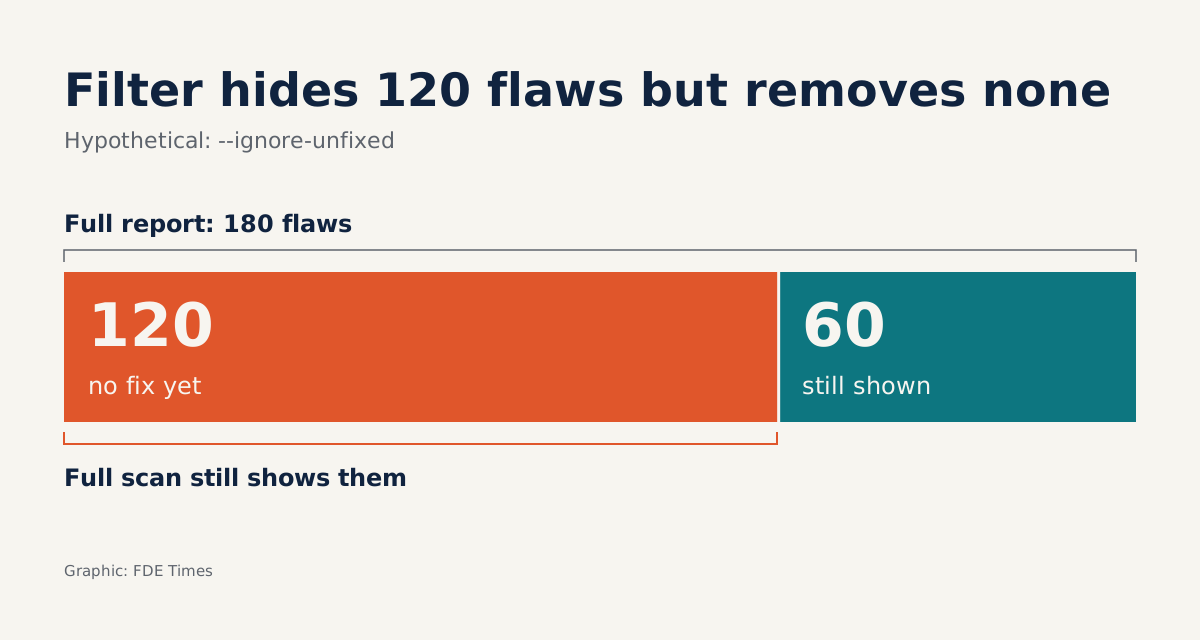
trivy image --ignore-unfixed acme/api:1.4.3Suppose 120 lines disappear and 60 remain. You now have a workable list: upgrade the base image, upgrade dependencies, rescan. When you need to check one category on its own, --scanners runs just that scanner:
trivy image --scanners secret acme/api:1.4.3Filters help you focus, and make it easy to fool yourself
Go back to those 120 lines. --ignore-unfixed removes them from the screen, not from the image. If you send only the filtered report and the client’s security team runs the full one, they will see 120 lines you never mentioned.
The safer approach is to send both versions, with a sentence stating what you filtered and why. Do not make zero the goal of your handover email; show the client’s security team that you understand your own risk.
Ignore files need the same discipline. Trivy supports .trivyignore and .trivyignore.yaml for vulnerabilities, misconfigurations and secrets, so one hastily added line can hide a real secret. A sensible rule: every ignored entry goes through code review, with a reason and a named owner.
The bigger limit lies in the data itself. Trivy’s documentation makes clear that the tool uses advisories only from the sources it lists, so a vulnerability not yet in those sources will not appear in the report.
So do not write “the image is safe” in a handover email. Be more precise: which Trivy version you scanned with, on what date, and what the result was.
In a client’s CI, a tag is not a promise
Aqua has an official GitHub Action, aquasecurity/trivy-action, for running Trivy on Docker images. This is also the component that had 76 of its 77 tags force-pushed, so a workflow pointing at a tag could run malicious code without anyone changing a line in the repo.
Aqua’s recommendation is to pin the action to a full commit SHA rather than a version tag, because a SHA is immutable and a tag is not. To find out which commit a tag points to, ask the repo directly, replacing TAG with the tag you plan to use:
git ls-remote https://github.com/aquasecurity/trivy-action "refs/tags/TAG" "refs/tags/TAG^{}"The output begins with a 40-character SHA. If there are two lines, the one ending in ^{} is the commit to pin.
Do not stop there. This command tells you only where the tag points right now; it does not prove the commit is clean. Open the commit on GitHub, read the changes and compare them with Aqua’s notice before putting the SHA into a workflow.
A minimal workflow might look like this, using the hypothetical image from above:
name: scan-image
on: pull_request
permissions:
  contents: read
jobs:
  trivy:
    runs-on: ubuntu-latest
    steps:
      - uses: aquasecurity/trivy-action@FULL_COMMIT_SHA # TAG
        with:
          image-ref: acme/api:1.4.3
This file only illustrates SHA pinning and is not yet a real gate in CI: the image name is hard-coded, and the file does not define when the job passes or fails.
The tag name sits in the comment so a reviewer knows which version you intended, while what actually runs is the SHA. Note too that this job declares no secrets. If the image lives in a private registry, the job will need credentials, and that is something to weigh before adding them.
Do not take the pinning step lightly, because the cost of a swapped action is high. Aqua requires that every secret an affected runner could access be treated as exposed, which means rotating them.
In a client’s CI, that runner may hold the client’s credentials rather than yours. Before adding any action, ask which secrets the job can touch. Then check whether machines and runners are still using v0.69.4.
If you find that version on a runner, treat every secret that runner could access as exposed and rotate them, even if you have seen no sign of abuse.
What to learn first, and how to talk about it
A sensible order is to run trivy image on one of your own images, understand each part of the report, then practise --ignore-unfixed, .trivyignore and --scanners. Once you are comfortable, connect it to a workflow with a SHA-pinned action. Other targets such as Kubernetes or VM images can wait.
For your career, the valuable part is not knowing a command. On your CV, describe outcomes: scanning images before handover, dealing with secrets, reducing a list of findings to a level the client’s security team can review, pinning CI to SHAs.
When reading job descriptions, watch for terms such as container security, SBOM or customer security review. If they appear, have an example ready of an image scan you did yourself, and in the interview explain how you decided which lines to ignore and what you told the client about them.
The next time a security team asks “has this image been scanned?”, the credible answer does not lie in a zero. It lies in being able to say what you scanned with, what you filtered, and why that scanner deserves to run in their systems.
Was this article useful?
Thanks for the feedback!