Caddy puts a demo on HTTPS in two lines; client networks break it
Before the meeting, find out which ports are open, who issues the certificate and which machines will trust it, or the browser warning lands on screen.
In brief
- A site address and one reverse_proxy line are enough for Caddy to obtain and renew certificates and redirect HTTP to HTTPS on its own.
- The HTTP challenge needs port 80 open from the internet. When a client's firewall blocks all inbound connections, the DNS challenge is the fallback.
- Internal hostnames and IP addresses get certificates from Caddy's local CA, so browsers on the client side must trust that CA's root.
Caddy’s official documentation illustrates the reverse_proxy directive with a single block: a site address and the line reverse_proxy localhost:9005. For an FDE whose demo has to run on HTTPS before a client meeting, those two lines replace requesting a certificate, writing redirect rules and scheduling renewals.
The hard part is the client’s network. Three questions need answers first: which ports are open, who issues the certificate, and which machines will trust it. Answer all three and the browser will not throw a security warning at the very moment the client is watching the screen.
What does Caddy do out of the box?
Caddy’s homepage says that by default it obtains and renews TLS certificates for every site you declare. The Automatic HTTPS documentation adds that HTTP requests on port 80 are redirected to HTTPS on port 443 automatically, with no configuration line required.
The certificate can come from one of two places. By default Caddy enables two ACME-compatible CAs, Let’s Encrypt and ZeroSSL, so when you inspect a certificate the issuer may be either.
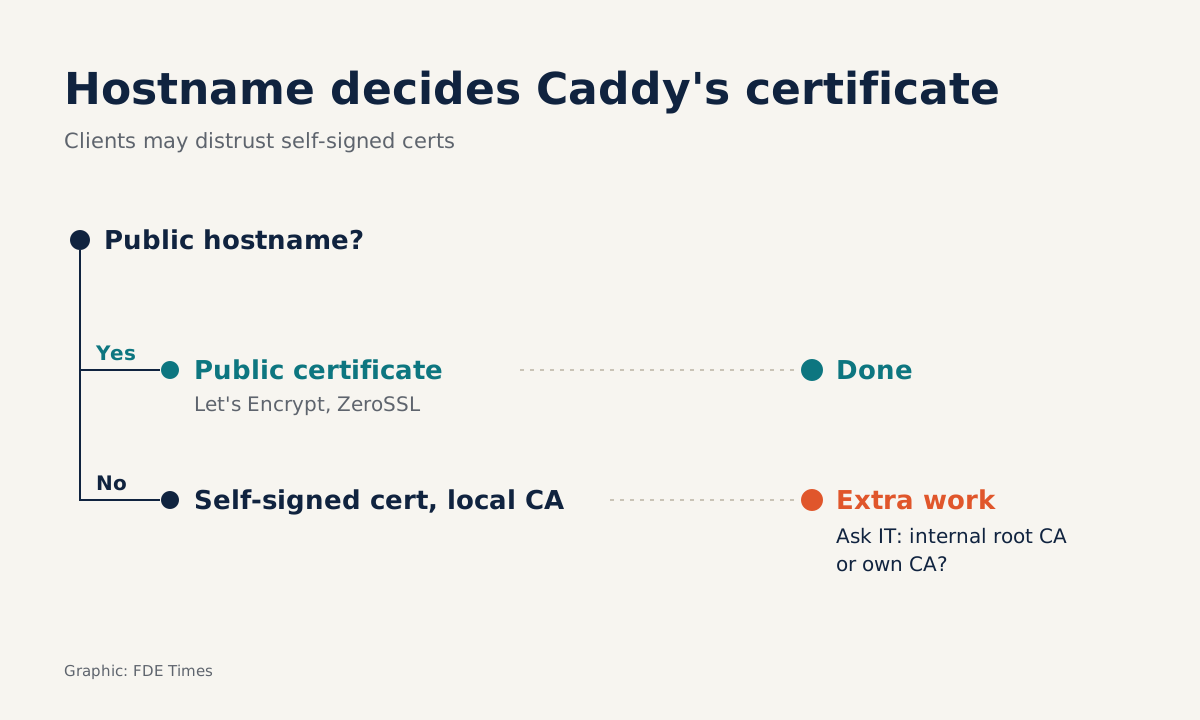
What triggers the whole mechanism is the hostname. According to the reverse_proxy documentation, when the site address is a public domain, Caddy turns on HTTPS for that site automatically.
Worked example: from Caddyfile to a URL the client can open
Say you have a demo API running on port 9005 on a VPS and have already pointed demo.example.com at that machine. The Caddyfile needs only this:
demo.example.com {
	reverse_proxy localhost:9005
}
The first line is the site address. The middle line forwards every request to the backend on port 9005. Following the reverse proxy quick start, run caddy run in the directory that holds the Caddyfile. Reload Caddy after every edit; otherwise the server keeps running the old configuration.
A running server is not a finished job. Before sending the link to the client, check three things. First, open https://demo.example.com in a browser and see whether the page loads and whether any warning appears. Next, inspect the certificate details: the issuer should be Let’s Encrypt or ZeroSSL.
The last check is the redirect. Run curl -I http://demo.example.com and see whether the response points to an https:// address. Because the redirect runs on port 80, a failure here usually traces back to that port, which is also the first place to look when working on a client’s site.
Which ports must be open on the client side?
The way Caddy proves to a CA that you control a domain is called a challenge, and each challenge type has its own network requirement. Caddy’s documentation states plainly that the HTTP challenge needs port 80 reachable from outside. Let’s Encrypt likewise confirms that HTTP-01 works only on port 80, with no alternative port.
If port 80 is blocked but port 443 is still open to the outside, the TLS-ALPN challenge remains. If the client’s firewall blocks every inbound connection, Caddy’s documentation says the DNS challenge needs no open port at all. In exchange, you need permission to create DNS records for the domain.
Let’s Encrypt recommends that every web-facing server keep both port 80 and port 443 open. It also notes that HTTP-01 will fail if an ISP blocks port 80, and that this challenge cannot issue wildcard certificates. So if the client needs *.demo.example.com, switch to DNS-01 from the start.
That yields three questions to send the client’s IT team a few days before installation. Is port 80 open from the internet to this machine? What about port 443? If both are closed, who on the team has permission to create DNS records for the domain?
Your own preparation is to read the DNS challenge section of Caddy’s documentation in advance. When the answer to the third question comes back, you already know what you need to switch to that fallback.
What about a demo on a private network?
If the service has only an IP address or an internal hostname, Caddy’s repository explains that Caddy obtains a certificate from a local CA that it manages entirely itself, in place of a public CA. Traffic is still encrypted, but a browser trusts the certificate only if its machine trusts the local CA’s root.
Ask about this early too: will the IT team agree to install that root on users’ machines, or would they rather use a certificate issued by their own CA? If the client already has a proxy, its own CA and a certificate management process, your job is to follow that process.
What to learn first, what to put on a CV
Start with a site block and one reverse_proxy line, move on to challenge types and network ports, and leave the local CA for last. On a CV, a line such as “put a demo API on HTTPS inside the client’s network, with a runbook on ports and certificates for the IT team” carries far more weight than the word Caddy in a list of tools.
Clients rarely notice the padlock in the address bar. What they remember is a security warning popping up in the middle of a demo, and that warning usually starts with a port 80 nobody checked beforehand.
Was this article useful?
Thanks for the feedback!
7 sources
- Caddy - The Ultimate Server with Automatic HTTPS
- GitHub - caddyserver/caddy: Fast and extensible multi-platform HTTP/1-2-3 web server with automatic HTTPS
- Automatic HTTPS — Caddy Documentation
- Challenge Types - Let's Encrypt · 2026-02-12
- Best Practice - Keep Port 80 Open - Let's Encrypt · 2019-01-24
- Reverse proxy quick-start — Caddy Documentation
- reverse_proxy (Caddyfile directive) — Caddy Documentation