Self-hosting Dify for a client? Know where drag-and-drop stops
A machine with 4 GiB of RAM is enough to run it, but the code sandbox and the license decide how far Dify can take a deployment.
In brief
- Dify self-hosts with Docker Compose and needs at least 2 CPU cores and 4 GiB of RAM.
- The Code node runs in a sandbox: it cannot read files or run system commands, can import only preinstalled libraries, and has hard output limits.
- The license bars running a multi-tenant environment without written permission, and bars removing the logo from the console.
Dify calls itself an open-source platform. The LICENSE file in its repo adds a condition, though: without written permission from Dify, you may not use the source code to operate a multi-tenant environment.
That sentence deserves a careful read before you take Dify to a client. The self-hosted edition lets you build LLM applications that run on the client’s data, inside their own infrastructure, and that kind of deployment forces the question of who else will share the installation.
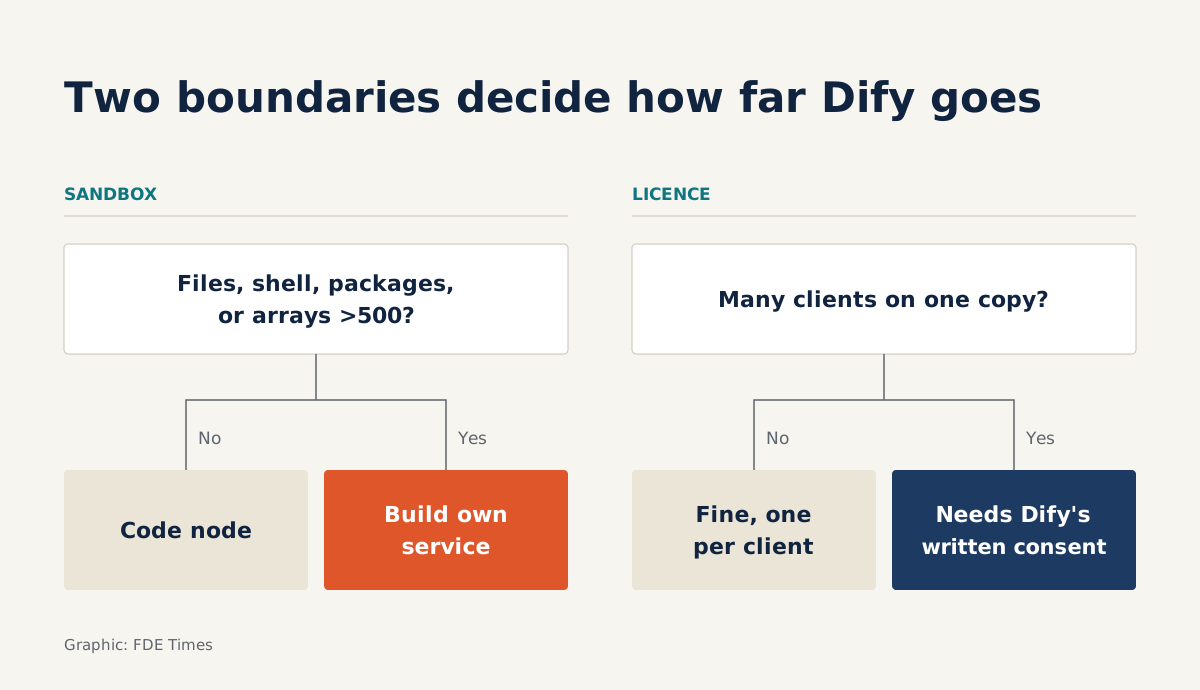
Once you have chosen Dify, you need to know two boundaries in advance, one set by the sandbox and one set by the license. Cross the sandbox boundary and you have to write your own code. Cross the license boundary and you need written permission from Dify, or a different architecture.
What can Dify do for you at a client site?
The official langgenius/dify repo describes a platform covering workflows, RAG, agents, model management and observability. According to the documentation, you can build agents, agentic workflows and chatbots that draw on the client’s own data. Agents can call tools, MCP servers or APIs you write yourself.
For an FDE, the most valuable detail is that every app comes with an API. Dify’s documentation states plainly that Dify apps can be embedded in a client’s product through a REST API. You can drag and drop a workflow in the interface to test ideas quickly with the client, while their systems only need to call one endpoint.
A first install in an afternoon
The README calls Docker Compose the easiest way to start a Dify server, and lists three deployment options: Cloud, self-hosted Community Edition, and Enterprise. The self-hosting process is short: clone a release tag, copy the .env file, then run docker compose up. On the software side, you need Docker Compose 2.35.0 or later.
On the hardware side, the minimum is modest: 2 CPU cores and 4 GiB of RAM. At companies where even a virtual machine needs an approved ticket, that figure lets you have a demo running on the internal network before the second meeting with the client.
Clients who need more can turn to the Enterprise edition, aimed at deployments in a VPC, on-prem or in air-gapped networks, with Helm charts and Terraform modules.
Dify says this edition keeps data within the client’s control, supports SSO via SAML/OIDC and runs offline with local models. These are all vendor claims, so test them in a real environment before promising anything to a client.
The Code node is where drag-and-drop ends
When the visual nodes are no longer enough, workflows offer a Code node where you write Python or JavaScript for data transformations, calculations and complex logic. This is where you start writing code inside Dify, and the Code node has hard limits worth memorizing.
Code runs in an isolated sandbox with no access to the file system and no ability to run system commands. You can import only preinstalled libraries; anything else fails at runtime. Output is capped too: each string can be at most 400,000 characters, each array at most 500 elements, nested at most 3 levels deep. Exceed a limit and the node fails.
Take a hypothetical insurance client that wants to split a claim file into individual expense lines and have an LLM check them. A small file with 120 lines runs fine in the Code node. A file with 1,200 lines returns an array past the 500-element cap, and the node fails on the largest file, which is often the one the client cares about most.
You have two options. The first is to batch inside the workflow, say 500, 500 and 200, at the cost of a more complicated workflow. The second is cleaner: write a small service in the client’s infrastructure that handles the line splitting itself, then have the agent call that service as a custom API. Dify keeps the orchestration and the prompts.
That yields an easy rule. Logic that needs only input variables, small outputs and the available libraries stays in the Code node. Anything that needs to read files, run commands, use new packages or return large data goes into a separate service from the start, before it fails in production.
Read the license before the docs
Dify’s license is Apache 2.0 with extra conditions. Besides the multi-tenant clause, it forbids removing or modifying the logo and copyright information in the Dify console or applications. That clause does not apply if you do not use Dify’s frontend.
Go back to the insurance client. If you install Dify in their own infrastructure and only their staff use it, that is one client and one installation. The problem changes entirely if your company is an agency that wants to serve this insurer and five other clients from one shared Dify installation.
That shared installation sits very close to the multi-tenant territory the license describes, so you need written permission from Dify before operating it. The lower-risk route is a separate installation per client. With a minimum of 2 CPU cores and 4 GiB of RAM, a few extra machines will likely cost less than a license dispute.
If the insurer wants the app under its own brand, calling the app through the REST API and building your own frontend avoids the logo clause. Whichever route you take, spell out the deployment model in the architecture document so the client’s legal team reads it before signing.
What to learn first, and what to put on your CV
Start with the limits rather than the drag-and-drop interface. Self-host with Compose, call an app through the REST API, then deliberately break the Code node by exceeding 500 elements or importing a package that is not preinstalled. After that, write a small custom API and have an agent call it.
When FDE job postings mention low-code LLM platforms, look for whether they also mention on-prem or air-gapped deployments. On your CV, do not just write “used Dify”.
A more specific line might read: “Self-hosted Dify with Docker Compose on a client’s internal network; moved large case-file processing into a separate service because the Code node caps arrays at 500 elements; chose one installation per client to stay clear of the multi-tenant clause.” That line is only worth including if you have actually done each part of it.
In an interview, tell that story in the same order: which limit you hit, how you discovered it, and why you wrote a service instead of batching. Interviewers will remember why you left Dify longer than how fast you can drag and drop.
Was this article useful?
Thanks for the feedback!