Airbyte: pulling customer data into one place without writing scripts
In the first week on site, a Forward Deployed Engineer usually spends the most time collecting data from five different systems. The model often goes untouched. Airbyte exists to take some of that work away.
In brief
- Airbyte's catalog has more than 600 connectors according to its GitHub README, and more than 700 according to airbyte.com. They cover APIs, databases, warehouses and data lakes.
- When an API has no connector, use Connector Builder, a no-code tool built on a low-code YAML format.
- PyAirbyte runs connectors directly in Python code and stores results in a local DuckDB cache by default, which is enough for a quick prototype.
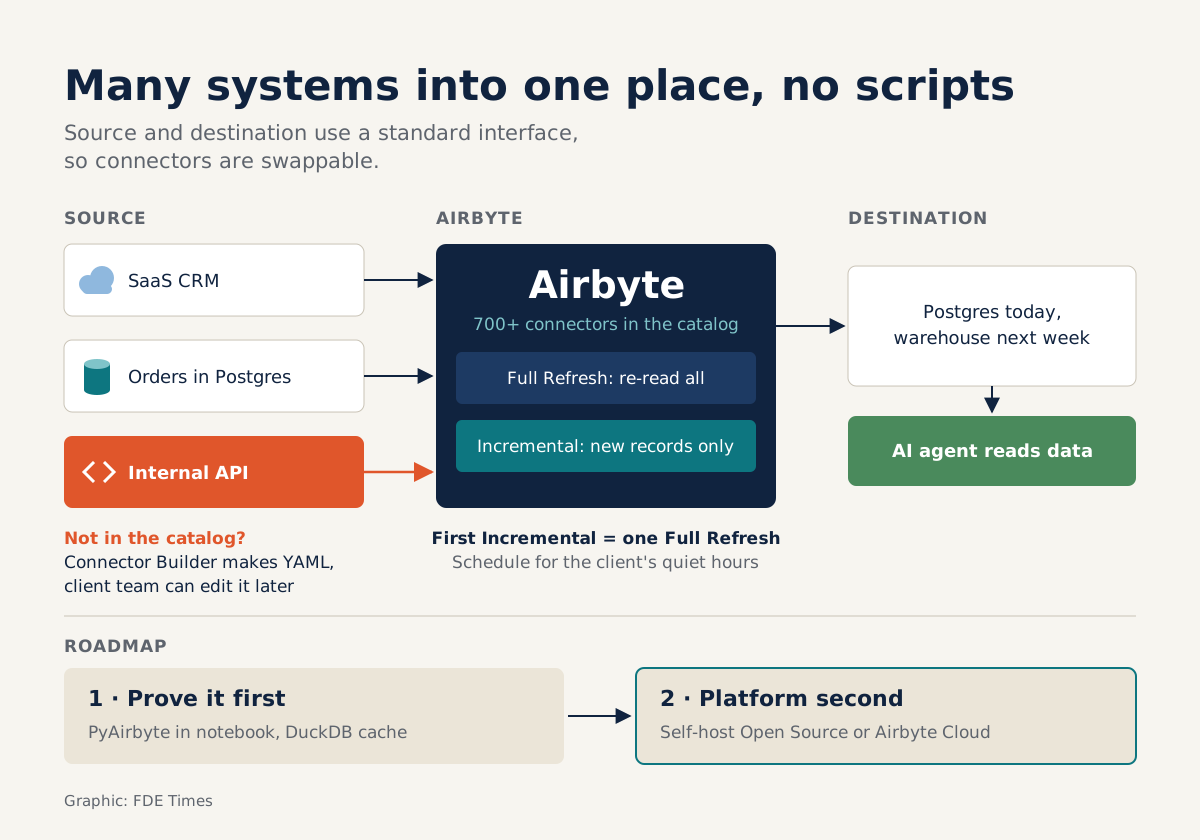
The first day at a customer often looks like this. The CRM lives in a SaaS product, orders sit in Postgres, and the most important piece is an internal API that only one person in the company understands. Everyone wants to see the agent demo, but the agent has no data to work with. The fastest fix is to throw together a few Python scripts.
By the third week, those scripts have usually become a tangle that nobody dares to touch.
Airbyte was built to replace those scripts. The project calls itself an open-source data movement platform, serving both ELT pipelines and AI agents.
For developers who want to become FDEs, it is worth learning early, because it changes how you spend your time at a customer. You write less connection code yourself, you plug ready-made connectors together, and you save your time for the problem the customer actually needs solved.
What does Airbyte do, in short?
Everything in Airbyte is built around two ideas: the source and the destination. The Airbyte Protocol gives both a standard set of interfaces. A source reads data out. A destination is the application that receives data and loads it into storage. Because the standard is shared, you can swap one connector for another.
You might load into Postgres today and move to the warehouse the customer has just bought next week, without rewriting the part that reads from the source.
There are a lot of ready-made connectors. The GitHub README lists more than 600 connectors for APIs, databases, data warehouses, data lakes and AI applications, while the catalog page on airbyte.com says more than 700. So when a customer names their systems, check the catalog before you open an editor.
There are two ways to deploy it: self-host the Open Source edition, or use Airbyte Cloud. At a customer, technical taste rarely decides this. If the customer will not let data leave their infrastructure, you self-host. If they need something running right away and are fine with an external service, you use Cloud.
Prove it first, build the platform later
During discovery, you often only need to pull a little real data to show the customer the agent working. PyAirbyte was made for this. It is a library that runs Airbyte connectors directly in Python code. If you do not specify a cache, PyAirbyte uses a local DuckDB cache.
A minimal example, using a connector that generates fake data for testing, looks like this:
import airbyte as ab

source = ab.get_source(
    "source-faker",
    config={"count": 1000},
    install_if_missing=True,
)
source.check()
source.select_all_streams()

# No cache passed -> data lands in a local DuckDB
result = source.read()
That gives you queryable data in a notebook without asking anyone for permission to set up a warehouse. Once the customer agrees to go further, the sensible next step is to move to self-hosted Airbyte or Cloud.
PyAirbyte runs the same connectors Airbyte uses, so the source configuration will probably carry over. Even so, test the connector in the target environment before you commit to a delivery date.
An afternoon with the customer’s data
Picture a retail chain that wants an agent to answer questions about orders. The orders table has millions of rows, new rows arrive every day, and the pipeline now has to run for real inside their environment.
You configure a source pointing at the database and a destination where the agent will read, then choose a sync mode. Full Refresh reads the whole source again and either overwrites or appends to the destination. Incremental reads only the records added since the last sync. For a table that grows every day, Incremental is clearly the better choice.
The documentation says one thing plainly that many people still miss: the first Incremental sync is equivalent to a Full Refresh. The first run still pulls all of those millions of rows, so warn the customer’s infrastructure team in advance and schedule it for a quiet period.
Then comes the internal API, which will certainly not be in the catalog. This is where Connector Builder comes in, a no-code tool inside the Airbyte UI. The Builder is a UI layer on top of the low-code YAML format, so what you end up with is a YAML connector definition that you can read, edit and commit to the repo like any other config file.
What Airbyte will not do for you
Airbyte handles moving data from one place to another. It does not tell you which tables matter, what each column means to the business, or how dirty the data is. You answer those questions through customer discovery: sitting with the customer’s users and asking until you understand.
A large catalog also does not mean every customer system has a connector. The older and more home-grown a system is, the more likely you are to need the Builder, and you will still have to read the customer’s API documentation yourself.
Some mistakes newcomers often make:
| Common mistake | How to avoid it |
|---|---|
| Running the first Incremental sync during working hours, assuming it only reads new data | The first run still reads everything; schedule it for a quiet period |
| Choosing Full Refresh for a table that grows every day | Use Incremental when you can identify which records are new |
| Turning on Incremental before knowing what counts as a “new” record | Ask the customer about the data before choosing a sync mode |
| Treating PyAirbyte’s local DuckDB file as long-term storage | Treat it as a prototyping space and move to a real destination when you go further |
What to learn first, and what to put on your CV
If you are a developer looking to move into an FDE role, learn in this order: get solid on sources and destinations, run the PyAirbyte example above, understand clearly how Full Refresh differs from Incremental, and then build at least one connector yourself with the Builder.
In job descriptions, phrases such as “data integration”, “ELT” or “connect to customer systems” signal that the company needs exactly this skill. On your CV, do not just write “knows Airbyte”. Say that you built a connector for an API that was not in the catalog and took a pipeline from prototype into a customer’s environment.
In interviews, do not stop at naming tools. Explain how quickly you got data from a real system into one place, and how you prepared for the first sync.
Was this article useful?
Thanks for the feedback!