Using Claude Code, Codex and Cursor in a client's repo: check the account before you write a prompt
All three coding assistants can be restricted. Their defaults differ, though, and the exceptions most likely to put an FDE in breach of a client's policy are buried in documentation few people read.

In brief
- By default, Claude Code stores session transcripts as plaintext on your machine for 30 days, including when you work on a client's code.
- No-training commitments and ZDR depend on the account type and how each tool is configured, for example whether you use your own API key in Cursor.
- CLAUDE.md is only an instruction. What actually limits the agent is the sandbox and the permission mode.
Every Claude Code session you open on your laptop leaves a trail. Anthropic’s documentation states that session transcripts are stored as plaintext in ~/.claude/projects/ and kept for 30 days by default. If that session ran on a client’s codebase, much of what the agent read and what you pasted in may still be sitting on your hard drive.
For engineers building internal products, this rarely matters. For FDEs it does. You work in repositories that do not belong to you, so every command the agent runs has to stay within the client’s data policy.
Claude Code, Codex and Cursor all offer ways to restrict what the agent can do. But each tool has different defaults, and the most important exceptions sit in the privacy documentation that few people read closely.
What can an agent do in your repo?
Anthropic describes Claude Code as an agentic coding tool. It reads the codebase, edits files, runs commands and connects to development tools, in the terminal, the IDE, a desktop app and the browser. At the start of each session it reads the CLAUDE.md file in the repo, which makes that file the natural place to record coding standards and the client’s constraints.
OpenAI’s Codex, when running locally, is confined by the operating system itself in a sandbox, so it can only touch what it is allowed to. By default Codex runs with the network off. A separate approval policy decides when it must ask you before acting.
With Cursor, the part that needs the closest reading is its data commitments, and that is also where FDEs most often trip up.
Ask about the account before you write a prompt
A wrong command still shows up on screen, where you can stop it. Where your code goes after it leaves the machine is much harder to see, which is why it is worth getting clear answers before typing the first prompt.
Anthropic says it does not use code or prompts sent to Claude Code to train models if you are on commercial terms (Team, Enterprise, API); individual plans are different, so the account type is the first question to ask.
Even an Enterprise plan does not come with zero data retention (ZDR) automatically. Anthropic’s documentation says ZDR is enabled per organisation, after the account team confirms the organisation is eligible.
Cursor has a subtler trap. For teams, Privacy Mode is on by default for every member, with a commitment that code will not be used for training by Cursor or the model providers, and admins can enforce it across the organisation so members cannot switch it off.
But ZDR does not apply when you use your own API key. Picture yourself at a client site, out of quota, plugging a personal API key into Cursor to get a demo done in time. The screen looks exactly the same, but the ZDR commitment no longer applies, so changes like this need to be cleared in advance rather than reported afterwards.
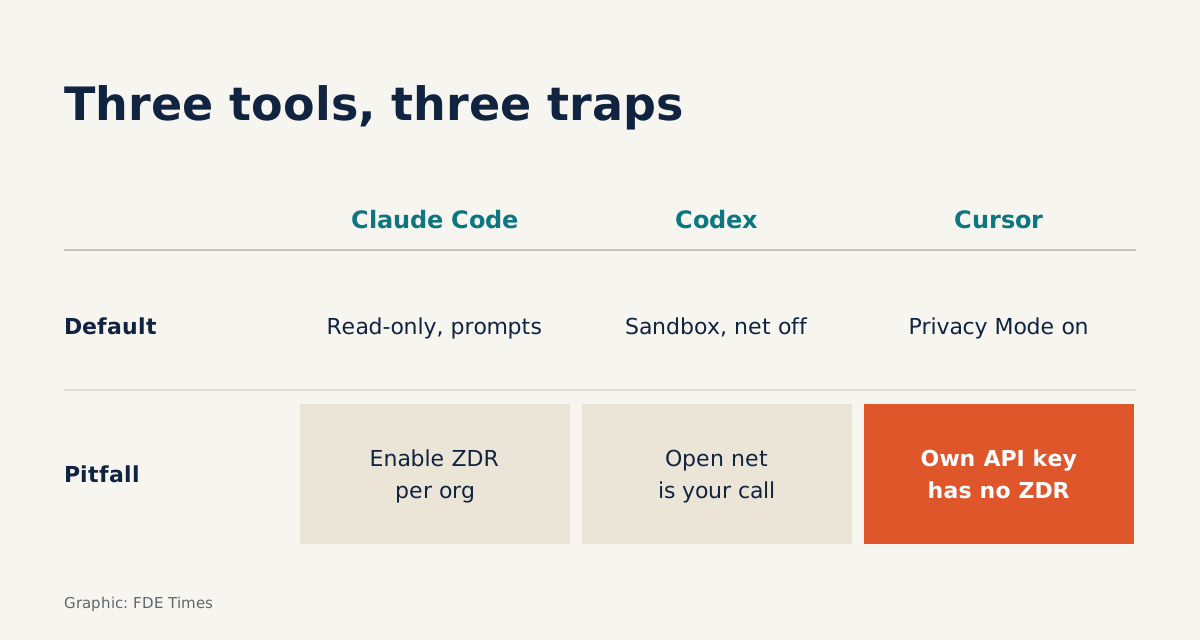
| Claude Code | Codex | Cursor | |
|---|---|---|---|
| Default behaviour | Manual mode: read-only, asks before editing files or running commands | Operating-system sandbox, network off | Privacy Mode on by default for teams |
| Restriction mechanism | Sandboxed bash, isolating the filesystem and network | Approval policy decides when it must ask | Admins enforce Privacy Mode across the organisation |
| Where people trip up | ZDR must be enabled per organisation; plaintext transcripts for 30 days | Opening the network or loosening permissions is your decision | ZDR does not apply with your own API key |
A sample session
Suppose the client asks you to fix a failing test in the payments service. Before typing the first prompt, create a short CLAUDE.md at the root of the repo:
# Client constraints
- Do not read the secrets/ directory or any .env files
- Do not call external network services
- Run tests only with: make test-payments
- Do not commit; only propose diffs for the client's engineers to review
Then open the session in Manual mode. Claude Code starts with read-only permissions, so the first task should be asking it to read the code and explain why the test fails.
When it proposes editing a file or running make test-payments, read each command before approving it. If the permission prompts become too frequent, switch to sandboxed bash, where the filesystem and network are already isolated, rather than approving everything blindly.
Remember that CLAUDE.md is only something the agent reads at the start of the session. It is an instruction, not a fence. The line “do not call external network services” is only truly guaranteed when the sandbox blocks the network.
Doing the same job with Codex
With Codex, the network fence is already in place because the network is off by default. Imagine the payments test needs to download a dependency that is not on the machine: the command will fail, and the agent will stop or ask you, depending on the approval policy.
That is the moment mistakes are easiest to make, because allowing network access takes one second. Stop and ask the client’s engineers whether this service is allowed to call out, and to where. Loosen permissions only once they agree, and record that decision in your handover notes.
The tool does not carry the responsibility for you
Anthropic’s security documentation is blunt: you are responsible for reviewing proposed code and commands before approving them. At a client site, that sentence has practical consequences. A command to delete a directory that the agent proposed but you approved is still your command.
The second limit sits on the laptop itself. Plaintext transcripts kept for 30 days mean that when a project ends, the handover is not finished until you have cleaned up those directories as the client requires. Add this step to the offboarding checklist for every engagement.
What to learn first and what to put on your CV
Do not start with prompting tricks. Learn three things in order: the permission modes and sandbox of the tool you use, what “commercial terms” and ZDR mean, and then how to write a constraints file for a repo. The first should become a reflex, because it is the part the tool actually enforces.
When reading a job description, check whether the role involves working directly in the client’s infrastructure or codebase; if it does, this is a skill worth raising in interviews. On a CV, a line such as “set up a workflow for using coding agents in a sandbox, with the network off, on a financial-services client’s codebase” tells a hiring manager more than “proficient in Claude Code”.
The client will most likely never ask which tools you used. But if they ask where the project’s transcripts are, you should have the answer ready.
Was this article useful?
Thanks for the feedback!