Reading field photos with AI starts with a hand-typed answer key
A practical pipeline for site photos, handwritten forms and phone video, covering image rotation, the detail setting, 1-fps video sampling and where vision models still fail.
In brief
- Most image-reading errors start with the input: photos that are rotated or upside down, text that is too small, and oversized files that are rejected rather than automatically downscaled.
- Models count only approximately, are weak at locating things in an image and can misread non-Latin text, so Vietnamese diacritics need their own tests.
- By default, video is sampled at 1 frame per second; for fast events, raise the fps, trim to the right segment and ask by timestamp.
A technician photographs an inspection sheet from across the room with the phone turned sideways. The handwriting is in Vietnamese, full of diacritics, and it arrives alongside a three-minute clip of a conveyor belt where the only thing that matters happens in half a second. People in the field do not take pictures the way sample documents look.
A demo on clean images looks good. Only the client’s real images show whether a pipeline actually works.
For a Forward Deployed Engineer this comes up all the time: the client hands over a folder of photos, scanned PDFs and videos and asks, “Can AI read this?” This guide walks through building a small pipeline that reads all three kinds of input, checks the results at each step and shows where models tend to go wrong.
What you will build, and what you need
Take a hypothetical client that maintains factory equipment. They send three things: a photo of a broken pump, a photo of a handwritten inspection form, and a phone video of a production line. The output they want is structured JSON that their engineers can review, not a paragraph of generic description.
The foundation is a Vision Language Model (VLM). Hugging Face defines these as models that can understand and process both images and text. You need an API key for a model that reads images (this guide uses OpenAI’s documentation as the example), a model that reads video (this guide uses Gemini), and about 20 real samples from the client.
The most important preparation is not code. It is the answer key. For each form, type out the correct contents yourself. For each video, write down the timestamp of the event you need to catch. Without it, you have no way of knowing whether the model read things correctly.
Step 1: errors usually start in the input image
OpenAI’s vision documentation states plainly that the model can misinterpret text and images that are rotated or upside down. Phone photos taken in the field are often exactly that. So the first job is to normalize image orientation before sending, using whichever image-processing library you know.
The second job is small text. For forms photographed from a distance, OpenAI recommends enlarging the text in the image so the model can read it more easily. In practice, you can crop out the region with the handwriting and enlarge just that, instead of sending the whole picture with the text tucked into one corner.
The third job is the one most often forgotten: checking size. Each request has a payload limit when you send multiple images, and the documentation says images that exceed 30,000 patches after processing are rejected, not automatically downscaled. If the client uploads very large files from professional cameras, the pipeline has to downscale them before sending.
Check after step 1: open 10 processed images and read them yourself. If you have to tilt your head or squint, the model will struggle too.
Step 2: choose how to send images and test the detail parameter
OpenAI supports three ways to pass in an image: a URL, a Base64 data URL or a file ID. If the client’s images sit on an internal network that cannot be reached from outside, URLs will not work, and Base64 is usually the simplest option. The request structure below is simplified; check the exact field names against the documentation for the API you are using:
{
  "role": "user",
  "content": [
    { "type": "text", "text": "Read this inspection form and return JSON." },
    { "type": "image", "image_url": "data:image/jpeg;base64,<...>", "detail": "high" }
  ]
}
The detail parameter determines how the image is preprocessed. The low setting gives a coarse result, and the documentation says explicitly that low does not always use fewer tokens than high. So do not default to low to save money. Send the same image at both settings, then record the token count and the number of correctly read fields for each run.
Step 3: read handwritten forms without trusting the model completely
OpenAI’s documentation lists several known limitations: the model counts objects only approximately, is weak at locating things in an image, and does not yet handle non-Latin text well. Vietnamese uses the Latin alphabet but carries many diacritics, so test the diacritics separately rather than assuming the model will get them right.
If the Vietnamese for “broken pump” comes back with its diacritics stripped, a reader may still understand it. With a person’s name or a part name, a wrong diacritic means wrong information.
Given those limitations, the prompt should give the model a way to say it is unsure:
Read the inspection form in the image. Return JSON with the fields:
equipment_id, inspection_date, inspector, condition, notes.
If a field is not clearly legible, write "UNREADABLE" instead of guessing.
Preserve the Vietnamese diacritics exactly as they appear in the image.
For the photo of the broken pump, do not give the model tasks such as “count how many bolts are rusted” or “give the exact coordinates of the crack”. Those are precisely the counting and localization tasks the documentation warns about.
Ask descriptive questions instead, such as whether there are signs of a leak, and let a person confirm the numbers.
Check after step 3: compare the JSON with the answer key field by field, not image by image. You will see at once which fields are often wrong, usually proper names with diacritics and handwritten digits.
Step 4: video is sampled at 1 frame per second
Gemini samples video at 1 frame per second by default. In a conveyor clip, if a product falls off within half a second, the model may never see that frame.
You can change the sampling rate by passing an fps parameter in the processing configuration object, and limit the part of the clip to be analyzed. The snippet below is also simplified to illustrate the idea:
{
  "processing": { "fps": 5 }
}
You can also ask about a specific moment using a MM:SS timestamp:
At 02:14, does the product on the conveyor belt fall off?
Describe the state of the conveyor belt from 02:10 to 02:20.
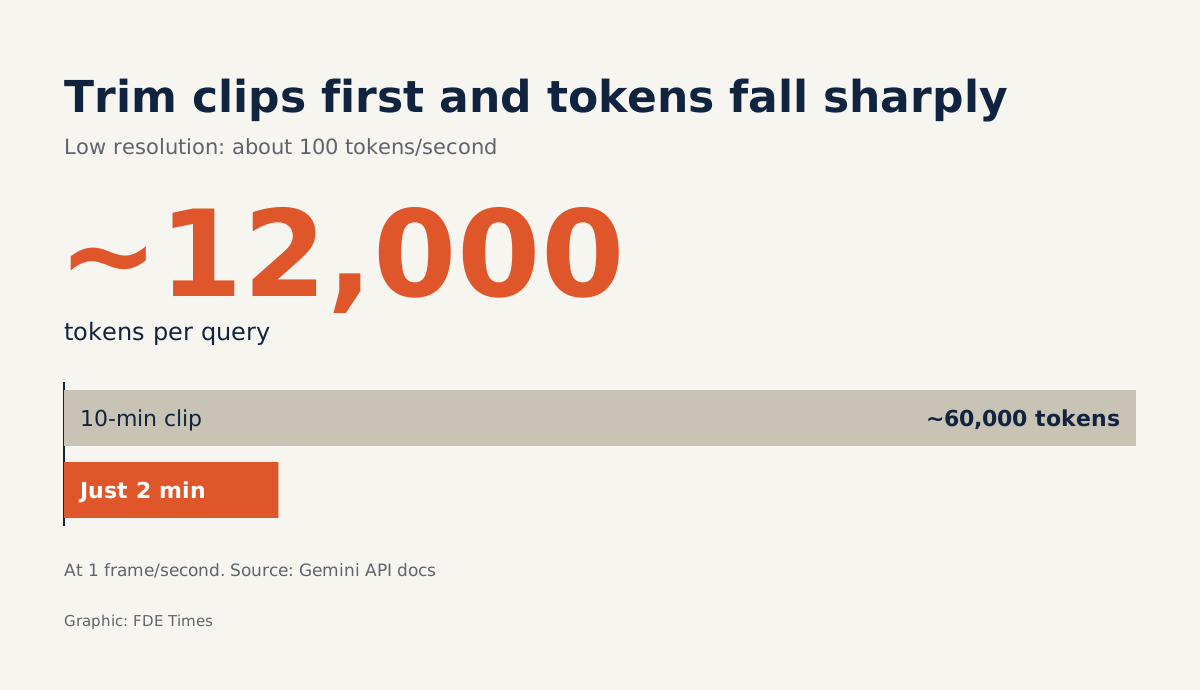
Work out the cost in advance, too. At the default (low) resolution, video costs about 100 tokens per second. A 10-minute clip is 600 seconds, or about 60,000 tokens per question. Trim it to the 2 minutes you need and the figure drops to about 12,000.
This estimate assumes the default of 1 frame per second; when you raise the fps, measure the actual token count again rather than reusing the old figure.
Google has also introduced agentic video understanding, enabled through a setting in the API. It targets this exact problem: catching state changes that happen in an instant and are easily missed at 1 FPS. If the client needs to catch brief moments like that, it is worth testing against simply raising the fps yourself.
Step 5: dirty data is the normal state
Describing multimodal AI, Splunk named three difficulties: varying levels of noise, missing data, and combining data from multiple sources. In the field all three happen at once: blurry photos, forms with missing pages, videos that do not match the written record. The pipeline has to treat this as normal, not as an exception.
| Input | Common error | First fix |
|---|---|---|
| Field photo | Upside down, oversized file rejected | Normalize orientation, downscale before sending |
| Handwritten form | Small text, wrong Vietnamese diacritics | Crop and enlarge the text region, allow an “unreadable” answer |
| Phone video | Fast events missed at 1 FPS | Trim to the segment needed, raise fps, ask by MM:SS |
How this skill shows up in real work
At the client, the hard part is not calling the API. It is being honest about accuracy. When you demo, show the client a field-by-field scorecard on their own data: what percentage of equipment names were right, how many dates were right, which fields need a person to review them.
A table like that is far more persuasive than a demo image that runs perfectly.
When reading FDE job descriptions, look for phrases such as “unstructured data”, “document processing” or “multimodal”. On your CV, instead of writing “used GPT-4 Vision”, say specifically how far you raised accuracy on handwritten Vietnamese forms by rotating images and cropping text regions. That number shows you have worked with real data.
The first crooked photo a client sends you is a good sign. It means you are working with the client’s real data, and the demo is behind you.
Was this article useful?
Thanks for the feedback!