A support-ticket classifier that trains just 0.07% of the model
LoRA needs no GPU cluster; what decides the result is consistent labels and a held-back test set that keeps the final score honest.
In brief
- LoRA freezes the original weights. In PEFT's Llama-3.2-1B example, only 851,968 of 1,236,666,368 parameters are trained.
- A low training loss proves nothing on its own. Tune hyperparameters on validation and run the test set only once, at the end.
- Adapters are tiny (about 6MB for opt-350m, against roughly 700MB for the full weights), so you can deploy one adapter per task.
In the healthcheck example in the PEFT library, a Llama-3.2-1B model has 1,236,666,368 parameters, but only 851,968 of them are trained: 0.0689%. All the others stay frozen.
The exact figure depends on the model and the configuration. Still, it shows why an engineer working on a client’s site can fine-tune a model for a narrow problem without a GPU cluster.
Support ticket classification is that kind of narrow problem: the input is a piece of text and the output is one label from a fixed list. If you are moving into a Forward Deployed Engineer role, doing this end to end and being able to explain every decision gives you a complete project to present in interviews.
This guide shows how to build a ticket classifier with LoRA on a small language model. You finish with a compact adapter and an evaluation number you can trust.
What do you need before running anything?
You need Python, Hugging Face’s peft library with the transformers ecosystem that comes with it, and a small base model. Opt-350m and Llama-3.2-1B, the two models the PEFT documentation uses in its examples, are both sensible choices for a laptop with a GPU or a small cloud machine.
Labelled data matters more than the GPU. Supervised fine-tuning requires every training example to come with the correct answer, called the target. For tickets, the target is the category: for example “thanh toán” (payments), “đăng nhập” (login), “giao hàng” (delivery) or “khác” (other). The examples below use these Vietnamese labels.
Fine-tuning means adapting a pre-trained model to a specific task rather than training one from scratch. So you do not need millions of tickets. You need consistent labels.
Step 1: Format tickets as input–label pairs
Take the simple route and treat classification as short text generation: the model reads a ticket and generates the label name. This matches TaskType.CAUSAL_LM in PEFT’s official example. Each JSONL line might look like this (the prompt format is up to you). The first ticket reads “I was charged twice for order #4821”, the second “I didn’t receive the OTP code when logging in”:
    {"text": "Ticket: I was charged twice for order #4821.\nLabel:", "label": "billing"}

    {"text": "Ticket: I didn't receive the OTP code when logging in.\nLabel:", "label": "login"}
Check: count tickets per label. If one label accounts for most of the data, note it now, because it will make the accuracy figure in the evaluation step look better than it really is.
Step 2: Split the data and lock away the test set
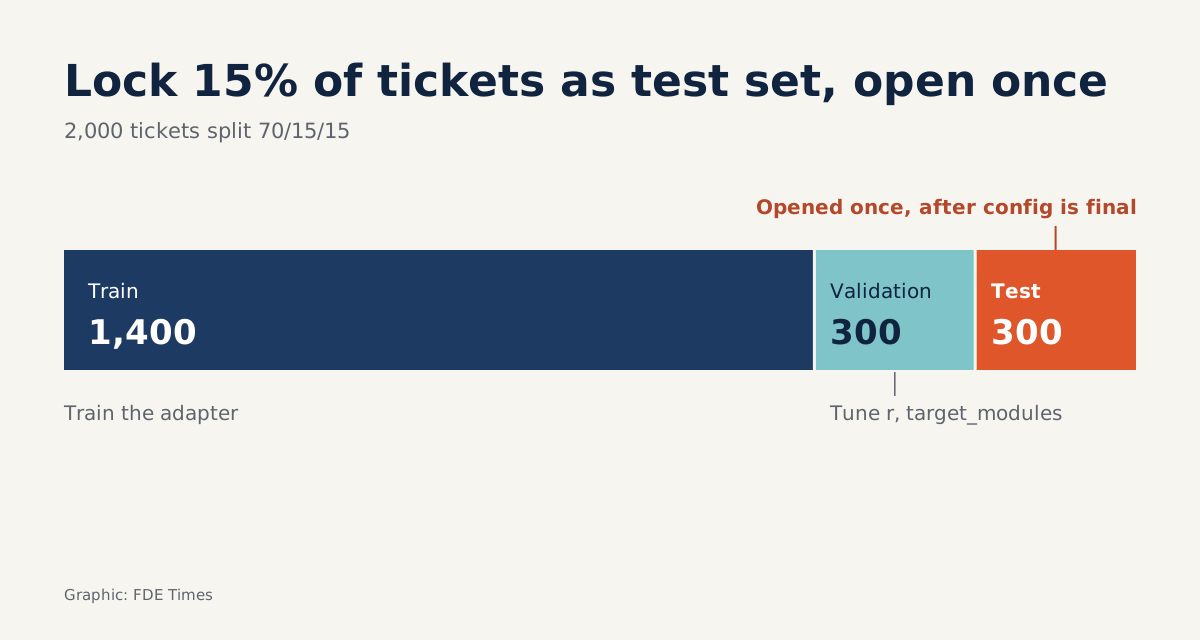
This step decides whether your result can be trusted. Split the data three ways: train for learning, validation for tuning hyperparameters, and test, used exactly once after every decision has been made.
import random
random.seed(42)
random.shuffle(tickets)
n = len(tickets)
train = tickets[: int(n * 0.70)]
val   = tickets[int(n * 0.70): int(n * 0.85)]
test  = tickets[int(n * 0.85):]
Picture 2,000 tickets: that gives you 1,400 for training, 300 for validation and 300 for testing. Write the test file to disk and do not open it again until step 5.
Check: all three sets contain every label. If tickets share a customer or an email thread, consider putting them in the same set so that information does not leak between sets.
Step 3: Configure LoRA and wrap the base model
The snippet below uses exactly the values from the PEFT quicktour, with the arguments reordered for readability. The variable base_model is the model you have already loaded (the loading code is left out for brevity):
from peft import LoraConfig, TaskType, get_peft_model

config = LoraConfig(
    r=8,
    lora_alpha=32,
    lora_dropout=0.1,
    target_modules=["q_proj"],
    task_type=TaskType.CAUSAL_LM,
    inference_mode=False,
)
model = get_peft_model(base_model, config)
The two parameters you will adjust most are r and target_modules.
Raising r, the rank, means more parameters to train and more capacity to learn, at the cost of more compute and a greater risk of overfitting. target_modules decides which layers LoRA attaches to. Here it is only q_proj. To cover every linear layer, as QLoRA does, set target_modules="all-linear", and the share of trainable parameters will rise.
lora_alpha=32 and lora_dropout=0.1 come from the official example. On a first run, leave both alone so that each experiment changes only one variable (r or target_modules) and the comparison table in step 4 stays readable.
Check: print the number of trainable parameters against the total. The result should be a very small fraction, of the same order as the 0.0689% in the Llama-3.2-1B example. If it is close to 100%, LoRA has not been applied correctly and you are fine-tuning the whole model.
Step 4: Train, but read validation, not training loss
With CAUSAL_LM, the simplified picture is that the model learns to predict the next piece of text. So each training example is the input string joined to the label. At prediction time you supply only the “Ticket: …\nNhãn:” part (Nhãn means label) and read what the model generates.
The sketch below covers only the data and scoring. For the training loop, use the familiar trainer from the Hugging Face ecosystem; predict is a function you write yourself to have the model generate a label:
# Simplified sketch
def to_training_text(t):
    return t["text"] + " " + t["label"]

train_texts = [to_training_text(t) for t in train]

def accuracy(rows, predict):
    correct = sum(1 for t in rows if predict(t["text"]).strip() == t["label"])
    return correct / len(rows)

def majority_baseline(rows):
    labels = [t["label"] for t in rows]
    top = max(set(labels), key=labels.count)
    return labels.count(top) / len(rows)
The last function is the one many people skip. Suppose 150 of the 300 validation tickets are labelled “thanh toán”: a lazy “model” that always answers “thanh toán” already scores 50%. If your LoRA gets 240 out of 300, or 80%, what matters is the 30-point gap over the baseline, not the 80% on its own.
The most common trap is a training loss that falls steadily to a very low level, followed by a hasty report of success. A model can reach low training loss simply by memorising the data. With 1,400 tickets and many epochs, that is entirely possible.
Picture this: after epoch 3, training loss keeps falling but accuracy on the 300 validation tickets stalls or even drops. That is the signal to stop. At this point you are free to try alternatives, such as fewer epochs, a different r or switching to all-linear, as long as every comparison is made on validation.
Check: keep a small table of configuration, validation accuracy and baseline. When the client asks “why r=8?”, that table is your answer.
Step 5: Open the test set exactly once, then save the adapter
Once the configuration is fixed, run accuracy(test, predict) on the 300 test tickets and record the result. That is the number you report. If it disappoints, do not go back, tweak and rerun the test: doing so turns the test set into a second validation set and the number loses its value.
Save the adapter and you will find it surprisingly small. The PEFT documentation says the opt-350m adapter is only about 6MB, against roughly 700MB for the full weights.
Where do first attempts usually go wrong?
A common reflex is to raise r as soon as results look weak. A higher rank gives the model more capacity, but with a few thousand tickets it also makes memorisation easier. Check the labels before raising the rank.
Inconsistent labels are the next source of error. Two support agents may file the same ticket, “charged but can’t log in”, under different categories, and the model can only learn as well as the labels allow.
The hardest to spot is peeking at the test set. The number still looks normal; it just can no longer be trusted.
What does this skill look like on a client site?
Hugging Face explains the reason for PEFT plainly: fine-tuning every parameter again for each task becomes increasingly expensive and impractical. On a deployment project this is very concrete. The client has one ticket queue, later adds a second, and then a business unit wants its own set of labels.
Because the base model is frozen and the adapter is only the difference, you can keep one base model and swap in several LoRAs by task. Picture three classifiers for three departments: the total cost is a few small adapters, not three full copies of the model. That is the answer the client’s infrastructure team wants to hear.
The first thing to do on arrival at a client is not training. Sit down with the support lead to agree a definition for each label, then pull a sample of tickets to check whether the existing labels are consistent. Most of the project’s risk lies in that step, not in LoraConfig.
If you are aiming for an FDE role, look for keywords such as PEFT, LoRA, fine-tuning and evaluation in job descriptions. On your CV, do not just write “fine-tuned an LLM”. Spell out the share of trainable parameters, the adapter size, the baseline you compared against, how you split the data and the fact that the test set was run only once.
Anyone can run get_peft_model. What clients pay for is an evaluation number they can believe.
Was this article useful?
Thanks for the feedback!