VCR.py and pytest in practice: record a customer's API once, run tests offline for good
The customer's sandbox may go down and tokens may expire, but your integration tests still have to pass in CI without leaking a single byte of customer data.

In brief
- Record real requests to a cassette once; after that, tests replay the responses with no network and no token.
- Filter headers, query strings and response bodies before committing, because a cassette is a plain-text file anyone can read.
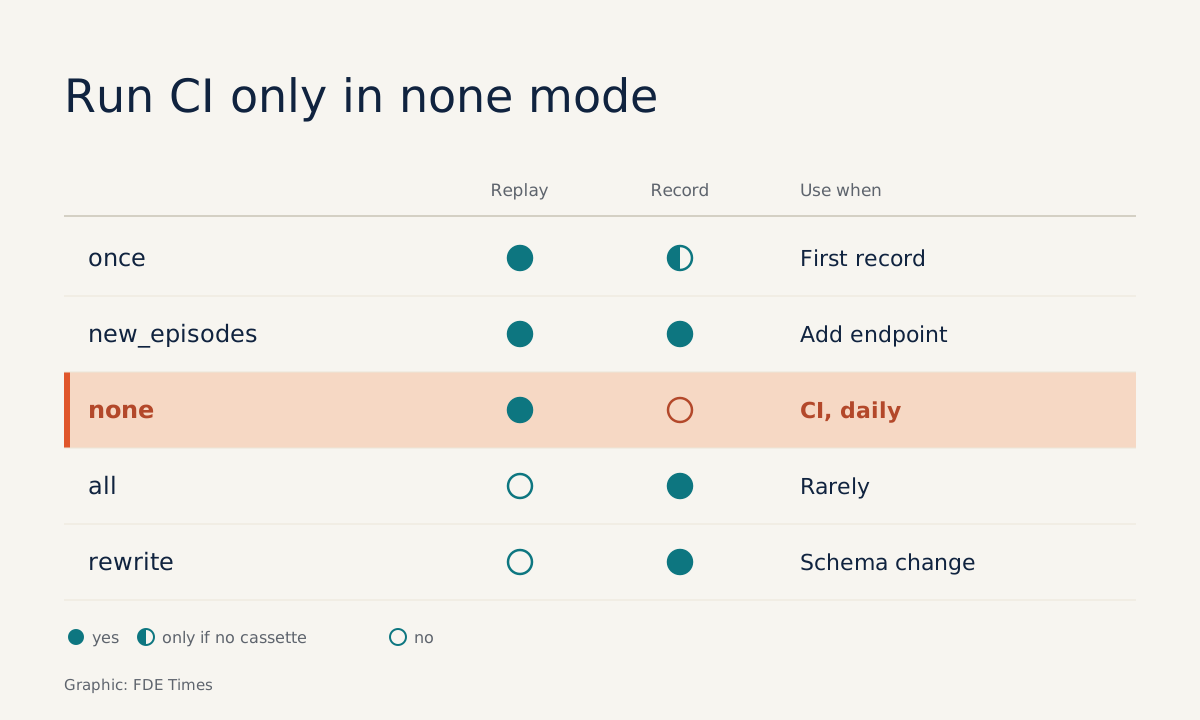
- In CI, leave pytest-recording in its default none mode and add --block-network so any unexpected request fails.
Picture this: in your second week on a customer site, their sandbox API starts returning 503 errors every afternoon. Each time, CI goes red, even though not a line of your code has changed.
The cleanest fix is to call the real API exactly once, record every request and response, and let every later run use that recording. VCR.py does precisely this. According to the library’s documentation, the first run of a test records its HTTP requests to a YAML cassette file, and from then on the test reads from that file.
This guide builds a complete example: a client for a hypothetical customer orders API, pytest tests that record once, sensitive data masked before commit, and CI running entirely offline. It is something you will need in the first week of any integration engagement.
What do you need before starting?
You need Python, pytest, the requests library and two packages: vcrpy and pytest-recording. The second is a pytest plugin built on VCR.py that lets you mark tests with the pytest.mark.vcr marker instead of wrapping each block of code yourself.
pip install pytest requests vcrpy pytest-recordingThe api.example-customer.com endpoint below is a placeholder. On a real engagement, swap in the customer’s sandbox and a token they issue you.
Step 1: write a thin client, separate from the tests
Keep every HTTP call in its own module. Tests call this function exactly as production code does.
# orders_client.py
import requests

BASE_URL = "https://api.example-customer.com"

def list_orders(token, status="open"):
    resp = requests.get(
        f"{BASE_URL}/v1/orders",
        params={"status": status},
        headers={"Authorization": f"Bearer {token}"},
        timeout=10,
    )
    resp.raise_for_status()
    return resp.json()["orders"]
Check: run this function once from the terminal with a real token to make sure the API returns a list of orders. If this step fails, record nothing, because the cassette will faithfully store the error too.
Step 2: record a first cassette with plain VCR.py
Before using the plugin, see how VCR.py works at the lowest level.
# test_raw.py
import os
import vcr
from orders_client import list_orders

def test_list_orders_raw():
    with vcr.use_cassette("fixtures/vcr_cassettes/orders.yaml"):
        orders = list_orders(token=os.environ["CUSTOMER_TOKEN"])
    assert isinstance(orders, list)
VCR.py’s default record mode is once: if the cassette file does not exist, it records new interactions; if it does, it only replays. Run the test twice and the second run is noticeably faster, because it no longer goes over the network.
Now open orders.yaml. You will find the Authorization header with the token sitting in the file verbatim, along with the full contents of the customer’s orders. Note down a few real email addresses and the email domain you see here; you will use them for checking later. Do not commit this file. Delete it and move on to step 3.
Step 3: switch to pytest-recording and filter secrets
With pytest-recording, recording configuration lives in the vcr_config fixture. This is also where you declare what must never reach a cassette.
# conftest.py
import pytest
from scrub import scrub_response

@pytest.fixture(scope="module")
def vcr_config():
    return {
        "filter_headers": ["authorization"],
        "filter_query_parameters": ["api_key"],
        "before_record_response": scrub_response,
    }
filter_headers takes a list of headers to drop from the recording, and filter_query_parameters does the same for the query string. The second matters when the customer passes keys in the URL, as in ?api_key=..., which still turns up in older systems.
# test_orders.py
import os
import pytest
from orders_client import list_orders

@pytest.mark.vcr
def test_list_open_orders():
    token = os.environ.get("CUSTOMER_TOKEN", "dummy")
    orders = list_orders(token=token)
    assert all(o["status"] == "open" for o in orders)
Note the "dummy" value: on replay, the test does not need a real token. CI holds no secrets at all, which is exactly what you want.
Step 4: mask customer data in responses
Filtering headers solves only half the problem. The response body still contains end customers’ emails, names and addresses. The before_record_response hook lets you modify a response before it is recorded, or return None to drop that request-response pair from the cassette entirely.
# scrub.py
import json

def scrub_response(response):
    body = response["body"]["string"]
    try:
        data = json.loads(body)
    except ValueError:
        return response
    for order in data.get("orders", []):
        order["customer_email"] = "[email protected]"
    response["body"]["string"] = json.dumps(data).encode()
    return response
This is simplified. It assumes the body is uncompressed JSON and that the field to mask is called customer_email. With a real API, ask the customer which fields hold personal data rather than guessing.
Now record again. pytest-recording runs in none mode by default so it never hits the network by accident, which means you have to switch recording on deliberately. Because the plugin’s recording configuration lives in vcr_config, the easiest approach to keep track of is to temporarily set once mode in that fixture on your machine, run the test once with a real token, then remove that line before committing.
CUSTOMER_TOKEN=xxx pytest test_orders.pyCheck: open the newly generated cassette and search for Bearer, for the token, then for the customer’s real email domain and the email addresses you noted in step 2. Do not search for the @ character, because the replacement value [email protected] contains it too. Commit only when nothing turns up.
Step 5: lock CI into offline mode
In CI you need no extra record-mode configuration, since none is already the default. This mode raises an error on any new request, so if someone adds an API call and forgets to record a cassette, the test fails immediately instead of quietly calling out.
pytest --block-networkThe --block-network flag blocks all network access during the test run, including tests without the vcr marker. It is a second line of defence, catching network calls that bypass VCR altogether.
When the customer’s API changes, how do you re-record?
This is where many people break their cassettes. Each record mode serves a different situation, and the wrong choice can leave CI calling the real network by accident.
| Mode | Behaviour | Use when |
|---|---|---|
once |
Records only if no cassette exists | First recording on your machine |
new_episodes |
Replays existing interactions, records new ones | Adding an endpoint to an existing test |
none |
Raises an error on any new request | CI and every routine run |
all |
Never replays, always records | Rarely; almost never in CI |
rewrite |
Re-records the cassette from scratch (pytest-recording) | The customer changed the schema and you need a clean recording |
When the customer announces a schema change, run rewrite on your own machine, open the file and check for secrets as in step 4, then commit in a separate pull request. The cassette diff then shows you exactly what changed in the API.
Common mistakes
The first concerns request matching. By default VCR.py matches on method, scheme, host, port, path and query, which means it ignores the body. Two POST /v1/orders calls with different bodies can be treated as the same, and your test receives the wrong response.
When you need to test several POSTs to the same URL, the safe approach is to give each call its own cassette file with vcr.use_cassette, as in step 2.
The second is adding filters after a cassette has already been committed. Filters apply only to the next recording; they cannot remove a token that is already in git history. If that happens, tell the customer so they can revoke the token, rather than just fixing the file.
The third is forgetting to remove the record mode from vcr_config after a debugging session, worst of all leaving it on all. Every run then calls the real API, CI starts needing a token, and you are back where you started.
How does this skill play out on a customer site?
On a real engagement, cassettes double as documentation. When the customer asks what your system sends to their API, you open the YAML file and show them the requests, with data masked. That answer is more convincing than any architecture diagram.
It also helps with handover. An engineer on the customer’s side clones the repo, runs pytest --block-network and sees green tests without requesting sandbox access. You leave the site; the test suite stays behind and keeps running.
On the career side: when reading FDE job descriptions, look for phrases such as “integrate with customer systems” or “own integrations end to end”. On your CV, instead of “wrote tests”, describe the outcome, for example “built an offline integration test suite for a customer API, recorded with VCR.py, with credentials and personal data filtered, so CI needs no network”.
In an interview, if you can explain clearly why CI should run in none mode, the interviewer will see that you understand the risk, not just how to use a library.
The next time the customer’s sandbox returns 503, your CI will be unaffected. You only need to call the real API again on the day the customer announces a schema change.
Was this article useful?
Thanks for the feedback!