A service that runs fine today can die at the first reboot
The cause usually sits in three lines of systemd configuration, and the evidence may vanish with the restart itself.
In brief
- start only runs the service now; enable is what brings it back after every reboot
- Restart=on-failure cannot save a process that exits with code 0 after an error, and repeated crashes hit the start limit
- With Storage=auto, a machine without /var/log/journal loses all its logs on restart
You finish installing a service on a customer’s server, type systemctl start, see active (running), send the “done” email and leave. Over the weekend the customer’s operations team patches the operating system and restarts the machine. On Monday morning the service is not running, and journalctl has not a single line explaining what happened.
For an FDE, this kind of incident is especially painful. You do not own the server, there is no one on the night shift, and what the customer remembers is not the model’s accuracy but that “the vendor’s system keeps dying”.
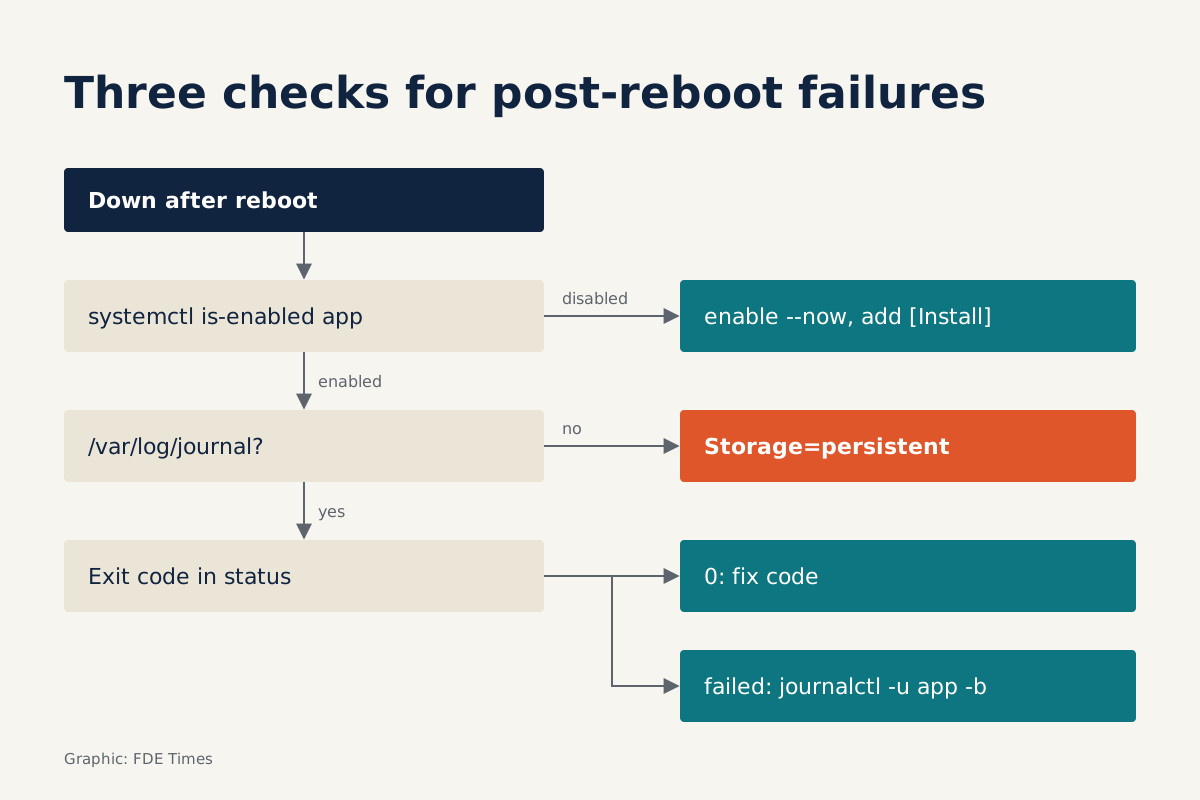
There are three easily missed causes, all in the systemd configuration. A fourth makes the other three hard to find: the logs were never kept.
Start and enable are separate operations
The systemctl documentation is explicit that enabling and starting are independent. A unit can be enabled without running, and it can be running without ever having been enabled. systemctl start only runs the service now; after the next reboot, systemd has no idea it should bring it back.
Conversely, systemctl enable does not run the service. It only creates symlinks based on the unit’s [Install] section, and the documentation states that it does not start the unit at the same time. The line WantedBy=multi-user.target adds a Wants=-style dependency from that target to your service. The direct consequence is that a unit with no [Install] section has nothing to enable.
So the command to type at install time is systemctl enable --now app.service: it creates the links for the next boot and runs the service immediately. Then check with systemctl is-enabled app, rather than looking only at status.
Restart= does not do what you think
The second cause is a service that dies mid-run with nobody to bring it back. Restart= is off by default, and the systemd.service documentation recommends on-failure for long-running services.
Red Hat’s guide to self-healing services also treats on-failure as the policy that covers the most crash scenarios, including unclean signals and non-zero exit codes.
But there is a trap. on-failure only restarts when the exit code is non-zero, or on a signal or timeout. Picture a Python worker that catches every exception, logs “lost database connection” and then calls sys.exit(0). To systemd, that is a clean exit, so the service stays down.
Restart=always restarts regardless of whether the exit was clean. The better choice is still to fix the code so that errors return a non-zero code, because under on-failure an exit with code 0 counts as work finished, not as a failure. Use always only when you cannot fix the process.
When systemd gives up
The third cause is harder to see. Every restart is subject to the unit’s start rate limit, while the default RestartSec delay is only 100ms. A service that crashes as soon as it starts, say because of a bad configuration file, uses up its allowed starts very quickly.
The systemd.unit documentation says that a unit started more than burst times within an interval is no longer permitted to start. Red Hat’s example configures a service so that two failed restarts within 30 seconds move it into the failed state. At that point Restart= has no effect: systemd has stopped trying.
You can use this mechanism on purpose. A sensible unit for a service at a customer site looks like this:
[Unit]
Description=Customer inference worker
After=network-online.target
Wants=network-online.target
StartLimitIntervalSec=30
StartLimitBurst=2

[Service]
ExecStart=/opt/app/bin/worker
Restart=on-failure
RestartSec=5

[Install]
WantedBy=multi-user.target
RestartSec=5 gives transient errors, such as a database that is slow to start, time to clear on their own. The burst limit makes permanent errors surface as a clear failed state instead of an endless crash loop.
The evidence disappears with the reboot
Back to Monday morning. You type journalctl -u app -b -1 to see the service’s logs from the previous boot, and there is nothing. According to the journald.conf documentation, with Storage=auto the journal is written to disk only if the /var/log/journal directory exists; otherwise the logs live in memory.
Red Hat warns of exactly this consequence: the records are deleted after a reboot, so there is no historical data left to analyse. The fix is to create the storage location and set persistent mode:
sudo mkdir -p /var/log/journal
# in /etc/systemd/journald.conf, under [Journal]
# Storage=persistent
sudo systemctl restart systemd-journald
Once logs persist, the three diagnostic flags are -u to filter by a single unit, -b to limit output to one boot, and -f to follow live while you try starting the service again.
Checks to run before leaving the site
Do not wait for an incident to do this. Each row in the table below is a question you should be able to answer before sending the “done” email.
| Symptom | Likely cause | Command to check |
|---|---|---|
| Not running after reboot | Not enabled, or missing [Install] |
systemctl is-enabled app |
| Dies mid-run and stays down | Missing Restart=, or exits with code 0 |
systemctl status app to see the exit code |
| Failed state after a few attempts | Hit the start limit | journalctl -u app -b |
| No logs from the previous boot | Journal kept only in memory | ls /var/log/journal |
The most reliable test is still to reboot the customer’s staging machine yourself while you are on site, then kill the process by hand to see whether it comes back. Those five minutes are far cheaper than a Monday-morning phone call.
Mistakes that keep recurring
One common mistake is setting Restart=always on a process with a broken configuration, then being surprised when it is locked in the failed state after a few seconds. Another is testing only with start and never with a real reboot.
The last mistake is more human: leaving the machine with the customer without a runbook. The handover should include the unit name, the journalctl command to run, and an explanation of what the failed state means, so the customer’s on-call engineer does not have to call you.
Turning this skill into a point in your favour
In an FDE interview, describing a time a service died after a reboot, how you diagnosed it with journalctl -u ... -b -1 and how you fixed the unit is more persuasive than a generic line in a skills list.
On a CV, write it as an outcome: standardised unit files and persistent journals for customer-site deployments, with a handover runbook.
This week’s exercise: set up a VM, install a worker that deliberately exits with code 0 on error, install the unit from the template above and reboot. If you can explain why it does not come back and point to the log line that proves it, next time you are at a customer site you will know what to check before you leave.
Was this article useful?
Thanks for the feedback!
7 sources
- systemctl manual (freedesktop.org)
- systemd.unit manual (freedesktop.org)
- systemd.service manual (freedesktop.org)
- Set up self-healing services with systemd · 2021-10-04
- journald.conf manual (freedesktop.org)
- How to configure your system to preserve system logs after a reboot · 2022-06-02
- journalctl manual (freedesktop.org)