Your LLM app has 99.9% uptime and still gives wrong answers
The same error-budget arithmetic SRE teams use for availability works for quality, once a good event means a correct answer rather than a successful request.
In brief
- Uptime only tells you whether the system answered; a semantic SLI measures what it actually said.
- Quality SLI = answers the judge marks Pass divided by all graded answers; error budget = 100% minus the SLO.
- Alert on burn rate across several windows, and still read 10-20 traces a week to catch failures no machine knows to look for yet.
The client’s dashboard has been green all month. Uptime is 99.9%, p95 latency is within its threshold and the HTTP error rate is close to zero. Yet on Monday morning the head of customer support sends you screenshots of three answers from the AI assistant, each one citing the wrong contract clause.
The system did not go down. It answered fully, quickly and in the right format. The content was simply wrong, and not one alert fired.
The skill needed here is to carry SRE’s SLO discipline over to answer quality. The arithmetic is exactly the same; the only difference is how a “good event” is defined.
Uptime measures the wrong thing
Google’s SRE Workbook defines an SLI as the number of good events divided by the total number of events. For a web service, a good event is usually a request that returns successfully within a latency threshold. Nothing in that definition requires a good event to be purely technical.
Tian Pan, in a piece on SLOs for non-deterministic systems, names the missing kind of metric the semantic SLI: a measure of what the system said, not how fast it said it. For the contract assistant above, a “good event” could be an answer in which every claim is grounded in the retrieved documents.
Once you have that ratio, every SRE tool applies at once. The error budget, according to Google, is 100% minus the SLO. Burn rate is how fast the service consumes its error budget relative to what the SLO allows.
Start from real failures, not a rating scale
The first mistake is to open an eval tool and immediately pick an off-the-shelf metric such as “helpfulness” or “quality score”. Hamel Husain and Shreya Shankar argue that error analysis is the most important activity in evals. Before deciding what to measure, you have to read real traces and note the ways the system breaks.
Imagine reading 100 traces from the contract assistant. You might find a few failure types: citing the wrong clause number, answering when no relevant document exists, a tone that is too stiff. The first does real harm to customers; the third does not. Your first SLI should target the first.
Next comes measurement. Husain and Shankar recommend using an LLM judge as a classifier that returns Pass or Fail for exactly one failure, rather than letting it hand out a general score. The question for the judge is very narrow: “Does every clause number in the answer appear in the retrieved documents?”
Do not trust the judge yet. Both authors stress that it must be checked against human-labelled examples of the specific failure it is meant to catch. If the judge misses half of the wrong answers a human flagged, your SLI will look deceptively healthy and your alerts will stay silent exactly when they should fire.
One calculation: a 95% SLO over a 30-day period
Tian Pan advises measuring current performance on a representative sample of traffic before setting any target. Suppose you run the validated judge on two weeks of traffic and find that about 96-97% of answers pass. Setting the SLO at 95% is reasonable: it leaves breathing room without hiding a genuine decline.
The error budget is then 5%: over 30 days, at most 5% of graded answers may fail. A burn rate of 1 means a failure rate of exactly 5%, spending the budget precisely by the end of the period. A burn rate of 2 means a 10% failure rate, exhausting the budget in 15 days.
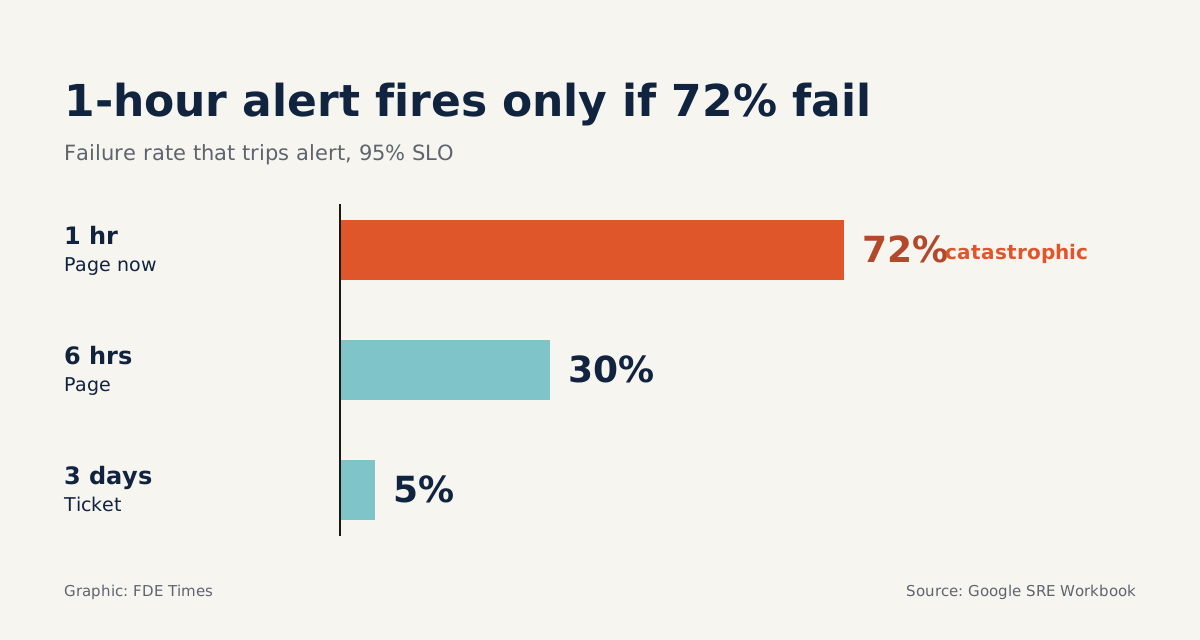
Google recommends multiwindow, multi-burn-rate alerting as the most appropriate way to protect an SLO. Its suggested starting thresholds: page when 2% of the budget is spent in one hour or 5% in six hours, and open a ticket when 10% is spent in three days. Converted to a 30-day period (720 hours) and a 95% SLO, that gives the following table.
| Window | Budget consumed | Burn rate | Equivalent failure rate | Action |
|---|---|---|---|---|
| 1 hour | 2% | 14.4 | 72% | Page immediately |
| 6 hours | 5% | 6 | 30% | Page |
| 3 days | 10% | 1 | 5% | Open ticket |
The table teaches something few people notice. With a 95% quality SLO, the fast alert fires only when nearly three-quarters of answers fail within an hour: catastrophic failures such as an overwritten prompt or an empty retrieval index. Most quality degradation will surface in the six-hour or three-day window, so do not skip the ticket tier.
Enough code for the first week
You do not need an expensive observability platform to start. The Python below takes the number of Pass results and the total graded in each window, then decides whether to alert.
SLO = 0.95
BUDGET = 1 - SLO  # 5%

# (action, window, burn-rate threshold) for a 30-day period
# Simplified version: each rule looks at one long window only
RULES = [
    ("page", "1h", 14.4),
    ("page", "6h", 6.0),
    ("ticket", "3d", 1.0),
]

def burn_rate(passes: int, total: int) -> float:
    if total == 0:
        return 0.0
    error_rate = 1 - passes / total
    return error_rate / BUDGET

def evaluate(counts: dict[str, tuple[int, int]]) -> list[str]:
    alerts = []
    for action, window, threshold in RULES:
        passes, total = counts[window]
        rate = burn_rate(passes, total)
        if rate >= threshold:
            alerts.append(f"{action}: burn {rate:.1f} over {window}")
    return alerts

# Example: 50 answers graded in 1 hour, 40 passed -> 20% failed, burn 4
print(evaluate({"1h": (40, 50), "6h": (250, 300), "3d": (3300, 3500)}))
In the example, the most recent hour has a 20% failure rate, not enough to page. The six-hour window fails at about 16.7%, a burn rate of about 3.3, also not enough. But the three-day window fails at about 5.7%, a burn rate of about 1.1, so the code opens a ticket: quality is drifting slowly, exactly the kind of failure uptime never sees.
Because this code looks only at long windows, an alert may keep firing for a while after an incident is over, since the window still contains the old failures. Before taking it to production, read the alerting chapter of the SRE Workbook carefully and build the full “multiwindow” logic rather than stopping at this cut-down version.
A practical note: the judge usually runs on only a sample of traffic to save cost. At 50 answers an hour, a few random failures can make the rate jump sharply, so the longer windows are where the signal is stable.
When the numbers fluctuate, do not draw a fixed line
Judge scores vary by hour, by question type and by user volume. Tian Pan suggests adding alerts for when the mean deviates by more than two standard deviations from a rolling window, rather than when it crosses an arbitrary line.
This catches model or prompt changes that knock quality down a notch, even when it stays above the SLO.
But no metric catches a failure nobody has defined yet. Husain and Shankar recommend reading 10-20 production traces every week, focusing on unusual cases. This is where your next SLI comes from: when a new failure type keeps recurring, it deserves its own judge.
Common mistakes on client engagements
The most common mistake is setting a target by gut feel, such as “quality must be 99%”, before measuring anything. The budget runs out on day one, alerts fire constantly and the operations team switches them off. Measure the baseline first, then negotiate the number with the client.
The second is using a judge that rates “overall quality” from 1 to 10. A score of 7 tells nobody what to fix, and it cannot be cleanly validated against human labels. A Pass/Fail judge for one specific failure is both easier to validate and easier to act on.
The third is treating a quality SLO as a one-off job. The judge must be revalidated whenever the model, prompt or data changes, and the weekly trace review needs a named owner in the operations schedule you hand over.
Where this skill fits in your career
When reading FDE job postings, watch for phrases such as “evals”, “production monitoring” and “reliability of AI systems”. When they appear together, the role very likely needs someone who can connect evals to operations, exactly the skill this process trains.
On a CV, one concrete line carries more weight than a list of tools: defined a quality SLI for a RAG assistant, validated the judge against human labels, and set multiwindow burn-rate alerts. If you have no real project yet, build this exact process on a small application of your own and write down the numbers.
The next time a client asks “is the system OK?”, you will have two answers instead of one: whether it is running, and whether it is saying the right things. The second is what gets the contract renewed.
Was this article useful?
Thanks for the feedback!