Entra's SCIM test looks for a user who doesn't exist
The right answer is an empty 200 list, and the harder part is PATCH, where Entra and Okta send the same disable-account command in different shapes.
In brief
- Entra's Test Connection searches for a user who does not exist, and the endpoint must return 200 with an empty ListResponse, not 404.
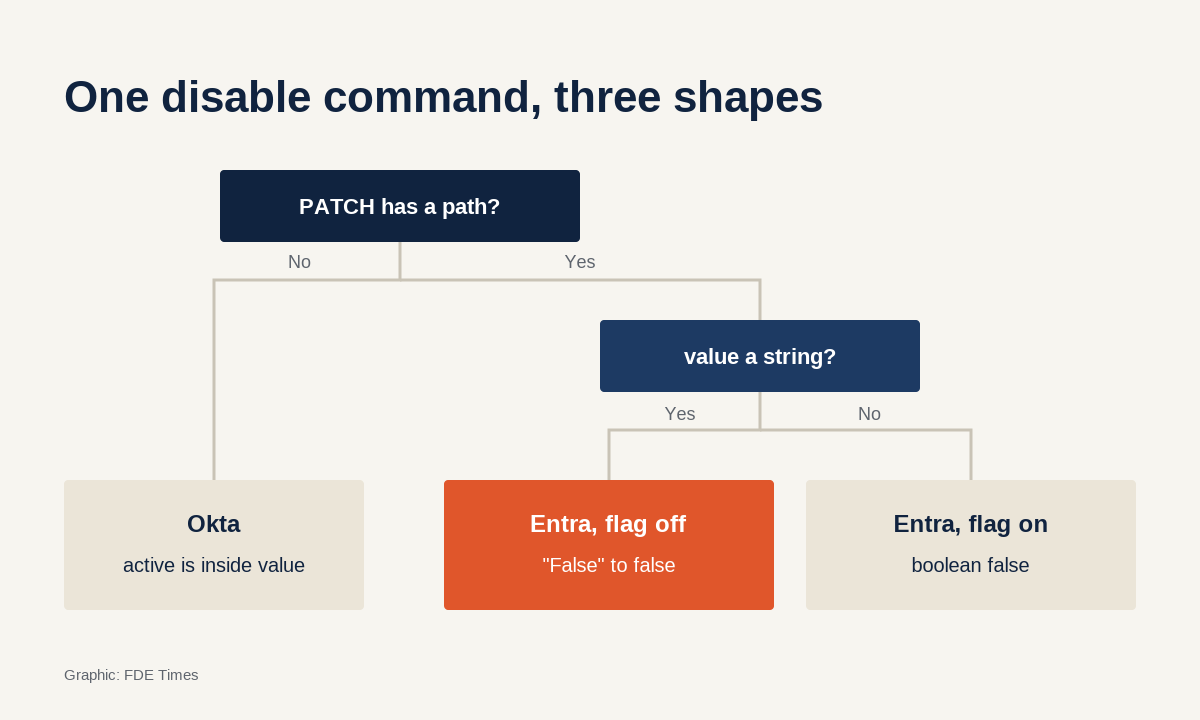
- To disable an account, Entra by default sends op "Replace", path "active" and the string "False"; Okta omits the path and puts active inside value.
- Okta never sends DELETE, Entra sends it only on hard deletion, and the sync cycle runs roughly every 40 minutes, so a disable does not take effect immediately.
When a customer’s IT team clicks Test Connection in Microsoft Entra, the system does not ask your app to create anyone.
It searches for a user who does not exist, using a random GUID as the value of the matching attribute, and according to Microsoft’s documentation the only correct answer is HTTP 200 with an empty ListResponse.
An endpoint that returns 404 to that query fails at the first step.
That small detail captures what SCIM is really like. At first glance the protocol is just CRUD on /Users, but each identity provider reads it in its own way. For an FDE, knowing these differences is what lets the customer’s IT team provision and disable accounts themselves, without calling you every time someone joins or leaves.
This guide builds a minimal SCIM server in FastAPI that can connect to both Entra and Okta. Data lives in memory and the error format is trimmed down from the RFC, so this is a version for learning, not for production.
What you need
You need Python 3.11 or later, FastAPI and whichever ASGI server you usually use. All the code sits in a single main.py file. If you later want full Pydantic models for the SCIM schemas, the scim2-models library (version 0.12.4, requires Python >=3.11) is built specifically as a foundation for SCIM servers and clients:
pip install scim2-modelsThis guide does not use it yet, so that every decision stays visible. One point about request bodies: if a request carries Content-Type: application/scim+json, FastAPI’s source code still treats it as JSON, because any subtype ending in +json falls into that category. A body parameter typed as dict can therefore read it without middleware.
Step 1: the user store and the userName rule
RFC 7643 says userName is required, unique and case-insensitive. Every lookup must therefore compare values after lowercasing them.
import copy, os, re, secrets, uuid
from fastapi import Body, Depends, FastAPI, Header, HTTPException
from fastapi.responses import JSONResponse, Response

USERS: dict[str, dict] = {}  # id -> user, simplified in-memory store
SCIM = "application/scim+json"
USER_SCHEMA = "urn:ietf:params:scim:schemas:core:2.0:User"
LIST_SCHEMA = "urn:ietf:params:scim:api:messages:2.0:ListResponse"

def auth(authorization: str = Header("")):
    expected = f"Bearer {os.environ['SCIM_TOKEN']}"
    if not secrets.compare_digest(authorization, expected):
        raise HTTPException(401)

app = FastAPI(dependencies=[Depends(auth)])

def scim(body, status=200):
    return JSONResponse(body, status_code=status, media_type=SCIM)

def find_by_username(name: str):
    key = name.lower()
    return next((u for u in USERS.values() if u["userName"].lower() == key), None)
Check: calling any endpoint without an Authorization header must return 401.
Step 2: GET /Users must answer “does this person exist yet?”
Okta checks whether a user already exists with GET /Users and a userName eq filter, plus startIndex and count (for example count=100). Okta’s documentation states that servers must support this query.
Entra’s Test Connection is also a search query, but it filters on the matching attribute the customer has configured, which is not necessarily userName. The version below understands only userName eq; if the customer’s tenant matches on a different attribute, you must extend the filter expression, or the server will return 400 and the test will fail.
FILTER = re.compile(r'^userName eq "([^"]+)"$', re.IGNORECASE)

@app.get("/scim/v2/Users")
def list_users(filter: str | None = None, startIndex: int = 1, count: int = 100):
    users = list(USERS.values())
    if filter:
        m = FILTER.match(filter.strip())
        if not m:
            return scim({"detail": "Only the userName eq filter is supported"}, 400)
        u = find_by_username(m.group(1))
        users = [u] if u else []
    page = users[startIndex - 1 : startIndex - 1 + count]
    return scim({"schemas": [LIST_SCHEMA], "totalResults": len(users),
                 "startIndex": startIndex, "itemsPerPage": len(page),
                 "Resources": page})
Check: filtering on a random userName must return 200 with totalResults: 0. When the matching attribute is userName, this is the response Test Connection waits for.
Step 3: create and read, including disabled users
@app.post("/scim/v2/Users")
def create_user(body: dict = Body(...)):
    name = body.get("userName")
    if not name:
        return scim({"detail": "userName is required"}, 400)
    if find_by_username(name):
        return scim({"detail": "userName already exists"}, 409)
    uid = str(uuid.uuid4())
    user = {"schemas": [USER_SCHEMA], "id": uid, "userName": name,
            "active": body.get("active", True),
            "name": body.get("name", {}), "emails": body.get("emails", [])}
    USERS[uid] = user
    return scim(user, 201)

@app.get("/scim/v2/Users/{uid}")
def get_user(uid: str):
    user = USERS.get(uid)
    return scim(user) if user else scim({"detail": "Not found"}, 404)
Do not filter out users with active: false here. Microsoft requires the record to be returned whether or not the user is active, and to disappear only once it has been hard-deleted.
Step 4: PATCH, where the two providers part ways
For SCIM applications, Entra treats “disable” as setting active to false, and the endpoint must support both disabling and re-enabling. The problem is the shape of the command.
By default, Entra capitalizes the first letter of ops: Add, Replace, Remove. When the tenant URL does not have the aadOptscim062020 flag enabled, the disable command has op "Replace", path "active" and the string value "False". With the flag on, the op becomes "replace" and the value is the boolean false, but Microsoft lists this compliance issue among those not yet fixed by default.
Okta, according to an analysis by WorkOS, takes a different route: the disable command has no path, and the active attribute sits inside value. Your PATCH handler therefore has to read three forms of the command: Entra without the flag, Entra with the flag, and Okta.
In the same spirit as op, the code below matches attribute names case-insensitively, maps them to their canonical names, and refuses to remove id and userName.
ATTRS = {"username": "userName", "name": "name",
         "emails": "emails", "displayname": "displayName"}
PROTECTED = {"id", "username"}

def to_bool(v):
    if isinstance(v, bool):
        return v
    if isinstance(v, str) and v.strip().lower() in ("true", "false"):
        return v.strip().lower() == "true"
    raise ValueError(f"Invalid active value: {v!r}")

def set_attr(user, attr, v):
    key = attr.lower()
    if key == "active":
        user["active"] = to_bool(v)
    elif key in ATTRS:
        user[ATTRS[key]] = v
    else:
        raise ValueError(f"Attribute not supported: {attr}")

def remove_attr(user, attr):
    key = attr.lower()
    if key in PROTECTED:
        raise ValueError(f"Cannot remove {attr}")
    if key not in ATTRS:
        raise ValueError(f"Removing {attr} is not supported")
    user.pop(ATTRS[key], None)

def apply_op(user, op):
    kind = str(op.get("op", "")).lower()        # Entra sends "Replace"
    path, value = op.get("path"), op.get("value")
    if kind not in ("add", "replace", "remove"):
        raise ValueError(f"Invalid op: {kind}")
    if path is None:                              # Okta style
        if not isinstance(value, dict):
            raise ValueError("Without a path, value must be an object")
        for k, v in value.items():
            set_attr(user, k, v)
    elif kind == "remove":
        remove_attr(user, path)
    else:
        set_attr(user, path, value)
This version is deliberately simplified. It does not yet handle complex paths such as an element of the emails array, and it accepts only a small set of attributes. Blocking the removal of userName comes straight from RFC 7643: the attribute is required.
What if a PATCH fails halfway through?
RFC 7644 requires each PATCH request to be processed atomically, however many operations it contains. If any operation fails, the resource must return to its original state. The simplest approach is to apply the operations to a copy and write it back only when every one succeeds.
@app.patch("/scim/v2/Users/{uid}")
def patch_user(uid: str, body: dict = Body(...)):
    user = USERS.get(uid)
    if not user:
        return scim({"detail": "Not found"}, 404)
    draft = copy.deepcopy(user)
    try:
        for op in body.get("Operations", []):
            apply_op(draft, op)
    except ValueError as e:
        return scim({"detail": str(e)}, 400)
    USERS[uid] = draft
    return scim(draft)
Now try two payloads. The first mimics Entra without the flag; the second is a shortened form of the Okta style:
curl -X PATCH "$BASE/scim/v2/Users/$ID" \
  -H "Authorization: Bearer $SCIM_TOKEN" -H "Content-Type: application/scim+json" \
  -d '{"Operations":[{"op":"Replace","path":"active","value":"False"}]}'

curl -X PATCH "$BASE/scim/v2/Users/$ID" \
  -H "Authorization: Bearer $SCIM_TOKEN" -H "Content-Type: application/scim+json" \
  -d '{"Operations":[{"op":"replace","value":{"active":true}}]}'
Check: the first command must return "active": false as a boolean rather than a string, and the second re-enables the account. Then send a request containing one valid operation and one with active: "maybe", and GET the user again to confirm the record has not changed.
Step 5: DELETE is for hard deletion
@app.delete("/scim/v2/Users/{uid}")
def delete_user(uid: str):
    if USERS.pop(uid, None) is None:
        return scim({"detail": "Not found"}, 404)
    return Response(status_code=204)
Okta never sends DELETE for users; it only updates active=false. Entra sends DELETE in cases such as hard deletion, by default 30 days after the user is soft-deleted in Entra ID.
Microsoft recommends always supporting both paths. If your product treats disabling as deletion, you will lose the data of someone who may be back at work next week.
Common mistakes
The first mistake is comparing op == "replace" literally, which silently ignores every command from Entra. The second is assigning value straight to active. The string "False" is non-empty and therefore truthy in Python, so someone who has left the company can still sign in.
The third concerns authentication. A long-lived bearer token, as used here, is still documented in the tutorial as supported for non-gallery applications.
To get into the Entra App Gallery, however, you must use OAuth 2.0 client credentials or workload identity federation and handle a minimum load of 25 requests per second per tenant. If the product is headed for the gallery, design the authentication path from the start.
What will the customer’s IT team ask before go-live?
The first question the customer’s IT team will ask is: “If we disable someone in Entra, how long until they lose access?” After the initial cycle, Entra syncs roughly every 40 minutes, so the honest answer is that it does not happen immediately.
Saying so before go-live goes far better than letting the security team find out on its own. Ask early, too, whether the tenant has the aadOptscim062020 flag enabled and what the matching attribute is, and put both payload shapes in your test suite.
For your career, search FDE job postings for SCIM, provisioning, Okta and Entra, especially at companies that sell to large enterprises.
A CV line such as “built a SCIM 2.0 endpoint that works with both Entra and Okta, with atomic PATCH” says more than “experienced with REST APIs”, because it shows you have studied the places where documentation and reality diverge.
The CRUD takes an afternoon. The rest is understanding what each provider actually sends, and that is the work an FDE is hired to do.
Was this article useful?
Thanks for the feedback!
10 sources
- Tutorial - Develop a SCIM endpoint for user provisioning to apps from Microsoft Entra ID · 2026-09-15
- Known issues with System for Cross-Domain Identity Management (SCIM) 2.0 protocol compliance - Microsoft Entra ID · 2025-08-25
- How provisioning works - Microsoft Entra ID
- User provisioning requirements for Microsoft Entra App Gallery · 2026-08-26
- SCIM 2.0 | Okta Developer
- Okta vs Entra ID SCIM requests (WorkOS blog) · 2026-10-12
- RFC 7644: System for Cross-domain Identity Management: Protocol
- RFC 7643: System for Cross-domain Identity Management: Core Schema
- GitHub - python-scim/scim2-models
- fastapi/fastapi: fastapi/routing.py