Permission denied? Check the parent directory before you chmod
Read the errno, then the path, then the permission triad, then SELinux, in that order, and the fix lands on the layer that is actually blocking access.
In brief
- A single directory in the path without the execute bit is enough to cause EACCES, even when the file's own permissions are correct.
- If the Unix permissions all check out and access is still blocked, read the AVC records in audit.log and use restorecon instead of switching to permissive and moving on.
- 'Too many open files' is a soft-limit problem, not a permissions problem, and editing limits.conf only affects new sessions.
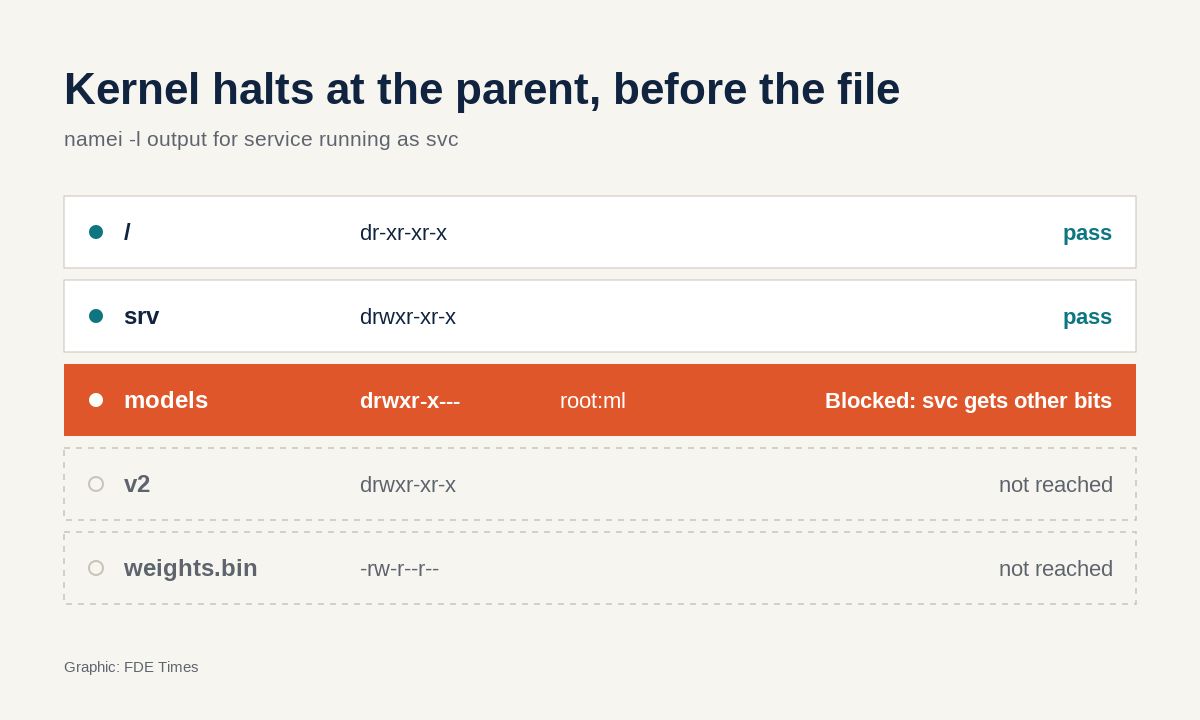
On Linux, a “Permission denied” line in an application log often has nothing to do with the file the application is opening. The path_resolution(7) man page is explicit: a process that lacks search permission on any directory the kernel walks through while resolving the path gets EACCES, even if the file’s own mode is entirely correct.
For FDEs, this error tends to appear at the worst possible moment. You are deploying on a client’s server with limited sudo, every change has to be logged in a ticket, and someone from the client is watching your screen. It is tempting to reach straight for chmod -R 777 or setenforce 0, because one command makes the error go away.
Both commands come at a cost. Each cause of EACCES sits in a different layer, and fixing the wrong layer leaves a security hole on the machine of someone who trusted you with it. The skill that matters is reading the error in the right order, working from the outer layers inward, and fixing only the spot that is blocking access.
First, is it really a permissions error?
Start by reading the message exactly, before touching any permissions. The open(2) man page separates two error codes that newcomers often lump together. EACCES means access to the file was denied, or search permission was denied on a directory in the path. EMFILE, “Too many open files,” means the process has used up its file descriptor limit.
| Message | Error code | Layer to check | First command |
|---|---|---|---|
| Permission denied | EACCES | Mode and owner along the whole path, then SELinux | namei -l <path> |
| Too many open files | EMFILE | The process’s resource limits | Check the soft limit of the running process |
Confuse the two and you can spend an afternoon running chmod on an error that has nothing to do with permissions. So copy the exact error line into your notes before doing anything else.
The kernel walks every directory, and so should you
Once you are sure it is EACCES, check the way the kernel checks: one path component at a time. The namei command does exactly this, following a pathname through each component to its end. The -l flag gives the long format (equivalent to -m -o -v), printing the mode and owner of every component on one screen.
Take a hypothetical example. A service running as user svc needs to read /srv/models/v2/weights.bin. ls -l shows the file has mode -rw-r--r-- and belongs to svc. Nothing looks wrong, yet the service still reports Permission denied. Run namei -l:
$ namei -l /srv/models/v2/weights.bin
f: /srv/models/v2/weights.bin
dr-xr-xr-x root root /
drwxr-xr-x root root srv
drwxr-x--- root ml   models
drwxr-xr-x svc  svc  v2
-rw-r--r-- svc  svc  weights.bin
The culprit is the third line. The models directory belongs to root:ml with mode 750. User svc is neither the owner nor in the ml group, so it falls into the “other” triad, which is ---. Without the execute bit there is no search permission, and the kernel stops here without ever looking at weights.bin.
There are two fixes, and their scope differs widely. chmod o+x /srv/models lets every user on the machine traverse that directory. Adding svc to the ml group opens it only to the service that needs it. Because its scope is narrower, the second option is the one to propose to the client’s administrator.
The kernel checks one triad, and the owner comes first
Another detail in path_resolution(7) costs many engineers time. The kernel picks exactly one permission triad based on the process’s effective user ID. If that UID matches the file’s owner, the kernel uses the first triad and stops there.
The consequence sounds odd at first: a file with mode 0070 owned by svc:ml blocks svc itself, even though the ml group has full rwx and svc is a member of it. The owner does not “fall through” to the group’s permissions. So when reading namei -l output, the first question on each line is which triad the process falls into, and only then the bits.
For the same reason, because the kernel checks the process’s UID, do not test with your own account. Running sudo -u svc cat /srv/models/v2/weights.bin reproduces the error under the identity the service actually uses.
When every bit is right and access is still blocked
Sometimes namei -l is clean from top to bottom, sudo -u svc still returns Permission denied, and the machine has SELinux enabled. The Unix layer is fine; the block is in SELinux policy. Oracle Linux’s SELinux documentation says denials are recorded as AVC records in /var/log/audit/audit.log. If auditd is not running, they go to /var/log/messages.
$ sudo ausearch -m avc -ts recent
$ ls -Z /srv/models/v2/weights.bin
$ sudo restorecon -Rv /srv/models
ausearch filters audit.log for AVC records, the lines that mark an SELinux denial. If the cause is a mislabeled file, restorecon writes the policy’s default context into the file’s extended attributes. That is the standard fix; chmod does nothing at this layer.
A Red Hat guide advises against disabling SELinux or switching to permissive as a fix. Permissive mode is only for confirming the cause. Once confirmed, return to Enforcing immediately and then fix the context.
On a client machine, record both steps in the ticket so that a later auditor can see SELinux was lowered exactly once, briefly and for a reason.
chmod will not fix “Too many open files”
Back to the EMFILE branch. The getrlimit(2) man page defines RLIMIT_NOFILE in terms of descriptor numbers: the limit is one greater than the highest file descriptor number the process may open. There are two levels: the kernel enforces the soft limit, while the hard limit is only the ceiling the soft limit may be raised to.
The common trap is limits.conf. The limits.conf(5) man page says these limits are applied by pam_limits at login, are not global and last only for that session. After you edit the file, running processes keep their old limits. It follows that a service not started through a PAM session may never read the file at all.
That is also why ulimit -n in your shell tells you nothing, since your shell is a different session. Check the limit of the failing process itself, restart it after changing the configuration, and check once more.
The mistakes that wreck a deployment
The most common mistake is fixing from the inside out: seeing an error on a file and running chmod on that file, when the parent directory is what is blocking access.
The second is switching to permissive “just for now” and forgetting to switch back, leaving SELinux in that state until the next audit. The third is editing limits.conf and declaring the problem solved while the service is still running with the old soft limit.
All three share a root: fixing before knowing which layer is blocking. Read the errno first to pick the right branch. For EACCES, move through the path, the permission triad, then SELinux; for EMFILE, go straight to the process’s soft limit. Each step rules out a layer before you change anything.
Interviewers want to hear the order, not a command
Before a technical interview, practice answering out loud: “a service can’t read a file on a client machine, what do you do?” A good answer starts with the errno, runs namei -l as the right user, reads the AVCs before touching SELinux, and checks the limits of the process, not the shell.
On a CV, one concrete line is worth more than a generic “Linux troubleshooting.” For example: “Wrote a runbook for diagnosing EACCES/EMFILE on SELinux Enforcing machines using namei and ausearch, fixing with restorecon instead of disabling SELinux,” with a link to the runbook containing real output from your own VM.
The next time a client’s screen shows Permission denied, you will have a procedure to follow instead of a guess.
Was this article useful?
Thanks for the feedback!
8 sources
- path_resolution(7) — Linux manual page · 2026-02-08
- open(2) — Linux manual page
- namei(1) — Linux manual page
- getrlimit(2) — Linux manual page
- limits.conf(5) — Linux manual page
- Troubleshooting Access-Denial Messages (Oracle Linux SELinux)
- restorecon(8) — Linux manual page
- How to read and correct SELinux denial messages · 2020-11-16