Client bans message brokers? Build the job queue inside Postgres
One SKIP LOCKED query is enough to share work across many workers; the harder part is dealing with stuck jobs and a bloating table.
In brief
- FOR UPDATE SKIP LOCKED combined with ORDER BY and LIMIT 1 lets many workers claim jobs in parallel without picking up the same one.
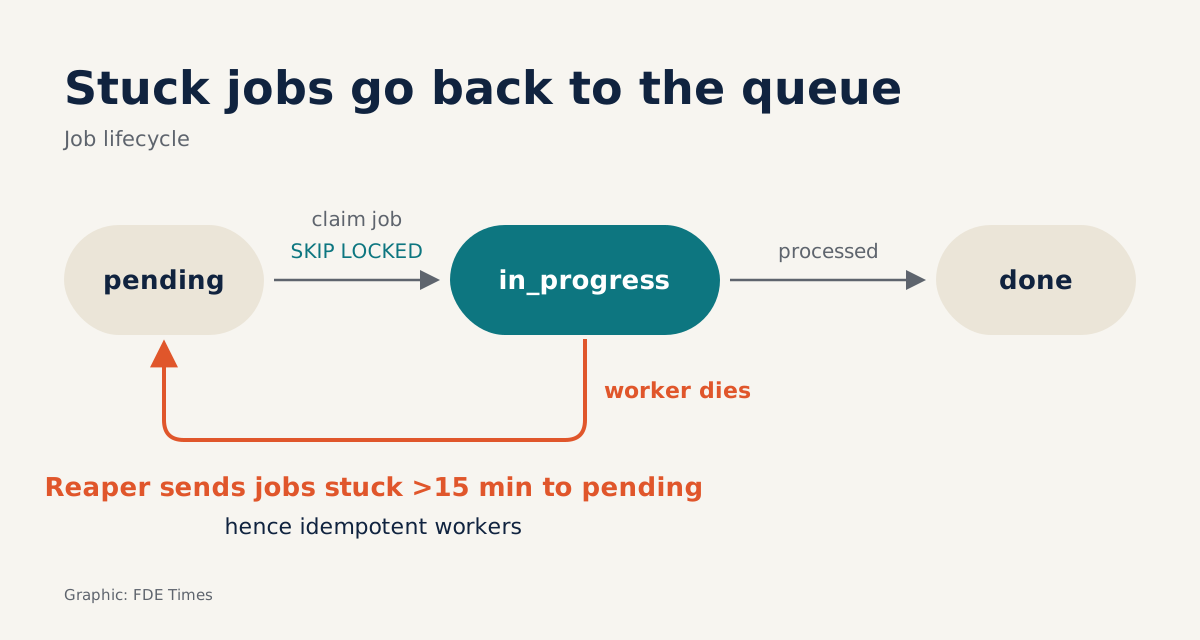
- A worker that dies mid-job leaves that job stuck in in_progress. To avoid this, either hold the whole job in one transaction or run a reaper that returns jobs to the queue.
- Queue tables generate dead tuples faster than autovacuum can clean them up, so measure bloat from the first day.
A queue table in Postgres can swell to tens of gigabytes while its live data amounts to a few megabytes. Microsoft’s Postgres blog has documented exactly this. It tends to happen in systems that everyone thought, when they were first built, were just “a small table and one SELECT”.
As an FDE, you will run into this situation. Imagine the client is a bank or a hospital. The operations team will not allow RabbitMQ or Kafka into infrastructure that has already been approved, yet you need to push thousands of documents through an extraction pipeline. The only thing they will let you use is the Postgres instance already running.
This guide builds a queue that is good enough on that same Postgres. All you need is a Postgres to experiment with (local or in the cloud) and two psql windows. The code has been trimmed for learning and is not yet production-ready.
Step 1: one table, one index, and that is enough
Start with a jobs table that has a status column. A partial index covers only the rows that are waiting, because those are the only rows workers need to find.
CREATE TABLE jobs (
  id          bigserial PRIMARY KEY,
  status      text NOT NULL DEFAULT 'pending',
  payload     jsonb NOT NULL,
  created_at  timestamptz NOT NULL DEFAULT now(),
  started_at  timestamptz
);

CREATE INDEX jobs_pending_idx ON jobs (created_at)
  WHERE status = 'pending';
Once this is done, run \d jobs to check that the index carries the condition WHERE status = 'pending'. Remember the name of this index: by Step 6 it will be the source of the biggest headache.
Step 2: claiming work without treading on each other’s toes
According to the official Postgres documentation, SKIP LOCKED skips rows that cannot be locked immediately. The option is intended for queue-like tables with multiple consumers.
Neon’s guide sets out the basic pattern: take the oldest pending task, ordered by time, LIMIT 1, then FOR UPDATE SKIP LOCKED. Whichever process reaches a row first locks it; the others skip it and take the next one.
From here there are two ways to claim work. Approach A keeps the transaction open for the whole of the processing:
BEGIN;
SELECT id, payload FROM jobs
WHERE status = 'pending'
ORDER BY created_at
LIMIT 1
FOR UPDATE SKIP LOCKED;
-- the application processes the job here
UPDATE jobs SET status = 'done' WHERE id = 1;  -- replace 1 with the id the SELECT just returned
COMMIT;
In psql, copy the id the SELECT returned and paste it into the UPDATE. In real code, the application passes that id in as a parameter.
Approach A is very tidy. According to the dbpro blog, if a worker crashes midway the transaction is rolled back and the job returns to the queue by itself. The price is that every running job holds an open transaction, and calling a model or running OCR can take several minutes.
Approach B claims the job and commits immediately:
UPDATE jobs
SET status = 'in_progress', started_at = now()
WHERE id = (
  SELECT id FROM jobs
  WHERE status = 'pending'
  ORDER BY created_at
  LIMIT 1
  FOR UPDATE SKIP LOCKED
)
RETURNING id, payload;
The transaction is now very short, but you have to handle dead workers yourself. Step 4 deals with that.
Step 3: proving two workers never take the same job
Add a few jobs to test with:
INSERT INTO jobs (payload) VALUES
  ('{"doc": 1}'), ('{"doc": 2}'), ('{"doc": 3}');
Open two psql windows. In the first, type BEGIN; and run the Approach A SELECT, but do not commit yet. In the second window, do exactly the same.
If everything is right, the second window immediately returns a different id rather than hanging. If it sits waiting, you have most likely forgotten SKIP LOCKED. When you are done, run ROLLBACK; in both windows.
Take this test to the client’s machine and you have instant evidence to show the operations team. They are often sceptical of arguments on paper, but two terminal windows running side by side are far more persuasive.
Step 4: who cleans up stuck jobs?
With Approach B, Neon’s guide warns that tasks can get stuck in in_progress forever when a worker fails. It suggests a query to find tasks that have been running too long. In other words, you need a reaper.
UPDATE jobs
SET status = 'pending', started_at = NULL
WHERE status = 'in_progress'
  AND started_at < now() - interval '15 minutes';
The 15 minutes is only an example. Choose a threshold longer than the slowest processing time you have measured on the client’s real data. If the threshold is too short, the reaper will put a job that is still running back in the queue, and that job gets done twice.
That is why your worker should be idempotent: processing the same document again must not create two result records.
To test it, have a worker claim a job using Approach B, kill that process, wait past the threshold and run the reaper. The job should return to pending.
Step 5: wake the workers, but do not rely on notifications alone
If workers query the table every few seconds, most of those queries will find nothing new. So you will want LISTEN/NOTIFY. According to the Postgres documentation, NOTIFY is transactional: the event is delivered only when the transaction commits. Writing the job and sending the notification in the same transaction is therefore safe.
-- producer side
BEGIN;
INSERT INTO jobs (payload) VALUES ('{"doc": 4}');
NOTIFY jobs_channel;
COMMIT;

-- worker side
LISTEN jobs_channel;
One point is often missed: notifications reach only sessions that have already run LISTEN. A worker that is restarting receives nothing. The true state of the queue always lives in the jobs table, so workers must still poll periodically so that no job is missed.
The documentation also warns that the NOTIFY queue can fill up, at which point transactions that call NOTIFY fail at commit. The cause is a listener sitting inside a long transaction. This is a hidden cost of Approach A if a worker both LISTENs and holds a transaction while processing. Keep the connection used for LISTEN separate from the connection used to do the work.
Step 6: measure bloat before the client’s DBA asks
Microsoft’s Postgres blog explains the mechanism clearly: dead tuples accumulate faster than autovacuum can clean them up. The partial index on pending status suffers worst. On a table under constant writes, vacuum and workers can also get in each other’s way.
You can create that pressure on your own machine. The snippet below is a trimmed-down exercise: push 10,000 dummy jobs into the table and then mark them all as done, as in a burst of processing.
INSERT INTO jobs (payload)
SELECT jsonb_build_object('doc', g)
FROM generate_series(1, 10000) AS g;

UPDATE jobs SET status = 'done' WHERE status = 'pending';
Then measure the dead tuples and the size of the table and index:
SELECT n_live_tup, n_dead_tup, last_autovacuum
FROM pg_stat_user_tables
WHERE relname = 'jobs';

SELECT pg_size_pretty(pg_relation_size('jobs'))             AS table_size,
       pg_size_pretty(pg_relation_size('jobs_pending_idx')) AS pending_index_size;
You will see n_dead_tup rise with the number of UPDATEs, while the pending index does not shrink even though no jobs are now waiting. Run the snippet several times and record the results of each round. You will see for yourself why a queue table swells far faster than the real data inside it.
At the client’s site, have these two measurement queries run daily from the first week, store the results by date and set alert thresholds. Do not wait until the claim query has slowed noticeably before hunting for the cause. The client’s DBA team will trust you far more if you are the one who raises bloat before they discover it themselves.
Three traps that make a queue misbehave
The most common trap is finding SKIP LOCKED convenient and then using it for business queries. The Postgres documentation is explicit: skipping locked rows means you see an inconsistent view of the data. The option therefore does not suit general-purpose work, only queue-like tables.
The second trap is assuming SKIP LOCKED skips every kind of lock. In fact it acts only on row-level locks; the table-level ROW SHARE lock is still acquired as usual. The last trap is writing FETCH ... WITH TIES to take a whole group of jobs with the same timestamp: Postgres does not allow SKIP LOCKED with this syntax.
When should you switch to something else?
If the client allows extensions but not a separate broker, pgmq is worth considering. It is an SQS-style queue that runs entirely inside Postgres. According to the project’s repository, pgmq guarantees that each message is delivered exactly once within the visibility timeout.
The visibility timeout does much the same job as the reaper you just wrote, but it does not remove the two lessons of Step 4. You still need a timeout longer than the real processing time, and the worker still has to be idempotent.
When you put this experience on your CV, describe the constraint and how you handled it rather than just writing “knows Postgres”. For example: “Client did not allow a broker; built a queue on the existing Postgres, with a reaper for stuck jobs and daily bloat monitoring.” When an FDE job ad mentions “on-prem” or “customer infrastructure”, that is the story to bring to the interview.
A queue in Postgres is not a makeshift fix. It lets you deliver on infrastructure the client already trusts, provided you know exactly where it can break.
Was this article useful?
Thanks for the feedback!
6 sources
- SELECT (PostgreSQL Documentation)
- Queue system using SKIP LOCKED in Lakebase Postgres · 2026-09-24
- PostgreSQL FOR UPDATE SKIP LOCKED: The One-Liner Job Queue · 2026-01-25
- Potential Consequences of Using Postgres as a Job Queue · 2026-04-30
- NOTIFY (PostgreSQL 18.7 Documentation)
- pgmq/pgmq: A lightweight message queue. Like AWS SQS and RSMQ but on Postgres