ETag alone will not keep a customer's API data in sync
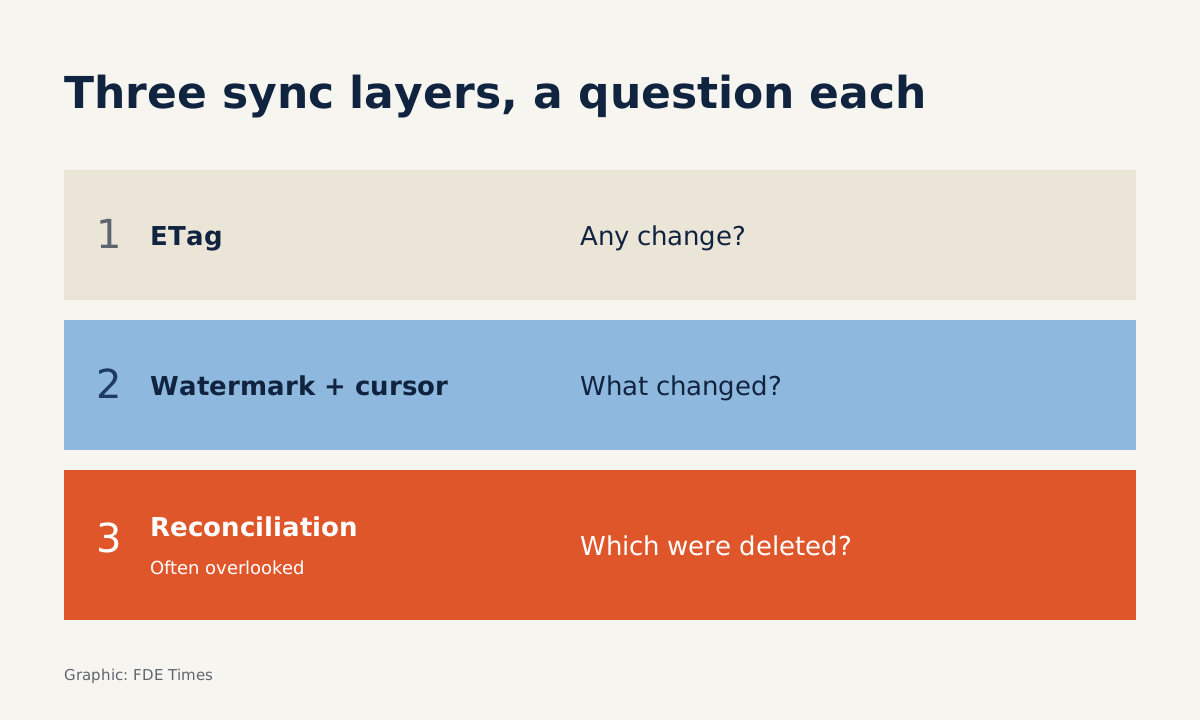
To handle duplicate records and catch deletions, pair ETags with a time watermark, a pagination cursor and a scheduled full reconciliation.
In brief
- A 304 response only saves you anything if the endpoint actually supports it, so test with curl before writing code.
- A 'from this point onwards' timestamp returns duplicates of records sitting exactly on the boundary, so you need to overwrite by id.
- A watermark cannot catch deleted records, so you need a scheduled full reconciliation as well.
On GitHub, a conditional request that comes back 304 Not Modified does not count against the primary rate limit. But GitHub’s own documentation is explicit: you save time and quota only when the endpoint actually returns 304.
At a customer site, that is the first thing to check. The API you have to work with might be a ticketing system, a CRM or an internal service someone wrote five years ago, and it may never have returned a 304 in its life.
A great many deployments start with the same job: pull the customer’s data on a regular schedule, without draining their quota and without missing a single record.
This guide builds a two-layer sync. The first layer uses ETags to ask “has anything changed?” at almost no cost. The second uses a time watermark such as updated_since, together with a pagination cursor, to fetch exactly what has changed. Last comes a periodic reconciliation, the part many people forget.
What do you need before you start?
You need curl, Python 3 with the requests library, and any public GitHub repo to experiment on. The Python snippets here have been trimmed for readability. They have no retries, backoff or network error handling, so do not paste them straight into production.
First, the concept of an ETag. MDN describes it as a unique identifier for a specific version of a resource, and as an opaque string: the client does not need to know what it contains.
The client stores this string and sends it next time to ask the server whether the resource has changed. If it has not, the server returns 304 Not Modified instead of resending the full body, and the client keeps using its stored copy.
Step 1: Check whether the server issues an ETag
curl -i https://api.github.com/repos/OWNER/REPOCheck: the response headers include an etag line. Copy the value exactly, including the quotation marks and any prefix. Because the string is opaque, you do not need to understand it, and you should not try to construct it yourself.
Step 2: Send the ETag back and expect a 304
curl -i https://api.github.com/repos/OWNER/REPO \
  -H 'If-None-Match: <paste the exact etag value from step 1>'
Check: the status line is 304 and the body is empty. According to MDN, when the condition fails for a GET or HEAD, the server must return 304 along with certain headers it would have sent in a 200 response, including the ETag. So your client can still read the ETag even when there is no new data.
It also pays to understand how the comparison works. If-None-Match succeeds, meaning it returns new content, only when the server’s ETag differs from every ETag the client lists. The comparison is weak: two versions with equivalent content are treated as the same. As a result, a 304 does not guarantee the two sides are identical byte for byte.
Step 3: Store ETags per URL
In the workflow GitHub describes, you store the etag from one response and send it in the if-none-match header on the next request to the same URL. Each ETag belongs to exactly one URL, so the storage key must be the URL as well, query string included.
# Trimmed for illustration: no retries, backoff or error handling
import requests

def fetch(url, etags):
    headers = {}
    if url in etags:
        headers["If-None-Match"] = etags[url]
    r = requests.get(url, headers=headers, timeout=30)
    if r.status_code == 304:
        return None              # unchanged, use the stored copy
    r.raise_for_status()
    if "ETag" in r.headers:
        etags[url] = r.headers["ETag"]
    return r.json()
Check: call fetch twice in a row with the same URL; the second call must return None. Picture polling an endpoint every 5 minutes, or 288 requests a day. If the data changes only 20 times in a day, the other 268 requests can end in a 304, and on GitHub they do not eat into the primary rate limit.
Why is an ETag on its own not enough?
An ETag answers only one question: “has this resource changed?” For a list of 100,000 orders, a “yes” does little good if you then have to download all 100,000 again. You also need to ask “what changed?”, and that is the question a time watermark exists to answer.
Zendesk offers a real example. With its incremental export API, you supply a start time and the API returns every item created or changed from that time onwards.
“From that time onwards” means a record updated exactly on the boundary will appear in both runs. If the watermark is 10:00:00 and a ticket is edited at exactly 10:00:00, that ticket comes back in the next run.
Step 4: Separate the watermark from the pagination cursor
These two concepts are often confused. Stripe paginates by object ID (starting_after) with a has_more flag; when the flag is false, you have reached the end of the list. Zendesk in cursor mode returns a cursor with each page for the next request, while the end_of_stream property tells you when to stop paginating.
The cursor gets you through every page within one run. The watermark tells you where the next run starts. The code below runs against a hypothetical customer API; the parameter and field names are examples:
# Hypothetical API: GET /v1/orders?updated_since=...&cursor=...
# returns {"items": [...], "next_cursor": "...", "has_more": true}
def sync_orders(base, watermark, db):
    newest = watermark
    cursor = None
    while True:
        params = {"updated_since": watermark}
        if cursor:
            params["cursor"] = cursor
        page = requests.get(f"{base}/v1/orders", params=params,
                            timeout=30).json()
        for item in page["items"]:
            db.upsert(item["id"], item)      # overwrite by id
            newest = max(newest, item["updated_at"])
        if not page["has_more"]:
            break
        cursor = page["next_cursor"]
    return newest    # save the new watermark only once the loop has finished
The code makes two choices worth keeping when you write the real thing. Upserting by id makes duplicates on the timestamp boundary harmless.
The new watermark comes from the server’s data, not from your machine’s clock, and it is written only when the whole run succeeds. If the job dies on page 7, the next run starts again from the old boundary rather than skipping six pages.
Check: run sync_orders twice with the same watermark; the number of records in the store must stay the same.
Step 5: Schedule reconciliation for deleted records
A deleted record no longer has an updated_at for the watermark to see. Zendesk says its incremental export can still include deleted records, but once a ticket is permanently deleted, it keeps only a minimal record for 90 days. If your job stops running for longer than that, the trace of the deletion disappears too.
The safe approach is to periodically fetch the full list of IDs from the customer’s API, compare it with your store and mark the IDs that no longer exist. This pass is expensive, so run it sparingly, nightly or weekly for example, depending on how long the customer can tolerate stale data.
The most common mistakes
The most common mistake is assuming every endpoint supports 304. Repeat step 2 against the customer’s own API before building ETags into the design. The second is treating a 304 as proof that the data is identical byte for byte, when the comparison is weak. The third is advancing the watermark after every page instead of after the whole run.
There is one more: polling when you do not need to. GitHub advises subscribing to webhooks instead of polling the API where possible, and, if you must poll, doing so on a fixed schedule. When the customer’s system offers webhooks, use them to learn when something has changed and keep the incremental sync as a safety net.
Where does this skill come up at a customer site?
In your first week with a customer, ask three questions straight away: “Does your API return ETags? Can it filter by update time? How are deletions reported?” Asking early saves you from a pipeline that blows through the quota on demo day.
When reading FDE job ads, if you see phrases such as integrating with customer systems or building data pipelines, have an incremental sync example ready to talk through. On your CV, do not just write “API integration”.
Describe how you handled duplicate records, pagination and deleted records, with real numbers if you have them, such as the share of requests that ended in a 304.
In a system design round, do not stop at “use updated_since”. Ask yourself “what about deleted records?” and lay out your reconciliation schedule.
Was this article useful?
Thanks for the feedback!