Pick the wrong OAuth2 grant and it works today, then breaks
Ask who is calling the API, keep the secret out of the repo, and rotate it without breaking the nightly job.
In brief
- Background jobs with no user use client credentials; flows with a user use authorization code with PKCE; drop the implicit and password grants entirely.
- Secrets never live in source code: read them from environment variables, and the repo should be open-sourceable at any moment without exposing anything.
- Rotate secrets with an overlap: issue a new secret, run both in parallel, switch over fully, and only then revoke the old one.
On your second day at the customer, the IT team sends you a client_id and a client_secret over chat, with one line: “Here’s the orders API, just pull the data every night.” Before writing the first line of code, you have two decisions to make. Which OAuth2 grant to use, and where that secret string will live.
Pick the wrong grant and the integration works today, then breaks when the customer tightens its policies. Let the secret slip into the repo and a single mistaken push is enough to undo the trust you have spent weeks building.
What follows tracks an order-sync job from start to finish: choosing the grant, writing the client, storing the secret, then rotating it without breaking the nightly job.
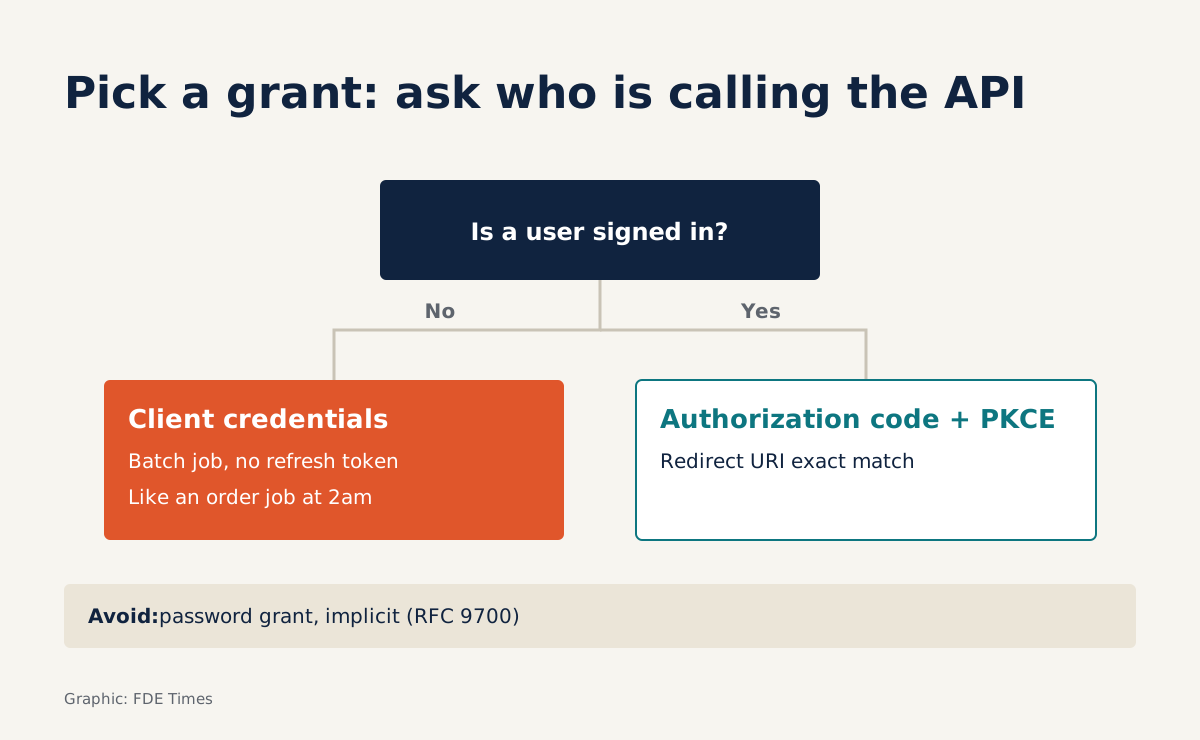
Choosing a grant starts with one question: who is calling the API?
OAuth2 has many grants, but in the field you only need to ask one question: is there a user behind this request? RFC 6749 describes client credentials as the grant used when the client acts on its own behalf. Microsoft’s documentation is more explicit: it is the common choice for server-to-server interactions that run in the background, with no user interacting directly.
A job pulling orders at 2am fits exactly. Nobody logs in; there is only your service. This grant suits only clients that can keep a secret, meaning code running on a server you control, not an app installed on a user’s machine.
When there is a real user, say an internal dashboard where warehouse staff log in, the picture changes entirely. Then you use authorization code. The table below covers the situations you will meet:
| Situation at the customer | Grant to use | Note |
|---|---|---|
| Background job, daemon, service account | Client credentials | No refresh token; request a new token on expiry |
| Web app with logged-in users | Authorization code + PKCE | Redirect URI must match exactly |
| SPA or mobile app (public client) | Authorization code + PKCE | Refresh tokens must be sender-constrained or use rotation |
| Customer suggests “just use user/password” | Do not use the password grant | This grant exposes user credentials to the client |
| Old docs describe the implicit flow | Do not use implicit | RFC 9700 recommends clients not use it |
The last two rows are where you often have to say “no” politely. RFC 9700, the best current practice document for OAuth 2.0 security, states plainly that the password grant exposes the resource owner’s credentials to the client in an insecure way. When the customer suggests it as a shortcut, you have a standards document to cite.
When there is a user: PKCE, redirect URIs and refresh tokens
For the warehouse dashboard you use authorization code, and oauth.net recommends PKCE for every flow of this kind, including web apps running on a server. Remember, though, that PKCE is not client authentication and does not replace a client secret. A server-side web app still needs to guard its secret as carefully as a background job.
RFC 9700 requires the authorization server to match redirect URIs exactly. So when registering the app with the customer, list every URI for dev, staging and production in full; do not ask for a wildcard. For public clients such as SPAs, refresh tokens must be sender-constrained or use rotation.
Writing a client credentials client end to end
Back to the order-sync job. Here is a minimal client in Python; note that no credential string appears in the file:
import os, time, requests

TOKEN_URL = os.environ["CUSTOMER_TOKEN_URL"]
CLIENT_ID = os.environ["CUSTOMER_CLIENT_ID"]
CLIENT_SECRET = os.environ["CUSTOMER_CLIENT_SECRET"]
SCOPE = os.environ.get("CUSTOMER_SCOPE", "")

_cache = {"token": None, "exp": 0.0}

def get_token(force=False):
    if not force and _cache["token"] and time.time() < _cache["exp"] - 60:
        return _cache["token"]
    resp = requests.post(TOKEN_URL, data={
        "grant_type": "client_credentials",
        "client_id": CLIENT_ID,
        "client_secret": CLIENT_SECRET,
        "scope": SCOPE,
    }, timeout=10)
    resp.raise_for_status()
    body = resp.json()
    _cache["token"] = body["access_token"]
    _cache["exp"] = time.time() + body.get("expires_in", 300)
    return _cache["token"]

def call_api(url):
    r = requests.get(url, headers={"Authorization": f"Bearer {get_token()}"}, timeout=30)
    if r.status_code == 401:
        r = requests.get(url, headers={"Authorization": f"Bearer {get_token(force=True)}"}, timeout=30)
    r.raise_for_status()
    return r.json()
With client credentials you get no refresh token. Microsoft’s documentation says that when the token expires, you call the /token endpoint again for a new access token. The code above does exactly that and adds two habits: it requests a token 60 seconds before expiry, and it retries exactly once on a 401.
Retrying only once keeps real errors visible. If the new token is still rejected, the problem lies in permissions or scope, and the logs should show that immediately, rather than a loop hammering /token in the middle of the night.
Secrets do not belong in the repo
Microsoft states that application credentials must never be published in source code, embedded in web pages or shipped in widely distributed native apps. It sounds obvious, but OWASP notes that many organisations still hardcode plaintext secrets directly in source code. On customer projects you will see this more often than you expect.
The twelve-factor app offers a simple approach: store config, including credentials, in environment variables. Its accompanying test is useful: could the codebase be open-sourced at any moment without exposing a single credential? The code above passes that test.
On a dev machine, put the variables in a .env file and add that file to .gitignore in the very first commit. In production, ask the customer which secret manager they use and let the platform inject environment variables at runtime.
Once the integration is stable, you can propose an upgrade. Microsoft allows services to authenticate with a certificate or a federated credential instead of a shared secret. That is worth discussing with the security team for long-running jobs.
Rotating secrets while the nightly job keeps running
OWASP recommends rotating secrets regularly so that a stolen credential is only usable for a short time. The hard part is rotating without breaking the 2am job. The method is to always leave an overlap window in which both the old and new secrets are valid.
Picture a rotation schedule for the orders job, assuming the customer’s identity system allows an application to hold two secrets at once (ask IT to confirm). On Monday, IT issues secret B while secret A is still valid. You update CUSTOMER_CLIENT_SECRET in the secret manager to B and redeploy.
Tuesday and Wednesday are the parallel-running period. New instances use B; any stragglers or instances not yet restarted still work with A. You read the logs each night and confirm that every request to /token succeeds.
On Thursday, once you are certain nothing still uses A, you ask IT to revoke it. Then you deliberately call /token with A once and confirm it is rejected. That check proves A is actually dead, not just “probably revoked”.
If your code reads the secret from an environment variable, this whole process requires not a single line of code change. That is the most practical payoff of getting secrets out of code.
Common mistakes in the field
The most common mistake is a secret that remains in commit history even though the current files are clean. Run git log -p -S "client_secret" to find it. If you find one, the first job is to tell the customer to revoke it and issue a new secret; cleaning the repo history comes later, because a leaked secret must be treated as unusable.
The next is accepting the password grant simply because the customer wants speed. The fix: cite RFC 9700, then propose client credentials for a background job, or authorization code with PKCE if users log in.
Quite a few people also treat PKCE as a shield that replaces the secret. The fix: for a server-side web app, still keep the client secret in the secret manager as you would for a background job, and treat PKCE as an extra layer of protection.
Finally, there is caching a token while forgetting its lifetime, then hitting a wave of 401s on the very first night in production. The fix: store the expiry time from expires_in, request a new token before it expires, and retry only once on a 401, as the code above does.
Showing employers you can do this
If you have integrated with a customer’s systems and passed their security team’s review, describe that experience in concrete terms.
On your CV, write a specific line instead of “experienced with OAuth2”. For example: “Built a sync job using client credentials, with secrets loaded from a secret manager and rotated on a schedule with zero downtime”. In interviews, walking through the four-day rotation schedule above is far more convincing than reciting definitions of the grants.
The next time someone sends you a client secret over chat, treat it as the first thing to clean up: move it into the secret manager, then agree a rotation date with IT.
Was this article useful?
Thanks for the feedback!
6 sources
- OAuth 2.0 client credentials flow on the Microsoft identity platform - Microsoft Learn · 2026-01-30
- RFC 6749: The OAuth 2.0 Authorization Framework · 2012-10
- RFC 9700: Best Current Practice for OAuth 2.0 Security · 2025-01
- PKCE — OAuth 2.0
- Secrets Management - OWASP Cheat Sheet Series
- III. Config: Store config in the environment