Moving an application to MongoDB Atlas: don't copy tables into collections
Copying each table into its own collection is quick. The hard part of a migration is redesigning the data around how the application reads it, not how the old database stored it.

In brief
- Don't copy each table into a collection: start from how the application reads its data
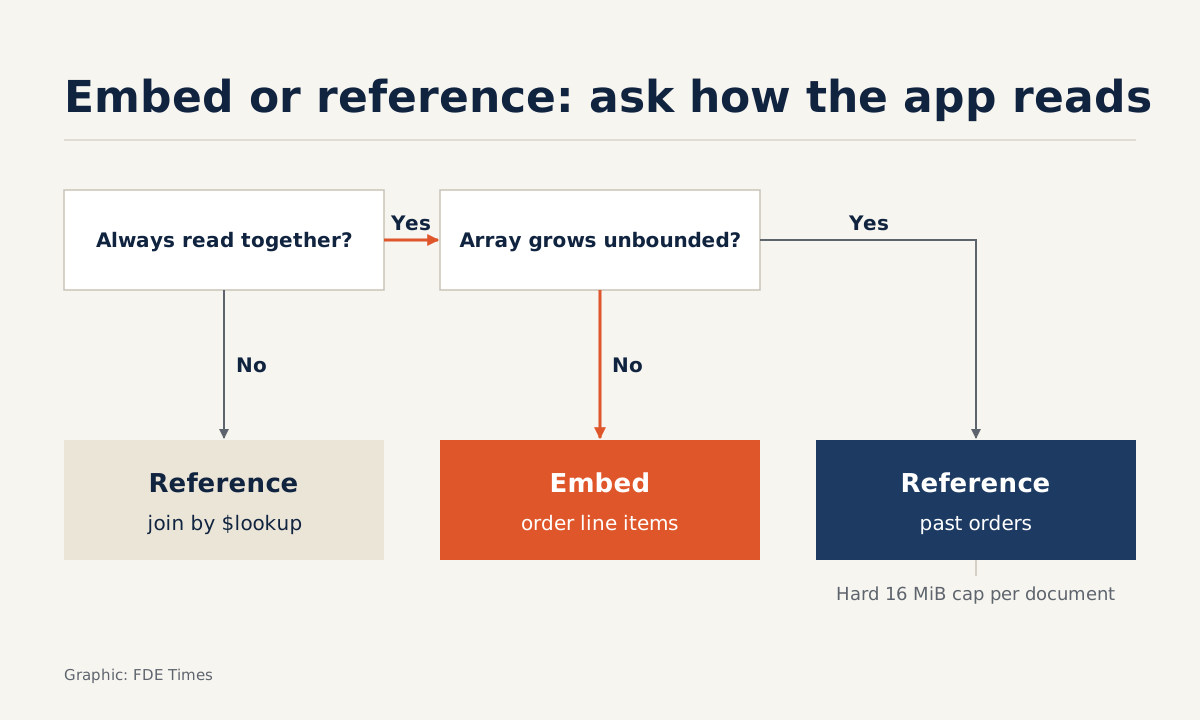
- Embed when two entities have a "has-a" relationship and are always read together; reference when the embedded data could grow without limit
- Moving the data is only half the job. The other half is translating SQL into aggregation pipelines and verifying them before cutover day
Picture a client handing you an application that has run on SQL Server for ten years: a few hundred tables, thousands of queries scattered through Java code, and an operations team with just one question. How long will the move to MongoDB Atlas take, and what are the risks?
MongoDB’s own job posting admits that migrations like this are time-consuming and often risky.
That is the problem MongoDB’s newly formed Field Engineering team is aimed at, through a “Forward Deployed AI Engineer” role dedicated to modernising applications for customers. Whoever takes the job works hands-on on outcome-driven projects, from POCs and MVPs to everything in between, and brings what they learn from customers back into the product roadmap.
Whether or not you ever work at MongoDB, the skill applies anywhere a legacy system needs a new data model. The easiest place to slip, and the first thing worth practising, is carrying table-based thinking unchanged into the world of documents.
The right question is “what does the application read together?”
In the relational model you normalise: one table per entity, joined back together at read time. In the document model you do the opposite. Data that is always read together goes into the same document, so a single read is enough.
MongoDB’s documentation gives two signs that you should embed: there is a “has-a” or “contains” relationship between two entities, and the data is often queried together. The reverse is just as clear: reference when the embedded data could grow without bound.
Behind the second rule sits a hard limit: a BSON document cannot exceed 16 mebibytes. This is not performance advice but a wall. Hit it in production and writes fail.
An example: orders, line items and customers
Picture a sales system with three tables: customers, orders and order_items. The most-opened screen is “order details”, and it always needs both the order and every line item in it. The SQL behind it looks like this:
SELECT o.id, o.created_at, SUM(i.qty * i.price) AS total
FROM orders o
JOIN order_items i ON i.order_id = o.id
WHERE o.customer_id = 42
GROUP BY o.id, o.created_at;
An order “contains” its line items, and the two are always read together. Both signs are present, so the line items are embedded in the order. The number of lines in an order also has a natural ceiling, because nobody puts a million items in one basket.
{
  "_id": 9001,
  "customerId": 42,
  "createdAt": "2026-10-01T09:30:00Z",
  "items": [
    { "sku": "A-17", "qty": 2, "price": 150 },
    { "sku": "B-03", "qty": 1, "price": 90 }
  ]
}
What about the relationship between customers and orders? Many people will be tempted to embed the whole order history in the customer document. Run a hypothetical calculation: if each order is about 2 KB, then 16 MiB (16,777,216 bytes) holds only around 8,192 orders.
A business customer ordering daily for years will hit that ceiling, and order history is exactly the kind of thing that “grows without bound”. So orders live in their own collection and reference the customer through customerId.
Rewritten as an aggregation pipeline, the SQL query above no longer has a JOIN:
db.orders.aggregate([
  { $match: { customerId: 42 } },
  { $project: {
      createdAt: 1,
      total: { $sum: { $map: {
        input: "$items", as: "i",
        in: { $multiply: ["$$i.qty", "$$i.price"] }
      } } }
  } }
]);
When a screen needs customer details alongside the order, you follow the reference with $lookup:
db.orders.aggregate([
  { $match: { _id: 9001 } },
  { $lookup: {
      from: "customers",
      localField: "customerId",
      foreignField: "_id",
      as: "customer"
  } },
  { $unwind: "$customer" },
  { $project: { createdAt: 1, items: 1, "customer.name": 1 } }
]);
A practical rule: $lookup is perfectly fine when a preceding $match has already narrowed things down to a few documents and the screen is not on a hot path, such as an admin page or a report.
If the most-opened screen also has to run $lookup constantly, that is a signal to revisit the design and consider copying a few rarely changing fields, such as the customer’s name, directly into the order document.
On site with a client, where do you start?
Not by copying data. The pattern for migrating from a relational database to Atlas on AWS, written by AWS together with a MongoDB author, begins with discovery and assessment: estimate the working set using Relational Migrator’s suggestions plus db.stats() to get the total index size, and plan the cutover early.
The pattern requires MongoDB 5.0 or later.
Only once you have those measurements do you map the schema. Relational Migrator can read Oracle, Microsoft SQL Server, MySQL, DB2, Sybase and PostgreSQL sources, and lets you visually map the relational model to a document schema: customising fields, splitting tables, embedding documents.
The tool speeds you up, but the decision to embed or reference still has to come from the list of screens and queries you gathered during discovery.
After the schema comes the application code, the most underestimated part. Relational Migrator does translate SQL into aggregation pipelines, but you still have to run both the old and new queries against the same dataset, compare every result, and only then think about cutover.
Even AMP, the AI-assisted modernisation platform MongoDB launched on 16 September 2025, comes with delivery engineers who oversee and guide the work: the tooling speeds up the conversion, while design decisions and verification remain the job of the person on site with the client.
The mistakes that break migrations
The most common mistake is copying each table verbatim into a collection and then using $lookup to replace JOINs everywhere. The result is a slower relational database dressed up as MongoDB.
The opposite mistake is just as dangerous: embedding everything, including arrays that will grow forever, such as logs, comments or transaction history. It runs beautifully in a POC with sample data, then a year later crashes into the 16 MiB limit.
Next comes treating migration as nothing more than moving data, forgetting that thousands of SQL queries in the code must change too. And if you skip measuring the working set, it is easy to pick the wrong cluster size, leaving performance on cutover day worse than the old system’s, just when the client is watching most closely.
How does this skill show up on a CV?
MongoDB’s job posting asks for proficiency in JavaScript plus Java or C#, along with an understanding of GenAI. That skill set reflects the work: you have to read enterprise backend code, where the SQL lives, and write MongoDB queries in JavaScript.
When writing your CV, don’t just put “experience with MongoDB”. Describe a specific case: how many tables the source schema had, where you chose to embed and why, how many queries were translated and verified.
Next time you face a relational schema, don’t ask which collection each table becomes. Ask which screen reads what together, and which arrays will keep growing.
Was this article useful?
Thanks for the feedback!
6 sources
- Senior Forward Deployed AI Engineer @ MongoDB | AlleyCorp Job Board
- MongoDB Relational Migrator | MongoDB
- Best Practices for Data Modeling in MongoDB (MongoDB Database Manual)
- MongoDB Limits and Thresholds - Database Manual - MongoDB Docs
- Migrate a relational database to MongoDB Atlas on AWS
- MongoDB Launches AI-Powered Application Modernization Platform to Reduce Technical Debt and Speed Innovation · 2025-09-16