Build a Jira ticket triage agent that creates issues when confident and escalates to a reviewer when not
Getting a model to label tickets is the easy part. The hard part is deciding when code may create work in a client's Jira on its own, and when it must stop and ask a human.

In brief
- The tool description matters more than anything else, so define every label and every priority level inside it.
- Do not let the model decide when to escalate: code outside it checks both the confidence threshold and the risk boundary.
- The threshold must come from the client's real ticket distribution and be recalibrated continuously against reviewer decisions.
Picture an agent that creates issues in a client’s Jira on its own, then files a serious login outage as a low-priority “feature request”. The client’s support team may well never trust that agent again.
That is why, in ticket triage, the hardest question is not “does the model label correctly?” but “when is the code allowed to act on its own?”
This guide walks through building a small agent that does exactly three things: it classifies tickets through a tool with a strict schema, creates an issue when it is confident enough, and hands the ticket to a reviewer when confidence is low or when the action crosses a risk boundary.
When a client wants to “bring AI into the support process”, this is a small, measurable problem and a sensible first thing to try.
What do you need?
You need access to the Claude API, a test Jira Cloud instance with at least one project, Python, and a few dozen old tickets that have been labelled correctly, to compare against. The code below is simplified. Authentication, HTTP calls and log storage are replaced with placeholder functions so you can wire them to the libraries you already use.
Step 1: the tool description is your triage rulebook
A tool consists of name, description, input_schema and an optional input_examples field. Put your effort into the description: say clearly what the tool does, when to use it and how it should behave. Anthropic calls a detailed description the single most important factor in tool quality.
For a triage agent, define each label and each priority level inside the description, rather than just listing the label names. Give the tool a service prefix, such as jira_..., so the model does not get confused when the agent later works with other systems too.
{
  "name": "jira_triage_ticket",
  "description": "Classify a support ticket before creating a Jira issue. Use for EVERY new ticket. category: 'access' = cannot log in or lacks permission; 'bug' = a feature behaves differently from its description; 'billing' = invoices, payments; 'feature_request' = a request for a new feature. priority: 'critical' = many customers cannot use the product; 'high' = one customer is blocked with no workaround; 'medium' = a workaround exists; 'low' = cosmetic issue or a question. confidence: from 0 to 1. evidence: a short quote from the ticket that supports the decision.",
  "strict": true,
  "input_schema": {
    "type": "object",
    "properties": {
      "category": {"type": "string", "enum": ["access", "bug", "billing", "feature_request"]},
      "priority": {"type": "string", "enum": ["low", "medium", "high", "critical"]},
      "confidence": {"type": "number", "minimum": 0, "maximum": 1},
      "evidence": {"type": "string"}
    },
    "required": ["category", "priority", "confidence", "evidence"],
    "additionalProperties": false
  }
}
The strict: true flag turns on schema validation, so returned labels always fall within the enum. The evidence field asks only for a short supporting quote, not step-by-step reasoning. A reviewer needs evidence to check quickly, not a paragraph of argument to read.
Check: run five sample tickets. Every result must contain all four fields, the labels must be in the enum and confidence must lie between 0 and 1.
Step 2: force the tool call, but plan for when you can’t
The tool_choice parameter with type tool makes the model call exactly one tool. Not every model or configuration supports forced tool calls, however. Anthropic’s documentation states explicitly that Sonnet 5.5 returns a 400 error when any or tool is used.
# Simplified: only the tool-related configuration
request = {
    "tools": [TRIAGE_TOOL],
    "tool_choice": {"type": "tool", "name": "jira_triage_ticket"},  # remove this line if your model returns 400
}
So check the model you are using before relying on forced calls. If forcing is not available, your code must treat a response with no tool call as a signal to escalate to a person, rather than trying to guess a label from free text.
Step 3: escalation logic must live outside the model
This is the most important step. Do not let the model decide when to escalate, because it does not do so consistently. The trigger has to be your code.
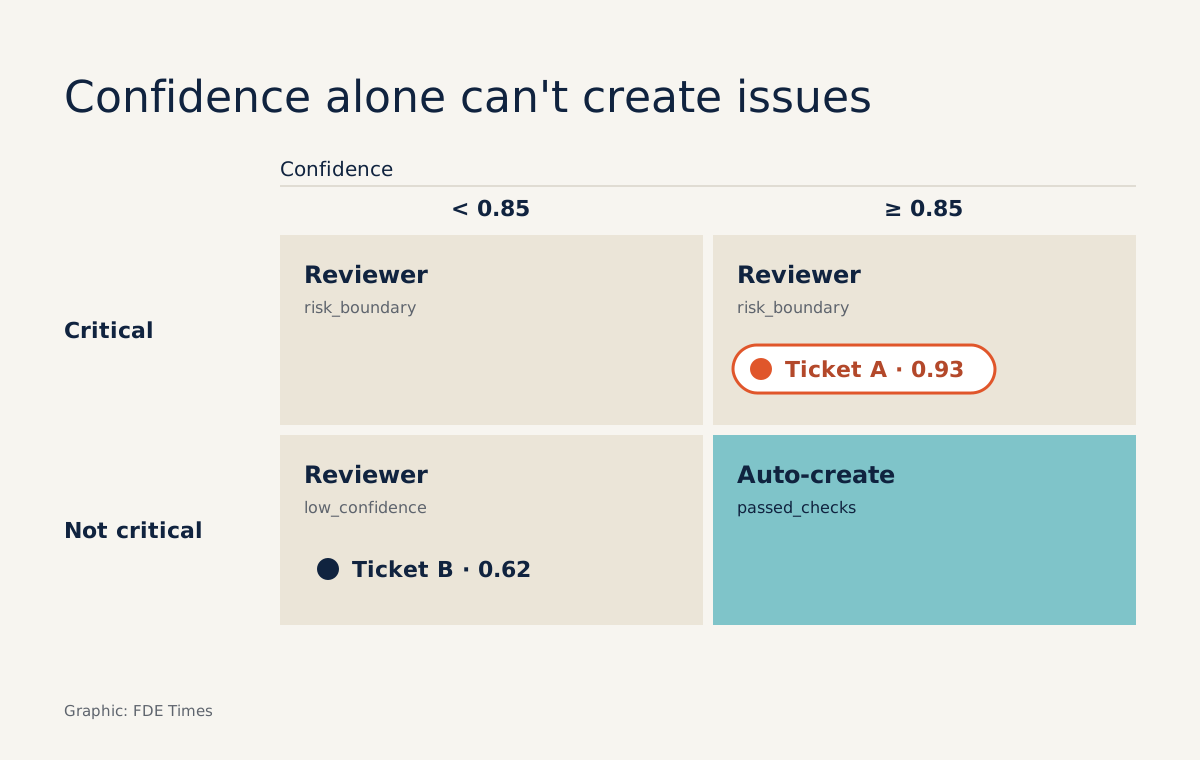
Nor should you rely on the confidence score alone: an analysis on dev.to of escalation mechanisms for agents calls that a common mistake. Add a condition that escalates whenever the intended action crosses a risk boundary, which here means a critical ticket.
THRESHOLD = 0.85          # starting point, calibrated in step 5
RISKY_PRIORITIES = {"critical"}

def route(triage):
    if triage is None:
        return "human", "no_tool_call"
    if triage["priority"] in RISKY_PRIORITIES:
        return "human", "risk_boundary"
    if triage["confidence"] < THRESHOLD:
        return "human", "low_confidence"
    return "auto", "passed_checks"
Consider two tickets. Ticket A reads “after the password change, none of our three subsidiaries can log in”, and the model returns access, critical, confidence 0.93. Ticket B reads “the export button is slightly misaligned”, and the model returns bug, low, confidence 0.62.
Judged on confidence alone, ticket A would go straight into Jira, even though it is exactly the kind of ticket the client wants a person to read first. The route function above stops both tickets, but for different reasons. That reason must be logged, because step 5 depends on it.
Check: write unit tests for all three escalation branches before connecting to Jira.
Step 4: create the issue and log every decision
In Jira Cloud, you create an issue with a POST request to the /rest/api/3/issue endpoint on your instance. The response returns the id, the key and a REST endpoint for the new issue. Record all three, together with the reason route() gave for each ticket, including tickets that did not produce an issue.
# Simplified: jira_post(), send_to_reviewer(), audit_log(), audit_update() are placeholders.
# Check payload field names against the client's project configuration.
def handle(ticket, triage):
    decision, reason = route(triage)
    record = {"ticket_id": ticket["id"], "triage": triage,
              "route": decision, "reason": reason,
              "issue_id": None, "issue_key": None, "issue_url": None,
              "reviewer_category": None, "reviewer_priority": None}
    if decision == "auto":
        payload = {"fields": {
            "project": {"key": "SUP"},
            "summary": ticket["title"],
            "issuetype": {"name": "Task"},
            "labels": [triage["category"], triage["priority"]],
        }}
        resp = jira_post("/rest/api/3/issue", payload)
        record.update(issue_id=resp["id"], issue_key=resp["key"], issue_url=resp["self"])
    else:
        send_to_reviewer(ticket, triage, reason)
    audit_log(record)

def on_review(ticket_id, category, priority):
    # called when the reviewer confirms the labels for a ticket
    audit_update(ticket_id, reviewer_category=category, reviewer_priority=priority)
When the client asks why issue SUP-… carries a particular label, you open the record: the key, labels, confidence, evidence quote and routing reason are all there, so reconciliation takes seconds. The two reviewer_* fields are the raw material for the next step.
Check: create a real issue in the test project, open the returned key in Jira and compare its labels with the log. Then send a ticket down the reviewer branch, call on_review and confirm the record now holds the labels the reviewer chose.
Step 5: the threshold is not a number you set once
The confidence threshold is the dividing line: decisions above it are handled automatically, decisions below it need a person. The 0.85 in step 3 is only a starting point.
Galileo’s guide to agent monitoring stresses that calibration is continuous work, and that the target escalation rate must come from the real distribution of your own tickets, not from a generic industry figure.
The log from step 4 makes this concrete. After a week, compare triage with reviewer_category and reviewer_priority. You will see which labels the model often gets wrong despite high confidence, and which it almost always gets right even at middling confidence. That is the data for raising or lowering THRESHOLD, or even setting a separate threshold per label.
Track the escalation rate as a health metric for the system, broken down by each value of reason. If the low_confidence rate spikes after the client launches a new product, the tool description is probably missing a label.
Common mistakes
The first mistake is splitting the work into too many small tools. When the agent needs to update or comment on issues as well, group related operations into one tool with an action parameter so the model makes fewer errors when choosing a tool.
The second is reading the model’s self-reported confidence as a calibrated probability. It is only a signal, to be checked against reviewer decisions.
The third is hiding the escalation reason. Reviewers need to know whether a ticket was stopped because of risk or because of low confidence, since the two call for different levels of attention.
What does this look like on a real client project?
On site with a client, the code in this guide is probably not the hardest part. The harder part is sitting down with the support lead to write their own definition of “critical” into the description, and agreeing who the reviewers will be.
Your team also has to settle what counts as a risk boundary. The first thing to do is ask for 50 old tickets that people have already triaged, and measure the agent against them before touching the real Jira.
If you are moving into an FDE role, this makes a strong portfolio project. On your CV, do not just write “built a ticket triage agent”. Say that you separated escalation logic from the model, how you chose the threshold, and how the escalation rate changed after calibration.
In job descriptions, phrases such as “human-in-the-loop”, “tool use” and “integrations with customer systems” all describe this skill.
An agent that knows when to stop tends to win a client’s trust faster than one that always acts on its own. So spend more time on the route() function than on the prompt.
Was this article useful?
Thanks for the feedback!