Automate the process on paper and you automate the wrong one
At one logistics client, Edana found four email exchanges missing from the documentation; a spreadsheet and a seat beside the staff are enough to find such gaps.
In brief
- Staff adapt and invent shortcuts, so the real process drifts from the official one; automating without remapping it simply digitizes the mess.
- The method has six steps: gather evidence, run walk-through interviews, list every step roughly, add exceptions, arrange swimlanes and validate them in a workshop, then label friction.
- The end product is a list of friction points to cut first; a pretty diagram is optional.
On a logistics project, the consultancy Edana remapped a client’s data integration process and found four email exchanges that appeared nowhere in the documentation. Alongside them were shared files that staff opened to correct data by hand before loading it into the system.
Had the engineering team automated from the official diagram, those steps would have vanished from the new flow, and bad data would have gone straight into the system.
Expect the same at every client. Edana observes that employees adapt to constraints: they work around the tools or invent shortcuts to move faster.
So the real process drifts away from the one on paper, and, in Edana’s view, digitizing without seeing those gaps merely moves the mess into digital form.
This guide walks through drawing an as-is process map in the order the work should be done. No specialist software is required. A text editor, a spreadsheet and permission to sit beside the people doing the work are enough.
What will you end up with?
Three things: a list of every step (manual ones included), a swimlane diagram by role, and a labeled list of friction points. Of the three, the friction list is the most valuable.
Edana writes that mapping exposes friction points and suggests ways to simplify or eliminate them before anything is automated.
To keep things concrete, the examples below follow a hypothetical distributor: it takes orders from resellers, accounting checks each reseller’s credit, and the warehouse ships. The client wants an agent that reads orders and creates dispatch notes on its own.
Step 1: Gather evidence before you ask anyone
Visual Paradigm’s guide to as-is modeling advises starting with every piece of available evidence: forms, emails, system logs, policy manuals. For the distributor, that means asking for the order template, a few email threads between sales and accounting, a log export from the accounting software and any process documentation that exists.
Check before moving on: you hold at least one real record from every department involved. If a department offers documentation but no real trace of its work, flag it, because that is usually where the real process has drifted furthest.
Step 2: Interview with “walk me through it”
Don’t ask, “Do you follow the process?” That question only gets the answer people think you want. Visual Paradigm suggests an open prompt along the lines of: “Tell me what happens when a customer places an order.”
When the interviewee says, “Then I enter it into the system,” keep going: entered from where, what happens if information is missing, does anyone have to be asked? Every “and then…” is a potential step. Interview each role separately, because sales and accounting often tell two different versions of the same order.
Step 3: List every step, rough is fine
MockFlow advises listing all the steps first rather than trying to make the map perfect straight away. The template below is a simple text table made up for illustration, not any standard notation. The first three rows:
# | Role       | Action                             | Notes
1 | Sales      | Takes order by phone/chat          | not documented
2 | Sales      | Retypes order into Excel           | entry 1
3 | Sales      | Emails accounting for credit check | hidden step
The next three:
4 | Accounting | Checks credit, replies by email    | accounting software
5 | Sales      | Enters order into sales software   | entry 2
6 | Warehouse  | Ships against the dispatch note    | warehouse software
Visual Paradigm is explicit: any task done manually over email must appear on the model. Row 3 is the kind of step people skip because “it isn’t part of the process.” In fact, it is the process.
Check: every handoff between two people has its own row in the table.
Step 4: Add exceptions, rework and waiting points
The happy path is only part of the story. MockFlow reminds mappers to record rework loops, exceptions, waiting states and bottlenecks. Go back over each row and ask: what happens when this step goes wrong?
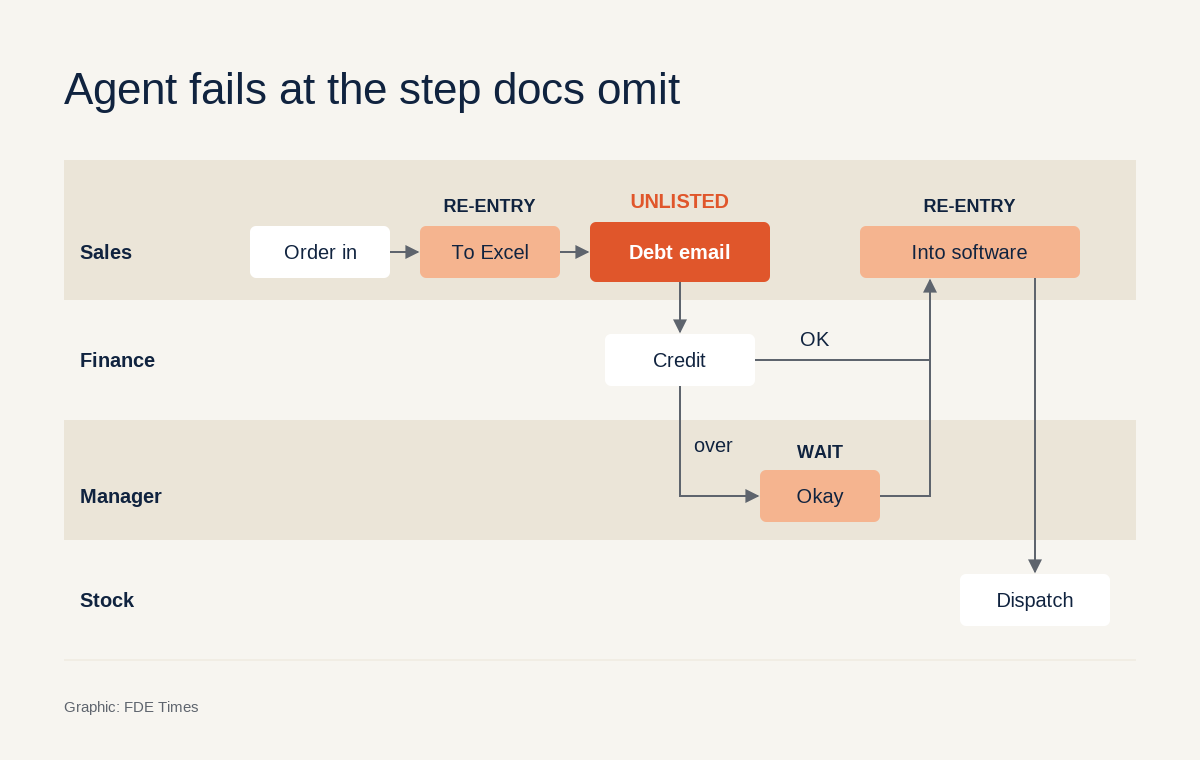
In the distributor’s case, you might discover that when a reseller exceeds its credit limit, accounting forwards the email to the department head for approval, and the order waits until a reply comes. The agent you plan to build will hit exactly this case. If the map lacks that branch, the agent will not know what to do.
Step 5: Arrange swimlanes, then test them
When a process crosses several roles, departments or systems, MockFlow recommends swimlanes. ManageEngine describes a workflow as a sequence of stages linked by intermediate actions that move work from one stage to the next. Seen that way, laying out the lanes becomes easier.
A text sketch (simplified; the numbers in brackets match the table in Step 3):
[Sales]        (1) Take order → (2) Type into Excel → (3) Email credit check
                                                          ↓
[Accounting]                     (4) Check credit → within limit? ── yes ──┐
                                                          └ no             │
                                                               ↓           │
[Dept head]                                         Approve (WAIT) ────────┤
                                                                           ↓
[Sales]        (5) Enter into sales software ←─────────────────────────────┘
                        ↓
[Warehouse]    (6) Ship goods
Both branches, with or without approval, return to Sales for entry into the sales software before reaching the Warehouse. The swimlane shows at a glance how many times the order bounces between lanes. Every lane change is a place where work can slow down, lose information or need retyping.
Yet the map you drew is still only a hypothesis. Visual Paradigm advises taking the as-is draft to a workshop with the people who actually run the process. Print it large or put it on a screen, and let them correct it with a pen.
The most productive question in that session is “What’s wrong here?”, not “Is this right?” Check: every role on the swimlane has at least one person who has confirmed their lane.
Step 6: Label friction before choosing where AI goes
Edana warns that modernizing an undiagnosed process carries every shortcut along with it: repeated data entry, multi-layer approvals, detours. So before writing a single line of agent code, mark each friction point:
Steps 2 + 5   [DUP-ENTRY]     order typed twice into two systems
Step 3        [HIDDEN-EMAIL]  credit checked by email, no trace in any system
Approval      [WAIT]          order sits idle until the department head replies
This list changes the brief. The client may not need an agent that reads orders at all; it may first need to drop the Excel retyping step, and only then let an agent handle the rest.
Common mistakes
The most common mistake is drawing from the documentation and calling it as-is. The second is interviewing only managers: they describe the process as it should run, while staff know how it actually runs. The third is leaving out exceptions because they “rarely happen.”
Exceptions are precisely where agents break most easily once they reach production.
Where does this skill show up in FDE work?
The six steps draw on the business analyst’s elicitation toolkit: interviewing, modeling, scenario analysis. Microsoft’s Requirements Gathering in Business Analysis course on Coursera teaches exactly these parts and includes a project writing requirements for a manual process.
It is a good place to practice if you have never done this.
When reading job descriptions, look for passages about working directly with a client’s operations teams, or understanding and remapping business processes. Where you see them, put your process-mapping experience near the top of your CV. Avoid a vague line such as “business analysis.”
Give the number of manual steps you found and say which ones you removed before automating.
However capable an agent is, it only runs the process you give it. Hand it the process on paper and it will go wrong at the first hidden email the documentation never mentioned.
Was this article useful?
Thanks for the feedback!
5 sources
- Business Process Mapping: Why It's Essential Before Digitizing, Automating or Developing Custom Software · 2026-05-12
- Mapping the As-Is Process (BPD): Seeing Reality Clearly · 2026-02-25
- How to Create a Process Map: A Step-by-Step Guide for Teams · 2026-06-15
- What is enterprise workflow management?
- Requirements Gathering in Business Analysis