HL7 publishes the v2-to-FHIR map. The conversion code is yours
How to turn a sample ADT message into a valid Patient resource in about 40 lines of Python, and avoid the R4-versus-R5 trap that catches newcomers.
In brief
- The v2-to-FHIR map only says which field goes where; the conversion logic is yours to write.
- python-hl7 lets you address fields by the 1-based numbers used in the spec, so the code reads like the documentation.
- The v2-to-FHIR IG is built on R4, while fhir.resources defaults to R5, so import from the R4B branch.
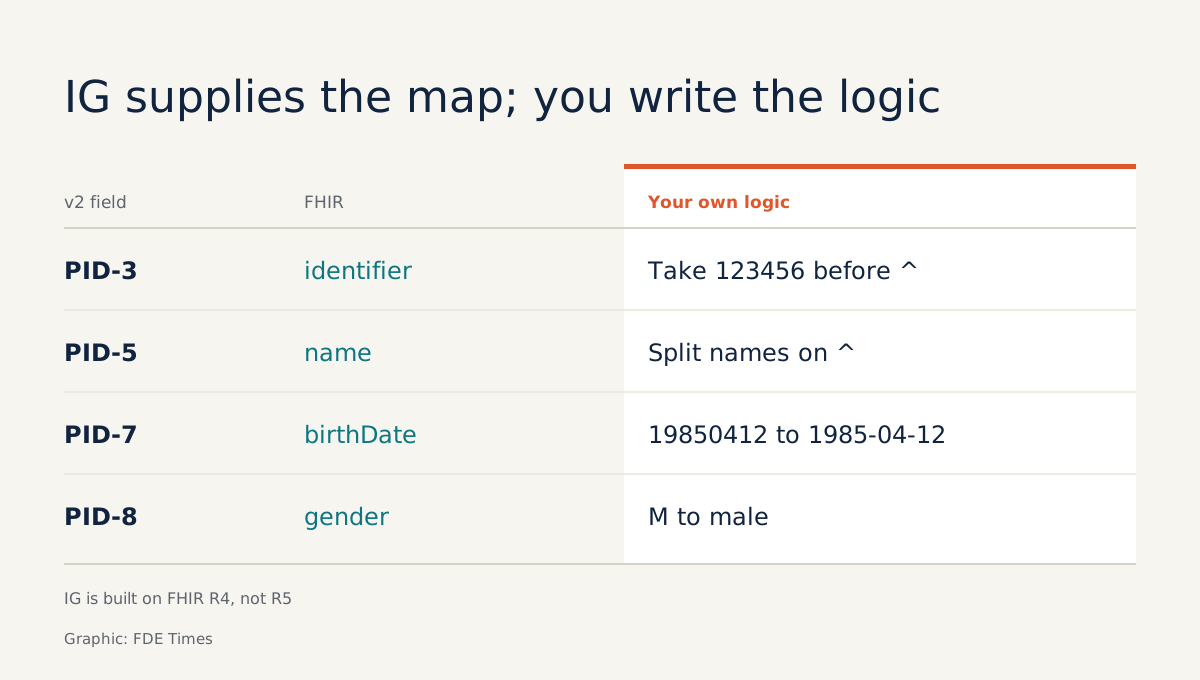
HL7’s official guide to converting v2 messages into FHIR states plainly that it describes which field corresponds to which element, and not how to do the conversion. It tells you that PID-8 is equivalent to gender, but there is not a line of code in it that turns the string M into male. That part you write yourself.
If you are an FDE on a healthcare project where the source systems send v2 messages and your product reads FHIR, someone has to write the conversion layer in between. The person who can write it, and explain where every field goes, is the one the client’s integration team calls whenever the data drifts.
This guide walks through the whole process on a laptop: parse a sample ADT message, read the PID segment, map it to a Patient resource using the official map, then validate the result. The code runs to about 40 lines.
What do you need?
Python 3 and three libraries. python-hl7 is a lightweight library that parses HL7 v2.x messages into Python objects. hl7apy understands the HL7 schema, which helps when you need to cross-check. fhir.resources builds FHIR resources on Pydantic v2.
python -m venv .venv && source .venv/bin/activate
pip install hl7 hl7apy fhir.resources
Keep two pages of the HL7 v2-to-FHIR IG open: the map from the ADT_A01 message to a Bundle, and the map from the PID segment to Patient.
Step 1: write a sample message
The message below was built for this tutorial. It is not real data.
MSG = "\r".join([
    "MSH|^~\\&|LAB|HOSP_A|EHR|HOSP_A|202611190830||ADT^A01|MSG0001|P|2.5",
    "PID|1||123456^^^HOSP_A^MR||NGUYEN^AN^VAN||19850412|M",
])
Check: count the | characters in the PID line. Field 3 is 123456^^^HOSP_A^MR, field 5 is the name, field 7 the date of birth, field 8 is M. Miscount by one and every later step is wrong without raising an error.
Step 2: parse and read fields by their spec numbers
Call hl7.parse() on the message string. The result is an object tree you can access two ways: as a Python list indexed from 0, or by calling it like a function using the HL7 convention of counting from 1. Use the second, because then the code matches the field numbers in the documentation.
import hl7

h = hl7.parse(MSG)
pid = h.segment("PID")      # PID appears only once
print(pid(3)(1))            # first repetition of PID-3
print(str(pid(5)), str(pid(7)), str(pid(8)))
segment() is a shortcut for segments that occur only once in a message, such as PID or MSH. Check: the first line prints the patient ID with the components after the ^ separators; the second prints the name, date of birth and M.
Step 3: map PID to Patient
The IG says that when you process the PID of an ADT_A01 message, you create a new Patient. At the segment level, the map pairs PID-3 with identifier, PID-5 with name, PID-7 with birthDate and PID-8 with gender.
GENDER = {"M": "male", "F": "female", "U": "unknown"}  # abridged table

def v2_date(s):
    return f"{s[0:4]}-{s[4:6]}-{s[6:8]}"

def pid_to_patient(pid):
    mrn = str(pid(3)(1)).split("^")[0]
    parts = str(pid(5)).split("^")
    return {
        "resourceType": "Patient",
        "identifier": [{"value": mrn}],
        "name": [{"family": parts[0],
                  "given": [p for p in parts[1:3] if p]}],
        "birthDate": v2_date(str(pid(7))),
        "gender": GENDER.get(str(pid(8)), "unknown"),
    }
This is simplified. It does not handle escape sequences, it ignores second repetitions of PID-3 and PID-5, and it assumes the date of birth always has eight characters. The GENDER table is abridged too: on a real project you have to check it against the code table the client’s system actually uses.
Step 4: validate against the right FHIR version
This is where newcomers most often go wrong. The v2-to-FHIR IG is version 1.0.0 (STU1), built on FHIR R4. fhir.resources, by contrast, defaults to R5 and keeps R4B and STU3 as older versions. Importing the default means validating R4 data against an R5 schema.
from fhir.resources.R4B.patient import Patient

patient = Patient.model_validate(pid_to_patient(pid))
print(patient.model_dump_json(indent=2))
model_validate builds a Patient from a dict, as the library’s README describes. Do not treat R4B and R4 as the same thing either: they have different names because they are different releases, so when you map to resources beyond a basic Patient, check again against the R4 definitions the IG uses.
Check: change PID-7 to 19851345, run it again and see how validation responds. If it still passes, do not assume the data is correct: add your own date check in v2_date.
Step 5: cross-check with a schema-aware parser
python-hl7 does not know what PID-5 is called; it only knows positions. hl7apy parses an ER7 string with parse_message and lets you reach subcomponents by name, case-insensitively.
from hl7apy.parser import parse_message

m = parse_message(MSG, find_groups=False)
print(m.pid.patient_name.to_er7())
By default hl7apy arranges segments into HL7 groups. Passing find_groups=False turns that off so you can call m.pid directly. If this call differs in the library version you installed, check the hl7apy tutorial. Check: the printed string must be identical to str(pid(5)) from step 2.
When two different parsers give the same result, you have one more layer of assurance that you have not miscounted a field.
Where will real messages break the code?
The sample message has a single PID. A message with several OBX segments is different: under the mapping guidance, each repetition of a segment must produce a new instance of the corresponding resource, so ten OBX segments become ten Observations.
The segment() shortcut will not work here. You have to walk the whole tree, for instance [s for s in h if str(s[0]) == "OBX"], and map each element.
The second breaking point is fields the IG does not map. The guide allows you to add local mappings, and encourages you to propose them back to HL7 through JIRA.
For an FDE, each local mapping should be a decision written down and confirmed by the client, rather than an if statement sitting quietly in the code.
What does this skill look like on a client site?
At the start of a hospital project, the first thing to do is ask the client for a few de-identified sample messages, then run steps 2 and 5 on each message type.
The output is a field-by-field comparison table, and you bring that table to the meeting with their integration team.
The same table is the best evidence for a CV. When an FDE job posting mentions HL7, FHIR or an interface engine, a repo with a set of test messages, a PID-to-Patient function labeled “per the v2-to-FHIR IG, R4” and a test that catches a bad date of birth is far more convincing than a line saying “experience with healthcare standards”.
Parsing is the easy part. The hard part is sitting down with the client and deciding what the U in their hospital’s PID-8 really means.
Was this article useful?
Thanks for the feedback!
7 sources
- python-hl7 - Easy HL7 v2.x Parsing
- Getting started — hl7apy tutorial
- Message ADT_A01 to Bundle Map - HL7 Version 2 to FHIR v1.0.0
- Segment PID to Patient Map - HL7 Version 2 to FHIR v1.0.0
- Mapping Guidelines - HL7 Version 2 to FHIR
- Message Maps - HL7 Version 2 to FHIR v1.0.0 · 2025-10-07
- nazrulworld/fhir.resources (GitHub README)