No API docs for the client's portal? A HAR file is your first spec
Record one workflow, build an OpenAPI spec from it and write replay tests, provided the session cookies inside the file never leave your hands.
In brief
- Turn on Preserve log, walk through exactly the business workflow, then use Copy as cURL to replay one request before exporting the whole HAR file.
- By default Chrome strips Cookie, Set-Cookie and Authorization from exported HAR files, so the file is usually not enough to replay authenticated calls.
- mitmproxy2swagger builds OpenAPI 3.0 from a HAR file in two passes, and Playwright replays HAR files so integration tests run without calling the client's portal.
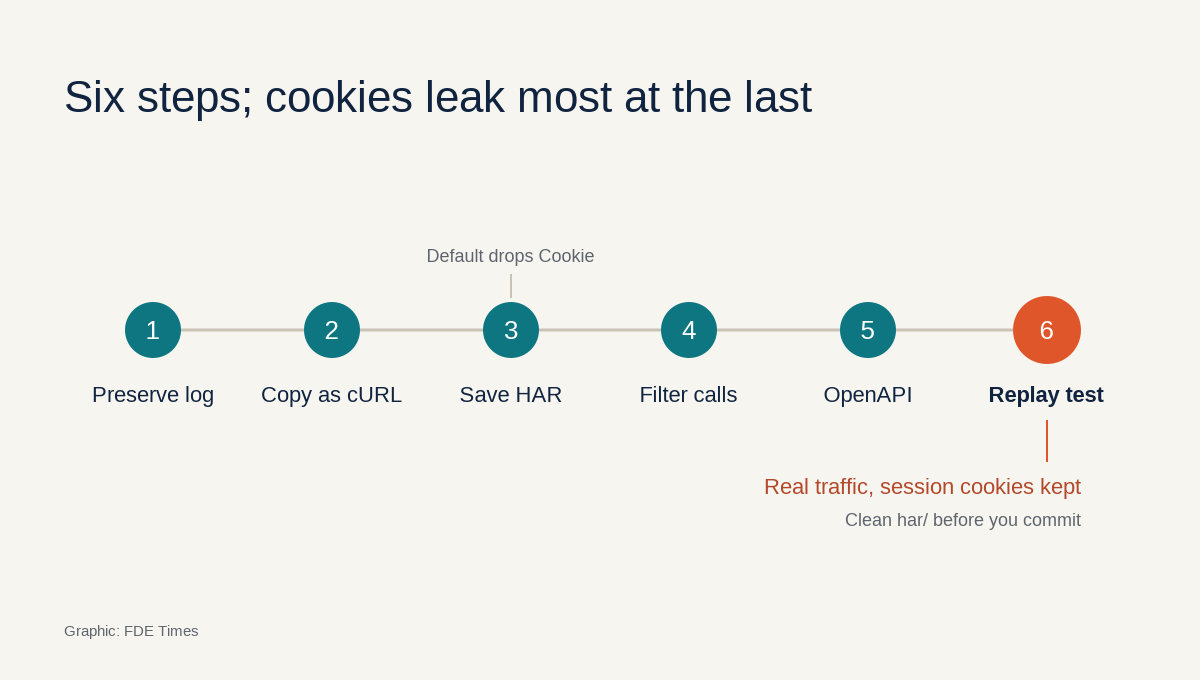
When you export a HAR file from Chrome DevTools, the browser by default strips the Cookie, Set-Cookie and Authorization headers from it. This is by design. The consequence is that the file you just exported from a client’s internal portal can contain every request and still be unable to replay a single call that requires a login.
That small detail captures both sides of the technique. For an FDE, a HAR file is often the first API specification of a system nobody ever documented. It is also a file that can let someone else impersonate the client’s users.
This guide walks through the whole process on a laptop: record a workflow, replay one request, extract the list of endpoints, generate an OpenAPI spec and write replay tests. Each step comes with a way to keep the file safe. You need Chrome, Python 3, a terminal with curl, and a Node project if you want to do the final step with Playwright.
The running example: an “Export report” button
Take a hypothetical logistics client that wants your agent to pull a daily inventory report on its own. The report lives only behind an internal web portal. The client’s IT team confirms that “there is an API”, but nobody still has the documentation.
You do not need to guess. The browser has been calling that API every time an employee clicks the button, and your job is to record those calls. HAR is a JSON format whose root is a log object holding an entries array of every exported request. Each element in the array is one call.
Before opening DevTools, ask the client for a test account. Automated HAR sanitization tools do not try to remove user information, which is why Okta recommends recording with a test account. Recording with a real employee’s account means their name, email and customer data end up in the file.
Step 1: turn on Preserve log before you sign in
Open DevTools, go to the Network tab and tick Preserve log. If you skip this, Chrome clears the request list every time the page redirects, and login flows often redirect several times in a row. You would lose exactly the part that shows how the session is created.
Then walk through the business workflow, slowly and in order: sign in, open the reports page, choose a warehouse, click export. Do not click anything outside that flow. Every extra click becomes a few dozen lines of noise to filter out later.
Check: the Network list still shows the login requests at the top, even though the page has redirected several times.
Step 2: replay one request before exporting the whole file
Find the request that returns the report data, right-click it and choose Copy as cURL. Chrome also offers to copy it as a fetch call. This is the fastest way to turn one call into a script you can rerun.
Before running it, move the cookie value into an environment variable so it does not sit in your shell history or in a file you send to a colleague. The command below is shortened, and the URL and cookie name are illustrative:
export PORTAL_SESSION='...paste the value from the copied request...'
curl 'https://portal.example.internal/api/reports/inventory?warehouse=HCM1' \
  -H "Cookie: session=$PORTAL_SESSION" \
  -H 'Accept: application/json'
Check: the response in the terminal should match the response in the Network tab exactly. If you get a 401 or are sent back to the login page, the request depends on another header, usually a CSRF token or a custom header. Add headers back one at a time until it works, and note which ones are required.
Step 3: export the HAR and understand what it lacks
Now export the whole flow to a HAR file. As noted at the start, Chrome’s default export omits Cookie, Set-Cookie and Authorization. To include those headers, you have to explicitly choose to export with sensitive data.
Keep the default version. To understand the shape of the API you need URLs, methods, parameters and response structures. You already worked out the authentication in step 2. Choose the full export only when you genuinely need to replay the login flow itself, and only with a test account.
One more caveat: the W3C draft for HAR was never published as a standard and has been abandoned. HAR is widely used without a formal standard, so each tool exports a slightly different set of fields. Code that reads HAR files should use .get() rather than assume every field is present.
Step 4: extract the endpoint list in a dozen lines of Python
A short flow can generate hundreds of requests, most of them images, fonts and analytics scripts. The script below filters by the portal’s host and groups calls by method and path:
# list_endpoints.py: usage: python3 -I list_endpoints.py portal.har portal.example.internal
import json, sys
from urllib.parse import urlsplit

with open(sys.argv[1], encoding="utf-8") as f:
    har = json.load(f)

seen = {}
for e in har["log"]["entries"]:
    req = e.get("request", {})
    u = urlsplit(req.get("url", ""))
    if u.netloc != sys.argv[2]:
        continue
    seen[(req.get("method"), u.path)] = e.get("response", {}).get("status")

for (method, path), status in sorted(seen.items()):
    print(method, path, status)
Check: the output should be down to a few dozen lines. In the logistics example, you will see at once which call fetches the warehouse list and which exports the report. Those are the two endpoints your agent needs.
Step 5: let mitmproxy2swagger write the spec
The endpoint list is only a draft. The open-source tool mitmproxy2swagger takes a HAR file exported from DevTools and generates an OpenAPI 3.0 specification. For an internal API that has never been documented, this is the first description that both you and the client’s IT team can read.
The tool runs in two passes. The first lists the paths it found, each prefixed with ignore:. You remove the prefix from the paths you want to keep, then run the second pass to generate the descriptions. The syntax below follows the current README; check it against the version you install:
mitmproxy2swagger -i portal.har -o inventory-api.yaml -p https://portal.example.internal/api
# open inventory-api.yaml and remove 'ignore:' from the paths to keep
mitmproxy2swagger -i portal.har -o inventory-api.yaml -p https://portal.example.internal/api
Check: open the YAML file and compare it with the output from step 4. The spec is only accurate for what you clicked. Any parameter that did not appear in the recorded flow is missing from the spec, so record a second flow with a few different filters.
Step 6: write replay tests from the HAR file
An undocumented API comes with no guarantees. The client’s IT team could change it next week. Playwright can record real traffic to a HAR file and replay it in tests, with strict matching on URL and method. That suits integration tests for the code that reads responses from the internal API. The snippet below is shortened:
// first run: record real traffic to the HAR file
await page.routeFromHAR('har/inventory.har', { url: '**/api/**', update: true });
// later runs: drop update to replay, with no calls to the client's portal
await page.routeFromHAR('har/inventory.har', { url: '**/api/**' });
The same HAR file has other uses. GitLab uses HAR files as input for API fuzz testing in CI/CD. Fuzz testing stresses the API being called, which here means the client’s system, so run it only with their IT team’s agreement and against a test environment.
The most common mistake is leaking the file
Technical mistakes are usually easy to fix: forgetting Preserve log, missing a CSRF header, assuming a HAR field is always present. The hard one to undo is leaking the file. A HAR file records the headers and cookies of each request, so it reconstructs the session step by step. Cloudflare warns that a single session cookie can be enough for an attacker to impersonate a legitimate user.
So before sending the file to anyone, run it through a sanitizer such as Cloudflare’s HAR Sanitizer, which removes session-related cookies and JWTs. Okta requires API keys, secrets, cookie values and passwords to be removed from traces before they are shared.
The easiest place to forget is the test file from step 6. The HAR file Playwright records with update: true is real traffic, so it also stores the live session cookie of whatever account you recorded with.
GitLab points out that HAR files can contain tokens, API keys and session cookies, and should be reviewed before committing. Sanitize the har/ directory before every commit, and record only with a test account.
A working integration in your first week on site
At a client, this skill gets you a working integration in the first week instead of waiting for documentation that may never arrive. It also opens a well-timed conversation with the IT team: you bring them an OpenAPI spec and ask which endpoints are stable, rather than asking where the API is.
When reading FDE job postings, look for phrases such as legacy system integration, internal systems or customer data. They often describe exactly this kind of work.
On your CV, tell the whole story: building a spec from recorded traffic, adding replay tests, and a process for sanitizing files before sharing them. For a portfolio piece, repeat the process on a web app you are permitted to use, then publish the spec and the tests without the HAR file.
In practice, the first spec for an internal portal is already sitting in the Network tab. The hard part is getting it out without exposing anyone’s login session.
Was this article useful?
Thanks for the feedback!