All green in the sandbox, and five ways production still breaks
The code barely changes at go-live, but the configuration, data and rules around it do, and they usually sit in the client's account, not your repo.
In brief
- A green sandbox only proves the code is right; production is a separate account that has to be configured from scratch.
- The usual breakpoints: objects recreated with the wrong ID, unregistered live webhooks, mismatched API versions, transfer limits and approval gates the sandbox never had.
- Turn the provider's go-live documentation into a runnable preflight script, with an owner for every line.
Stripe’s go-live documentation says that moving between sandbox and live is “mostly a matter of swapping API keys”. For the code, that is true. That is also why it becomes a trap: the code stays the same while everything around it has changed.
Stripe designs live and sandbox to behave alike, so the differences all pile up in the surrounding configuration. For a forward deployed engineer this is bad news. That configuration usually lives in the client’s account, is set up by someone else’s clicks, and appears nowhere in your repo.
When you connect a client’s system to a payments API, a bank or any other third-party service, an all-green sandbox test suite proves nothing about production. The skill that matters is spotting what the sandbox hides, then putting it into a check script and an owned task list, finished before go-live day.
Sandbox is a different account, not a copy
Braintree states plainly that a sandbox account is “not linked in any way” to a production account. Neither transaction-processing settings nor billing settings carry over. Cross River is blunter still: the sandbox is a simulated environment that behaves differently from the real system, while production has real money, real cards and transfer limits.
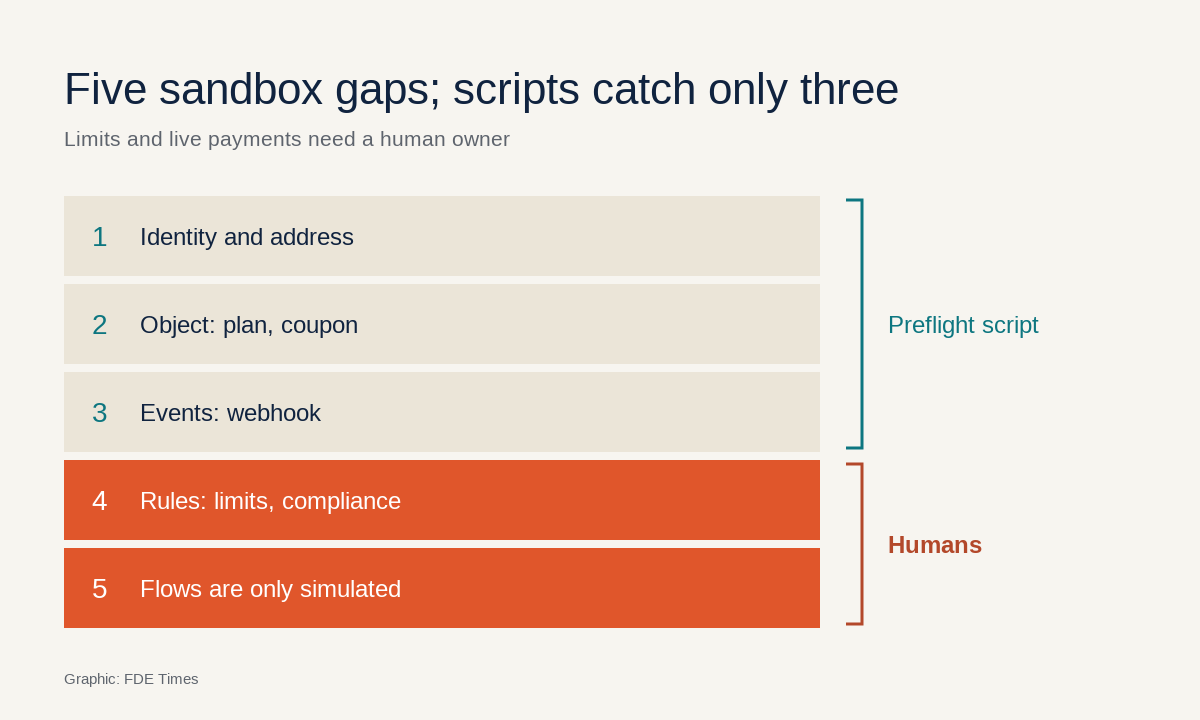
The safe assumption, then, is to treat production as a new customer that needs configuring from the start. To avoid gaps, split the differences into five layers and check each in turn.
Layer one is identity and address. With Stripe, you swap keys. With GoCardless, you change the base URL from the sandbox host to the live host, or change the environment variable in the client library.
A GoCardless live access token is shown exactly once, when it is created. If the person creating it is the client’s accountant and they paste it into a chat window, you have a security incident before day one.
Layer two is objects. According to Stripe, plans, coupons and products created in the sandbox cannot be used in live mode, so that test data does not leak into production. You have to recreate them with the same ID; the same name is not enough. Whatever ID the code references, production must have that exact ID.
Layer three is events. Production webhooks must be registered separately. GoCardless requires you to add the endpoint in the live account, following the same steps you took in the sandbox. Stripe warns that events can arrive late or more than once, and that code must not assume they arrive in order.
The API version determines the shape of both requests and webhook payloads, and by default payloads follow the account’s version. So pin the version and keep both sides in step.
Layer four is rules. In Cross River’s production environment, transfer limits by frequency or amount are configured per program, so they can reject calls the sandbox never blocked. GoCardless adds a gate the sandbox lacks: custom payment pages must pass compliance review before going live.
Layer five is the flows the sandbox only simulates. At Braintree, test card values fail in production, and a settled test transaction costs real money. Cross River simulates every card interaction in the sandbox, so ATM withdrawals, refunds and ACH only truly run once you are in production.
What do those five layers look like in code?
Take a hypothetical case: you are integrating a gym chain’s membership system with a recurring-billing API. The code references two IDs, the plan plan_gold and the discount code coupon_welcome10. Two weeks before go-live, the first job is a preflight script that runs against the production environment itself.
REQUIRED_IDS = ["plan_gold", "coupon_welcome10"]  # IDs the code references

def preflight(env):
    errors = []
    if "sandbox" in env.base_url:
        errors.append("Base URL still points to the sandbox")
    if env.account_api_version != env.pinned_api_version:
        errors.append(f"API version mismatch: {env.account_api_version}")
    missing = [i for i in REQUIRED_IDS if not env.object_exists(i)]
    if missing:
        errors.append(f"Objects missing in live: {missing}")
    if not env.webhook_registered(env.webhook_url):
        errors.append("Live webhook not registered")
    if not env.secret_store.has("live_token"):
        errors.append("Live token is not in the secret store")
    return errors
The script does not check layers four and five, by design. Limits and compliance review are jobs for people, so they go on the owned task list and stay out of the code.
The second piece is the webhook handler. It has to survive duplicate and out-of-order events:
def handle(event):
    if already_processed(event.id):
        return 200  # duplicate event: skip it, still return 200
    latest = fetch_object(event.object_id)  # read the latest state; don't trust event order
    apply_state(latest)
    mark_processed(event.id)
    return 200
The line to notice is fetch_object. Instead of inferring state from the sequence of events, the handler asks for the current state. That way, a “canceled” event arriving before an “activated” event cannot corrupt the membership record.
When production says “no” and the sandbox never did
The script cannot measure limits, but the code still has to know what to do when it is blocked. Say your integration also sends money out, and a transfer is rejected for exceeding the program’s limit. The safe response is to hold the transfer and alert the right person, rather than letting a retry loop hammer the same wall.
def submit_transfer(transfer):
    result = api.create_transfer(transfer)
    if result.ok:
        return mark_sent(transfer)
    if result.is_limit_rejection:  # look up the exact error code in the provider's docs
        mark_on_hold(transfer, reason=result.message)
        notify(owner="limit_owner", item=transfer)
        return
    raise IntegrationError(result)  # unknown error: stop and report, no automatic retry
The is_limit_rejection branch is where you answer in advance a question the sandbox never asks. For layer five, the matching step is the first real transaction, covered below.
Doing it yourself, in what order?
Start with the provider’s documentation: the go-live checklist page, and the sandbox-versus-production comparison page if there is one. Sort each item into the five layers. Every line should say who does it: you, the client’s engineering team, or the account holder on the client’s side.
Then move the work that depends on other people to the top. Compliance review is approved by the provider, and you cannot control when it finishes, so submit the payment page for review as early as possible. Next, create the live token with the account holder, and put it straight into the secret store in the same session.
Finally, agree with the client on the first real transaction. Because test cards do not work in production and real card flows can only be tried there, there has to be a small transaction with real money. Ask in advance: whose card, how much, who issues the refund, and who watches the limits.
The bad go-live mornings a script prevents
First scenario: the first member picks the Gold plan, and the sign-up page throws an error. The plan was recreated in live with the right name but a different ID, so plan_gold does not exist. The client’s front-desk staff find out first, before you do.
The second scenario is quieter. A member cancels, but the live webhook was never registered, so the client’s system hears nothing and the membership card still shows “active”. An error like this can sit for weeks before anyone notices.
Third scenario: the client’s account is on a different API version from the one the code was written against. The webhook payload changes shape, the handler reads the wrong fields, and data degrades steadily without a single error being raised. The preflight script would have caught all three two weeks earlier.
What the script misses are the error paths that have never run. Stripe advises against waiting until go-live to discover that the code does not handle every kind of error, including the ones you think will “never” happen. Missing data, wrong data and duplicate data all need testing beforehand.
On a CV, a line such as “wrote a preflight script for a payments integration that caught an unregistered live webhook before launch” says more than a list of frameworks. Keep one concrete difference like that ready to discuss if a job posting mentions go-live.
The best go-live is one with nothing to report, because every difference was found two weeks before.
Was this article useful?
Thanks for the feedback!