One error kills a Step Functions run. Agent approvals need guardrails
Capped retries, deadlines on human waits and a default that blocks the action when nobody replies are what enterprise security teams will ask an FDE to prove.
In brief
- By default, a single failed state makes Step Functions fail the whole execution. You have to declare Retry and Catch yourself.
- The human wait step uses .waitForTaskToken, runs only on Standard workflows, and needs HeartbeatSeconds so it cannot hang forever.
- Send only high-risk actions to a reviewer, save the context to S3 before sending the notification, and block the action on timeout.
When a state reports an error, AWS Step Functions fails the entire execution by default. Workflows with agents fail in many ways: the model responds slowly, a tool call breaks, or the action the agent produces needs a human to check it. With that default in place, a night when the pager goes off is all but guaranteed.
To retry or handle errors, you have to declare Retry and Catch yourself. The human approval step also has to be built by hand, with a deadline and a fallback. This guide walks through each step to produce an approval flow that runs, that others can read, and that holds up in front of a client’s security team.
A post on AWS Builder Center calls this the “outer loop” pattern: Step Functions wraps the agent and enforces timeouts, retries and error routing, while the agent still picks its own tools, so non-deterministic behavior stays inside deterministic guardrails. It is also what enterprise clients will want an FDE to demonstrate before they let an agent touch real data.
What you will build, and what you need
The running example is hypothetical: an agent reads refund requests and proposes an amount. Small refunds go straight through; large ones need a human reviewer. The flow has five parts: calling the agent with retries, branching by risk, saving the context, waiting for the reviewer, and an escalation branch for when something goes wrong.
You need an AWS account with permission to create state machines, Lambda functions, SNS topics and S3 buckets. The fastest way to start is the official AWS human approval tutorial. It uses CloudFormation to create API Gateway, Lambda, the state machine and SNS, then sends an email with separate Approve and Reject links. Run it first, then modify it step by step as described below.
The JSON snippets below are trimmed: ARNs are replaced with placeholder values in angle brackets, and only the relevant fields are kept.
Step 1: choose Standard, not Express
The callback pattern, meaning a step that pauses to wait for a human, works only on Standard workflows. Express workflows support only the Request Response integration type. Pick Express to save money and you will discover the limit only when you start wiring in the approval step.
Check: in the console, the state machine type must be Standard. A Standard execution can wait up to a limit of one year, long enough for any approval process.
Step 2: wrap the agent call in Retry and Catch
Retry exists only on Task, Parallel and Map states. Its value is an array of retriers, and every retrier must have ErrorEquals.
"CallAgent": {
  "Type": "Task",
  "Resource": "<agent-integration-arn>",
  "Retry": [
    {
      "ErrorEquals": ["States.Timeout"],
      "IntervalSeconds": 3,
      "MaxAttempts": 3,
      "BackoffRate": 2.0,
      "MaxDelaySeconds": 30,
      "JitterStrategy": "FULL"
    }
  ],
  "Catch": [
    { "ErrorEquals": ["States.Timeout"], "Next": "EscalateToHuman" }
  ],
  "Next": "RouteByRisk"
}
Step Functions applies the matching retrier first and falls back to Catch only when retrying does not resolve the error. Here, after three failed attempts, the execution moves to EscalateToHuman instead of failing. In ErrorEquals, list only the errors your integration actually throws.
Which integration should you use? According to the AWS integrations table, Amazon Bedrock supports both .sync and .waitForTaskToken. Bedrock AgentCore, at the time that page was written, supported only Request Response.
On June 3, 2026, AWS announced an optimized Step Functions integration with the AgentCore managed harness for adding agent reasoning steps to workflows. The harness is still in preview. On a client project, write the word “preview” into the design document.
Step 3: work out the backoff schedule by hand
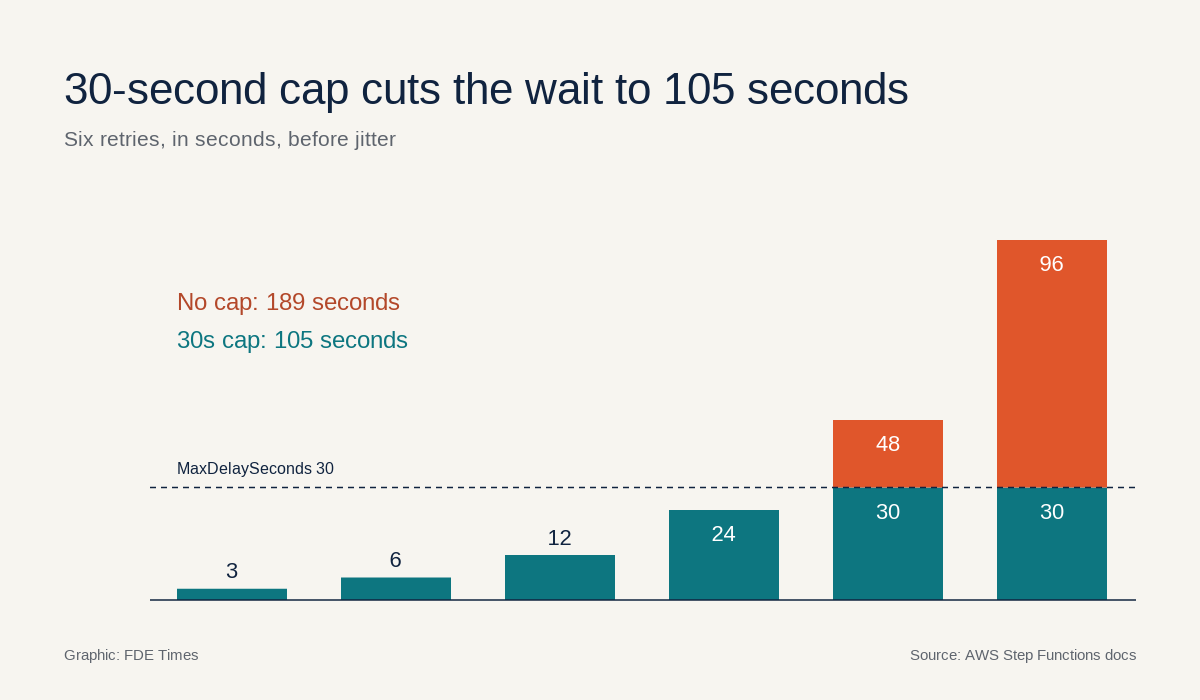
If you leave the fields empty, a retrier uses an IntervalSeconds of 1, a MaxAttempts of 3 and a BackoffRate of 2.0, so it waits 1, 2 and then 4 seconds. With the configuration in step 2, ignoring jitter, the schedule is 3, 6 and 12 seconds, which matches the example in the documentation.
Now raise MaxAttempts to 6 and remove MaxDelaySeconds. The schedule becomes 3, 6, 12, 24, 48 and 96 seconds, 189 seconds in total. Without MaxDelaySeconds, Step Functions places no cap on the wait between attempts, so each extra attempt waits twice as long as the one before. Set MaxDelaySeconds to 30 and the schedule becomes 3, 6, 12, 24, 30, 30, a total of 105 seconds.
JitterStrategy defaults to NONE. Switching it to FULL, as in step 2, randomizes the wait so that hundreds of executions hitting the same model problem do not all retry at once. That makes the 3, 6 and 12 seconds above ceilings only; the actual wait is random.
Remember, too, that every retry counts as a state transition, which means it appears on the bill. Setting MaxAttempts to 10 “just to be safe” is a cost decision.
Step 4: send only risky work to a human
After the agent step, add a branch based on the risk of the proposed action. In the refund example, the amount threshold is the branching point. There is no sample JSON here because the branching logic differs from client to client.
Set the threshold wrong and the approval gate stops working. The Agentic AI Lens in the AWS Well-Architected framework warns that routing every agent action through a reviewer leads to rubber-stamp approvals, while routing none gives the agent unlimited autonomy. Someone who has to click Approve 200 times a day will stop reading.
Step 5: save the context before sending the notification
Before sending the email or message that asks for approval, write the full decision context to durable storage such as S3: the agent’s reasoning chain, the proposed action and the input data. Well-Architected recommends exactly this order, and calls for recording who approved and when, for audit purposes.
The order matters. If the notification goes out first and the S3 write then fails, the reviewer signs off on a decision with no evidence behind it. Check: open the object you just wrote and see whether it is enough for an outsider to understand why the agent proposed what it did.
Step 6: pause with a task token
The human wait step is a Task with the .waitForTaskToken suffix. The token comes from the Context object via the $$.Task.Token path in Parameters and is passed to the external system.
"WaitForApproval": {
  "Type": "Task",
  "Resource": "<notify-integration-arn>.waitForTaskToken",
  "Parameters": {
    "token.$": "$$.Task.Token",
    "contextUri.$": "$.contextUri"
  },
  "HeartbeatSeconds": 600,
  "Catch": [
    { "ErrorEquals": ["States.Timeout"], "Next": "BlockAndEscalate" }
  ],
  "Next": "ExecuteAction"
}
The task moves on only when it receives SendTaskSuccess or SendTaskFailure. Without HeartbeatSeconds, a single forgotten token is enough to leave an execution hanging for a very long time. With 600 seconds, if no valid token arrives within 10 minutes, the task fails with States.Timeout and Catch sends it to BlockAndEscalate.
On that branch, the safe default is to block the action and escalate. A late refund can still be fixed. A wrong refund that has already been paid out is hard to claw back.
Step 7: let the approval app hold the credentials
Reviewers usually do not call the Step Functions API directly. In the tutorial, they simply click the Approve or Reject link in the email. Under Well-Architected, the approval app holds the credentials and calls SendTaskSuccess or SendTaskFailure on their behalf, while reviewers deal only with the app.
Final check: run an execution, click Reject and see whether the rejection branch runs. Run another, click nothing, wait for the heartbeat to expire and confirm that BlockAndEscalate fires.
Where clients usually stumble
One easy mistake is declaring Retry but forgetting Catch. Once the attempts run out, the execution fails exactly as it would by default. Also common: raising MaxAttempts without setting MaxDelaySeconds, so the schedule grows exponentially, or choosing Express to save money and then being unable to wire in the callback step.
The hardest mistake to spot is a design one: sending every action through a reviewer to keep the compliance team happy. A few weeks later, the approval rate is likely to be close to total and nobody reads the content any more. During discovery, ask the client which actions cannot be reversed, and put approval gates only there.
If you are aiming for an FDE role, this makes a worthwhile portfolio project. Put a state machine in a repo with Retry and a pre-calculated wait schedule, Catch on every Task, a heartbeat and a blocking branch, plus a short explanation of how you chose the risk threshold.
On your CV, state clearly that you designed human-in-the-loop with timeouts and an audit trail. When a job posting mentions “agent in production” or “governance,” this project is concrete evidence you can point to.
Agents will keep changing fast, and that word “preview” will disappear in time. What clients remember is the deterministic shell built around the agent: what gets retried, what has to wait, what gets blocked.
Was this article useful?
Thanks for the feedback!
6 sources
- Handling errors in Step Functions workflows - AWS Step Functions
- Discover service integration patterns in Step Functions - AWS Step Functions
- Deploying a workflow that waits for human approval in Step Functions
- AGENTSEC04-BP02 Human-in-the-loop for critical decisions
- AWS Step Functions adds AgentCore-powered agentic reasoning step · 2026-06-03
- Step Functions as the Outer Loop for Long-Running AI Workflows · 2026-03-30