A clean GoReplay run proves less than you think
GoReplay has no built-in way to compare old and new responses, so an FDE validating a migration has to write that check as middleware.
In brief
- A replay that runs through the whole file without errors does not prove the new version is correct, because GoReplay has no built-in comparison step.
- Original responses only reach the middleware if --input-raw-track-response was on during capture.
- The middleware receives three message types (request, original response, replayed response), which can arrive out of order and are paired by a shared ID.
A DEV Community article comparing traffic replay tools is blunt about GoReplay: if you want to compare original data with replayed data, you have to write the middleware yourself. GoReplay has no built-in comparison step.
For an FDE about to move a client onto a new integration, that detail matters. You can replay an entire file of real traffic into the new version without seeing a single error, and all you will have learned is that the new version accepts requests.
Whether it answers them correctly is still unknown. The GoReplay wiki also spells out a precondition: original responses are only passed to middleware when you enable --input-raw-track-response. Forget that flag and the comparison has no baseline.
The steps below cover the whole workflow: capture real requests, sanitize them, replay them into the new version at a limited rate, then pair old responses with new ones. You can practice against a service running on your own machine, then take exactly the same process to a client when they ask, “Are we ready to switch?”
What you will build, and what you need
The running example is hypothetical. A client has a legacy service listening on port 8080 and serving an API under /api. You have just written a new integration for the same endpoints. Before the cutover, you need to show with real traffic that both versions return the same results.
You need GoReplay’s gor binary on the machine running the legacy service, with permission to read network traffic there. You also need an environment separated from production to receive the replayed requests, and Python 3 for the middleware. GoReplay runs only in the terminal and has no web UI, so results end up in logs; there is no dashboard.
Set one safety rule before running anything: the environment receiving replayed requests must be isolated. If the new version accidentally writes to the production database, the test becomes a real incident.
Step 1: capture to a file, original responses included
Comparison needs an original response as a baseline. The minimal capture command below enables --input-raw-track-response so the middleware will later receive the original responses. Check the file-output flag names against ./gor --help for the version you installed:
sudo ./gor --input-raw :8080 \
  --input-raw-track-response \
  --output-file requests.gor
Check: send a few requests to port 8080 and watch whether the file grows. If it stays empty, you may be listening on the wrong port.
Step 2: sanitize before replaying
Real traffic always carries things that should not be replayed. Replaying a sign-out request can kill a session. A real token carried into another environment amounts to leaked credentials. GoReplay has three flags for this.
--http-allow-url forwards only URLs matching a pattern, so you keep just the endpoints being migrated. --http-disallow-url does the opposite, dropping matching URLs. --http-header sets a header on the request, overwriting it if it already exists. For this example, the three flags look like this (TEST_TOKEN is a test user’s token):
--http-allow-url /api \
--http-disallow-url "sign_(in|out)" \
--http-header "Authorization: Bearer TEST_TOKEN"
One exception to remember: according to the wiki, the header flag cannot overwrite Host. So do not plan to use it to change the target machine. The target is chosen with --output-http in the next step.
Step 3: replay into the new version, with limits
When replaying from a file, GoReplay preserves the intervals between requests as recorded. You can change the replay speed, say to double, and loop the file with --input-file-loop. For an integration that has only just been written, double speed is usually too much.
A safer approach is to cap the number of requests per second sent to the target. The GoReplay wiki includes an example that keeps staging from receiving more than ten requests per second.
Adding the sanitizing flags from step 2 gives the full replay command below. It is simplified, so check the |10 suffix syntax against ./gor --help for your version:
./gor --input-file requests.gor \
  --http-allow-url /api \
  --http-disallow-url "sign_(in|out)" \
  --http-header "Authorization: Bearer TEST_TOKEN" \
  --output-http "http://new-integration.internal|10" \
  --middleware "python3 diff.py"
Check: the new version’s logs show only requests to /api, no sign_in or sign_out, and an Authorization header carrying the test token.
Step 4: pair old responses with new ones
The middleware receives three message types: 1 is a request, 2 is the original response, 3 is the replayed response. Each message carries an ID, and that ID stays the same across the original and replayed responses, so you use it to pair them.
The trap is ordering. The wiki warns that requests and responses are not guaranteed to arrive one after the other, so the middleware has to hold state until it has both halves.
The code below is simplified and rests on a few assumptions you should verify: each input line is a hex-encoded message, the message type is the first value on the header line and the ID is the next one. It also compares only the status line. Check the exact format against the Middleware page in the GoReplay wiki.
import sys, binascii

pending = {}
for line in sys.stdin:
    raw = binascii.unhexlify(line.strip())
    header, _, body = raw.partition(b"\n")
    kind, msg_id = header.split(b" ")[:2]
    if kind == b"1":
        sys.stdout.write(line)   # pass the request back to GoReplay
        sys.stdout.flush()
        continue
    pair = pending.setdefault(msg_id, {})
    pair[kind] = body.split(b"\r\n", 1)[0]
    if b"2" in pair and b"3" in pair:
        if pair[b"2"] != pair[b"3"]:
            sys.stderr.write(f"{msg_id.decode()} {pair[b'2']!r} -> {pair[b'3']!r}\n")
        del pending[msg_id]
Results go to STDERR. Since GoReplay is terminal-only, that is where you read them, and it is worth redirecting them to a file for filtering later. In real use you will want to compare bodies too, ignore fields that differ every time such as timestamps, and clean up pairs that never receive both halves.
Mistakes that make the test meaningless
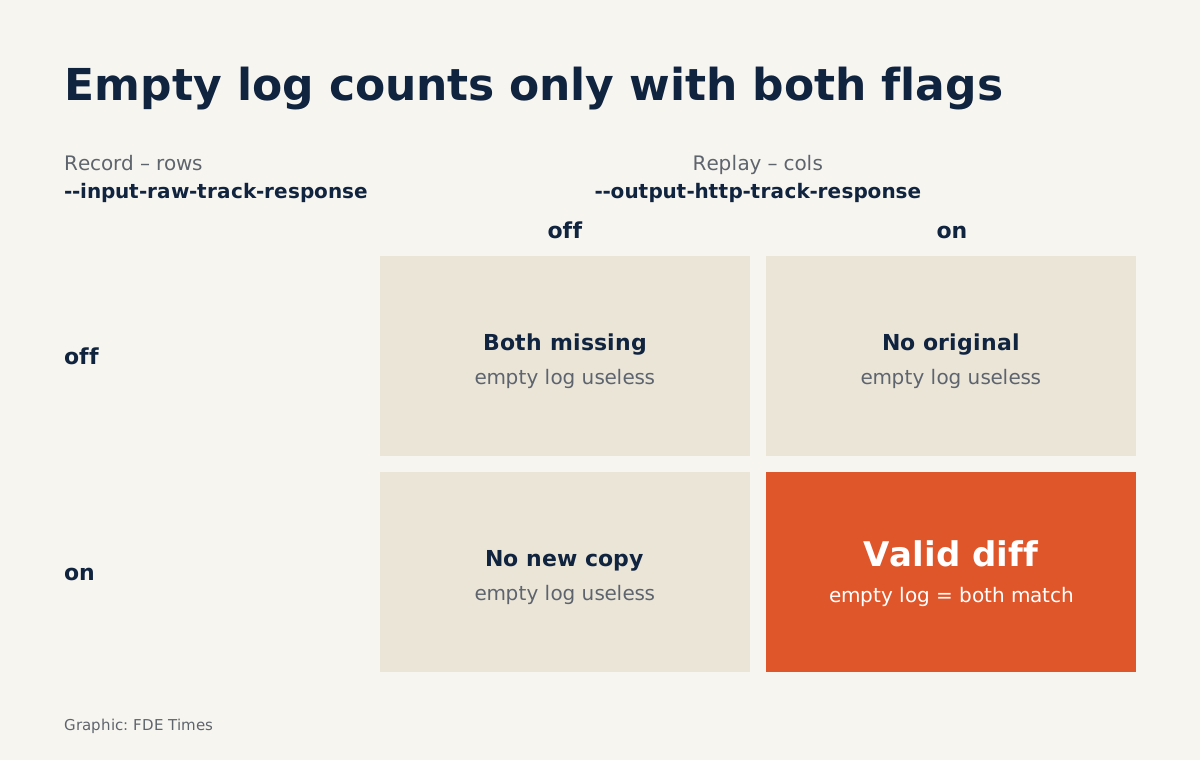
Before reading the results, check that the middleware is receiving both type 2 and type 3 messages. Forget --input-raw-track-response during capture and there is no original to compare against.
If either type is missing, the middleware will never complete a pair and the mismatch log will be empty. An empty log is easily misread as “no differences.”
Next, keep real tokens out of the new version, and do not point it at a real database. And do not replay too fast and then treat timeouts as logic errors. Start at 10 requests per second and raise the rate only once the mismatch list is clean.
How this skill shows up on a client site
Before an integration cutover, the question you have to answer is, “How do we know the new version doesn’t break anything?” A list of IDs with mismatched responses, along with the cause of each group, is far more convincing than a line saying “tests pass.”
The first thing to do on a client site is to ask which environment is genuinely separated from production, and which endpoints are in scope for the migration.
On a CV or in an interview, describe this skill by its outcome: you captured real traffic, sanitized it, replayed it at a controlled rate and compared responses before the cutover. If an FDE job posting mentions migration, shadow traffic or zero-downtime cutover, that is the moment to walk through this four-step process.
Was this article useful?
Thanks for the feedback!