Your first client site visit can fail over one missing login
Before you travel, settle three things: read access to the real systems, meetings with the right people, and a clear idea of what you will watch.
In brief
- A first trip can fail simply because you are blocked on access: confirm permissions and test your login before you leave.
- The project sponsor and the person whose job the project changes are usually two different people, so meet both.
- The first week is for finding the real problem by observing, not yet for building.
Srikrishnan Ganesan of Rocketlane, quoted by Insight Partners, sums up one kind of site-visit failure in a single sentence: you arrive, you are blocked on access, and the project loses momentum. No line of code was wrong. One account simply had not been granted.
PostHog says FDEs sometimes work out of a customer’s office for weeks at a stretch. Over a stay like that, if the first few days slip away waiting on IT tickets, you lose both time and the client’s first impression of you, and that impression is hard to rebuild.
That is why HatchWorks argues that nothing speeds up an FDE embedded with a customer more than early access to tools, systems and data. Preparation comes down to three jobs, in order: access, the people to meet, and what to observe. Skip any one and the trip falls short in exactly that place.
The first week is for finding the problem
Before writing a checklist, be clear about what the trip is for. An AI Codex piece on scoping puts it plainly: the first week is not for building but for working out which problem is the real one. HatchWorks frames it differently: week one is for immersing yourself in the client’s work, and it should not turn into a conference-room onboarding course.
Both framings lead to the same conclusion for preparation. You do not need to bring a polished demo. You need the conditions to see real work: accounts on the systems, time sitting beside the people doing the job, and someone with the authority to decide when you find something unexpected.
Ask for read access before documents
AI Codex advises asking for read access to the real systems before asking for documentation. The reason is practical. Documents describe a system as people want it to run; read access shows you how it actually runs.
PostHog also stresses that FDEs need access to the customer’s real infrastructure to onboard and deploy, and that sitting inside the customer’s team is what lets an FDE learn the existing tech stack and, from there, spot the pain points.
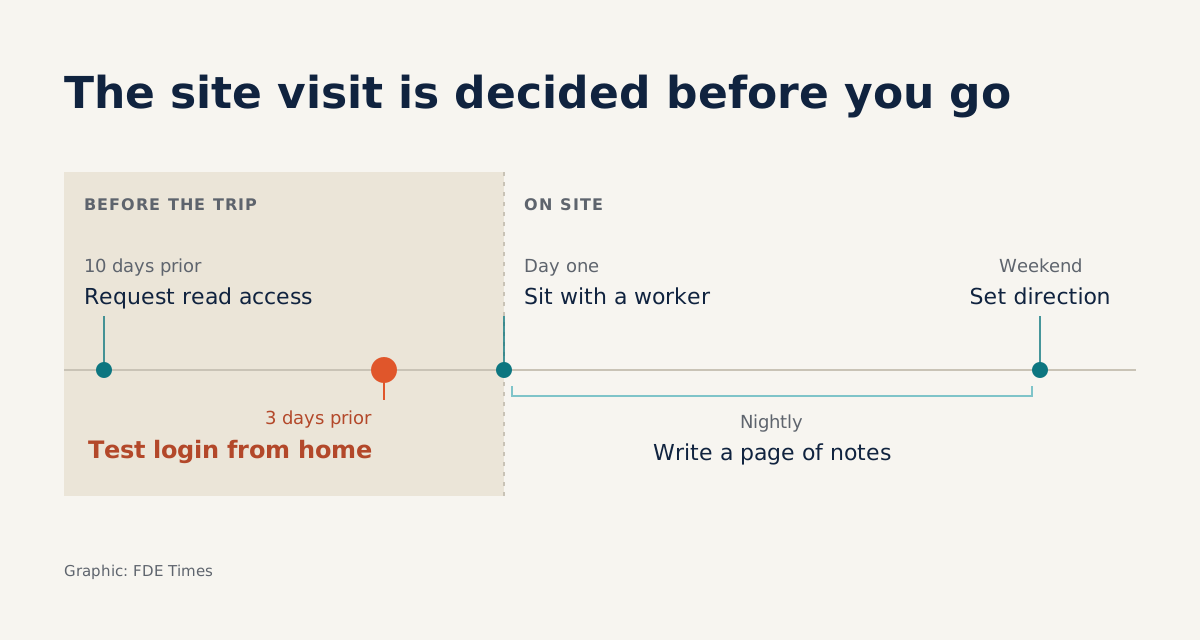
Take a hypothetical client: an insurer that wants an agent to process claims files. Ten days before the trip, you send your main contact an email like this:
Subject: Preparing for our week on site at [Company], [start date]

1. Access (read-only is enough):
   - A copy or staging instance of the claims database,
     with personal data masked if needed
   - The ticketing system where faulty claims are reported
   - The repo for the claims intake service
2. Logistics: VPN account, a laptop or a machine we are allowed
   to install software on, building access badge
3. Contact: one person who can decide priorities
   and trade-offs within the project scope
4. Schedule: two sessions sitting with claims handlers,
   one session with the engineering team that runs the system
5. Please confirm items 1-2 by [date, 3 days before the trip].
   If that is not possible, let us know who the approver is so we can follow up.
Every line has a purpose. “Read-only” helps the security team approve faster, because you are not asking for write access. Asking for the approver’s name turns a vague promise into a task someone owns.
The three-day deadline gives you time to test your login from home: if the VPN will not connect, you find out on Friday, not on Monday morning in the building lobby.
Who to meet in the first week
Access shows you the system; people tell you which problem is worth solving. HatchWorks says an FDE needs someone on the client side who owns the problem and can decide priorities and trade-offs. Panos Michelakis, an FDE at Wonderful, says he always makes a point of building relationships with both leadership and the technical team.
AI Codex adds a more important warning: the person who commissions a project and the person whose work it changes are almost never the same. Talk only to the sponsor and you will build what they think is needed. The four people below should be on your calendar before you arrive.
| Who to meet | Why you need them | Opening question |
|---|---|---|
| Problem owner | Decides priorities and trade-offs | “If you could fix only one thing in the next three months, what would it be?” |
| Executive sponsor | Defines what success means for the project | “At the end of the project, what number would make you call it a success?” |
| Engineer who runs the system | Understands the data, grants access, knows what tends to break | “Which system fails most often, and who gets woken up?” |
| Daily user | Their work is what will change | “Show me the last time you had to do this by hand.” |
The last question in the table is the most valuable. It turns an interview into a session watching someone do real work, which is also the final step of preparation.
Watch the gap between the documented process and real work
HatchWorks wraps observation into one idea: see how the work is actually done, compared with how it is written down. That gap deserves the closest look. Which steps get skipped, which side spreadsheet is open in parallel, which bits are copied and pasted between two systems, and who people ask when they get stuck.
In the insurance example, the official process may well list five steps, while handlers also check a homemade spreadsheet to verify hospital codes. That detail appears in no document. Yet it determines which data sources your agent needs to read, and explains why a design based on the documentation would be wrong.
Each evening of the trip, write one page of notes: what you saw today, where it differed from the documents, and how your hypothesis about the problem has changed. At the end of the week, take those pages to the problem owner to agree on direction.
Mistakes that waste a first trip
The first mistake to avoid is setting off without testing your own login, which is precisely the blocked-on-access scenario Ganesan describes.
The second is meeting only the sponsor and coming back with a requirement the daily users were never asked about. The third is requesting a stack of documents and reading them as the truth, while the running system tells a different story.
Two more are subtler. One is opening your laptop and building from day two because you want to look useful, even though the problem has not been defined. The other is having nobody with decision rights, so every new finding becomes a meeting and priorities drift.
If you are aiming for an FDE role, this whole process is material for your CV and interviews: instead of writing “worked directly with customers,” describe how you secured access, whom you met, and how your initial hypothesis changed after the first week.
Exercise for this week
Pick a system at your company you have never touched, and treat the colleague who owns it as a client. Write a preparation email using the template above, ask for read access, book time to sit beside someone who uses it daily, and write your first page of notes.
You will find that most of the outcome of a site visit is settled before you leave for the airport, by emails nobody praises but whose absence can wreck an entire week.
Was this article useful?
Thanks for the feedback!
4 sources
- A day in the life: How four companies run FDE motions · 2026-07-27
- Inside an FDE Engagement: How Embedded Engineers Find, Ship, and Multiply Value · 2026-09-16
- WTF is a forward deployed engineer? (and why everyone is hiring them) · 2026-02-11
- Scoping an FDE engagement: the first week decides the next three months · 2026-08-21