Thirty pages of client documents beat any parser leaderboard
A field-by-field scoring harness, built in an afternoon, lets an FDE choose a document parser on measured accuracy rather than benchmark rankings or gut feel.
In brief
- ParseBench tested 14 methods and none was consistently strong across all five dimensions, so parsers must be tested on the client's own documents.
- Text similarity scores mislead: they only check whether the words match and miss errors such as broken tables.
- Score by field, separate exact from relaxed match, then add business rules such as the total matching the line items.
A pipeline using Docling to read invoices reached 63% overall accuracy in one study of invoice extraction, with most of the errors in the numbers. Docling is not a bad tool. The figure is simply a reminder that a score on a leaderboard and a score on a client’s real documents can be far apart.
For an FDE, the question “which parser should we use?” usually arrives in the first week on site. Answering it with a blog post or a leaderboard is the fastest way to lose credibility three weeks later, when the client’s agent misreads a total. A more convincing answer lies in 30 pages of real documents, a list of fields and a scoring script that can be run in an afternoon.
This guide walks through exactly that kit. You need Python 3, access to a sample of documents (the client’s, or public invoices for practice), and at least two parsers to compare. The examples below use Docling, Unstructured and Amazon Textract AnalyzeExpense.
Why not trust a leaderboard?
ParseBench, a benchmark associated with LlamaIndex and published in April 2026, uses human-verified pages of enterprise documents from insurance, finance and government. Its most memorable finding: of the 14 methods tested, none was consistently strong across all five evaluation dimensions. A parser that is good at tables can be weak on scanned pages, and vice versa.
The authors also point to another trap: text similarity metrics mostly check whether the words match, so they miss errors that cause harm downstream, such as broken tables.
Picture a table with merged columns: every word and number is still present, so the text similarity score stays high, but the amounts now sit on the wrong rows. According to ParseBench, what needs measuring is whether the meaning of the data is still correct: the output must preserve enough structure and meaning for a system to make decisions on its own.
So the unit of scoring must be the data field the client actually uses, not the whole page of text.
Step 1: Choose 30 pages and write the answers
Do not take the first 30 pages in the folder. Split them by the types that tend to trip parsers up: roughly 10 born-digital PDF pages, 10 scanned pages and 10 table-heavy pages. Ask the client which pages cost their staff the most time, and include a few of those.
For each page, write a JSON answer file following exactly the field list the client’s process needs:
{
  "page_id": "inv_017",
  "fields": {
    "invoice_id": "HD-2024-0193",
    "vendor_name": "Minh An Co., Ltd.",
    "invoice_date": "2024-03-14",
    "total_amount": "12450000"
  },
  "line_items": [
    {"description": "A4 paper", "qty": "50", "amount": "4500000"},
    {"description": "Printer ink", "qty": "10", "amount": "7950000"}
  ]
}
Check after this step: ask someone on the client side to review any five files. If the ground truth is wrong, every score that follows is wrong.
Step 2: Pin each parser’s configuration
The most common mistake when comparing parsers is leaving the defaults. Unstructured has a rule-based strategy (fast) and model-based ones (hi_res, ocr_only), while auto is the default and chooses based on the document’s characteristics. Leave it on auto and you do not know what you are comparing, so run fast and hi_res as two separate candidates.
Docling uses a layout analysis model, TableFormer for table structure and OCR for scanned PDFs. Exporting to Markdown loses metadata, whereas JSON is lossless. To score by field, export JSON.
Textract AnalyzeExpense returns a standard taxonomy of fields such as INVOICE_RECEIPT_ID, with a Confidence score for each value. Keep both. A configuration file for your harness (simplified, of your own design) might look like this:
candidates:
  docling:           {export: json}
  unstructured_fast: {strategy: fast}
  unstructured_hi_res: {strategy: hi_res}
  textract_expense:  {api: AnalyzeExpense, keep: [Confidence]}
Step 3: Write adapters that map every output to the same field list
Each parser returns a different structure, so you need a small function per parser that converts its output into a dict identical in shape to the answer file. Textract is the easiest because it already has a standard taxonomy:
TEXTRACT_MAP = {
    "INVOICE_RECEIPT_ID": "invoice_id",
    # add the other fields from the client's list
}
For Docling and Unstructured, you will have to locate values in the JSON or the list of elements, for example by label (“Invoice no.:”) or by position in a table. Write down every lookup rule. A significant share of the gap between parsers may lie in the adapter rather than the parser, so say so plainly when presenting to the client.
Step 4: Score each field, separating strict and relaxed
The invoice study mentioned above scored with field-level precision, the number of consistency-check violations and exact match, and it separated exact match from relaxed match. The split is very practical: a total off by one digit is completely wrong, while a company name missing a full stop is still usable.
import re
from difflib import SequenceMatcher

EXACT_FIELDS = {"invoice_id", "invoice_date", "total_amount"}

def norm_amount(s, dec=","):
    s = re.sub(rf"[^\d{re.escape(dec)}-]", "", s or "")
    return s.replace(dec, ".")

def exact_match(field, pred, truth):
    if field == "total_amount":
        return norm_amount(pred) == norm_amount(truth)
    return (pred or "").strip() == (truth or "").strip()

def relaxed_match(pred, truth, threshold=0.9):
    # relaxed threshold: choose your own and state it in the report
    a, b = (pred or "").lower(), (truth or "").lower()
    return SequenceMatcher(None, a, b).ratio() >= threshold

def match(field, pred, truth):
    if field in EXACT_FIELDS:
        return exact_match(field, pred, truth)
    return relaxed_match(pred, truth)
The normalisation function above is simplified. The client’s number and date formats may be more complex, so agree the normalisation rules with them before scoring.
Step 5: Score tables without penalising reordering
ParseBench’s TableRecordMatch metric ignores the order of rows and columns: a table that preserves the relationships between values loses no points. A simple version of the same idea (not the original implementation) treats each row as a set of (column, value) pairs:
def table_score(pred_rows, truth_rows):
    as_set = lambda rows: {frozenset(r.items()) for r in rows}
    p, t = as_set(pred_rows), as_set(truth_rows)
    return len(p & t) / len(t) if t else 1.0
A row counts as correct only when every cell in it is correct. Strict, but that is exactly what the client’s agent needs.
Step 6: Add business rules
Comparing field by field is not enough. The invoice study counted separately the cases where extracted data violated predefined business rules, because some errors slip past field-by-field comparison. The easiest rule to write is that the total must equal the sum of the line items:
def consistent(doc):
    total = float(norm_amount(doc["fields"]["total_amount"]))
    lines = sum(float(norm_amount(r["amount"])) for r in doc["line_items"])
    return abs(total - lines) < 0.01
This rule also runs on documents that have no answer file. So once the system reaches production, you can keep it as an alert.
Step 7: Read the results by the field that matters most
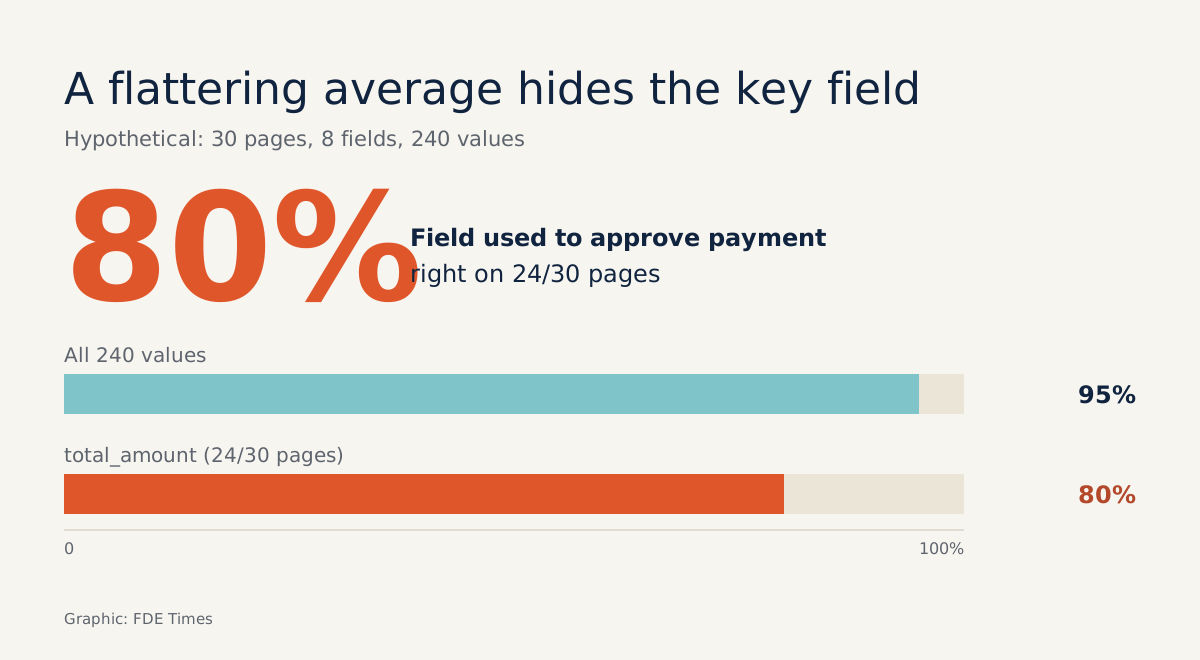
Picture 30 pages with 8 fields each, 240 values in total. Parser A gets 228 values right, or 95%. That sounds fine until you see that 6 of the 12 errors fall on total_amount: the field the client uses to approve payments is right on only 24 of 30 pages, or 80%.
So print the results as a field × parser matrix, split by page group. The numbers in the table below are hypothetical, purely to illustrate the layout:
| Field | Docling | Unstructured hi_res | Textract |
|---|---|---|---|
| invoice_id (exact) | 29/30 | 27/30 | 30/30 |
| total_amount (exact) | 24/30 | 25/30 | 28/30 |
| line_items (correct rows) | 81% | 74% | 77% |
| Total-amount rule violations | 5 | 4 | 2 |
For Textract, add one more step: plot accuracy against the Confidence threshold. If low-Confidence values are almost all wrong, you immediately have a rule for routing those pages to a human reviewer.
Common mistakes
The first is scoring on Markdown and blaming the parser, when the export step itself destroyed the structure. The second is using one relaxed threshold for every field, so that a wrong amount still counts as “close enough”. The third is choosing 30 clean pages, then being surprised by skewed scans in production.
The hardest to spot is tuning the adapter for the parser you happen to prefer. Keep one written set of adapter rules and apply it equally to every candidate.
On site, the harness is the product
When presenting, do not open with “parser X is best”. Open with the matrix: which fields are reliable enough to automate, which need human review, and which business rules catch the rest. Clients tend to remember how you measured long after they forget which parser you picked.
The harness also makes a tidy portfolio project: a repo with ground truth on public documents, adapters for two or three parsers and a results matrix. On a CV, a line such as “built a field-level parser evaluation harness, including business rules and confidence thresholds” says more than a list of tools.
Parsers will be replaced many times over. Thirty pages of answers and a scoring script can be reused every time a new candidate appears.
Was this article useful?
Thanks for the feedback!
7 sources
- ParseBench: A Document Parsing Benchmark for AI Agents · 2026-04-09
- ParseBench: A Document Parsing Benchmark for AI Agents · 2026-04-13
- Invoice Information Extraction: Methods and Performance Evaluation · 2025-10-17
- Invoice Information Extraction: Methods and Performance Evaluation · 2025-10-22
- Docling: An Efficient Open-Source Toolkit for AI-driven Document Conversion · 2025-01-27
- Partitioning strategies - Unstructured
- Analyzing Invoices and Receipts - Amazon Textract