The nightly CSV job will die at 2am. Make the rerun harmless
Hash each file's content rather than its name, record it in a ledger and quarantine bad CSVs, and no resent or half-loaded file lands twice.
In brief
- Don't use the filename as the deduplication key. Use the SHA-256 hash of the file's contents.
- Every file must have exactly one recorded outcome: processed, quarantined with a reason, or skipped as a duplicate.
- Quarantine data errors, delete the record on infrastructure errors, and reclaim records stuck in progress for too long.
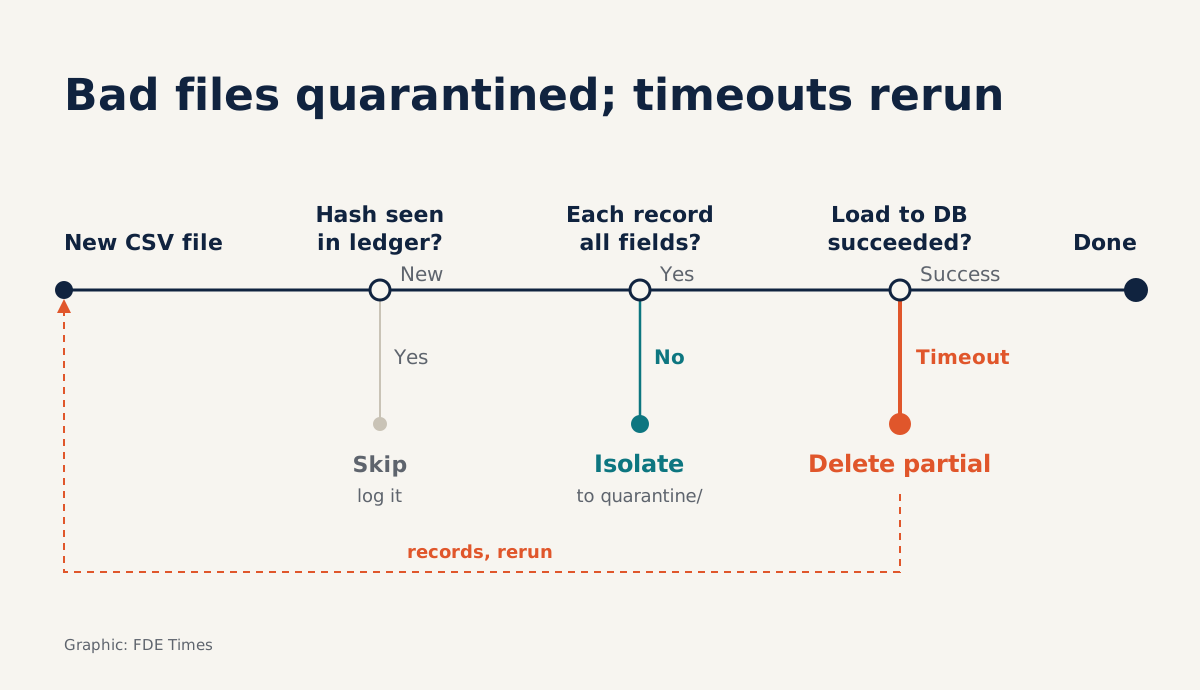
Picture the third night of a deployment. The customer drops orders_1108.csv on SFTP, your job loads half of it, and the database connection times out. In the morning you rerun the job, and the first half of the file is loaded a second time. The following week the customer sends the same file again as orders_1108_final.csv, and the whole file is loaded once more.
None of the steps in that chain comes from faulty logic. The problem is that the job has no memory. A nightly batch will certainly need rerunning at some point, so safe reruns have to be designed in from day one rather than patched in after an incident.
This guide builds a small Python job that does four things: hashes each file, checks the ledger, validates the CSV structure, then either processes the file or quarantines it. The code is a simplified sketch that uses only the standard library and SQLite. You need Python 3, an inbox/ folder standing in for the SFTP drop location, and a quarantine/ folder.
What does a safe rerun mean?
The Powertools for AWS Lambda documentation defines idempotency as an operation producing no additional side effects when it is called more than once with the same input parameters.
For a nightly batch, “the same input” means the same file contents; the filename does not count. The same documentation allows a hash of the entire payload to serve as the idempotency key, and that is exactly what your job will use.
Step 1: compute SHA-256 in chunks
import hashlib

def sha256_of(path):
    h = hashlib.sha256()
    with open(path, "rb") as f:
        for chunk in iter(lambda: f.read(1 << 20), b""):
            h.update(chunk)
    return h.hexdigest()
Reading in 1 MB chunks means even a file of several gigabytes won’t exhaust memory. Check: copy a file under a different name and hash both. The two hex strings must be identical, and if you change a single character in the file, the string must be completely different.
Step 2: one ledger table for every file
Appsilon has described an event-driven design for ingesting clinical data: each file has a single JSON record containing its SHA-256 checksum, size and processing status, and the record is written atomically. Here you use SQLite instead of JSON, but the principle is the same.
CREATE TABLE IF NOT EXISTS ledger (
  sha256     TEXT PRIMARY KEY,
  filename   TEXT,
  size       INTEGER,
  status     TEXT,   -- in_progress | done | quarantined
  reason     TEXT,
  updated_at TEXT
);
Putting the PRIMARY KEY on the hash column gives you two things at once: deduplication and a lock. Powertools uses an “in progress” record to stop two concurrent invocations on the same payload, and a rejected INSERT does the same job.
import sqlite3

def claim(db, digest, name, size):
    try:
        with db:  # one transaction
            db.execute(
                "INSERT INTO ledger VALUES (?,?,?,'in_progress',NULL,datetime('now'))",
                (digest, name, size))
        return True
    except sqlite3.IntegrityError:
        return False  # already seen: done, quarantined or running
Check: call claim twice with the same hash. The first call must return True and the second False.
What does a valid CSV file look like?
RFC 4180 offers the easiest structural rule to check: every line in the file should contain the same number of fields. The same RFC recommends enclosing in double quotes any field that contains line breaks, double quotes or commas.
Files exported from legacy systems trip over exactly this point, for example an address column containing a comma that isn’t quoted.
Step 3: check field counts against the header
import csv

def validate(path):
    try:
        with open(path, newline="", encoding="utf-8") as f:
            rows = csv.reader(f)
            header = next(rows, None)
            if not header:
                return "empty file"
            for n, row in enumerate(rows, start=2):
                if len(row) != len(header):
                    return f"record {n}: {len(row)} fields, header has {len(header)}"
    except (csv.Error, UnicodeDecodeError) as e:
        return f"parse error: {e}"
    return None
The csv module understands quoted fields, so a correctly written address such as "12 Le Loi, District 1" still counts as one field.
The code counts records, not physical lines, because a field containing a line break spans several lines. Check: create a file with an 8-column header and one 7-column row; the function must return a reason that includes the record number.
This is only a structural check. Data types, dates and whether a customer ID exists belong to a separate validation layer, but if a file is structurally broken, the later layers need not run.
Data errors and infrastructure errors must take different paths
This is the most important idea in the whole job. In Appsilon’s design, failed files are moved to a quarantine path with their own audit record explaining what happened, rather than simply being retried. The reason is simple: a file with the wrong number of fields will still be wrong after a hundred reruns.
Infrastructure errors such as timeouts or dropped connections are the opposite. Powertools handles them by catching the exception, deleting the idempotency record to avoid inconsistent data, then re-raising the exception. The next attempt therefore actually runs instead of being treated as finished.
Step 4: put it all together
import shutil, logging

def handle(db, path, quarantine_dir, load):
    digest = sha256_of(path)
    if not claim(db, digest, path.name, path.stat().st_size):
        logging.info("skip %s (sha256 %s already in ledger)", path.name, digest)
        return "skipped"
    try:
        err = validate(path)
        if err:
            shutil.move(path, quarantine_dir / path.name)
            mark(db, digest, "quarantined", err)
            return "quarantined"
        load(path)                      # your import into the customer system
        mark(db, digest, "done", None)
        return "done"
    except Exception:
        with db:
            db.execute("DELETE FROM ledger WHERE sha256=?", (digest,))
        raise
The mark function is just an UPDATE ledger SET status=?, reason=?, updated_at=datetime('now') WHERE sha256=? inside a transaction. The log line for skipped files is mandatory. Appsilon sums up the audit principle in one sentence: nothing is silently discarded, and every outcome, success or failure, is recorded.
Rerunning night three, this time with a ledger
Return to the opening scenario, but now there are three files that night. a.csv is clean and loads fully. b.csv has a record with 7 fields while the header has 8, so it is moved to quarantine/ with a reason. c.csv is halfway through loading when the database times out, and its record is deleted.
In the morning you rerun. a.csv has a hash already marked done, so it is skipped and leaves a log line. b.csv is already in quarantine. c.csv no longer has a record, so it is loaded again from the start.
The next week the customer sends a_final.csv with the same contents as a.csv: same hash, so it is skipped. The customer sends a corrected b.csv: different contents mean a different hash, so it is processed as a new file.
Four common mistakes when taking the job to production
The first mistake is trusting that the except block always runs. If the process is hard-killed, say by running out of memory, receiving SIGKILL or the machine rebooting, no exception is caught. The in_progress record stays there forever, and every night the file is skipped as though another worker were handling it.
The fix is to treat any in_progress record older than N hours as dead and allow it to be reclaimed. The sketch below runs at the start of every job:
def reclaim_stale(db, hours=6):
    with db:
        db.execute(
            "DELETE FROM ledger WHERE status='in_progress' "
            "AND updated_at < datetime('now', ?)",
            (f"-{hours} hours",))
N must be longer than the longest real processing time for a single file, or you will snatch a file that a live worker is still loading. Check: manually insert an in_progress record with updated_at set 7 hours back, run the job, then confirm the file is processed again.
The second mistake is letting the ledger expire too soon. By default, Powertools expires idempotency records after one hour (3,600 seconds). That default suits API requests, but not files a customer may resend three weeks later. A file ledger should be kept at least as long as the customer can still resend old data.
The third mistake is letting the load function write rows straight into the live table. If the job dies at row 5,000, deleting the ledger record only lets the file rerun; the 5,000 rows already loaded stay where they are. Load into a staging table inside a transaction before moving the data to the live table, or upsert on a business key, so the load step itself is idempotent.
The fourth mistake is reading a file while SFTP is still writing it. This sketch does not handle that. In a real environment, agree a convention with the customer to signal that a file is complete, for example uploading under a temporary name and then renaming, or sending a checksum file to compare with the hash you compute yourself.
When the customer asks “where’s my file?”
The ledger pays off every time a customer asks that question. With it, you can answer in a minute: which file, when it arrived, what its hash is, whether it loaded or was quarantined because of which bad record. Without it, you are digging through logs and guessing.
If you are preparing to move into an FDE role, put this job on GitHub with tests for five scenarios: a clean file, a structurally broken file, a mid-run timeout, a killed process, and a duplicate file under a different name. On your CV, don’t just write “built ETL”; say specifically that the pipeline reruns without duplicates and keeps an audit trail for every file.
When you read a job description and see that the role involves receiving regular data drops from customers, have the story of this job ready. The question worth asking is what happens when the job dies at 2am, and your answer should be “just rerun it”.
Was this article useful?
Thanks for the feedback!