When your old eval set starts lying: how to keep up with a client's changing production data
The dashboard still reads 97% while the client's complaint queue grows longer every week. The model probably has not got worse. Your test set has stopped looking like reality.

In brief
- An eval set is a snapshot of traffic at one moment; production keeps changing. When the client ships a new feature, new intents appear that the test set has no cases for.
- An eval set scoring close to 100% only catches regressions and no longer shows where to improve.
- Maintain evals the way you maintain unit tests: log everything, read real samples regularly, give each case an expiry date and assign one owner.
On Monday morning you open the eval dashboard for the customer service agent you deployed for a client three months ago. Everything is still green: 97%, almost unchanged since go-live. Ten minutes later, the client’s head of operations forwards you an email thread titled “the bot is getting too many answers wrong”.
Both can be true. The eval set is not wrong about the cases it contains. The problem is that those cases no longer resemble what real users ask every day.
The FDE who spots this early keeps the client’s trust. The one who only trusts the dashboard is the last to find out, usually in an uncomfortable meeting.
Why does a correct test set produce the wrong number?
A practical guide to drift from Futureagi sums up the problem: a golden set is a snapshot, while production is a distribution. When you build the eval set, the snapshot is a fair likeness of reality. But the client’s business keeps changing after go-live.
According to the same source, a common cause is the product adding new features, which bring types of questions (intents) the dataset never accounted for. A post on the tianpan.co blog puts it more briefly: an eval set is not a fixed fixture but a simulator. The main risk is offline scores rising while quality in production falls.
OpenAI also classes building an eval set that does not reproduce real production traffic as a biased-design error. When users change and the test set stays the same, you fall into exactly this error without meaning to.
Work it through with a number
Imagine your client is a delivery company. At go-live, the eval set has 150 cases, split to match traffic at the time: 60% order lookups, 25% address changes, 15% complaints. The agent scores 97%, and everyone is happy.
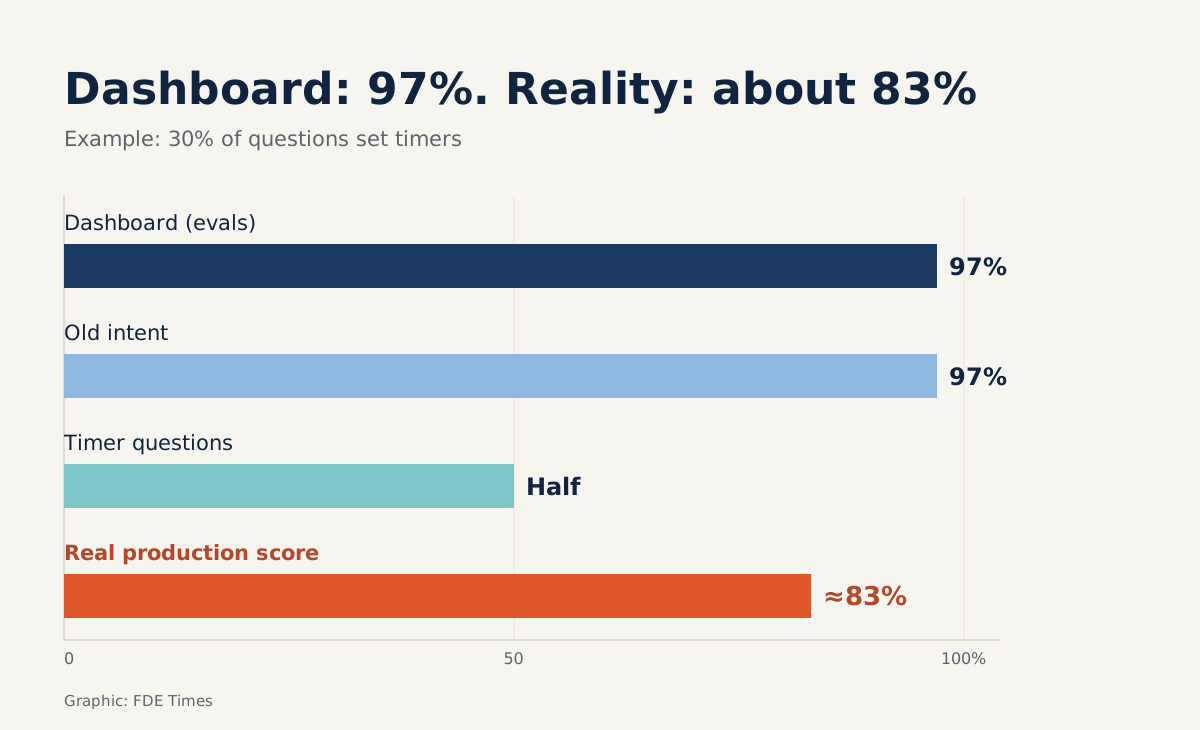
In month two, the client launches scheduled delivery. By month three, the logs show that 30% of questions concern scheduling, such as changing a time slot or asking why the courier arrived later than the booked time. The eval set has no cases in this group, so the score stays at 97%.
Suppose the agent still handles 97% of the old intents correctly but gets only half of the scheduling questions right. The real score on production traffic is then 0.7 × 0.97 + 0.3 × 0.5, roughly 83%. Nobody changed the model, nobody touched the prompt, yet more than one user in six now gets a wrong answer. The dashboard does not show it.
You do not need sophisticated tooling to catch this. Just compare intent shares between the eval set and a recent sample of logs:
from collections import Counter

def intent_gap(eval_cases, prod_samples, threshold=0.05):
    ev = Counter(c["intent"] for c in eval_cases)
    pr = Counter(s["intent"] for s in prod_samples)
    n_ev, n_pr = sum(ev.values()), sum(pr.values())
    gaps = []
    for intent in set(ev) | set(pr):
        share_prod = pr[intent] / n_pr
        share_eval = ev[intent] / n_ev
        if share_prod - share_eval > threshold:
            gaps.append((intent, round(share_prod, 2), round(share_eval, 2)))
    return sorted(gaps, key=lambda g: -g[1])

# Example output: [("scheduled_delivery", 0.3, 0.0)]
Next, compute a traffic-weighted score by multiplying each intent’s score by that intent’s share of production, and put this number beside the offline score in the weekly report. When the two start to diverge, you have a concrete reason to refresh the eval set rather than a vague feeling that something is off.
The refresh process, step by step
The first step is having data to compare against. OpenAI recommends logging everything from the development stage onwards so you can later pull it out as eval cases. On the client side, this means agreeing log access, a policy for masking personal data and a retention period in the first week of the project.
The second step is reading real data, not just looking at charts. Hamel Husain regards error analysis on real examples as the most valuable activity to invest in, because nothing replaces what you learn from looking at individual cases.
He also stresses that tests must be updated continuously based on what you observe through manual review and debugging.
The third step is choosing the right new cases. According to Husain, tests should be as hard as possible while still reflecting how real users interact with the system. So take real scheduling questions, including ones with typos or missing order numbers, instead of writing tidy questions no user would ever type.
The fourth step is adding expiry dates. The tianpan.co post proposes giving each eval case its own refresh deadline. Futureagi uses a monthly cycle as the default, which is a sensible starting point until you know how quickly the client’s traffic changes.
Expired cases are not deleted straight away. They are checked against new logs, then kept, fixed or moved into the regression suite.
The final step is naming an owner. Anthropic describes an eval set as a living artefact that needs regular care and clear ownership.
It also recommends making eval maintenance a routine task, like maintaining unit tests. When handing over a project, write this person’s name in the runbook, because “the whole team looks after it” usually means nobody does.
Common traps
The first trap is treating 100% as the goal. Anthropic notes that an eval set scoring 100% can only track regressions and no longer shows where to improve. If your test set is saturated, that is a sign to add harder cases, not a reason to celebrate.
The second trap is trusting LLM-as-judge for ever. Husain warns that automated evaluation tends to drift gradually away from human expectations.
In the example above, a judge calibrated on order-lookup questions may misgrade answers about scheduled time slots. So each time you refresh the eval set, have someone on the client side regrade a small sample and compare it with the judge’s results.
The third trap is thinking offline evals can replace monitoring. Anthropic treats production monitoring as a separate layer that runs after launch to detect distribution drift and real-world failures nobody anticipated. Evals tell you whether the system does what you thought of; monitoring tells you about what you did not.
How to tell this story in your portfolio
Building a new eval set is half the story; the other half is how you kept it accurate after go-live. On your CV, write in terms of outcomes, for example: refreshed the eval set monthly from production logs and caught a new intent before the client had to raise it.
In an interview, the gap between 97% and 83% is a more concrete story than any memorised definition.
This week’s exercise
Pick a system you run, or a personal project that has logs. Run the intent_gap function on the last 30 days of logs, compute the traffic-weighted score and put it beside the offline score.
If the two numbers are close, you have evidence to answer the client when they ask whether the system is still good. If they diverge, you have just found the problem before the client emailed you about it.
Was this article useful?
Thanks for the feedback!
6 sources
- Demystifying evals for AI agents · 2026-01-09
- Your AI Product Needs Evals · 2024-03-29
- A Field Guide to Rapidly Improving AI Products · 2025-03-24
- Evaluation best practices
- The Eval-Set-as-Simulator Drift: When Offline Scores Improve and Production Gets Worse · 2026-04-27
- LLM Eval Data Drift Detection in 2026 · 2026-03-03