Hands-on: add correlation IDs to JSON logs in Python to debug remotely
The customer won't give you SSH access, but they can still run grep. Set up your logs so that a single grep is enough to find the bug.

In brief
- JSON logs let programs read logs without complex regexes, and Python's standard library is enough to produce them.
- Store the ID in a ContextVar and let a Filter write it onto each LogRecord. This works with both threads and asyncio.
- Reset the context at the start of every request. In apps that mix sync and async code, test separately that the ID is not lost.
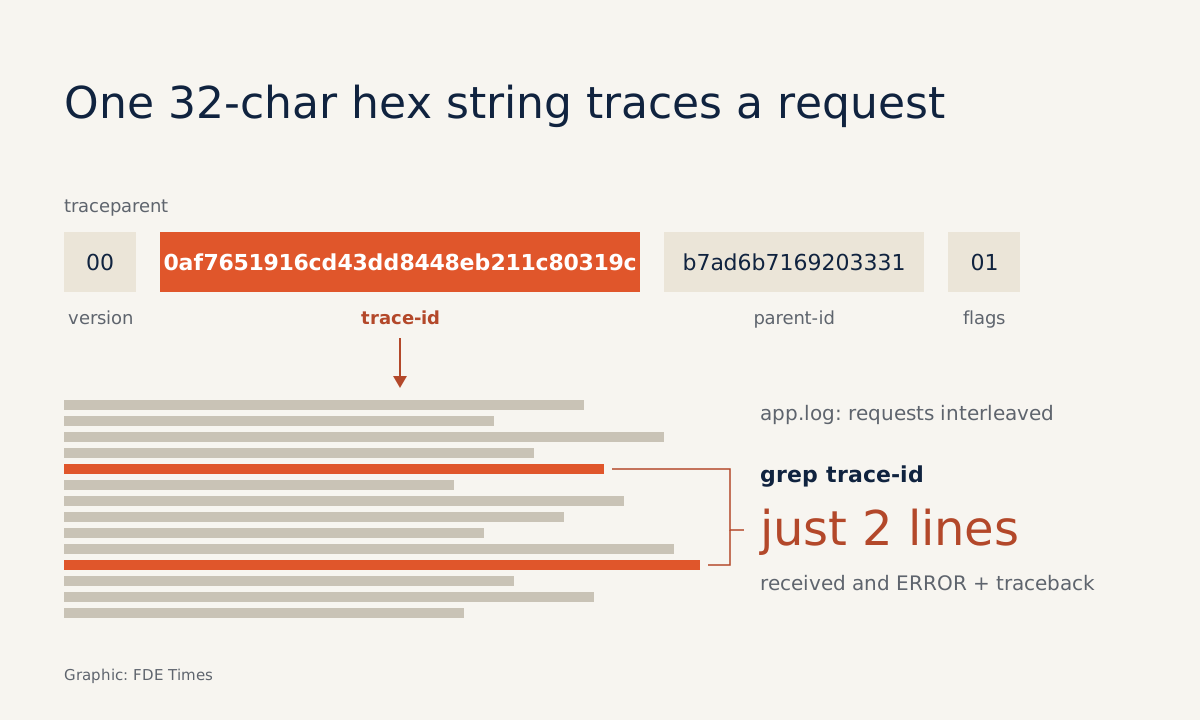
The customer runs one grep for a 32-character hex string and sends back exactly two log lines from the failed request, traceback included. No SSH account, no screen-sharing call. This guide shows how to build that mechanism.
For FDEs this is a familiar situation. The system runs inside the customer’s internal network, the security team will not grant access, and all you receive is a log file tens of thousands of lines long, with the logs of hundreds of requests interleaved. If no line says which request it belongs to, you are left guessing.
You will build it from scratch using only the standard library: JSON logs, a correlation ID on every line, and an ID taken from a standard header when a request crosses several services. You need Python 3.7 or later, one app.py file and about 30 minutes.
Why JSON rather than a nicely formatted text line?
Python’s Logging Cookbook states the goal plainly: emit logs in a structured form that programs can parse without writing complex regular expressions. The Cookbook also offers a simple approach: serialise each event as JSON.
The benefit is obvious when working with customers. They can load the logs into whatever tool they already have, and you can write scripts that filter by field without worrying that a regex will break because someone added a colon to a message.
Step 1: a ContextVar to hold the request ID
The Cookbook notes that since Python 3.7 the contextvars module provides context-local storage that works for both threading and asyncio, and that it should generally be preferred to thread-locals. A service may handle many requests at once, so this is the right place to keep the ID.
import contextvars, json, logging, uuid

correlation_id = contextvars.ContextVar("correlation_id", default="-")
How to check: correlation_id.get() should return "-" when no request is in flight. The default is useful because start-up logs still have the field; they simply belong to no request.
Step 2: a Filter that writes the ID onto every log line
The Python documentation says you can use a custom Filter to add contextual information to logs. A Filter may modify the LogRecord and add attributes, which a format string or Formatter then prints.
class CorrelationIdFilter(logging.Filter):
    def filter(self, record):
        record.correlation_id = correlation_id.get()
        return True  # never drop the record
Remember return True. If the filter returns a falsy value, the log line is silently dropped, and that is a very hard bug to find.
Step 3: a Formatter that writes each event as one JSON line
class JsonFormatter(logging.Formatter):
    def format(self, record):
        event = {
            "ts": self.formatTime(record),
            "level": record.levelname,
            "logger": record.name,
            "msg": record.getMessage(),
            "correlation_id": getattr(record, "correlation_id", "-"),
        }
        if record.exc_info:
            event["exc"] = self.formatException(record.exc_info)
        return json.dumps(event, ensure_ascii=False)

def setup_logging():
    handler = logging.StreamHandler()
    handler.addFilter(CorrelationIdFilter())
    handler.setFormatter(JsonFormatter())
    root = logging.getLogger()
    root.handlers = [handler]
    root.setLevel(logging.INFO)
A practical tip: attach the filter to the handler, not to a particular logger. That way every line this handler writes passes through the filter and carries the ID, whichever logger it came from.
This is a stripped-down version for learning. In production you should add fields such as the service name and build version.
Step 4: take the ID from traceparent, or generate one
When a request crosses several services, the ID needs to travel with it. The W3C Trace Context standard defines HTTP headers and value formats for propagating context between services. The traceparent header takes the form version-traceid-parentid-flags; the spec’s example is 00-0af7651916cd43dd8448eb211c80319c-b7ad6b7169203331-01.
def id_from_headers(headers):
    parts = headers.get("traceparent", "").split("-")
    if len(parts) == 4 and len(parts[1]) == 32:
        return parts[1]          # trace-id
    return uuid.uuid4().hex      # no header: start a new trace

log = logging.getLogger("orders")

def handle_request(headers, order_id):
    token = correlation_id.set(id_from_headers(headers))
    try:
        log.info("received order %s", order_id)
        if order_id == "B-42":
            raise ValueError("missing warehouse code")
        log.info("done")
    except Exception:
        log.exception("order failed")
    finally:
        correlation_id.reset(token)
The header check here is simplified and only looks at the number of parts and the trace-id length. The full rules are in the W3C spec. The code uses the trace-id as the correlation ID because it is the part shared across services, so the same grep string works on the logs of every service the request passes through.
The structlog documentation advises resetting the context at the very start of a request handler so that the previous request’s ID does not leak into the next one. The code above does this with a pair of calls: set a new value on entry, then reset(token) in finally on exit, so no request leaves its ID behind for the next.
Step 5: run it and grep a single request
if __name__ == "__main__":
    setup_logging()
    handle_request({}, "A-1")
    handle_request(
        {"traceparent": "00-0af7651916cd43dd8448eb211c80319c-b7ad6b7169203331-01"},
        "B-42",
    )
python app.py 2> app.log
grep 0af7651916cd43dd8448eb211c80319c app.logStreamHandler writes to stderr by default, hence the 2>. The grep should return exactly two lines for order B-42: the received order B-42 line and a "level": "ERROR" line with an exc field holding the traceback. If any A-1 line appears, the ID has leaked and you need to recheck the reset step.
Step 6: does the ID hold up under concurrency?
Add a worker to app.py that simulates a request running under asyncio:
import asyncio

async def worker(n):
    token = correlation_id.set(f"req-{n}")
    try:
        await asyncio.sleep(0.01)
        log.info("worker %s done", n)
    finally:
        correlation_id.reset(token)
Do not just eyeball the logs. Turn the check into a test: attach the same CorrelationIdFilter to pytest’s log-capture handler, run three workers concurrently, then assert on each line. The version below is trimmed for learning:
# test_app.py
import asyncio, logging
from app import CorrelationIdFilter, worker

def test_no_id_leak(caplog):
    caplog.handler.addFilter(CorrelationIdFilter())
    caplog.set_level(logging.INFO)

    async def main():
        await asyncio.gather(*(worker(i) for i in range(3)))
    asyncio.run(main())

    done = [r for r in caplog.records if "done" in r.getMessage()]
    assert len(done) == 3
    for r in done:
        assert r.correlation_id == f"req-{r.args[0]}"
pytest -q test_app.pyThe test should pass: each worker N done line carries the matching req-N. Try deleting the reset(token) line, or storing the ID in a global variable instead of a ContextVar, and watch the test go red. That tells you the test really catches ID leaks.
The harder case is an app that mixes sync and async code. The structlog documentation warns that with Starlette or FastAPI, context variables set in a sync context may not appear in logs from an async context.
If middleware sets the ID in one mode and the endpoint runs in the other, the logs will carry the value "-". So add a test that calls both a def endpoint and an async def endpoint, and assert that no line carries "-".
If your team uses structlog instead of the hand-written version, its documentation recommends making structlog.contextvars.merge_contextvars the first processor so that bound context appears in every event. The rule about resetting context at the start of each request still applies.
Common mistakes
The most common mistake is forgetting to reset the context, so the previous request’s ID shows up in the next request’s logs. The customer then sends you unrelated log lines, and you waste time following the wrong trail.
Another is having the ID in the logs while end users never see it. Return the ID in the response or print it on the error screen, so customers already have the string to grep when they report a bug.
How this skill is used with customers
In a real deployment, agree three things with the customer in the first week: where logs are written, who on their team is allowed to run grep, and where the ID appears in the interface. When something breaks, you ask for one ID instead of the whole log file, which is faster and carries less risk of exposing unrelated data.
For your career, when reading FDE job descriptions, look for phrases such as “debug in customer environments” or “observability”. On your CV, be specific, for example “added W3C traceparent correlation IDs to JSON logs, cutting time to find bugs on customer systems with no access”, rather than just “knows logging”.
In interviews, have an answer ready for whether the ID gets lost between sync and async code. The question tells the interviewer whether you have run real systems or only read the documentation.
The next time a customer says “the system failed at 3pm”, the only thing you will need to ask for is the ID of that request.
Was this article useful?
Thanks for the feedback!