Hands-on: build a thin Hono API on Cloudflare Workers to wrap a client's legacy system
You usually can't change a client's system. You can still put a clean, typed, authenticated API in front of it without touching a line of the old code.

In brief
- Hono runs neatly on Cloudflare Workers: scaffold the project with create-hono and deploy with an npm script that calls Wrangler.
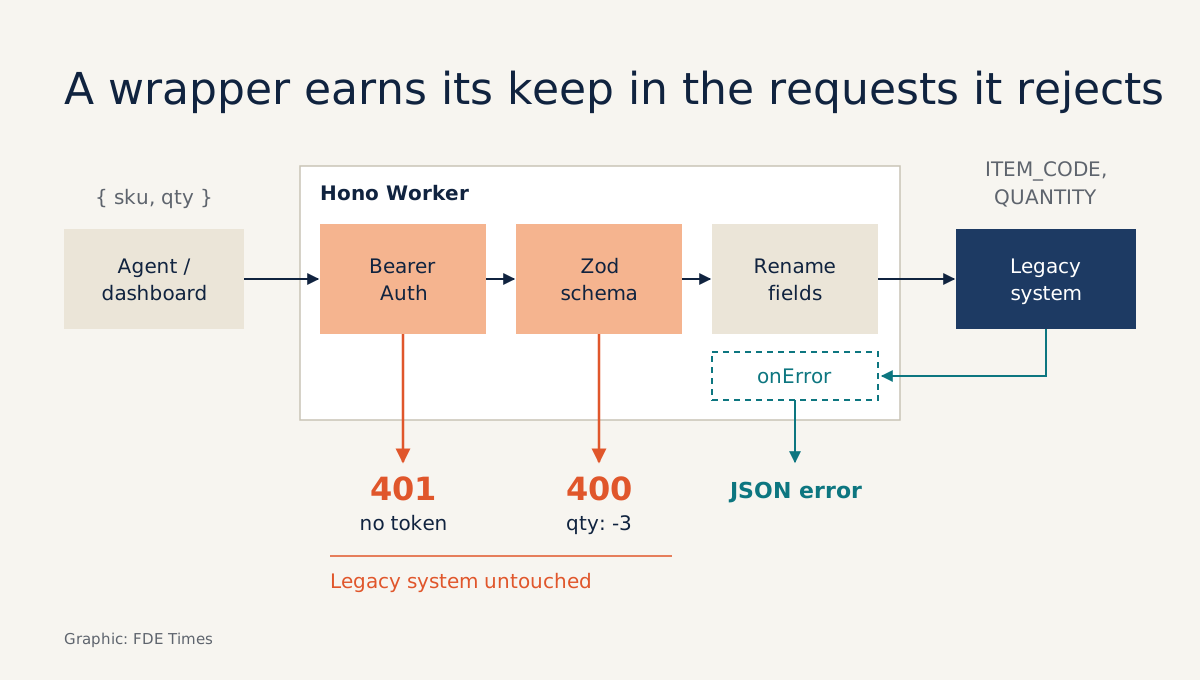
- The wrapper must stop bad requests before they reach the client's system: check the token, validate the payload, map the errors.
- Keep tokens in secrets, never store per-request data in module-level variables, and turn on observability before going to production.
In your first week at a client, this scene is common: the data your agent or dashboard needs lives in a ten-year-old order system. The field names are all upper case, errors come back as HTML, and nobody dares touch its code. You don’t need to either. Your job is to build a thin layer in front of it.
This is exactly the kind of work FDE job ads spell out. Synapse Analytics’ posting for a Forward Deployed Engineer II asks candidates to build and maintain client-specific integration components, including adapters, connectors, scripts and APIs, and to turn recurring patterns into product improvements.
This article builds such a layer with Hono and TypeScript on Cloudflare Workers. According to Cloudflare’s documentation, Hono is a lightweight framework that works very well on Workers. The code below is trimmed for readability, so check it against the official documentation before handing it to a client.
What you will build, and what you need
A hypothetical example: the client has a legacy order API that accepts ITEM_CODE and QUANTITY. Your wrapper exposes a POST /api/orders endpoint that takes clean JSON, { sku, qty }. It checks the caller’s token, validates the payload, calls the legacy system with its own token, and turns every downstream failure into a consistent JSON error.
You need Node.js and npm, a Cloudflare account if you want to deploy, and the URL and token of the system you are wrapping. To practise at home, any internal API you are allowed to call will do.
Step 1: project skeleton and first endpoint
Hono provides the create-hono command to scaffold a project. Run the command below and pick the Cloudflare Workers template when prompted:
npm create hono@latest orders-wrapper
cd orders-wrapper
The entry point is src/index.ts, which exports the app as the default handler. Add a health-check endpoint to confirm everything runs:
import { Hono } from 'hono'

const app = new Hono()
app.get('/health', (c) => c.json({ ok: true }))

export default app
Run npm run dev and open the local URL Wrangler prints. Check: /health must return {"ok":true}. Open package.json to see how the dev and deploy scripts call Wrangler. You will use these two commands for the whole project.
Step 2: where do the client’s tokens live?
This is where many people go wrong from the start. Cloudflare’s best-practices guide is explicit: API keys, tokens and database credentials must never appear in the Wrangler configuration file or in source code. Put them in secrets:
npx wrangler secret put UPSTREAM_TOKEN
npx wrangler secret put CLIENT_TOKEN
When you run locally with npm run dev, Wrangler reads secrets from a .dev.vars file in the project root. Use test tokens, not the client’s real ones, and add this file to .gitignore:
UPSTREAM_TOKEN=dev-upstream-token
CLIENT_TOKEN=dev-client-token
Cloudflare also advises against writing the Env interface by hand; generate it with wrangler types instead. Run this every time you add a new binding:
npx wrangler typesThen change the const app = new Hono() line from step 1 to the line below. This replaces it; it does not declare a second app:
const app = new Hono<{ Bindings: Env }>()Check: typing c.env. in your editor should suggest the right variable names. The legacy system’s URL (UPSTREAM_URL) is not a secret, so it can be an ordinary configuration variable.
Step 3: stop bad requests before they reach the client
Before translating anything, the wrapper has to know how to say no. Hono’s Bearer Auth middleware does not require the token to be a JWT, and you can check the token yourself with a verifyToken function:
import { bearerAuth } from 'hono/bearer-auth'

app.use('/api/*', bearerAuth({
  verifyToken: async (token, c) => token === c.env.CLIENT_TOKEN,
}))
Next comes payload validation. Zod is a validation library designed for TypeScript, and Hono’s validator middleware can check json, query, header, param, cookie and form. Install the packages and declare a schema:
npm i zod @hono/zod-validatorimport { z } from 'zod'
import { zValidator } from '@hono/zod-validator'
const OrderInput = z.object({
sku: z.string().min(1),
qty: z.number().int().positive(),
})Check: once the schema is attached to the route in step 4, a request without an Authorization header must get a 401. Sending qty: -3 must be rejected with a 400 before any downstream line has a chance to run.
Step 4: translate into the legacy system’s language and centralise errors
Only now comes the translation. The handler receives validated data, renames the fields to match the legacy system and calls it with its own token:
import { HTTPException } from 'hono/http-exception'

const route = app.post('/api/orders', zValidator('json', OrderInput), async (c) => {
  const { sku, qty } = c.req.valid('json')
  const res = await fetch(`${c.env.UPSTREAM_URL}/createOrder`, {
    method: 'POST',
    headers: {
      Authorization: `Bearer ${c.env.UPSTREAM_TOKEN}`,
      'Content-Type': 'application/json',
    },
    body: JSON.stringify({ ITEM_CODE: sku, QUANTITY: qty }),
  })
  if (!res.ok) throw new HTTPException(502, { message: 'Order system unavailable' })
  return c.json(await res.json(), 201)
})
When the legacy system returns an HTML error page, the caller should never have to see it. Hono lets you throw HTTPException and handle errors in one place with app.onError:
app.onError((err, c) => {
  if (err instanceof HTTPException) {
    return c.json({ error: err.message }, err.status)
  }
  console.error(err)
  return c.json({ error: 'Internal error' }, 500)
})
Check: temporarily point UPSTREAM_URL at a wrong address. The caller must get JSON with an error field, never a stack trace or HTML.
Step 5: share types and deploy
If you also write the code that calls the API, such as an agent or a frontend, Hono’s RPC feature lets server and client share the API specification. You only need to export the app’s type:
export type AppType = typeof routeThe client imports AppType and immediately gets a typed client. Rename a field on the server and the client fails at compile time, rather than at the client’s site. Cloudflare also notes that a Hono API can be combined with an SPA through Workers Assets if you later need a user interface.
Finally, run npm run deploy. A Worker can run on a *.workers.dev subdomain or on a custom domain, and can be deployed from a laptop or from any CI/CD system. At a client, put the deploy command into CI in the first week so nobody depends on your machine.
The mistakes that break a wrapper in production
The hardest one to spot: Workers reuse isolates across requests. If you store a token or a request’s data in a module-level variable, the next request may read the previous request’s data. Everything that belongs to a request must live inside the handler and come from c.
The next is ignoring plan limits. The Free plan allows 10 ms of CPU per request and 50 subrequests per invocation. Picture an “order details” endpoint that calls the legacy system once per line item: an order with 60 lines breaks the limit straight away. Batch the calls or review the plan before making promises to the client.
The last is deploying with no way to see inside. Cloudflare describes a production Worker without observability as a black box. Turn it on in the Wrangler configuration file (a trimmed example for wrangler.jsonc is below; if your template uses wrangler.toml, declare the equivalent), then redeploy:
{
  "observability": { "enabled": true }
}
Do this before the first time someone asks you why an order failed at 2am.
How to start at the client, and how to put it on your CV
At the client, the first task is not writing code but listing three things: which endpoints are really needed, who will call them, and how the legacy system reports errors. From there, one read endpoint and one write endpoint give you something to demo within the week.
On your CV, don’t write a vague “built APIs”. Say which system you wrapped, which authentication you used, which kinds of bad payload you blocked, and how you mapped downstream errors.
That is the language of the “adapters, connectors, APIs” line in FDE job ads. And when you wrap a third system and see the same pattern again, that is the moment to tell the product team.
Was this article useful?
Thanks for the feedback!