GCP IAM for FDEs: service accounts, roles and tracing 403 errors in a customer's project
Most 403 errors in a customer's Google Cloud project are not bugs. Read properly, they usually tell you which identity lacks which permission. They also show when the problem lies outside IAM.

In brief
- The error 'missing permission iam.serviceaccounts.actAs' means the deployer lacks Service Account User on the runtime service account. The job itself is fine.
- Basic roles such as Editor are too broad for production. Use predefined or custom roles, and remember that a custom role cannot be carried over to another project.
- A 403 right after a role is granted may just be propagation delay: usually 2 minutes, sometimes 7 minutes or more, and hours if the grant goes through a group.
It is nine in the morning. You are in the customer’s meeting room with a terminal open, about to deploy your first data-processing job into their Google Cloud project.
The command runs for a few seconds, then stops with a red line: Caller is missing permission 'iam.serviceaccounts.actAs' on service account. The customer’s infrastructure lead turns to you: “Just tell me what you need. Shall I give you Editor?”
How you answer shows the customer whether you understand their system. Accept Editor and the job is done today, but you leave a hole in their production environment. Point to the exact permission that is missing, in the exact place, and their security team will trust you on every deployment after that.
For an FDE, IAM is a weekly skill, because you always work in someone else’s environment: their project, their org policy, their admins. This guide shows how to read a 403 the way you would read a diagnosis.
Every deployment has two identities, not one
The most common misunderstanding is to assume only “I” am calling the API. There are in fact two identities. One is you, the person running the deploy command. The other is a service account, which Google’s documentation describes as a special kind of account typically used by an application or workload rather than a person. Your job runs under this identity.
When you deploy, you ask Google to attach a service account to a resource, such as a Cloud Run function. Attaching it requires the iam.serviceaccounts.actAs permission, which is part of the Service Account User role (roles/iam.serviceAccountUser). Google describes this role as letting a principal attach a service account to a resource. It does not allow creating short-lived credentials; that belongs to the Token Creator role.
So whenever you hit a 403, the first question is which identity is being refused.
Tracing one case from start to finish
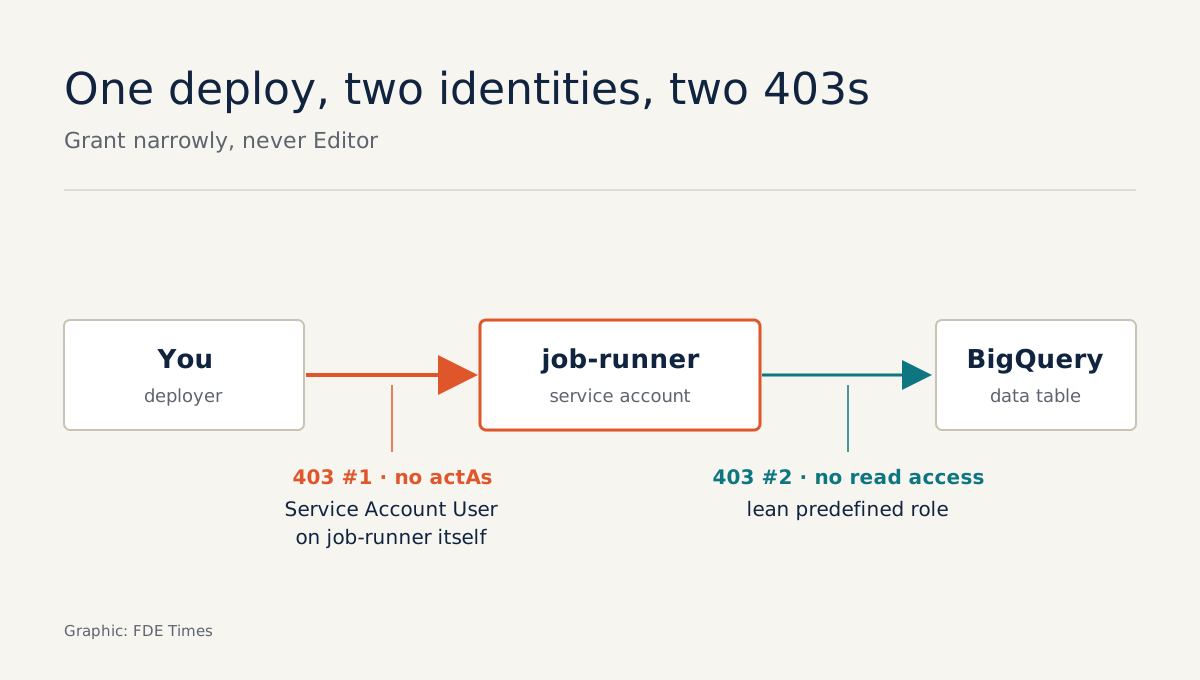
Take a concrete case. The customer gives you a service account, job-runner, to run a Cloud Run function that reads data from BigQuery. The deploy command fails with the actAs error above.
The error says plainly that you, the deployer, lack actAs on job-runner. Google’s troubleshooting documentation for Cloud Run functions gives the fix for this exact message: grant Service Account User on that service account.
The key words are “on that service account”. You do not need this permission at project level. The command you send to the customer’s admin should be this narrow:
gcloud iam service-accounts add-iam-policy-binding \
  job-runner@CUSTOMER_PROJECT.iam.gserviceaccount.com \
  --member="user:[email protected]" \
  --role="roles/iam.serviceAccountUser"
The deploy goes through. Ten minutes later the function returns a 403 again, this time when reading the BigQuery table. The identity being refused is now job-runner, not you. The fix is to grant job-runner a predefined role that is just enough to read the data it needs.
According to Google, predefined roles are created and maintained by Google, and their permissions are updated as services change. Same 403, then, but two different conditions, treated in two different places.
Why not just accept Editor?
Google is explicit: in production, do not grant basic roles (Owner, Editor, Viewer) unless there is no alternative. These roles are far too broad.
There is also a less obvious trap: depending on org policy configuration, the default account Cloud Run uses may hold the Editor role on the whole project.
If you do not specify a service account, your job may be running with Editor permissions without anyone noticing.
So always create a dedicated service account for each workload and grant it only what it needs. When even a predefined role is too broad, you can use a custom role, but know its limit: a custom role can only be granted within the project or organisation that created it.
On the same customer’s second project, you have to create it again. Keep the permission list as a file in the repo rather than in your head.
A role was just granted and it is still 403: wait or keep fixing?
This is where many engineers fix the wrong thing. The admin grants a role, you rerun immediately, still get a 403, and start asking for more permissions. But according to Google, IAM changes are eventually consistent.
A policy change usually takes 2 minutes to take effect, sometimes 7 minutes or longer. If access was granted by adding you to a group, the delay is usually a few minutes but can stretch to hours.
The safe approach: ask the admin whether access was granted through a policy or through a group. If it is through a group and the deployment session has a deadline, ask for a direct binding for the first phase and schedule the move to the group later. Then wait a few minutes before drawing conclusions.
If you have waited long enough and it still fails, use Policy Troubleshooter. It tells you whether a principal can access a resource. It cannot, however, diagnose errors caused by VPC Service Controls, so if Troubleshooter says “has access” but the request is still blocked, ask the customer about their network perimeter.
When the error comes from the customer’s org policy
Some errors cannot be fixed with IAM permissions. You want to create a JSON key for a service account to test from your laptop and get Key creation is not allowed. That is the customer’s org policy blocking key creation.
Google treats service account keys as a security risk if they are not managed properly, so many organisations switch the feature off entirely. Do not ask for an exception. Instead, ask the customer’s admin directly: “Without keys, how does your team allow me to run and test code under this service account’s identity?”
Similarly, an org policy may forbid attaching a service account from one project to a resource in another. If your architecture has a job in project A using a service account from project B, you will get a 403 even when every role is correct. The fix is to put the service account in the same project as the workload, not to ask for more permissions.
Common mistakes
The first mistake is granting permissions to the wrong identity: adding a role to yourself when the runtime service account is the one missing it, or the reverse. The second is letting a job run under the default account. The third is asking for more permissions when the real problem is propagation delay or org policy.
This skill deserves its own line on a CV, for example: “deployed into customer GCP projects with dedicated service accounts and least privilege, working alongside security teams”.
When an FDE job description mentions “customer cloud environments” or “security reviews”, prepare a 403 case you can tell clearly in an interview, from the moment you saw the error to the fix. A story like that shows the interviewer how you work in a customer’s environment.
Next time someone offers to “just grant Editor to speed things up”, hand them a binding command on exactly one service account. The deployment still gets done, and the customer’s production environment carries no extra permissions.
Was this article useful?
Thanks for the feedback!
8 sources
- Service accounts overview | Identity and Access Management (IAM) | Google Cloud Documentation · 2026-10-20
- Roles for service account authentication | Google Cloud Documentation
- Troubleshoot Cloud Run functions | Google Cloud Documentation
- Roles overview | Identity and Access Management (IAM) | Google Cloud Documentation
- Access change propagation | Identity and Access Management (IAM) | Google Cloud Documentation · 2026-10-20
- Troubleshoot IAM permissions | Policy Intelligence | Google Cloud Documentation
- Restrict IAM service account usage | Google Cloud Documentation
- How to Configure Cloud Run to Use a Custom Service Account with Least-Privilege Permissions · 2026-02-17