Fresh token rejected? Check the client's server clock first
JWT, AWS and TOTP each tolerate clock drift differently, but when any of them breaks, the first thing to check is the same: NTP.
In brief
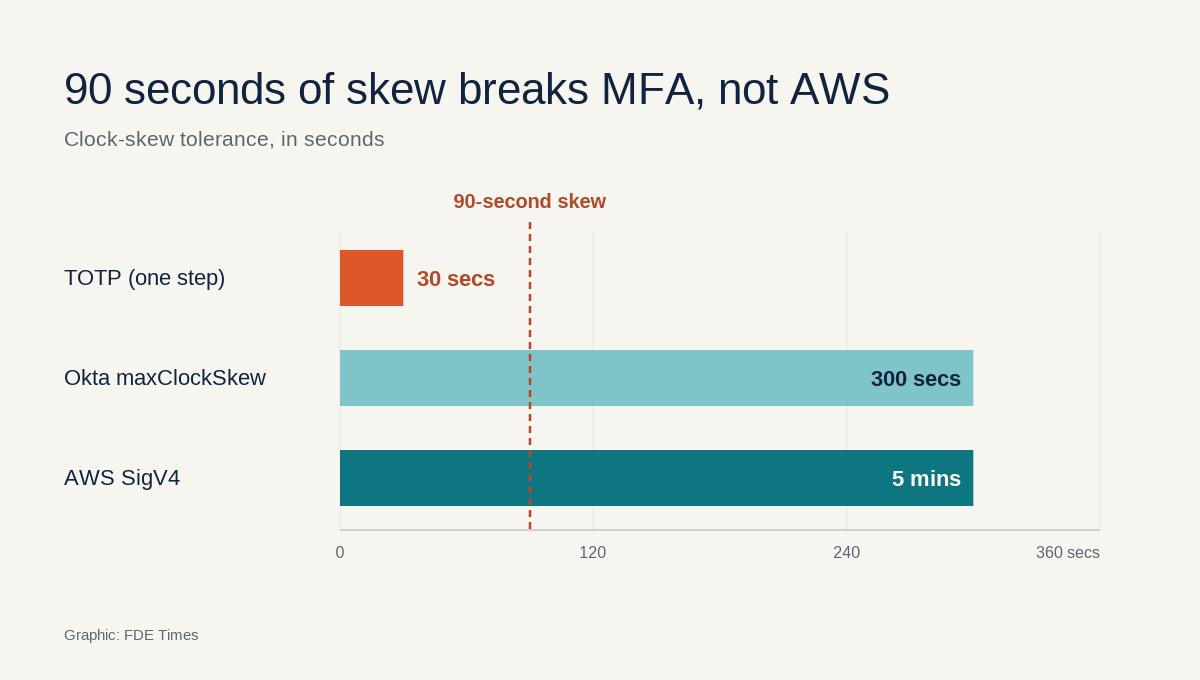
- In most cases AWS rejects a SigV4 request skewed by more than 5 minutes; Okta tolerates 300 seconds by default; TOTP has a time step of only 30 seconds.
- When you see errors like 'jwt not active' or 'Signature not yet current', check the clock before the key; 'Signature expired' can also mean the request was held up somewhere.
- Measure the time, check NTP and the firewall first, and only then think about loosening tolerance in code.
In most cases, AWS rejects a SigV4-signed request that arrives more than 5 minutes after the timestamp inside it. The rule exists to block replay attacks.
For an FDE deploying on a client’s machine, it has a more practical meaning: if the server clock drifts by a few minutes, every AWS call starts failing, even though the keys, the IAM permissions and the code are all correct.
AWS is not the only thing that depends on the clock. RFC 7519 defines the JWT nbf (not before) claim as the time before which a token must not be accepted.
RFC 6238 gives TOTP codes a default time step of just 30 seconds. A single clock error is enough to break MFA, then logins, then cloud calls, one after another, depending on how far the clock has drifted.
This class of bug is hard to catch because the error messages talk about tokens, signatures or codes, and none of them mentions the clock. On your own company’s infrastructure, someone usually already looks after NTP.
On a client’s virtual machine, behind the client’s firewall, you cannot assume that, and being able to read an error and guess which machine is off can save you an entire afternoon.
How much skew does each system tolerate?
For JWT, RFC 7519 allows (but does not require) implementers to provide some small leeway, usually no more than a few minutes, when checking exp and nbf. Each library has its own name for it.
PyJWT calls it leeway, and its documentation states that leeway also applies to nbf. The node-jsonwebtoken library uses clockTolerance, in seconds, and raises NotBeforeError with the message “jwt not active”.
Identity providers set their own thresholds too. According to Okta’s support pages, the default maxClockSkew is 300 seconds, applied when the local machine’s clock is behind Okta’s servers, and Okta has a dedicated error for skew: “The JWT was issued in the future”.
AWS SigV4 allows about 5 minutes in most cases, and you cannot change that figure because the check happens on the AWS side.
TOTP is the strictest. RFC 6238 recommends a 30-second step, says the verifier should accept at most one extra step to cover network delay, and says a specific limit should be set on how many steps the code generator may drift.
Even the codes on a phone need the right time: Google says Google Authenticator codes depend on the correct time on the Android device, and advises using “Time correction for codes” and then “Sync now” when codes do not work.
The table below shows what each error message tells you about the clock:
| Error message | Where you see it | What it says about the clock |
|---|---|---|
jwt not active |
node-jsonwebtoken | The verifier sees nbf still in the future: the verifier is behind the token issuer |
Signature not yet current: ... is still later than ... |
AWS SigV4 | The request carries a future time: the machine calling AWS is running fast |
Signature expired: ... is now earlier than ... |
AWS SigV4 | The timestamp is too old: the machine calling AWS is running slow, or the request was held up somewhere |
One 90-second drift, three different symptoms
Take a typical, hypothetical case. An authentication service runs on the client’s virtual machine, whose clock is 90 seconds behind the IdP. The IdP issues a token at 10:00:00 with nbf set to that exact moment. The VM thinks it is only 09:58:30, sees that nbf is still 90 seconds away, and returns “jwt not active”.
The frustrated user waits a couple of minutes and tries again, and this time it works, because the VM’s clock has passed nbf. An error that comes and goes like this is a familiar sign of clock skew.
The same machine calls S3 without trouble, because 90 seconds is well within 5 minutes, which is why the client’s team will insist the infrastructure is fine and the problem is your token.
If the drift grows to 6 minutes, AWS receives a timestamp 6 minutes older than its own time and returns “Signature expired”.
MFA, meanwhile, broke long before that: 90 seconds is three TOTP steps, far beyond the recommended one, so every code this machine checks is rejected even though the user’s phone keeps perfect time.
One cause, three symptoms, at three different moments.
Measure first, fix later
The first step is to measure, without changing anything. Compare the client machine’s UTC time with a machine you trust, then compare the iat and nbf in the token with the verifier’s time:
date -u            # run on the client's machine and on a time-synced laptop
chronyc sources    # check the Reach column for each NTP server
import time, jwt
claims = jwt.decode(token, options={"verify_signature": False})
now = int(time.time())
print("nbf - now =", claims.get("nbf", now) - now, "seconds")
print("iat - now =", claims.get("iat", now) - now, "seconds")If the difference is positive, the verifier is behind the token issuer by that many seconds. Use this signature-skipping decode only for diagnosis, and never let it slip into production code.
The second step is to find out why NTP is not doing its job. According to the chrony FAQ, a Reach of 0 means chronyd has not received a single valid response from the configured NTP server.
A common culprit is a firewall in between that blocks requests to UDP port 123 or blocks the replies, so when you ask the client’s network team, ask about both directions.
On Amazon EC2 there is a shortcut. Instances can use an internal NTP source at the link-local address 169.254.169.123; the traffic stays inside the VPC and needs no VPC configuration changes. AL2023 and recent Amazon Linux 2 releases use this endpoint by default, so if the machine still drifts, find out who changed the chrony configuration.
The third step is to correct the current drift. By default chronyd adjusts the clock gradually, by making it run slightly slower or faster, so a large offset takes a long time to disappear.
The makestep directive in the chrony configuration lets the clock jump immediately, including on virtual machines that were paused and resumed with the wrong time.
Only once the clock is right should you set a tolerance in code, as a safety net:
jwt.decode(token, key, algorithms=["RS256"], leeway=30)jwt.verify(token, key, { clockTolerance: 30 });Why raising leeway to 10 minutes fixes the wrong thing
The quickest and most tempting fix is to keep raising leeway until the errors stop.
Do that and you exceed the “few minutes” RFC 7519 suggests, you extend the window in which a leaked token remains usable, and you still do nothing for AWS or TOTP, because both check time by their own rules.
The error will come back somewhere else, when you least expect it.
The second mistake is fixing only one machine. A time error has two sides, the issuer and the verifier, and in a cluster a single drifting node is enough to cause intermittent failures depending on where each request lands. Measure every node behind the load balancer, not just the one you happen to be SSHed into.
The third mistake is forgetting machines that were paused. A VM restored from a snapshot, or a laptop that has just woken up, can run on the wrong time until chrony catches up. When end users report wrong MFA codes, ask them to sync the time on their phones before you open the logs.
Turning a debugging session into a selling point
When building a profile for an FDE role, show that you can untangle bugs that sit between layers: the application, the authentication protocol and the client’s network. If a job listing says you will deploy on client-managed infrastructure, have your approach to this class of bug ready.
On your CV, describe the case in one sentence with numbers: which error message, how many seconds of drift, what the cause was (for example, UDP port 123 being blocked), and at which layer you fixed it.
In an interview, the impressive answer has little to do with knowing the name clockTolerance. It lies in the order of your steps: measure the drift, check the NTP source, fix the clock, and only then set a small, documented tolerance. That order shows you fix the cause rather than just silencing the symptom.
The next time an error message talks about a token, run date -u before you open the code. Often the fault lies in no key at all, but in the clock on the client’s machine that nobody was watching.
Was this article useful?
Thanks for the feedback!
10 sources
- RFC 7519: JSON Web Token (JWT) · May 2015
- Usage Examples — PyJWT documentation
- auth0/node-jsonwebtoken (README)
- The Effect of System Clock Skew on Okta Authentication Flows · last updated Sep 25, 2026
- AWS Signature Version 4 for API requests - AWS Identity and Access Management
- Troubleshoot Signature Version 4 signing for AWS API requests
- RFC 6238: TOTP: Time-Based One-Time Password Algorithm · May 2011
- About Time sync for Google Authenticator on Android
- chrony – Frequently Asked Questions
- Set the time reference on your EC2 instance to use the local Amazon Time Sync Service