ODBC Driver 18 is installed, and the script still can't find it
Versions 17 and 18 register under separate names, so check the driver, certificate and database version before blaming the Python code.
In brief
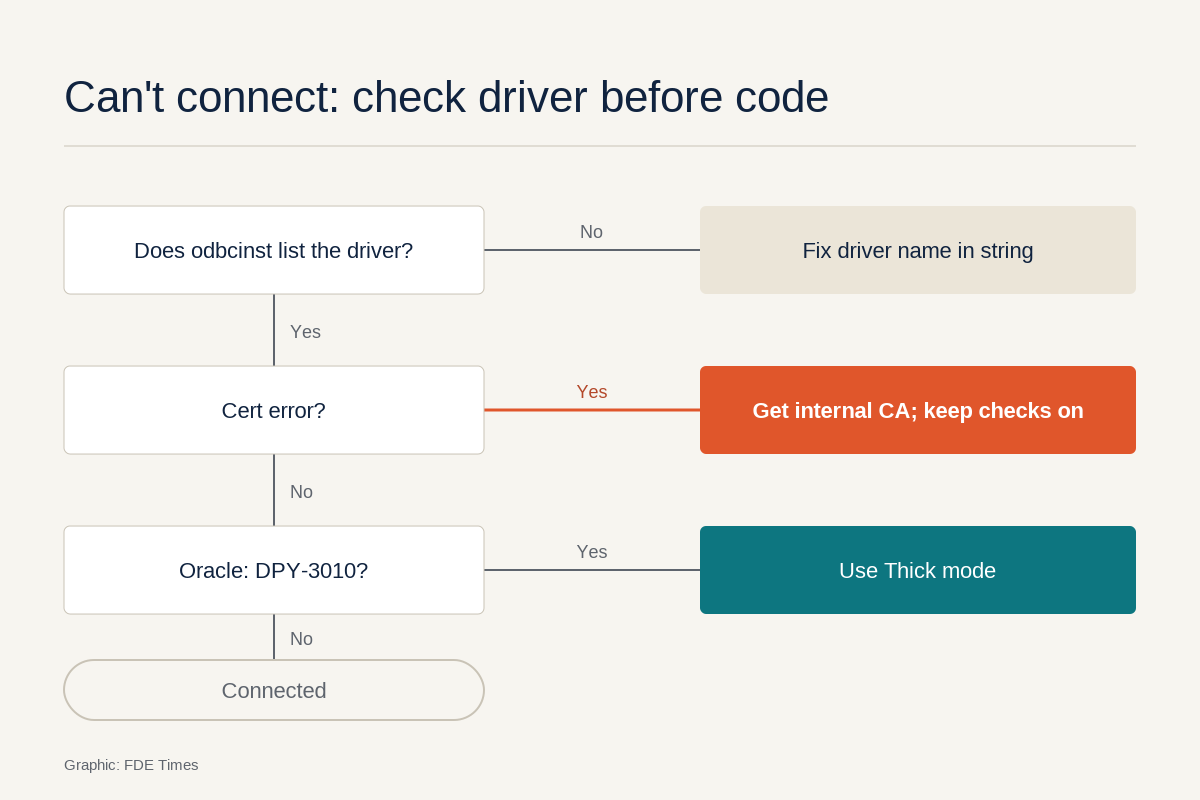
- Driver 17 and Driver 18 are registered under different names, so installing 18 does not rescue a connection string that calls 17.
- Driver 18 requires encryption by default; TrustServerCertificate=yes should only be an approved exception.
- python-oracledb runs in Thin mode by default; DPY-3010 means the database is too old and needs Thick mode.
You install ODBC Driver 18 for SQL Server on the client’s server, rerun the script, and still get an error saying the driver cannot be found.
Microsoft’s documentation explains why: versions 17 and 18 are registered under two separate names, can sit side by side on the same machine, and installing the newer one does not switch connection strings that name version 17 over to version 18.
It is the kind of error that can swallow an FDE’s entire first morning at a client. If the client’s data lives in SQL Server or Oracle, perhaps behind a self-signed certificate or an old database version, then when the connection breaks the driver, the certificate and the version are the first suspects, because they all sit outside your Python code.
The guide below builds a connection-check script for both systems, following the order of diagnosis: is the driver present, is the connection string right, does the encryption match, and only then Oracle and the JDBC fallback. The code samples are trimmed-down sketches; server names and accounts are placeholders.
Is the driver actually registered?
Before starting, you need a Linux machine with unixODBC, Python with pyodbc and oracledb installed, plus JayDeBeApi if you want a fallback route. The first step does not touch Python. Microsoft’s installation guide gives a command that asks unixODBC whether the driver has been registered.
driver_name="ODBC Driver 18 for SQL Server"
odbcinst -q -d -n "$driver_name"
Check: the command must return a driver entry with exactly that name. If it returns nothing, pyodbc will never find the driver, however correct the code is. Run it again with the name “ODBC Driver 17 for SQL Server” to see which version the machine has, then compare it with the name in the client’s existing connection string.
Debian hides one more trap. Microsoft notes that the driver needs libgssapi_krb5.so.2, yet the package does not declare this dependency. If the driver registers successfully but fails to load, this is the first thing to check on the machine.
Write the connection string so the driver has nothing to guess
Microsoft recommends a DSN-less string for Driver 18, with the protocol, port and encryption all spelled out. The following sketch passes that string to pyodbc:
# Sketch: host, database and account are placeholders
import pyodbc

host, db, user, pwd = "db.example.internal", "<db>", "<user>", "<pwd>"
conn_str = (
    "Driver={ODBC Driver 18 for SQL Server};"
    f"Server=tcp:{host},1433;"
    f"Database={db};UID={user};PWD={pwd};"
    "Authentication=SqlPassword;"
    "Encrypt=yes;TrustServerCertificate=no;"
)
conn = pyodbc.connect(conn_str)
Note the comma between the host name and the port. In the Server keyword the port is separated by a comma rather than a colon, a detail people used to writing URLs often get wrong. Stating the port explicitly also avoids trouble with named-instance discovery.
Check: the connection opens and a simple query returns a result. If the error changes to a certificate error, the driver layer is fine and the problem now lies in encryption.
Certificate errors: don’t just switch off the warning
Driver 18 requires encryption by default. With internal servers using self-signed certificates, that readily produces a certificate error on the very first connection, and Microsoft advises always setting Encrypt explicitly rather than relying on the default.
The “fix” everyone finds online is to set TrustServerCertificate=yes. Microsoft warns plainly that this is not a routine remedy for certificate errors, because once it is on, the client has no way to be sure it is talking to the right server. It should only ever be an approved exception.
At a client, the right move is to ask the DBA or security team for the internal CA certificate, or for written approval of an exception. An FDE who quietly disables certificate validation on production data can lose the client’s trust faster than any bug.
Oracle: choose Thin or Thick before you connect
Oracle is far gentler at the start. python-oracledb runs in Thin mode by default, connecting directly to Oracle Database without an Oracle Client install, so for a modern database the Python library is all you need.
Trouble arrives when the client runs an old Oracle. The error DPY-3010 means the server version is not supported by Thin mode, that is, a database at 11.2 or earlier. There are two ways out: switch to Thick mode, or upgrade the database, and the second is rarely in your hands.
Thick mode is enabled with a call that loads the Oracle Client libraries:
import oracledb

# Call only when Thick mode is needed, before any connection
oracledb.init_oracle_client()
The call must come before any connection, because every connection in a python-oracledb application must use the same mode. If one service reads both a new and an old Oracle, run both in Thick mode or split them into two separate processes.
When Thick mode fails, you will see DPI-1047: the Oracle Client library could not be loaded. The troubleshooting documentation suggests two paths. If you don’t actually need Thick mode, remove the init_oracle_client() call; if you do, check that Python and Oracle Client are both 32-bit or both 64-bit.
Quick reference when the script reports an error
| Symptom | Common cause | First thing to do |
|---|---|---|
| SQL Server driver not found | String calls Driver 17, machine has only 18 (or vice versa) | Run odbcinst -q -d -n with the exact name in the string |
| Driver registered but fails to load (Debian) | Missing libgssapi_krb5.so.2 |
Check that this library is on the machine |
| Certificate error with Driver 18 | Driver requires encryption by default, server uses a self-signed certificate | Request the internal CA or an approved exception |
| Instance lookup error | Named instance used, no port given | Write tcp:host,1433 |
DPY-3010 |
Oracle 11.2 or older in Thin mode | Switch to Thick mode |
DPI-1047 |
Oracle Client cannot be loaded | Remove init_oracle_client() or match bitness |
When ODBC is blocked, JDBC is the way out
If the client only allows JDBC drivers vetted by its internal team, or you lack permission to install system packages to add ODBC, JayDeBeApi lets Python call a JDBC driver. According to the library’s PyPI page, the first argument to connect is the Java driver class name, the second is the JDBC URL, and the path to the jar file is optional.
# Sketch: class name and URL come from the client's JDBC driver documentation
import jaydebeapi

conn = jaydebeapi.connect(
    "<driver.class.Name>",
    "<jdbc-url>",
    # remaining arguments (credentials, jar): see the JayDeBeApi PyPI page
)
JayDeBeApi is built on JPype and reads the CLASSPATH environment variable, so if you don’t pass a jar path, the driver must be on the CLASSPATH. The PyPI page also warns that older JPype versions can cause errors; if you hit an obscure error in the Java layer, check the JPype version before digging deeper.
Putting it together in one check script
The steps above fit into a single file to run first in every new environment. The script below tries both systems and prints the driver in use, the Oracle mode, and any DPY-/DPI- error code. It is a trimmed-down sketch: the connection details are placeholders, and you should check the oracledb.connect parameters against the python-oracledb documentation.
# Trimmed-down sketch: check SQL Server and Oracle connections
import re
import oracledb
import pyodbc

MSSQL_DRIVER = "ODBC Driver 18 for SQL Server"
ORACLE_THICK = False  # set to True if you hit DPY-3010

if ORACLE_THICK:
    oracledb.init_oracle_client()  # once, before any connection

def report(name, detail, err=None):
    if err is None:
        print(f"[OK]   {name} | {detail}")
        return
    codes = re.findall(r"DP[IY]-\d{4}", str(err))
    print(f"[FAIL] {name} | {detail} | codes: {codes or '-'} | {err}")

def check_sqlserver(host, db, user, pwd):
    conn_str = (
        f"Driver={{{MSSQL_DRIVER}}};"
        f"Server=tcp:{host},1433;"
        f"Database={db};UID={user};PWD={pwd};"
        "Authentication=SqlPassword;"
        "Encrypt=yes;TrustServerCertificate=no;"
    )
    detail = f"driver={MSSQL_DRIVER}"
    try:
        pyodbc.connect(conn_str).close()
        report("SQL Server", detail)
    except Exception as e:
        report("SQL Server", detail, e)

def check_oracle(user, pwd, dsn):
    detail = f"mode={'thick' if ORACLE_THICK else 'thin'}"
    try:
        oracledb.connect(user=user, password=pwd, dsn=dsn).close()
        report("Oracle", detail)
    except Exception as e:
        report("Oracle", detail, e)

check_sqlserver("db.example.internal", "<db>", "<user>", "<pwd>")
check_oracle("<user>", "<pwd>", "<host>/<service>")
Check: each system prints exactly one line. A SQL Server [FAIL] line with the driver name tells you at once whether to rerun odbcinst; the Oracle line, with its mode and error code, points straight to the matching row in the reference table above.
A script worth carrying with you
A good habit at a client is to run this script before anything else, then send the output to the DBA along with a specific question. “Driver 18 reports a certificate error; do you have an internal CA?” gets answered far faster than “I can’t connect.”
If you are aiming to move into an FDE role, put the script on GitHub with a README explaining each error code; when a job posting mentions “on-prem” or “legacy databases,” it is tidy evidence to cite on your CV.
Next time the script says the driver cannot be found, read the driver name carefully before you reread your own code.
Was this article useful?
Thanks for the feedback!