Forward Deployed GTME at Clay: taking an enrichment workflow into a customer's CRM, from discovery to handoff
The hard part of enrichment is rarely finding the data. It is writing that data into a customer's CRM without corrupting a single record.

In brief
- Clay's Forward Deployed GTME role owns the whole project: discovery, design, build, go-live and handoff.
- Most of the risk sits in writing back to the CRM: External IDs, API names, picklist semicolons, API limits.
- Keep auto-update off at first, test a few rows, and write documentation so the customer can keep running it.
Picture the kickoff with a large customer. The VP of RevOps puts it in one sentence: “I want every account in Salesforce to have an industry and an employee count, updated regularly.” It sounds like a week’s work.
In practice, that sentence hides at least five technical decisions, and getting any of them wrong means apologising to the Sales team for breaking their data.
That is the daily work of a Forward Deployed GTME, the role Clay is hiring for its newly formed Services team. According to the job description, the team helps Clay’s largest customers design, build and put workflows into production, and the person in the role stays with the project from discovery and solution design, through build and launch, all the way to handoff.
If you are a software engineer looking to move into FDE work, this is a kind of job well worth studying. It is closer to data integration than to feature development: a small pipeline, running on someone else’s systems, with real data that other people rely on to sell.
Enrichment is easy; writing back is hard
Clay’s core idea is fairly simple. You feed in a list of companies or people, and Clay runs a waterfall: it queries data providers one by one until one returns a result.
Clay advertises that this waterfall runs through more than 150 providers in sequence, then writes the enriched fields back to HubSpot or Salesforce and refreshes them on a schedule.
The problem is the last step. The job description requires workflows to plug into the customer’s existing GTM stack, including the CRM, MAP and data tools. A large company’s CRM has its own rules, its own custom fields and its own API limits. However good an enrichment workflow is, it becomes a liability if it creates duplicate records or overwrites the wrong fields.
So the right approach is to work backwards: start from where the data will be written, and only then design how to find it.
Discovery has to answer the question of the key
Clay describes discovery for this role as structured, covering many personas from IC to VP/C-level across RevOps, Marketing Ops, Sales and CS. Each group gives you a different piece. The VP states the goal, the RevOps admin knows the schema, Marketing Ops knows which fields the MAP reads, and Sales reps know which fields they actually look at.
The most important question to ask the RevOps admin is: what identifies an account? Clay’s documentation is explicit that for an upsert into Salesforce to work, the target object must have an External ID. If the customer has no field marked as an External ID, such as the company domain, you have to agree on creating one before you build.
The second question is the exact list of fields. Clay’s documentation stresses always checking the correct API name in Salesforce’s field settings rather than relying on the display label. The “Employee Count” label a rep sees on screen might map to an API name such as Employee_Count__c. Ask the admin to export the list of API names in the first week.
A worked example, end to end
Go back to the hypothetical customer above. Suppose they have 12,000 accounts to enrich, use Salesforce, and want to add a multi-select field called “Industry Tags”.
The first step is pulling the data into Clay. Clay’s documentation says that when pulling from a Salesforce report, the report is capped at 2,000 records. With 12,000 accounts, a single report brings back only a sixth of them.
You need to split the source, for example into 6 reports by region or by the first letter of the account name, and record that split clearly in the handoff documentation.
The second step is formatting. Salesforce uses a semicolon, not a comma, as the delimiter for multi-select picklists. If a provider returns “SaaS, Fintech”, you have to convert it before writing, with a formula column or a small snippet like this:
// Normalise values for a Salesforce multi-select picklist
const tags = (input || "")
  .split(",")
  .map(t => t.trim())
  .filter(Boolean);
return tags.join(";"); // "SaaS, Fintech" -> "SaaS;Fintech"
The third step is a test write. Clay’s best practice is to keep auto-update off when using the Create or Update actions, test on a few rows first and only then automate. In practice, pick around 10 accounts that a Sales rep knows well, write to them, then ask that same rep to open Salesforce and confirm. A rep’s nod carries more weight than any success log.
API limits are part of the timeline
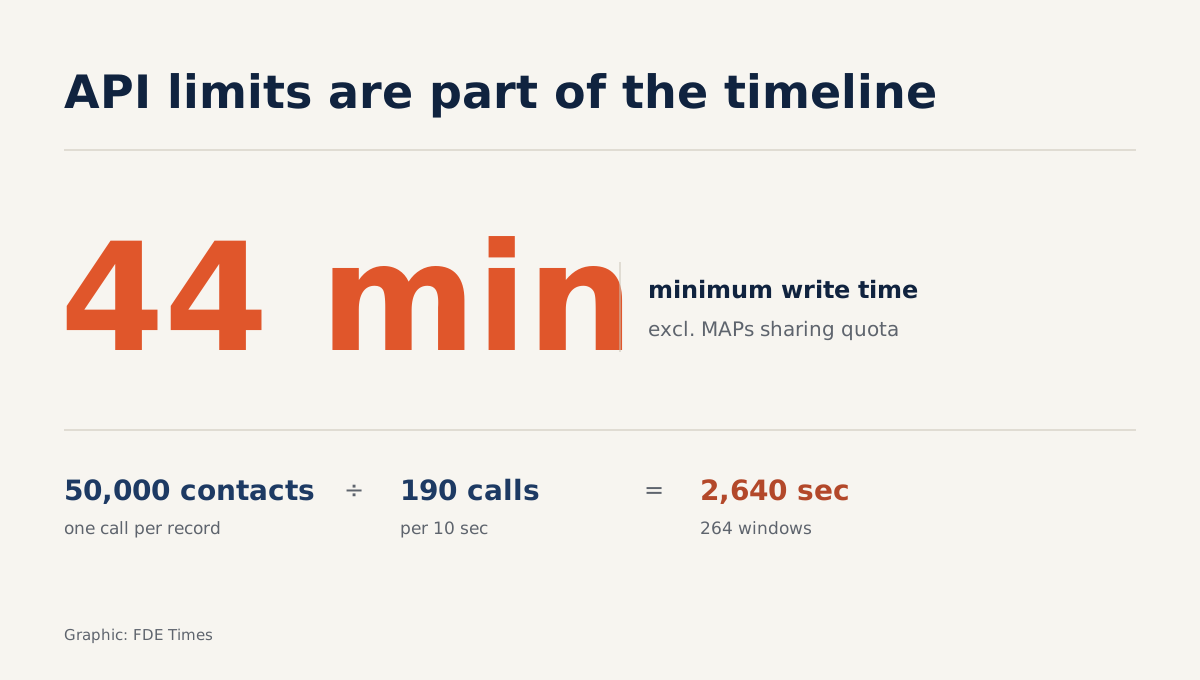
If the customer uses HubSpot instead of Salesforce, the problem becomes one of speed. HubSpot’s developer documentation states that any app or integration exceeding its rate limits will receive a 429 error for all subsequent calls. For private apps on Professional or Enterprise plans, the burst limit is 190 calls per 10 seconds.
Do a quick calculation. Suppose the customer has 50,000 contacts and each record costs one write call. 50,000 divided by 190 needs 264 ten-second windows, or at least 2,640 seconds, about 44 minutes, assuming everything runs right at the limit and no other integration shares the quota.
In reality, the customer’s CRM also has the MAP and other tools calling the API, so the real figure will be higher.
Clay’s job description says the person in this role owns the project plan, timeline, communication cadence and risk management from kickoff to go-live. The calculation above is risk management: it gives you grounds to propose running the first backfill outside working hours and to warn the Marketing Ops team in advance.
Handoff is a product, not a formality
Clay requires workflows to be documented so the customer and internal teams can run them after handoff.
Good documentation answers the questions the customer’s admin will ask at 9am on a Monday, when you have moved on to another project: which key the workflow upserts on, which fields it writes, how many reports the source is split into and why, when the refresh schedule runs, and what to do on a 429 error.
Write this documentation alongside the build, not in the final week. Every discovery decision, such as choosing the domain as the External ID, deserves one line explaining why. Whoever comes next needs to know the why, not just the what.
Common mistakes
The most common mistake is building a polished Clay table first and asking about the CRM later, only to find the target object has no External ID. The second is mapping by display label, so data lands in the wrong field or fails to write at all.
The third is switching on auto-update from the start, turning a small formatting error, such as a comma in a picklist, into thousands of broken records.
A mistake few people mention is doing discovery only with the VP. They give you the goal, but only admins and reps can tell you what the real data looks like.
How to show this skill on a CV
The requirements for this role emphasise hands-on experience with GTM tools: Salesforce or HubSpot, Marketo, Outreach or Salesloft, data enrichment and analytics. When reading job descriptions for similar roles, look for words such as “implementation”, “go-live” and “handoff”. They signal that you will own the whole lifecycle, not just write integrations.
On your CV, do not write a vague “experience with Salesforce”. Write one specific line: you built an upsert pipeline keyed on an External ID for so many records, handled API limits in a particular way, and handed it off to a named team to run themselves. A recruiter reading a line like that will see you have been round the full loop, from discovery to handoff.
Customers will not remember which data provider sat at which step of the waterfall. They will remember the first Monday after handoff, when the Sales team opened Salesforce and had nothing to clean up.
Was this article useful?
Thanks for the feedback!