AGENTS.md and a PreToolUse hook: two layers that keep coding agents out of a client's migrations folder
The word "Never" in a Markdown file is only advice. A client's real no-go zones need a second layer that actually blocks.

In brief
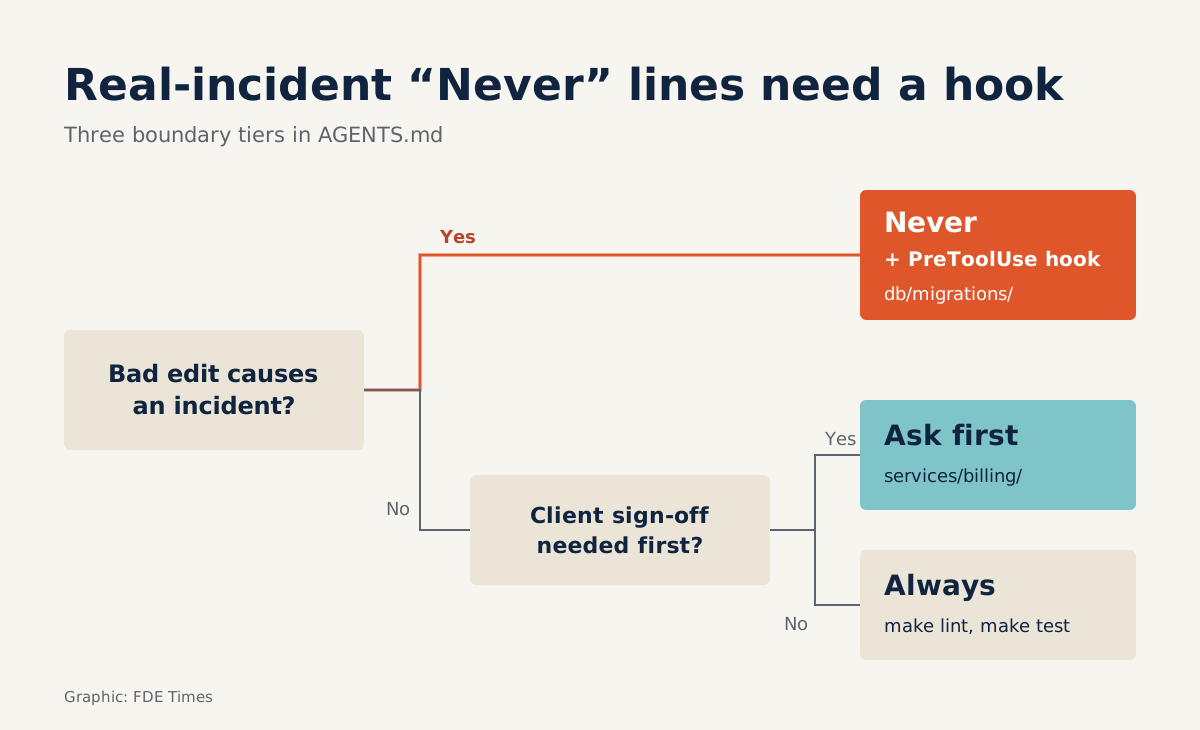
- GitHub recommends splitting boundaries into three tiers, and the "Never" tier should name specific paths such as `db/migrations/`.
- Agents read the nearest AGENTS.md, and Codex loads at most 32 KiB by default, so split files by folder and keep them short.
- AGENTS.md is only context: to block an action outright, use a PreToolUse hook with exit 2, and remember a hook only stops accidental mistakes.
In an unfamiliar repo, a coding agent has no idea which folder is live in production. To the agent, db/migrations/ looks like any other folder. GitHub analysed more than 2,500 repos that contain an AGENTS.md file, and one piece of its advice is blunt: tell the agent plainly what it must never touch.
But telling is not blocking. Claude Code’s documentation says these instruction files are treated as context, not as enforced configuration. To block an action outright, you need a PreToolUse hook.
This guide is for FDEs who have to work in a client’s codebase alongside an agent in their first week. After six steps you will have two layers of protection: an AGENTS.md so the agent understands the rules, and a hook so the no-go zone is actually locked. You will also know the limits of each layer, so you don’t promise the client something they cannot deliver.
What you will build, and what you need
The guide follows one hypothetical example: a logistics company’s monorepo with services/api, services/billing and a db/migrations folder that is live in production. Every command in the guide, such as make test, is illustrative for this hypothetical repo. In real work, substitute the commands the client’s team actually uses.
You need read access to the repo and a coding agent that supports AGENTS.md. Claude Code can read AGENTS.md in place of CLAUDE.md, and Codex has its own mechanism for loading the file. Most important of all is half an hour with one of the client’s engineers, asking how they build and test, and which folders nobody is allowed to change.
Step 1: write for the agent as you would write a README for a new hire
The agents.md site describes the file as a README for agents. It is plain Markdown, with whatever headings you like, because the agent simply reads the words you write. No schema also means no syntax guarantees the agent will comply.
Start the file with the commands the agent will need to run, with every flag spelled out:
# AGENTS.md

## Commands
- Build: `make build`
- Test (single service): `make test SERVICE=api`
- Lint before committing: `make lint`
Check: run each command yourself on your machine. Any command that fails for you will fail for the agent too, except the agent may “fix” it in a way you don’t want.
Step 2: three-tier boundaries, with specific paths
In a client’s repo, this is the most important section. GitHub proposes three tiers (always do, ask first, never do) and counts boundaries as one of six core sections every file should have. GitHub’s example documentation agent gets a path-level prohibition: never touch src/. Apply exactly that pattern to migrations:
## Boundaries
- Always: run `make lint` and `make test` before proposing a commit.
- Ask first: adding a new dependency; editing files in `services/billing/`.
- Never: edit or delete files in `db/migrations/`; commit `.env` files.
Don’t drop the middle tier: at a client it is often the most useful. Billing code is not a no-go zone, but every change there should get a nod from someone on the client’s side first.
Step 3: put a separate file inside the migrations folder
According to agents.md, an agent automatically reads the nearest AGENTS.md in the directory tree, and the nearest file takes precedence. Codex likewise walks from the project root, usually the Git root, down to the working directory to assemble its chain of instructions. So a file placed in db/migrations/ is loaded when the agent works there.
# db/migrations/AGENTS.md
Every file in this folder has already run in production.
Do not edit or delete existing files.
If a schema change is needed, stop and ask someone on the team.
There is a technical reason to split files as well. Codex stops loading further files once the total size reaches the project_doc_max_bytes limit, 32 KiB by default. A bloated root file can cause child files to be skipped without anyone noticing.
Check: open an agent session in db/migrations and ask which rules it can see. If this folder’s rules don’t appear, the file order or size is the problem.
Step 4: lock the no-go zone with a PreToolUse hook
A “Never” in a file is not a lock. Blake Crosley, in a piece explaining Claude Code hooks, draws the distinction clearly: instruction files give the model directions it will probably follow, while hooks run whether or not the model cooperates.
The blocking mechanism is simple. The hook script writes a message to stderr and exits with code 2: the tool call is rejected, and the message is passed back to Claude. Below is a simplified, illustrative script. It assumes the hook receives a description of the tool call on stdin, and blocks any call that mentions db/migrations/.
#!/usr/bin/env bash
# block-migrations.sh — illustrative, simplified version
input=$(cat)

if echo "$input" | grep -q "db/migrations/"; then
  echo "Blocked: db/migrations/ has already run in production. Do not edit files here; stop and ask the client's team." >&2
  exit 2
fi

exit 0
Pay attention to the stderr message. Because it is sent back to the agent, write it as an explanation with a next step, rather than just “denied”. This simple version also blocks reading the folder; in real use, look up the input format and how to declare a matcher in the documentation for the client’s agent, so that only writes are blocked.
Exit 2 is not the only way. A hook can also return a structured decision, permissionDecision: "deny". Both lead to the same result, a blocked tool: one uses an exit code plus stderr, the other returns the decision explicitly.
According to Crosley, a hook that returns deny still blocks the tool even in bypassPermissions mode. At a client, where someone may run the agent with every permission open, that detail is worth a lot.
Check: ask the agent to add a line to an old migration file. The edit must be rejected, and the agent should repeat the reason you wrote to stderr.
Step 5: know that hooks have limits too
A hook is a guardrail against mistakes, not a mechanism to stop an agent deliberately getting round the rules. A dev.to guide to blocking rm -rf also notes that path matching can be bypassed.
Consider the script above: it looks only for the exact string db/migrations/. A shell command that reaches the folder through a relative path or an environment variable may not contain that string, and the guardrail can easily let it through.
So when talking to the client, don’t call either layer a “security measure”. They make mistakes rarer and easier to spot. Real protection for production remains the access controls and review process the client’s team already has.
Step 6: start small, fix it when the agent gets it wrong
Don’t write 300 lines on day one, especially since Codex has a size limit. Give the agent a small, real ticket, watch which commands it runs and which files it edits, then add to the file exactly where it stumbles.
Imagine the agent runs make test across the whole repo, taking twenty minutes, instead of testing one service. You add a line explaining how to test a single service with SERVICE. Every line in the file should be traceable to a mistake that has happened or a risk the client has named.
What are these two layers for at a client?
AGENTS.md is in effect the minutes of a customer discovery session about the codebase. Asking “which folders must nobody touch?” can surface things that were never written down: a migration that once caused an incident, or a module only one person dares to change.
Write those down, add a hook for the most dangerous zone and ask the client’s tech lead to review both. It is a quick way to show them you respect their system.
If you are moving into an FDE role, add a sample repo to your portfolio with a three-tier AGENTS.md, a child file in the migrations folder, a write-blocking hook with tests, and a commit history showing the file being refined after each agent mistake.
When a job description mentions rolling out AI coding tools to client teams, you will have a concrete example to talk through in an interview, rather than just saying you are “comfortable with agents”.
Has your draft let anything slip through?
Take the repo you are working on and review it. Do the commands run exactly as written? Do the boundaries include an “ask first” tier, or only “never”? Does the “Never” tier name specific paths?
Next, open the agent in a subfolder and ask which rules it sees. Finally, for every “Never” line, ask yourself: if the agent ignored this line, would there be a real incident? If so, that line needs a hook.
The best AGENTS.md you leave at a client is one their team keeps editing after you leave the project, and the best hook is one they understand the reason for.
Was this article useful?
Thanks for the feedback!
6 sources
- AGENTS.md
- How to write a great agents.md: Lessons from over 2,500 repositories · 2025-11-19
- How Claude remembers your project
- Custom instructions with AGENTS.md | ChatGPT Learn
- Claude Code Hooks Explained: The Deterministic Layer Around Your Agent · 2026-07-01
- Block rm -rf with a Claude Code PreToolUse hook, and know its limits