Agents writing to a client's CRM should only run an approved plan
There is no Ctrl+Z for a few hundred wrongly edited customer records. Your agent should write out a plan first, and only a plan a person has approved should ever run.

In brief
- Terraform solved this long ago: plan -out saves the plan to a file, and handing that file to apply is the approval
- The approval step offers three choices: approve, edit or deny. A denial stops the agent for good, with no retry
- The apply step must check whether the data has changed since the dry-run, and send an idempotency key so a retry does not become a double write
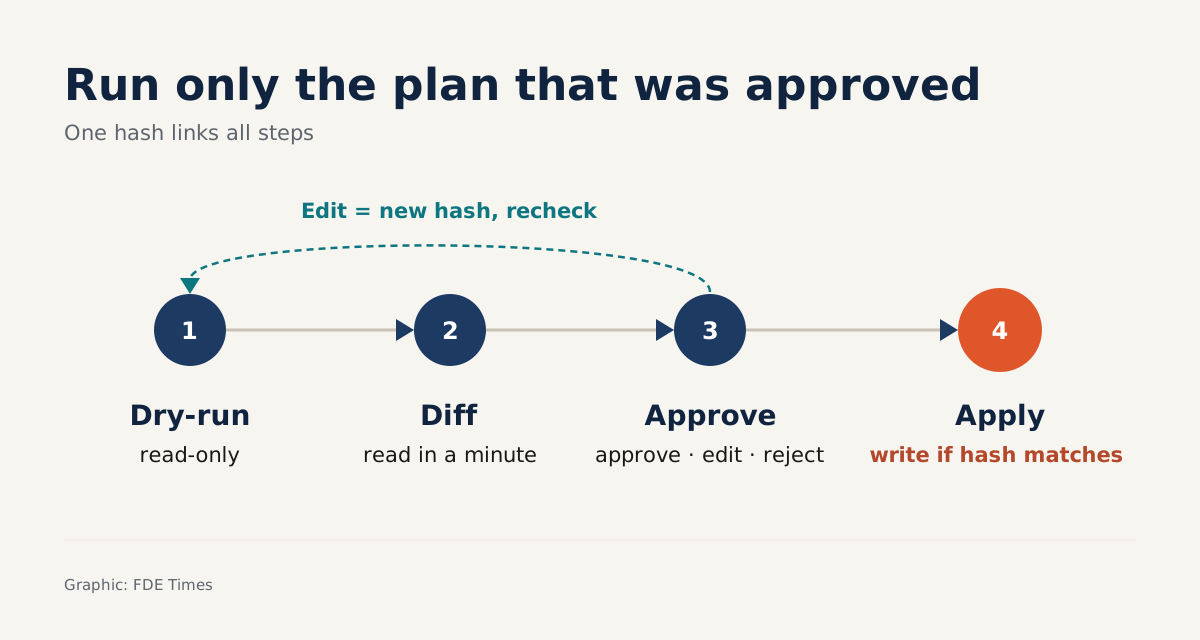
In Terraform, handing a saved plan file to apply is enough, because the tool treats that act as the approval. HashiCorp says so plainly in its documentation: passing in the plan file means it has been approved.
It is a small convention, but it answers a question every FDE who builds agents runs into: how do you know that what runs is exactly what a person reviewed?
The question is hardest when the agent writes to a client’s CRM. Picture your agent updating the status of a few hundred contacts after a data clean-up. If it writes the wrong thing, the client loses both the data and their trust in the project.
This guide shows how to build four safeguards around every write: a dry-run that produces a plan, a diff on screen, a wait for human approval, and then applying exactly the approved plan. The code is in Python and simplified. crm is a hypothetical client; swap in the client’s real SDK.
What do you need?
You need Python 3 and a CRM sandbox, either the client’s or your own. To try the original pattern, install Terraform as well. Do not run the first version against production data: Anthropic recommends testing thoroughly in a sandbox and putting appropriate guardrails around autonomous agents, and that advice matters even more when the agent has write access.
Before writing any code, try the original pattern in Terraform:
terraform plan -out=tfplan   # save the plan to a file, nothing changes yet
terraform apply tfplan       # passing the file = approval, runs exactly that plan
Without -out, Terraform only produces a speculative plan: a description of the effects, not meant to be applied. And when you apply a saved plan, you cannot add any other planning modes or options. The plan you reviewed is the plan that runs, and an agent writing to a CRM needs exactly that property.
Step 1: the dry-run may only read
The dry-run reads the current state of each record, compares it with the values the agent wants to write, and keeps only the fields that actually change. The result is hashed with SHA-256 so the plan has a unique identifier.
# Simplified: crm is a hypothetical client
import hashlib, json

def plan_hash(items):
    body = json.dumps(items, sort_keys=True, ensure_ascii=False)
    return hashlib.sha256(body.encode()).hexdigest()

def dry_run(changes, crm):
    items = []
    for c in changes:
        current = crm.get_contact(c["id"])   # read only, no writes
        diff = {f: [current.get(f), v] for f, v in c["fields"].items()
                if current.get(f) != v}
        if diff:
            items.append({"id": c["id"], "diff": diff})
    return {"hash": plan_hash(items), "items": items}
Check: run the function twice in a row against the sandbox. The two hashes must match, and the CRM’s logs must show no write requests. If the hash changes while the data does not, the usual culprit is a missing sort_keys.
Step 2: the diff must be readable in a minute
The reviewer will not read JSON. They need to see each record, each field, the old value, the new value, and the total number of records affected.
def render(plan):
    for item in plan["items"]:
        for field, (old, new) in item["diff"].items():
            print(f'{item["id"]}  {field}: {old!r} -> {new!r}')
    print(f'{len(plan["items"])} records | plan {plan["hash"][:12]}')

def save_plan(plan, path):          # plays the same role as the tfplan file
    with open(path, "w", encoding="utf-8") as f:
        json.dump(plan, f, ensure_ascii=False)
The plan file is the only thing that moves on to the approval and apply steps, just like tfplan. Check: show the output of render to someone who does not write code, such as the client’s CRM admin. If they cannot answer “what will change?”, your diff is not good enough.
Step 3: approve, edit or deny?
Tracecat’s approval gate for agents is a design worth studying. The agent pauses before a tool call that needs approval, and the reviewer chooses to approve, edit or deny it from their inbox. A denied call does not run, and the agent stops entirely rather than calling that tool again.
def decide(plan, path, reviewer, decision):
    assert decision in ("approve", "edit", "deny")
    approval = {"plan_hash": plan["hash"], "reviewer": reviewer,
                "decision": decision}
    with open(path + ".approval.json", "w", encoding="utf-8") as f:
        json.dump(approval, f)       # saved right next to the plan file
    return approval
This simplified version follows two rules. “Edit” means changing the input list of changes and running the dry-run again, so the new plan has a new hash and must be approved again. “Deny” ends the run: if the agent rephrases the request and asks for approval again, reviewers grow tired and start clicking approve just to be done with it.
If you build the agent with LangGraph, this is where the interrupt goes. The LangGraph documentation lists pausing before a critical action to ask for approval as one of the most common uses of interrupts. The checkpointer saves the graph’s exact state, so the reviewer can approve hours later and the run still resumes from exactly where it stopped.
LangGraph also warns of a trap: code before the interrupt runs again on resume, so nothing there may be non-idempotent. That is why your dry-run may only read. If it writes even a single log line to the CRM, the resume will write that line a second time.
Step 4: apply exactly the approved plan
This step loads the plan file and the approval record next to it, then does three things in order: matches the hash against the approved one, checks that nobody has edited the data since the dry-run, and only then writes. Re-hashing items on load catches a plan file that was edited after approval.
The second check is reasoning specific to the CRM problem, not something the Terraform documentation says. HashiCorp only advises always reviewing the final plan before applying it to make sure it still matches your intent. With a CRM, hours can pass between the dry-run and the approval, and in that time the client’s staff carry on editing contacts as usual.
def load(path):
    with open(path, encoding="utf-8") as f:
        plan = json.load(f)
    if plan_hash(plan["items"]) != plan["hash"]:
        raise RuntimeError("Plan file was modified after it was saved")
    with open(path + ".approval.json", encoding="utf-8") as f:
        return plan, json.load(f)

def apply(path, crm):
    plan, approval = load(path)
    if approval["decision"] != "approve" or approval["plan_hash"] != plan["hash"]:
        raise RuntimeError("Plan not approved or has been changed")
    # Check everything first, before writing a single record
    for item in plan["items"]:
        current = crm.get_contact(item["id"])
        if any(current.get(f) != old for f, (old, _) in item["diff"].items()):
            raise RuntimeError(f'{item["id"]} changed after the dry-run, a new plan is needed')
    for item in plan["items"]:
        crm.update_contact(
            item["id"],
            {f: new for f, (_, new) in item["diff"].items()},
            idempotency_key=f'{plan["hash"]}:{item["id"]}',  # hypothetical
        )
The idempotency key is borrowed from Stripe. With Stripe, if the connection fails, you can resend the request with the same key without fear of creating a second object or applying an update twice. Stripe also compares the parameters of the retry with the original request and returns an error if they differ, so each key is tied to exactly one payload.
The idempotency_key parameter in the code above is hypothetical. Not every CRM supports one, so read the client’s API documentation. If the CRM lacks the feature, keep your own table of the hash and id pairs that were applied successfully, and skip them on a re-run.
Check: cut the network in the middle of the write loop, run apply again, and confirm that no record was written twice. Then edit a contact by hand in the sandbox and run apply. The function must stop before writing anything.
Common mistakes
The most dangerous mistake is approving one plan and running another: at the apply step, the agent re-runs the dry-run and writes the new result. The plan -out and apply tfplan pair is designed to block exactly this. The second is interleaving drift checks with writes, so that by the time a mismatch shows up at record 150, the previous 149 have already been written.
The third is a diff that is too big. A plan touching thousands of records will be approved without anyone reading it closely. Split it into small batches, or show per-field statistics alongside a few sample records.
How does this skill show up on a client engagement?
Before the first meeting with a client, have answers ready for the questions that have nothing to do with the model: who is allowed to click approve, who receives the diff, and how data is recovered if a write goes wrong.
Bring these four steps to the meeting and you can turn “do we dare let the agent write?” into a process the client’s CRM operations team controls themselves.
On your CV, do not just write “built a CRM-integrated agent”. Write that you designed a write flow of dry-run, diff, approval and idempotent apply, with a number such as how many writes were blocked because of drift.
When reading FDE job descriptions, look for phrases such as “human-in-the-loop”, “production data” or “guardrails”, and be ready to walk through this four-step flow as a concrete example if asked about system design.
Clients will forget which model you used. What they remember is that the agent never wrote a single line they had not seen first.
Was this article useful?
Thanks for the feedback!