A 200 from a batch API does not mean your records landed
To lose no rows, read every item, match each result to its source record by the right key, and resend only what failed.
In brief
- Microsoft Graph says it plainly: a 200 on the whole batch says nothing about whether the requests inside it succeeded.
- Elasticsearch returns results in the order they were sent, while Graph may reorder them, so with Graph you must match by id.
- Retry only items with transient errors, keeping the same payload and idempotency key; a 424 is a consequence, so do not debug it as the cause.
The Microsoft Graph documentation puts it bluntly: a 200 status code on the batch response header does not mean the individual requests inside the batch succeeded. On a quick read that sounds obvious. Yet a job that checks only that code will still report success when several records inside have failed.
Sooner or later, every FDE has to wire a client’s systems into a bulk API: pushing contacts into a CRM, indexing documents into Elasticsearch for a RAG application, or creating users in bulk in Microsoft 365. The log says “200 OK” and the dashboard is green. A month later the client asks why 3% of their customers are missing from the new system.
The skill involved is narrow, but almost every integration project needs it: read a batch response down to each item, match each result to its source record, then resend only what needs resending. Get this right and your job counts records, where before it only counted requests.
What does 207 actually say?
The 207 Multi-Status code comes from WebDAV. MDN describes it as a success code indicating mixed results, used only in a WebDAV context. RFC 4918 defines 207 as a status for multiple independent operations, with an XML body whose root element is multistatus, containing codes from all four ranges: 200, 300, 400 and 500.
Two things matter in practice. First, when a client’s JSON API returns 207, they have borrowed the number, not the format, so make no assumptions about the body’s structure: read their documentation or pull a real response and look at it.
Second, whether the API returns 207, 200 or anything else, each item still has its own fate.
Elasticsearch makes this clearest. The Bulk API response has an errors flag at the top level: if it is true, one or more operations did not complete, even though the HTTP call itself succeeded. The items array holds the result of each operation, in exactly the order sent.
A batch of 500 documents, three bad rows
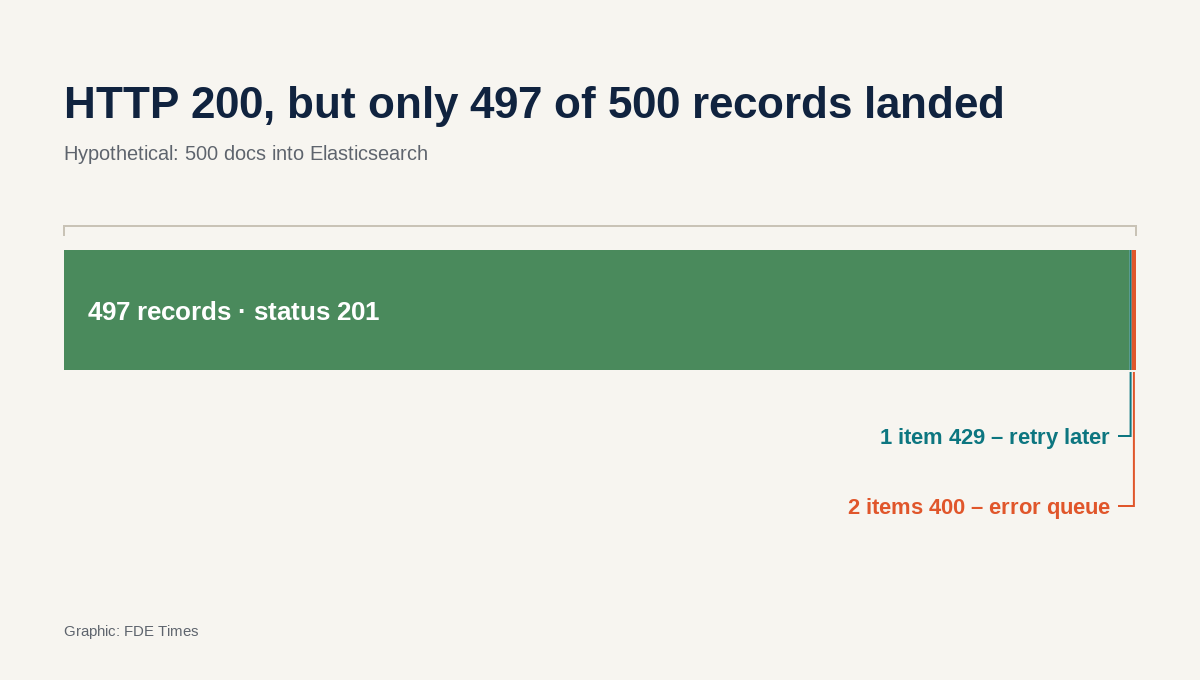
Take a hypothetical case: you index 500 of a client’s contract documents into Elasticsearch. HTTP returns 200, but the body contains "errors": true. In items, most entries carry status 201, one carries 429 because the cluster is overloaded, and two carry 400 because a date field is in the wrong format.
Hasty code logs “500 documents indexed” and moves on. Correct code splits the batch into three groups:
def split_bulk_result(batch, resp):
    if not resp["errors"]:
        return batch, [], []
    items = resp["items"]
    assert len(items) == len(batch), "count mismatch, stopping"
    ok, retry, dead = [], [], []
    for row, item in zip(batch, items):
        op = next(iter(item.values()))  # "index", "create", ...
        status = op["status"]
        if status < 300:
            ok.append(row)
        elif status == 429 or status >= 500:
            retry.append(row)
        else:
            dead.append((row, op.get("error")))
    return ok, retry, dead
Matching with zip is safe here because Elasticsearch guarantees ordering. The result: 497 records go straight in, one record is queued for a retry after a delay, and two records go to a dead-letter queue with their error messages so someone on the client side can fix the source data. No record disappears.
When order cannot be trusted
Move that same code to Microsoft Graph and it breaks at once. Graph warns that individual responses may come back in a different order from the requests, and that the id field is what pairs them. So build a lookup table by id:
by_id = {r["id"]: r for r in resp["responses"]}
for req in batch_requests:
    status = by_id[req["id"]]["status"]
Graph has two more traits to account for when classifying. Each batch holds at most 20 requests, and each sub-request is throttled separately, so one item can receive a 429 while others in the same batch succeed.
If you use dependsOn to order requests, one failed request drags down the requests that depend on it, with a 424 Failed Dependency.
A 424 is the consequence of some other error. If you see ten 424 rows and one 400, only the 400 is worth investigating.
| Item code | Meaning | What to do |
|---|---|---|
| 2xx | Operation completed | Mark the record as synced |
| 429, 5xx | Transient error, usually load | Resend that item alone after a delay |
| 400 and other 4xx | Problem with the data or permissions | Send to the dead-letter queue; retrying is pointless |
| 424 | Cascade failure from a parent request | Fix the parent request, then resend the whole chain |
Retrying without creating duplicates
Resending a whole batch of 500 documents because of a single 429 is the fastest way to generate duplicate data, especially for create operations. Resend only the items in the retry group.
Even when resending a single item, though, the connection can drop midway, leaving you unsure whether the first attempt succeeded. Idempotency keys solve exactly this. Stripe explains that with such a key, after a connection error you can repeat the request without fear of creating a second object or performing an update twice.
Two conditions come with it, and newcomers often miss them. Stripe checks that the parameters of the retry match the original, so you must store the original payload alongside the key rather than rebuilding it from source data that may have changed.
Stripe may also remove keys once they are at least 24 hours old, so the retry queue needs a deadline: once an item falls outside that window, it must pass a duplicate check before being sent.
Six steps, and the familiar traps
The process, condensed: before sending, give each record a stable id and, if the API supports it, an idempotency key. After the response arrives, read the top-level flag such as errors, but do not stop there.
Match each item to its source record, by position if the documentation guarantees ordering, by id if it does not. Classify using the table above, then resend only the transient-error group, with the same payload and the same key.
Finally, record three numbers: sent, succeeded, and pending. The last two must add up to the first.
The common mistakes all sit within these steps. Trusting the batch-level code. Matching by position against an API that never promised ordering. Resending the whole batch instead of only the failures.
Spending an afternoon debugging 424 rows. Rebuilding the payload on retry so it drifts from the original. And assuming a 207 body follows some standard shape, when every vendor defines its own.
On a CV, describe this skill in numbers: records synced per day, reconciliation down to the item, zero records lost.
An exercise for this week: pick a batch endpoint you use often, read the documentation on its response, and write down three answers. Are results returned in order? What does a failed item look like? Is a retry safe?
If you cannot yet answer those three questions, your job is tallying requests while records slip through, and sooner or later the client will notice.
Was this article useful?
Thanks for the feedback!
5 sources
- 207 Multi-Status - HTTP | MDN · 2026-06-22
- HTTP Extensions for Web Distributed Authoring and Versioning (WebDAV) (RFC 4918) · 2007-06
- Combine multiple HTTP requests using JSON batching - Microsoft Graph | Microsoft Learn · 2025-02-21
- Bulk index or delete documents | Elasticsearch API documentation
- Idempotent requests | Stripe API Reference