A right answer can hide a wrong path. Score the agent's tool calls
A golden dataset, a few scoring functions and a Langfuse experiment wired into CI show exactly which step an agent skips.
In brief
- Scoring only the final answer is black-box; scoring the trajectory shows which step the agent got wrong.
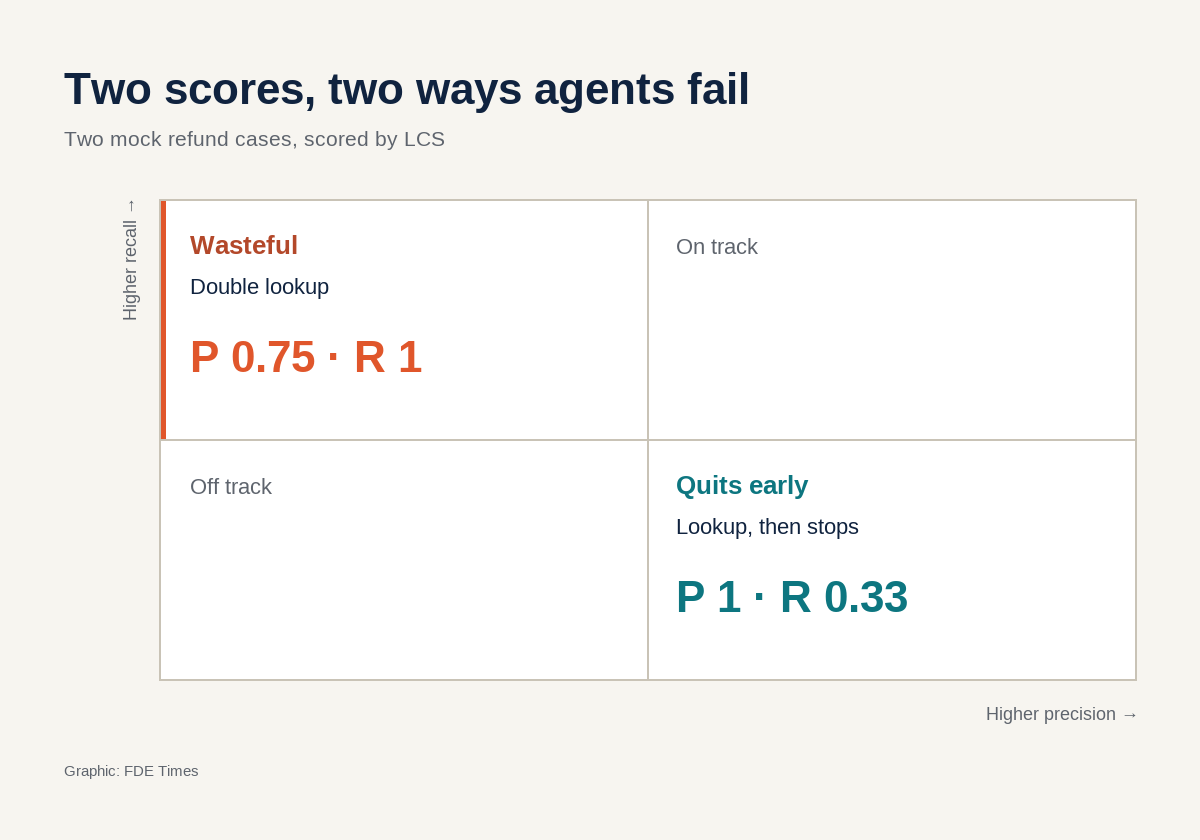
- Low precision with high recall means the agent makes redundant calls. High precision with low recall means it gives up early.
- When several routes are valid, avoid strict matching and use an LLM-as-a-judge that scores against a rubric.
A refund agent tells a customer “Your order has been refunded”, and the statement is true. Along the way, however, it looked up the same order twice.
If you score only the final answer, you will never see that redundant call. This time it merely made the agent slower, but if the repeated tool were one that writes data, the cost would be far higher.
Langfuse’s cookbook calls answer-only scoring black-box, because it ignores every intermediate step. Trajectory evaluation does the opposite: when the answer is wrong, it shows exactly which step of the reasoning went astray.
For a forward deployed engineer, this is the difference between saying “the agent is a bit weak” and “the agent skips the policy check in 3 out of 10 cases”.
This guide walks through a full loop. You will build a dataset with golden trajectories, write the scoring functions, run an experiment in Langfuse, read the results and wire them into CI. You need Python, a Langfuse account and any agent that calls tools. The refund agent below is a hypothetical scenario used for illustration.
Step 1: Golden trajectories must be written by people
The Langfuse cookbook states plainly that you need a “gold standard” dataset of inputs paired with expected outputs or trajectories. The hardest part of the process is not the code. It is sitting down with the people who run the business process and asking: for this request, which steps would a good employee take, and in what order?
For the refund agent, assume the correct process has three steps: look up the order, check the refund policy, create the refund. Write it down as a list of tool names:
expected = ["lookup_order", "check_refund_policy", "create_refund"]Check: every tool name in the list must match, character for character, the name of the tool the agent actually calls. If not, every score that follows will be wrong.
Step 2: Put the trajectory into a Langfuse dataset
Langfuse defines a dataset as a set of inputs and expected outputs used to test an application. Each item has an input; the expected output is optional, and that is where the trajectory goes. The cookbook places the expected sequence of tool calls in the expected_output.trajectory field.
The code below is a sketch. Function names and parameters may differ between SDK versions, so check against the documentation for the version you have installed.
# Sketch — check function signatures against the Langfuse SDK docs
langfuse.create_dataset_item(
    dataset_name="refund-agent-trajectory",
    input={"message": "I want a refund for order 1234"},
    expected_output={
        "trajectory": ["lookup_order", "check_refund_policy", "create_refund"]
    },
)
Check: open the dataset in the Langfuse UI and confirm that every item shows both the input and the trajectory.
Step 3: Three kinds of match, three different questions
Google Cloud’s Vertex AI documentation on agent evaluation describes three kinds of match, each answering its own question. Exact match requires the right tool calls in the right order, with nothing extra and nothing missing.
In-order match tolerates extra tool calls, provided all the reference tools appear in the correct order. Any-order match only requires all the reference tools to be present; order does not matter.
def exact_match(actual, expected):
    return 1.0 if actual == expected else 0.0

def in_order_match(actual, expected):
    it = iter(actual)
    return 1.0 if all(tool in it for tool in expected) else 0.0

def any_order_match(actual, expected):
    # Simplified: uses a set, so repeated tools are ignored
    return 1.0 if set(expected) <= set(actual) else 0.0
Now apply them to the agent that looked up the order twice: actual = ["lookup_order", "lookup_order", "check_refund_policy", "create_refund"]. Exact match gives 0 because the trajectory is not identical to the reference. In-order match gives 1 because the required steps are still in the right order, and any-order match also gives 1 because no step is missing.
The same run earns one 0 and two 1s. Binary scores tell you whether there is a deviation, but not how large it is. That is why a continuous measure is needed as well.
Step 4: Precision and recall via LCS
Pydantic Evals computes two metrics based on the longest common subsequence (LCS) between the actual and expected trajectories: precision is the LCS divided by the length of the actual trajectory, and recall is the LCS divided by the length of the expected trajectory. Pydantic also specifies that when both trajectories are empty, every mode scores 1.0.
def lcs_len(a, b):
    dp = [[0] * (len(b) + 1) for _ in range(len(a) + 1)]
    for i in range(len(a)):
        for j in range(len(b)):
            dp[i+1][j+1] = dp[i][j] + 1 if a[i] == b[j] else max(dp[i][j+1], dp[i+1][j])
    return dp[-1][-1]

def precision_recall(actual, expected):
    if not actual and not expected:
        return 1.0, 1.0
    l = lcs_len(actual, expected)
    p = l / len(actual) if actual else 0.0   # own convention for the one-side-empty case
    r = l / len(expected) if expected else 0.0
    return p, r
Work it out by hand to be sure you understand it. The double-lookup case has an LCS of 3 and an actual trajectory of length 4, so precision = 3/4 = 0.75 and recall = 3/3 = 1. Second case: the agent calls only lookup_order and then answers straight away. The LCS is 1, precision = 1/1 = 1, and recall = 1/3, about 0.33.
Decagon offers a compact reading: low precision with high recall means a wasteful agent; high precision with low recall means an agent that gives up early. The two cases above fall squarely into those two categories, and each needs a different fix.
A wasteful agent usually needs a better prompt or better memory so that it does not call tools again. An agent that gives up early usually needs stricter stopping conditions.
Step 5: Run an experiment on a versioned dataset
Langfuse lets you run experiments directly on a versioned dataset through the SDK, using run_experiment with a task function. The task function takes an item, calls the agent and returns the list of tool names the agent called. How you obtain that list depends on your agent framework.
# Sketch — check parameter names against the SDK docs
RECALLS = []  # collect per-item recall for use in Step 6

def task(item):
    return run_agent_and_collect_tool_names(item.input)  # your function

def trajectory_eval(output, expected_output):
    p, r = precision_recall(output, expected_output["trajectory"])
    RECALLS.append(r)
    return {"precision": p, "recall": r}

dataset.run_experiment(name="baseline-v1", task=task, evaluators=[trajectory_eval])
Check: every item should have a trace together with precision and recall scores. Open a trace with low recall and find the exact step where the agent stopped. That is the value of glass-box evaluation.
Step 6: Turn scores into a gate
The Langfuse cookbook suggests putting evaluation into CI/CD to block deployments that lower scores on a benchmark dataset. The simplest approach is to save the average recall of the latest run to a file, then fail the build if a new run scores lower.
The script below is a simplified version: it uses the RECALLS collected in Step 5 rather than reading results from the Langfuse API. Call it immediately after run_experiment in the CI job.
# ci_gate.py — simplified version
import json, statistics, sys
from pathlib import Path

BASELINE = Path("eval/baseline_recall.json")

def gate(recalls):
    current = statistics.mean(recalls)
    if BASELINE.exists():
        previous = json.loads(BASELINE.read_text())["recall"]
        if current < previous:
            print(f"FAIL: recall dropped from {previous:.2f} to {current:.2f}")
            sys.exit(1)
    BASELINE.parent.mkdir(parents=True, exist_ok=True)
    BASELINE.write_text(json.dumps({"recall": current}))
    print(f"OK: mean recall = {current:.2f}")

gate(RECALLS)
Commit the baseline file to the repository and update it only on merges to the main branch. If every branch can overwrite it, a weak branch can lower the bar for the next one. Gate precision the same way too, because recall alone will not catch a wasteful agent.
Check: break the agent on purpose, for example by editing the prompt so it skips check_refund_policy. Recall for the refund case drops from 1 to 2/3, mean recall falls, and the CI job should exit with code 1. If the build stays green, your gate is not working.
For agents with write access, such as create_refund, run this gate on every prompt change, not only on code changes.
Three common mistakes
The first mistake is strict matching when the business process allows several valid routes. If looking up an order by order number or by phone number are both correct, exact match will penalise the agent unfairly. For such cases Decagon recommends an LLM-as-a-judge that reads the full trace against a rubric; strict matching should be reserved for processes with a mandatory order.
The second mistake is failing to decide whether failed tool calls count. Pydantic has an include_failed option for exactly this question. A failed create_refund call followed by a retry produces very different precision depending on which way you choose, so choose once and document it.
For the any_order_match function in Step 3, that retry is completely invisible. The function uses a set, so create_refund appearing once or twice both score 1. To catch repeated tools, rely on LCS-based precision or switch to comparing a collections.Counter instead of a set.
The third mistake is a dataset made up entirely of “straight-line” cases. Add cases where the correct trajectory is empty, such as a customer who only says hello; under Pydantic’s rule, if both are empty the score is 1.0. The worrying case is when the expected trajectory is empty but the agent still calls, say, lookup_order:
| Measure | Score | Why |
|---|---|---|
| Exact match | 0 | The actual trajectory differs from the empty list |
| In-order match | 1 | The expected list is empty, so “all reference tools present” is always true |
| Any-order match | 1 | Same reason: the empty set is always a subset of the actual set |
| Precision | 0 | The LCS is 0, divided by the length of the actual trajectory |
| Recall | 0 | The precision_recall function’s own convention above, not Pydantic’s |
So for empty-trajectory cases, score with exact match or precision, and do not trust in-order or any-order match.
What this skill looks like on the customer side
On a customer site, the most important session is often the one where you sit with operations staff to write the golden trajectories. That dataset becomes an implicit contract between you and the customer about what “the agent did it right” means. When the customer asks “is the new version better?”, you answer with recall before and after, not with a hunch.
When reading job descriptions for FDE or AI engineer roles, look for phrases such as “evaluation”, “eval harness” and “regression testing for agents”. On your CV, do not just write “built agents”.
Write that you built a trajectory benchmark for an agent, diagnosed redundant-call and early-quit failures, and wired a regression gate into CI. If you can, include recall before and after your fixes, measured on that same dataset.
Agents will be given more and more authority inside customers’ systems. The person trusted to sign off the next deployment will be the one who can show which steps the agent took.
Was this article useful?
Thanks for the feedback!