Hands-on: make the model cite a source for every claim, and use code to block fabricated answers
Every RAG demo works. A system only earns trust once a checking layer stops fabricated claims before they reach the client's users.

In brief
- The model does not know what is true or false on its own, so every claim in an answer must come with a verbatim quote from the document
- Do not rely on prompt instructions alone: use code to check quotes against the source, check numbers and dates, and retract claims that do not match
- These techniques reduce hallucination but do not eliminate it, so high-risk answers still need human review
A wrong answer that sounds plausible does more harm than “I don’t know”. IBM defines AI hallucination in exactly those terms: outputs that sound plausible but are factually wrong.
Anthropic also acknowledges in its official documentation that even advanced models such as Claude sometimes generate content that is false or inconsistent with the context provided.
For an FDE, this bears directly on whether the product can be trusted. One fabricated statement about a contract clause, caught by a client’s employee, is enough for them to stop trusting the whole system. This guide shows how to build a blocking layer: make the model cite a source for every claim, then use code to check the answer before it goes out.
What you will build, and what you need
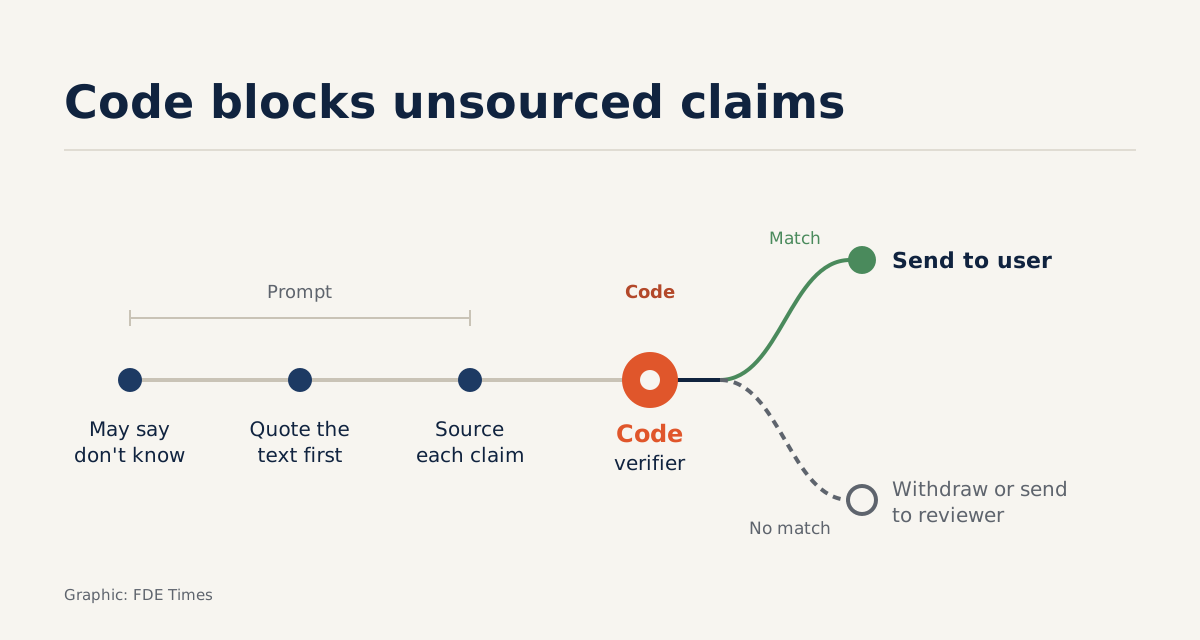
You will build a five-step pipeline. The model is allowed to say it does not know, must quote verbatim before answering, and must attach a quote to every claim. A code-based verifier then checks those quotes against the source document. Any claim that fails is retracted or sent to a human reviewer.
You need Python 3, a plain-text document and access to any LLM. The running example is hypothetical: an insurance company wants an assistant that answers staff questions based on product rules running to a few dozen pages.
This checking layer is necessary because, as IBM explains, generative AI does not “know” what is true or false, so feeding in the right document still does not guarantee the model will stick to it.
Step 1: allow “I don’t know”, require quotes first
Anthropic’s guide to reducing hallucinations sets out a basic technique: give the model permission to admit it is unsure. The documentation describes this as simple but able to cut false information sharply. For documents longer than 20k tokens, Anthropic recommends asking the model to extract the relevant passages verbatim first, and only then carry out the main task.
The prompt below tells the model to answer only from the document in the <document> tag, to write “not found in the document” when the document is insufficient, to put verbatim quotes in a <quotes> tag, to attach one of those quotes to every claim, to retract any claim it cannot quote, and to return JSON.
Answer only based on the document inside the <document> tag.
If the document is not enough to answer, write "Not found in the document".
Step 1: copy the relevant passages VERBATIM into the <quotes> tag.
Step 2: answer. Every point must come with a verbatim quote from step 1.
If you cannot find a quote for a point, retract that point.
Return JSON: {"claims": [{"text": "...", "quote": "..."}], "final": "..."}
The retraction instruction near the end follows the verification pattern Anthropic describes: each claim must have a supporting quote, and if none can be found, the claim must be withdrawn.
Check: ask a question the document definitely cannot answer. If the model still produces a number, the prompt is not strict enough or the document you passed in is contaminated with other content.
Step 2: write a verifier that checks quotes against the source
In the Step 1 prompt, the model both writes the answer and copies out its own quotes. It can easily “quote” a sentence that does not exist in the document, or return broken JSON. So the checking has to be done by code.
import json, re

def norm(s):
    return re.sub(r"\s+", " ", s).strip().lower()

def numbers(s):
    return set(re.findall(r"\d+(?:[.,/]\d+)*", s))

def verify(answer_json, document):
    try:
        claims = json.loads(answer_json)["claims"]
    except (json.JSONDecodeError, KeyError, TypeError):
        return [], [{"error": "invalid_json", "raw": answer_json}]
    doc = norm(document)
    kept, retracted = [], []
    for c in claims:
        q = norm(c.get("quote", ""))
        text = c.get("text", "")
        if q and q in doc and numbers(text) <= numbers(q):
            kept.append(c)
        else:
            retracted.append(c)
    return kept, retracted
This is a simplified version. The function only matches strings after normalising whitespace and case; it does not handle the model altering punctuation or Unicode characters. When the JSON is broken, the function does not try to guess: it returns an error entry for Step 3 to deal with.
Stay sceptical of the verifier itself. A quote that genuinely exists in the document does not necessarily support the claim attached to it: the model can copy a sentence about the waiting period correctly, then pin it to a claim containing a different number. That is why the function adds one cheap check: every number and date in the claim must appear in the quote.
The number check still does not understand meaning; it only catches number mismatches. A claim with no numbers in it will pass this step, so for important categories of question you still need another form of checking, or a human reviewer.
Applied to the insurance example (hypothetical): an employee asks about the waiting period for pre-existing conditions, and the model returns three claims. Two have quotes that match the policy rules verbatim. The third adds a number, and its quote does not exist in the document, so the verifier retracts it and the user receives only the two sourced claims.
Now take a variant: the third claim’s quote does exist in the rules, but the number in the claim is not in the quoted passage. Plain string matching would let it through; the number check retracts it.
Check: deliberately alter one quote in a sample JSON, then change a number in the text field of a different claim, and run it again. Both claims must end up in retracted. Also try a truncated JSON string: the function must return an error entry rather than throw an exception.
Step 3: decide what happens when claims are retracted
The verifier only tells you which claims lack support. How to handle them is a product decision you need to agree with the client.
kept, retracted = verify(raw_answer, document)
if not kept:
    log_for_review(retracted)
    reply = "This information was not found in the document."
elif retracted:
    log_for_review(retracted)   # your logging function
    reply = render(kept)        # show only the sourced points
else:
    reply = render(kept)
log_for_review and render are your own functions (the comments mark them as your logging function and as showing only sourced claims); neither belongs to a library. The fallback reply means “this information was not found in the document”. When the JSON is broken, the first branch runs. You can choose to call the model once more before falling back to the “not found” message, but never show the raw string to the user.
The log of retracted claims deserves careful reading. A claim may be retracted because retrieval failed to pass in the right passage, or because the model fabricated it even though the document was sufficient. Separate the two when reviewing the log, because they are fixed in different ways.
Step 4: run it several times to catch where the model wavers
Anthropic suggests an advanced technique, best-of-N: run the same prompt several times and compare, because inconsistency between runs can be a sign of hallucination.
def consistent(answers):
    finals = {norm(a["final"]) for a in answers}
    return len(finals) == 1
This too is simplified: exact string comparison is far too strict for long answers. In practice you should compare the key facts, such as numbers and dates, reusing the numbers function from Step 2. The technique costs N times as many model calls, so use it only for high-risk categories of question.
Step 5: when should you switch to the Citations API?
Writing citations yourself in the prompt has the weakness described in Step 2. Anthropic’s Citations API handles this on the API side: it returns the exact passage that supports each claim, so you can verify it and show the source to end users.
Anthropic’s documentation says the API parses and extracts cited_text itself, so citations are guaranteed to point validly into the documents provided.
The limitation from Step 2 remains. “Points validly” means the quoted passage is real, not that it actually supports the claim the model wrote. With the Citations API you can drop the string matching, but you should keep the number and date check between each claim and its cited_text.
Common mistakes
The first mistake is giving instructions in the prompt without any code to check them. The second is over-normalising the text, for example stripping out all digits, so that quotes with wrong numbers slip through. The third is treating this pipeline as an absolute guarantee.
Anthropic states plainly that these techniques significantly reduce hallucinations but do not eliminate them, and that critical information must still be validated, especially for high-stakes decisions.
IBM likewise stresses that humans must provide oversight wherever hallucinations could cause serious harm. For the insurance client in the example, answers about coverage amounts should go through a human reviewer even when the verifier has passed them.
At the client, the retraction log is your measure of trust
LlamaIndex describes evaluation in RAG as an objective way to measure the accuracy, faithfulness and speed of answers. At the client, the log from Step 3 is exactly that instrument. Instead of saying “the chatbot is fairly accurate”, you can report what percentage of claims were retracted for each category of question.
When reading job descriptions for FDE or AI engineer roles, watch for terms such as “evaluation”, “guardrails”, “grounding” and “citations”. If they appear, have a concrete example ready of a checking layer you have built, to talk through in the interview.
On a CV, a line such as “built a citation verifier, cutting the share of unsourced claims from X% to Y%”, with your own real figures, carries far more weight than “built a RAG chatbot”.
Next time a client asks whether the chatbot makes things up, do not answer from gut feeling. Open the log of retracted claims and show them.
Was this article useful?
Thanks for the feedback!