Agents that forget too fast and remember too long share one flaw
Split memory into the context window, a per-thread checkpointer and a long-term store, then set a deletion schedule for each before the client asks.
In brief
- Short-term memory is a rolling buffer or the context window and keeps nothing across sessions. Long-term memory has to live in a database, a knowledge graph or vector embeddings.
- LangGraph splits memory into two layers: a checkpointer keeps each thread's state, and a store keeps preferences, facts and knowledge shared across threads. Production needs a durable checkpointer.
- Deletion is part of the design: clear old tool results with context editing, prune checkpoints on a retention schedule, and don't overload the store.
A single redeploy, and every half-finished conversation with the client’s internal support agent is gone. It ran fine on a laptop. The same week, a user complains that the agent still addresses them the way they asked it to stop doing three days earlier.
Take this as a hypothetical second week on a client site. The two failures look like opposites, one forgetting and one remembering too long. The root cause is the same: information sits in the wrong layer, and nobody decided when it should be deleted. For an FDE, that is a design job. The client will ask you, not the LLM vendor.
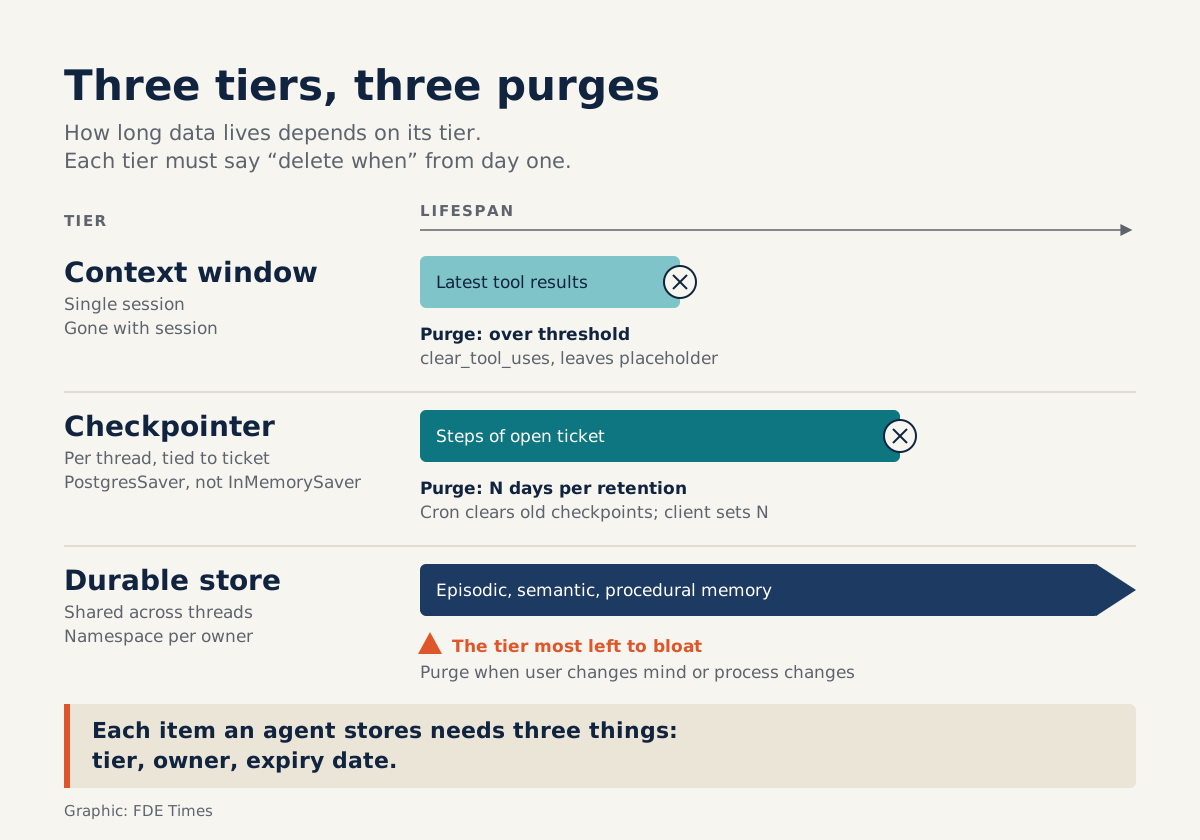
The fix is to split memory into three layers: the context window, a per-thread checkpointer and a long-term store. For each layer, answer “when do we delete this?” at the outset.
The context window keeps nothing across sessions
IBM describes an agent’s short-term memory as usually a rolling buffer or the context window itself. This layer has one property that matters: it carries nothing into the next session. Anything that lives only in the prompt is lost when the session ends.
Long-term memory, again according to IBM, is usually stored in a database, a knowledge graph or vector embeddings. IBM further splits long-term memory into three types. All three belong to the long-term layer, but the split is very useful when you sit down with a client to classify their data.
The first is episodic memory, a record of what happened, typically implemented as structured logs of events, actions and outcomes. The second is semantic memory, which holds structured factual knowledge, such as “customer A is on contract type B”.
The third is procedural memory: skills, rules and learned behavior, such as “always ask for confirmation before cancelling an order”.
Once the data is classified, the question of where to store it largely answers itself.
Two layers in code: thread and cross-thread
LangGraph turns this idea into two concrete components. The checkpointer saves the graph’s state within a thread as a series of checkpoints, so it is short-term, per-thread memory. The store serves long-term memory shared across threads: user preferences, facts, shared knowledge.
The LangGraph documentation says plainly that most applications should use both. The checkpointer tracks the current thread, while the store keeps what needs to persist across threads.
Go back to the two failures above. Conversations vanishing after a deploy is the classic sign of InMemorySaver: according to LangGraph, this checkpointer loses all its data when the process restarts, and production should use a durable one such as PostgresSaver. The wrong form of address is a store problem: the preference was written but never updated.
Worked example: a support agent for a logistics company
Say you are deploying an agent that answers operations staff at a delivery company. Before writing any code, sit down with the client and fill in the table below. The rows are illustrations, not a standard.
| Information | Type | Storage layer | Delete when |
|---|---|---|---|
| Result of the order-lookup tool just called | Short-term, in session | Context window | When the context exceeds the threshold |
| Steps of a ticket in progress | Short-term, per thread | Checkpointer | After N days, per retention policy |
| “Minh prefers short replies and the formal ‘anh’ form of address” | Semantic | Store, namespaced by user | When the user changes their mind or asks for deletion |
| “Last time we switched warehouses, routing broke” | Episodic | Store, written as a structured log | Per the client’s log retention policy |
| “Cancelling an order requires confirmation” | Procedural | Store, shared namespace | When the process changes |
Don’t leave the last column blank. Fill it in during the discovery session, while the person with authority to decide is still at the table.
The matching code skeleton is leaner than you might expect. The checkpointer and store are both created explicitly, setup() is called once to create the tables, and writing preferences happens inside a node:
from langgraph.checkpoint.postgres import PostgresSaver
from langgraph.store.postgres import PostgresStore
from langgraph.store.base import BaseStore

# node that saves preferences under the user's namespace
def save_preferences(state, config, *, store: BaseStore):
    user_id = config["configurable"]["user_id"]
    store.put(("users", user_id), "style",
              {"tone": "short", "address_as": "anh"})
    return {}

builder.add_node("save_preferences", save_preferences)

# durable checkpointer and store: they survive every deploy
with PostgresSaver.from_conn_string(DB_URI) as checkpointer, \
     PostgresStore.from_conn_string(DB_URI) as store:
    checkpointer.setup()  # create tables on first run
    store.setup()
    graph = builder.compile(checkpointer=checkpointer, store=store)

    config = {"configurable": {"thread_id": ticket_id, "user_id": user_id}}
    graph.invoke({"messages": [msg]}, config)
The detail to notice is that thread_id is tied to the ticket, not the user. Once the ticket closes, its checkpoints lose their value. Minh’s preferences must outlive every ticket, so they go in the store, under a namespace carrying user_id.
When to delete: three layers, three rhythms
The first rhythm runs within a single session, at the context-window layer. Anthropic’s context editing offers the clear_tool_uses_20250919 strategy, which automatically clears old tool results once the context exceeds a threshold you configure. Each cleared result is replaced with a placeholder, so the model knows content was removed.
The cost is that clearing content invalidates the cached prompt prefix, so cost and latency can rise on the next turn. When used with the memory tool, Claude receives an automatic warning as the context nears the threshold, giving it time to save important information.
For the logistics agent, that means the order number being worked on must be written out before the lookup results are cleared.
The second rhythm belongs to the checkpointer. LangGraph recommends periodically cleaning up old checkpoints or setting a retention policy, for example a cron job that deletes checkpoints older than N days. The client decides N; your job is to propose a value and write it down.
The third rhythm belongs to the long-term store, the layer most likely to be left to bloat. IBM counts retrieval optimization among the biggest challenges in memory design, because storing too much slows responses.
Stuffing every chat message into a vector store does not make an agent smarter. It only makes it slower and more likely to pull up the wrong memory.
The order to build it in
Start with the classification table above, and do it with the client rather than alone. Next, use a durable checkpointer from the dev environment onward, so that state lost on a process restart shows up early, before production.
Then design the store’s namespaces around data ownership, so that a “delete my data” request means deleting a single namespace.
Only then turn on context editing and tune the threshold. Measure latency before and after, because cache invalidation is real.
The most common mistakes
The most common mistake is shipping InMemorySaver to production because “the demo worked”. The second is mixing thread state with facts about the user, so closing a ticket wipes out preferences, or, conversely, debris from old tickets leaks into every new conversation.
The third is treating the store as a bottomless bin, then spending a quarter later investigating why the agent got slow. The fourth is harder to spot: nobody owns the deletion policy, so when the client’s legal team asks, nobody can answer.
When reading FDE job descriptions, phrases such as “stateful agents”, “conversation persistence” or “data retention” are where this experience belongs. On a CV, a line like “designed two-layer memory for an agent, with a durable checkpointer and per-ticket retention” carries far more weight than “used LangGraph”.
This week’s exercise
Take an agent you have built, even a personal demo. Fill in the four-column table for everything it remembers, then restart the process mid-conversation and record what survived and what was lost.
Any row with a blank “delete when” column is an incident waiting to happen at your first client site.
Was this article useful?
Thanks for the feedback!