Zarf: package a whole Kubernetes app into one file for clusters with no internet
When a customer's Kubernetes cluster cannot pull a single image from the internet, you have to bring everything the application needs with you. Zarf was built for exactly that job.

In brief
- Zarf bundles images, Helm charts and configuration into one file to carry into a Kubernetes cluster with no internet access.
- The build command generates an SBOM unless you deliberately skip it, so documentation is ready for the customer's security team to review.
- Zarf is a statically compiled binary written in Go and Rust, with no external dependencies, licensed under Apache-2.0.
Picture a helm install that fails on its first line because the node cannot pull an image. On an ordinary Kubernetes cluster, that is a configuration error. On the cluster of a bank, a factory or a defence unit with no route to the internet, it is a daily occurrence, and each time it means another round of approvals to copy files in.
Zarf cannot remove that approval round, but it collapses many piecemeal transfers into one: a single file, checked before it crosses the boundary. According to the official documentation, it is a declarative tool for packaging and delivering software into disconnected, restricted-network or fully standalone environments.
For FDEs this is not a niche concern. The more customers you have in tightly regulated industries, the more often you will need to deliver software into a cluster you will never be allowed to connect to.
The real problem is “bring everything”
According to Mattermost, a vendor that has deployed its product with Zarf, the tool is designed to deliver software into isolated systems along with all the files and dependencies it needs. Its original purpose was installing applications onto Kubernetes-orchestrated container clusters that go long stretches without connectivity.
The tool’s origins explain why it is so strict. Wayne Starr of Defense Unicorns, the company that first wrote Zarf, says it grew out of research at the Naval Postgraduate School for the US Navy.
Brandt Keller, who works on Zarf, said on the OpenSSF podcast that from the start it aimed at packaging, moving and deploying software reliably. Everything is described in a declarative manifest, so the package captures the exact state of the application and every deployment produces the same result.
What goes into a package?
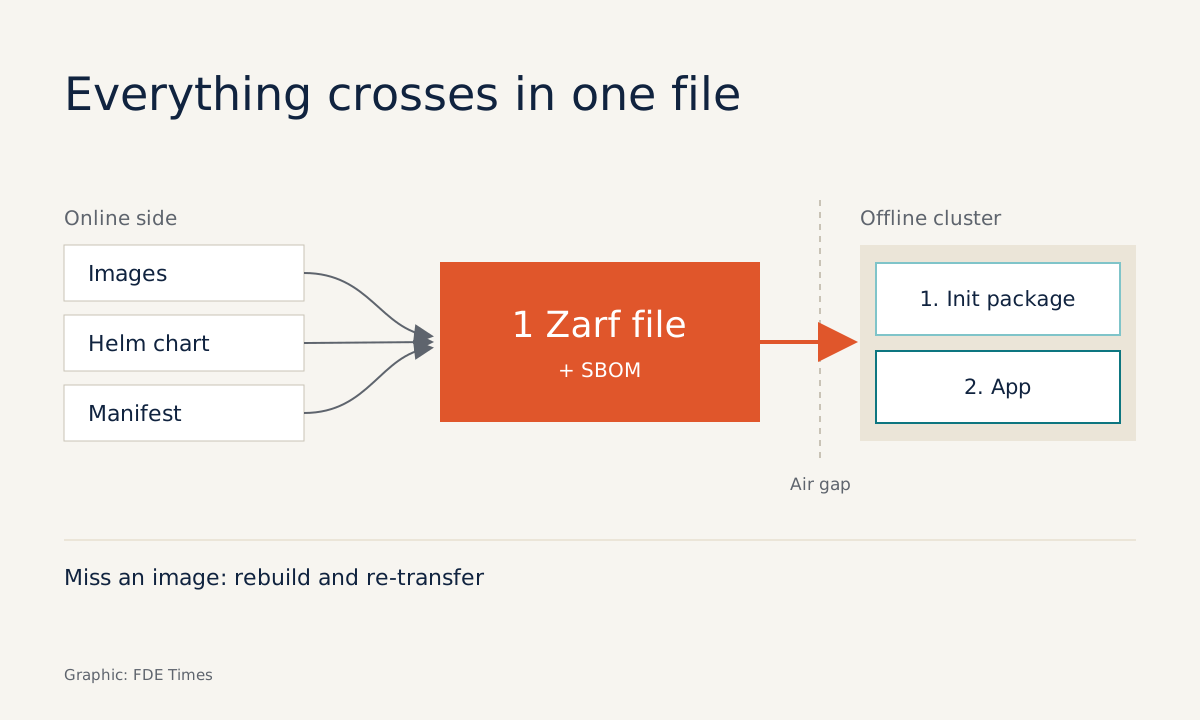
OpenSSF’s write-up says a Zarf package bundles an application’s images, Helm charts and configuration into a single file. The Create a Package documentation describes zarf package create working in order: it loads the contents of each component, collects every image, generates an SBOM unless you deliberately skip it, and only then writes the archive file.
An SBOM sounds like a side feature, but it is valuable. At tightly regulated customers, what holds you up longest is usually not the install command but the security review that precedes it. When the component list travels with the very file being brought in, you answer the question “what is in this?” with documentation rather than memory.
Keller advises that everything be checked before it crosses the boundary into the isolated network. So do not skip the SBOM just to shave a few minutes off the build.
Walking through a deployment
Suppose you need to deliver an application to a bank’s on-prem cluster: two images, backend and frontend, a Helm chart and a ConfigMap manifest. The declaration step is listing all four in a zarf.yaml file.
The template in the documentation starts with kind: ZarfPackageConfig; the rest below is a minimal illustration only, and field names should be checked against the Create a Package page before use:
kind: ZarfPackageConfig
metadata:
  name: bank-app
  version: 0.1.0
components:
  - name: app
    required: true
    images:
      - registry.example.com/backend:1.0.0
      - registry.example.com/frontend:1.0.0
    charts:
      - name: app-chart
        localPath: ./chart
        namespace: app
    manifests:
      - name: config
        files:
          - ./configmap.yaml
The easiest place to go wrong is the images list: it must match every image the chart actually uses. Build on a connected machine and you get a single archive file with an SBOM.
That file travels through whatever channel the customer permits to the disconnected side. Per the Getting Started guide, on a fresh cluster you run zarf init first, then deploy the package. The whole command sequence is short (the file name is illustrative):
# Connected side: build the package from zarf.yaml
zarf package create .

# Disconnected side, first install on a fresh cluster
zarf init
zarf package deploy <your-package-file>
The deploy command also accepts packages from an OCI registry. The Getting Started example installs the dos-games sample package from ghcr.io and passes a --key flag pointing to a public key to verify the package signature, in keeping with the principle of checking before trusting.
The biggest benefit is repeatability. For the next upgrade, you edit zarf.yaml, build and deploy again through the same process, rather than redoing each step by hand.
What limits should you know before promising a customer anything?
The biggest risk comes from the “bring everything” model itself. Because nothing more can be pulled at deploy time, forgetting one image or one subchart means rebuilding and transferring the file again from scratch, through the customer’s full approval process.
The next limit is scope. Zarf is designed for Kubernetes clusters and cloud-native workloads, so it pays off when the customer already has, or will stand up, such a cluster. According to the FAQ, Zarf also runs in connected environments, so you can use the same package for both test environments and closed ones.
Zarf itself is a statically compiled binary built in Go and Rust, with no external dependencies. Carrying the tool into a closed environment is therefore as simple as carrying the package.
Three mistakes to check for before the file leaves the connected side
The most common mistake is a missing image: the chart pulls an extra sidecar or auxiliary image that zarf.yaml does not list. To check, deploy the package to a kind cluster with outbound internet blocked, then see whether any pod is stuck unable to pull an image.
The second is getting the order wrong: deploying the application package to a cluster that has not run zarf init. Put this step in the runbook you hand the customer, because their operators may not know it.
The third is skipping the SBOM or signature to save time. Picture the security review: a few minutes saved at build time can be repaid with days of waiting for approval, simply because no one can say what the package contains.
What to learn first, and how to talk about it in interviews
Zarf is free and licensed under Apache-2.0, but the tool is only the top layer. Before touching it, you need to be solid on Helm, on how images get pulled onto nodes, and on OCI registries, because those are exactly what Zarf packages up.
When reading FDE job descriptions, watch for the words “air-gapped”, “on-prem”, “disconnected”, or customers in defence and finance. On your CV, do not just write “knows Zarf”: say that you packaged a real application, deployed it to a cluster with no network, and handed the SBOM to a security team for review.
In interviews, tell it in sequence: how you listed the dependencies, how you tested the package on an isolated cluster, and what documentation you gave the security team. Interviewers want to hear that you anticipated the failure points, not just that you know the tool’s name.
At air-gapped customers, you rarely get a second chance to fix a mistake on the same day. A package checked thoroughly before it leaves the connected side is how you keep your promise to the customer.
Was this article useful?
Thanks for the feedback!
9 sources
- What is Zarf? | Zarf documentation
- GitHub - zarf-dev/zarf: The Airgap Native Package Manager for Kubernetes
- FAQ | Zarf
- Getting Started | Zarf
- Create a Package | Zarf
- Tech Talk Recap: Simplifying DevSecOps in Air-Gapped Environments with Zarf · 2025-11-18
- What’s in the SOSS? Podcast #60 – S3E12 Packaging, Transferring, and Deploying Software in Air-Gapped Environments with Zarf · 2026-05-05
- The Kubelist Podcast | Ep. #42, Zarf with Wayne Starr of Defense Unicorns | Heavybit · 2024-07-31
- Deploying Mattermost with Zarf for highly secure air-gapped collaboration · 2023-03-07