Unstructured: parsing a client's Word files, slide decks and email by structure before RAG
Out of the box, Unstructured skips email attachments and splits long sections into small pieces. Change a few settings before you index a client's documents.

In brief
- Unstructured has separate partition functions for .docx and .pptx. They return elements that carry metadata about their place in the document.
- For email, attachments are processed only if you set process_attachments=True.
- by_title keeps each chunk inside one section, but the default 500-character limit needs tuning to fit the client's documents.
A client’s knowledge base rarely lives in a database. It sits in Word contracts, PowerPoint decks prepared for the board, and email threads where the real content is in the attachment. If you merge all that text into one block and cut a chunk every N characters before passing it to RAG, you lose the thing that matters most: structure.
If content is split into fragments or skipped at ingestion, changing the model or tuning the prompt later will not do much to recover it. A retriever cannot find what was never indexed.
Unstructured is an open-source library under the Apache-2.0 licence. Its developers describe it as free and say its aim is to turn documents into structured data. According to the company, supported formats include Word, PowerPoint and email, as well as Excel, HTML, images and scans.
Before you chunk, know what each piece is
The first step in Unstructured is partitioning: pre-processing raw documents into elements. Word .docx files have their own function, partition_docx, and PowerPoint .pptx files have partition_pptx.
What comes back is not a flat block of text but a list of elements, each carrying metadata. The parent_id field shows where the element sits in the document’s hierarchy, so when a chunk is retrieved you can trace it back to the section it came from.
This metadata should travel with each chunk into the index. Jim Allen Wallace writes on the Redis blog that fields such as document name, section title and page number help both retrieval ranking and answer quality. For the client, it also means the system can cite “clause 4.2, page 7” rather than return text with no clear source.
Email: the real content is often in the attachment
Email is where the default settings do the most damage. Unstructured’s documentation says attachments are partitioned only when you set process_attachments=True. The documentation for LangChain’s UnstructuredEmailLoader, which wraps Unstructured, also describes this as an option you must turn on yourself.
Picture an email thread with a client where the body says only “please see the attachment” and the 12-page proposal is in a Word file. Forget this parameter and your RAG system sees only the greeting.
Once it is on, elements produced from an attachment carry a metadata field naming the file it was attached to. An answer drawn from the proposal can then still point back to the email that delivered it.
Keep section boundaries with by_title, then tune the 500
Next comes chunking. The by_title strategy preserves section boundaries, and page boundaries too if you need them. In practice, no chunk will contain the second half of a “Payment terms” section and the first half of a “Warranty” section.
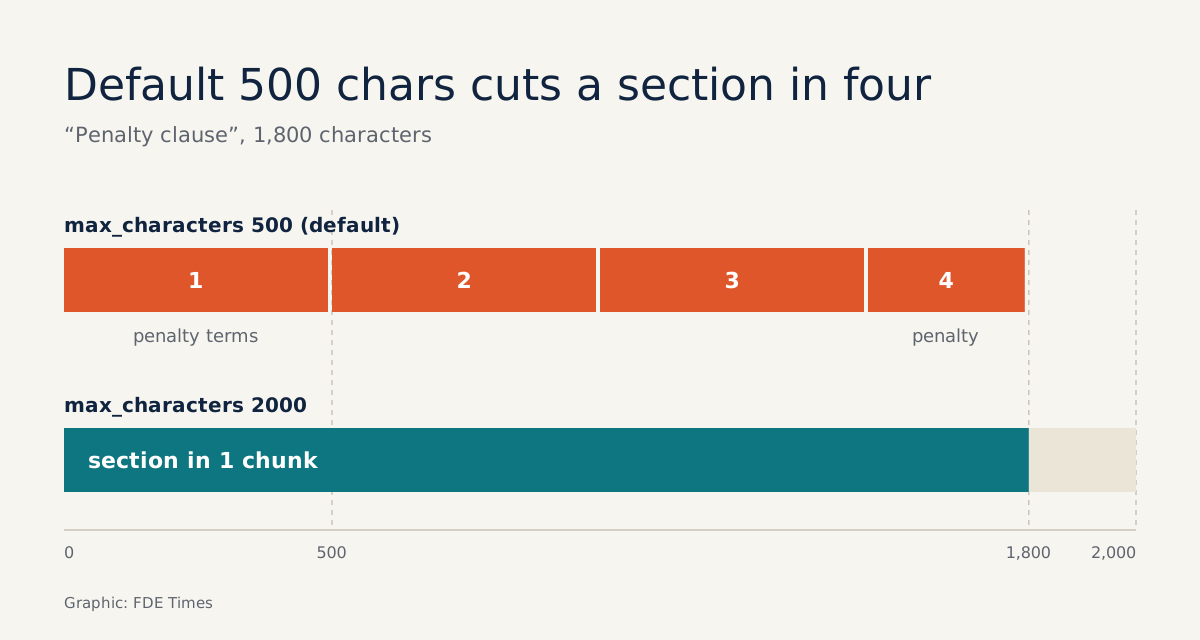
The number to watch is max_characters, the hard limit on chunk size, which defaults to 500 characters. Take a “Penalty clause” section of 1,800 characters: because 1,800 is more than 3 × 500, that section needs at least four chunks.
If the conditions for the penalty are in the first chunk and the amount is in the last, a question such as “what is the penalty for late delivery?” may retrieve only half the answer. The Redis piece sets out the principle behind structure-based chunking: an element is split only when it exceeds the maximum size; otherwise it is kept whole.
So the real question is where to set the limit. Redis advises treating chunk size as a parameter to tune, not a number copied from an old configuration. Base it on how long the sections in the client’s documents actually are, and on your eval results.
Tables break most easily
Unstructured splits tables that are too large into TableChunk pieces by cutting the text. Imagine a client asking about a price list or an SLA table several pages long: if the table is cut in the wrong place, the answer will be wrong too.
Redis lists ignoring structure among the common production failures: tables separated from their header rows, lists separated from their headings, and chunks that lose their original meaning. A table fragment that has numbers but no column names is of little use, even if the retriever finds it.
The fix starts with the size limit itself. Because an element is split only when it exceeds max_characters, raising the limit enough to hold the important tables keeps each of them whole in one chunk. For tables that are still too long, read each TableChunk and check which pieces still have the column header row and which have lost it.
Three steps in one block of code
Put together, a minimal pipeline has three steps: partition, read the elements yourself, then chunk by section with a limit above the default.
from unstructured.partition.docx import partition_docx
from unstructured.partition.email import partition_email
from unstructured.chunking.title import chunk_by_title

elements = partition_docx(filename="contract.docx")

# Print the first 10 elements to see how the document was split
for el in elements[:10]:
    print(type(el).__name__, "|", el.metadata.parent_id, "|", el.text[:60])

chunks = chunk_by_title(elements, max_characters=2000)
print(len(chunks), "chunks")

# Email: attachments are partitioned only when this is turned on
mail = partition_email(filename="quote.eml", process_attachments=True)
The value 2000 is only a starting point, chosen for the 1,800-character section in the example above. Run both 500 and 2000 against the same set of real questions, and keep whichever gives more complete answers.
Check for these five mistakes before the demo
Go through the table below before you index the whole collection. Each row is a mistake, how to spot it and what to do about it.
| Common mistake | Symptom | What to do |
|---|---|---|
| Attachments not enabled | RAG returns only the greeting from the email | Set process_attachments=True |
| Leaving the limit at 500 characters | Answers miss the second half of a clause | Compare two max_characters values on real questions |
| Tables cut apart | Table fragments without column names | Raise max_characters, reread each TableChunk |
| Metadata dropped at embedding | Cannot cite the section or page | Store section title, page number and parent_id with each chunk |
| Running the full collection without checking samples | Sections merged or broken for no clear reason | Partition a few sample files and read each element yourself |
Do not skip the last row. An afternoon spent partitioning a few of the client’s own files and reading the element list costs far less than discovering merged sections or broken tables after the whole collection has been embedded.
When you put this skill on your CV, do not just write “used Unstructured”. Say that you handled email attachments, kept tables intact, tuned chunk size to section length, and how many more answers you got right on the client’s real questions as a result.
At the demo, the client will not ask which embedding model you chose. They will ask why the system cannot find the quote from last week’s email, and the answer is often a parameter you did not turn on.
Was this article useful?
Thanks for the feedback!