An agent crashes at order 120, and Temporal keeps the 119 already done
Durable Execution pushes checkpoints and retries into the platform, sparing 119 repeat LLM calls and the risk of duplicate writes to the client's ERP.
In brief
- Temporal moves failure handling out of application code and into the platform: if a worker crashes, the Temporal Service hands the work to another worker.
- Recovery is based on Event History, so Workflow code must be deterministic; LLM and tool calls must live in Activities.
- Activities are retried automatically, so it is up to you to design them to be idempotent.
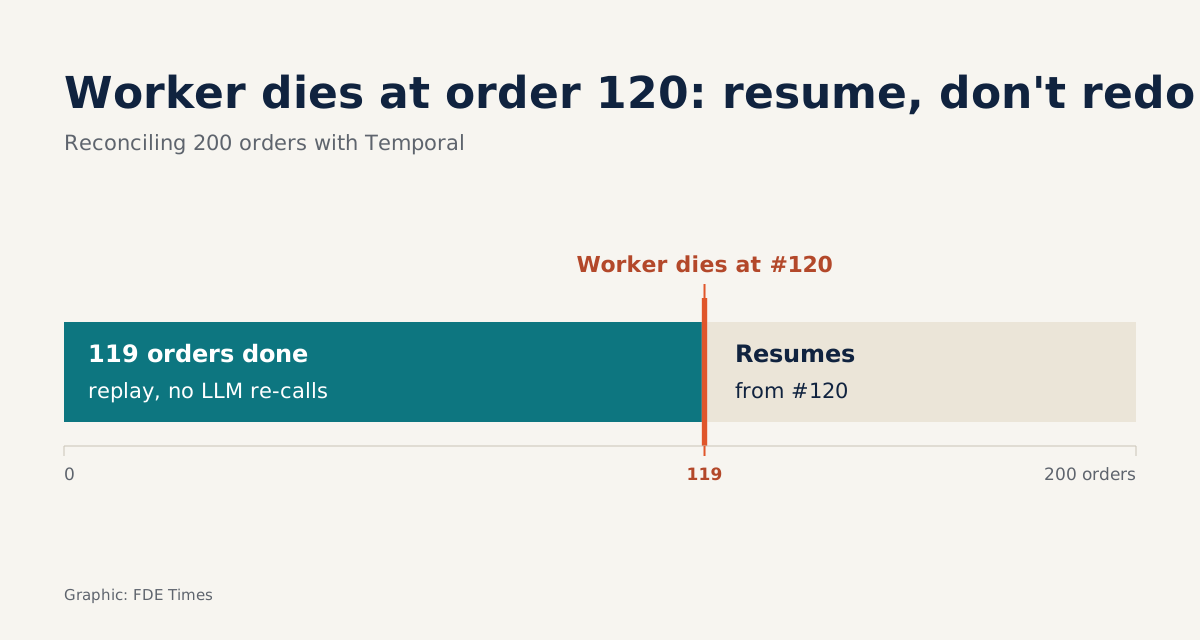
Picture an agent reconciling 200 orders for a logistics client. For each order, it calls an LLM to read the documents and then writes the result into the client’s ERP. At order 120 the ERP hangs, and the worker running the agent dies with it.
If the whole loop lives only in memory, you lose all 119 orders already processed. Starting again from scratch costs another 119 LLM calls and, worse, may write duplicates into the ERP. On a client site, an incident like that is enough to ensure the second demo never happens.
This is the problem Temporal sets out to solve. Samar Abbas, Temporal’s CEO and co-founder, argues that agentic AI does not create new problems so much as expose old ones, such as state management and failure handling. For an FDE, that is worth reading as a reminder: the hard part of a production agent is usually not the prompt.
What does Temporal do, in brief?
Temporal is an open-source, MIT-licensed platform from Temporal Technologies. You write business logic with the SDK for your language, and Temporal runs that code as Durable Execution. The official documentation states that once started, a Workflow will run to completion, whether that takes seconds or months.
The core idea is to move failure handling out of application code and into the platform. If a worker crashes, the Temporal Service hands the work to another worker. You do not have to write your own checkpoints, store a “how far did we get” flag in a database, or build your own retry queue.
The company is also betting openly on agents. Its homepage has a dedicated use case for agents, MCP and AI pipelines that keep running through failures. Its funding announcement in February 2026 put agentic AI in the headline.
Recovery by rereading history
Temporal does not take memory snapshots. Everything that happens in a Workflow is recorded in Event History, an ordered log that the documentation treats as the source of truth for everything that has happened in the Workflow. When a new worker picks up the work, it replays this log to rebuild state.
Apply that to the 200-order example: each LLM call and each ERP write is an Activity. The results for the first 119 orders are already in Event History. The new worker replays, sees that 119 steps already have results and so does not call them again, then continues from order 120.
The ERP call that hung at order 120 is retried automatically under a Retry Policy. The advice here is not to leave the policy on its defaults without review: check it, and set the maximum number of attempts and the timeouts explicitly to suit what the client’s system can bear.
The replay mechanism comes with a discipline that newcomers often trip over.
The boundary between Workflow and Activity
Because Workflows are replayed, Workflow code must be deterministic: given the same history, it must make the same decisions. An LLM call with the same prompt may return a different answer the next time, so it cannot sit directly in a Workflow. LLM calls, tool calls and calls to the client’s APIs all belong in Activities.
| Workflow | Activity | |
|---|---|---|
| What it contains | Orchestration logic: step order, branching, the agent loop | Fragile work: LLM calls, tools, the ERP, sending email |
| Requirement | Deterministic, because it will be replayed | Should be idempotent, because it will be retried |
| On failure | Another worker replays Event History and continues | Retried automatically under the Retry Policy |
| Common mistake | Calling an LLM or reading the system clock inside the Workflow | Writing duplicate records on retry |
The right-hand column is where the FDE has to do their own share of the work. Temporal recommends that Activities be idempotent, meaning that running one twice does not produce two side effects.
Walk through a concrete case. The Activity writes order 120 into the ERP; the ERP actually saves it, but the response does not come back in time, so the Activity is treated as failed and retried. If the Activity only knows how to “create a new record”, the ERP now has two rows for the same order.
The fix is to write with a unique key derived from the order number. The retry sends the same key, the ERP recognises that the record already exists and simply updates it, so however many retries happen there is still only one row. Temporal handles the retrying; whether a retry is safe remains your responsibility.
When to use it, and when you don’t need it yet
Temporal earns its place when an agent runs many steps, runs for a long time, and touches systems you do not control. That is close to an FDE’s job description: a document-reading pipeline that runs all night, an agent that waits for human approval before continuing, a tool-calling loop hitting a client’s flaky internal API.
For a chatbot that answers a single turn and stops, adding Temporal means one more platform to operate for almost no gain. The real cost lies in the deterministic discipline. A team used to writing agents as one long script will have to restructure its code, and non-determinism bugs typically surface only during replay, that is, in the middle of an incident.
On client sites running on-prem, the calculation needs even more care. If the Temporal Service sits in the client’s infrastructure, someone on their side has to be on call for and operate one more system after you leave. For a pipeline of a few steps that runs in a few minutes, a simple status table plus manual retries may be the easier thing to hand over.
What to learn first to use it on a client site
Do not start by installing a cluster. Get to grips with four concepts, in order: Workflow, Activity, Event History, Retry Policy. A good starting point is Temporal’s official AI Cookbook.
It includes a recipe that builds an agent on the OpenAI Agents SDK, survives failures and chooses its own tools to answer user questions. Alongside it is another recipe for an agentic loop with tool calling.
An exercise worth doing: take that recipe, add an Activity that writes results into a mock ERP table, then kill the worker mid-run and start it again. Then count the rows in the table. If you find duplicates, you have just discovered for yourself why an idempotency key has to be there from day one.
When reading job descriptions for FDE or AI engineer roles, look out for phrases such as “durable execution”, “long-running agents” or Temporal by name. On a CV, a line such as “multi-step reconciliation agent that recovers automatically from worker crashes, with Activities made idempotent by order number” carries far more weight than “experience with LLMs”.
On a client site, the first question is not which model is smartest. It is what your agent will do when their ERP goes down at 2am.
Was this article useful?
Thanks for the feedback!