Tailscale: reach a client's internal services without asking IT to open a single inbound port
On day one at a client site, the thing that blocks an FDE is rarely a technical problem. It is the firewall nobody dares to open. A tool built on WireGuard can clear that blockage in an afternoon.
In brief
- Tailscale builds WireGuard tunnels between machines and uses NAT traversal, so you usually do not have to open any inbound port.
- A single subnet router inside the client's network is enough to reach machines that cannot run the client.
- ACLs deny everything by default. Writing very narrow rules is how you keep the security team's trust.
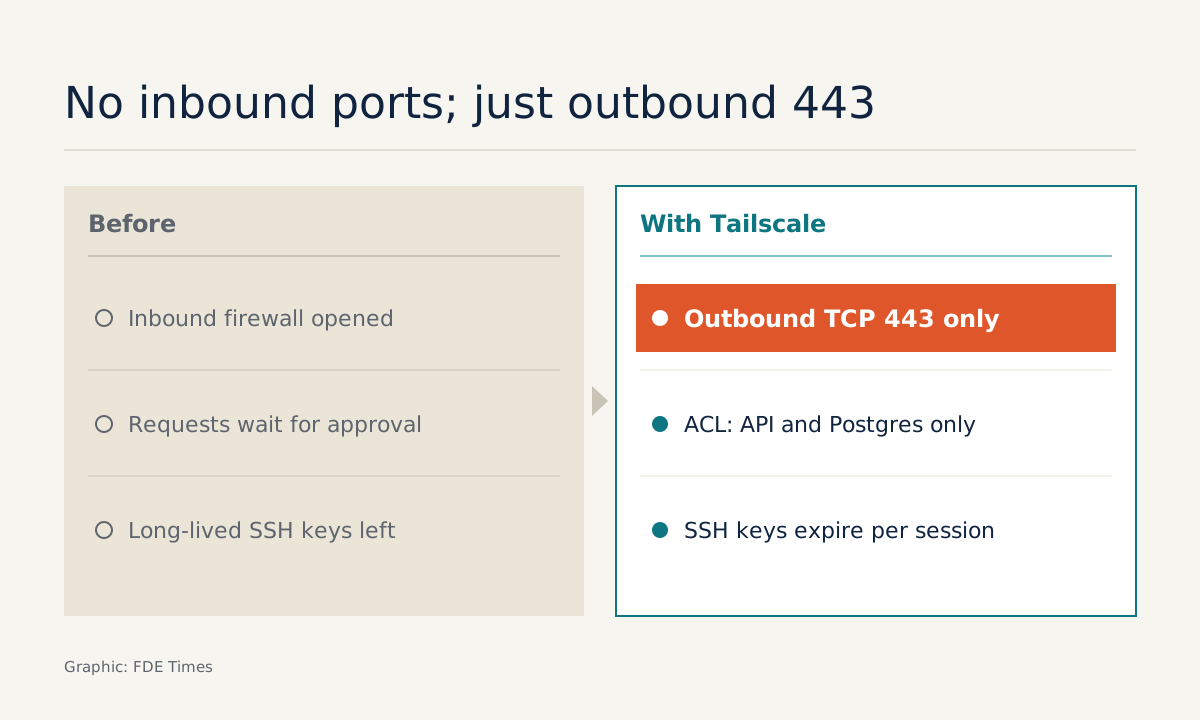
One sentence gets a client’s IT team to say yes far faster: “You don’t need to open any inbound ports.” Tailscale’s official documentation says exactly that. Most of the time you do not have to open any firewall port at all; internal machines only need to be able to initiate outbound TCP connections on port 443.
For an FDE, that matters more than any other feature. Picture the first week of a project: you need to read a database, call an internal API or SSH into the machine running the model, but everything sits behind NAT, and every firewall request waits for approval. Each day of waiting is a day without real work.
Tailscale shortens that wait, provided you understand it well enough to explain it to whoever holds the keys.
Why no ports need opening
In “How Tailscale works”, Avery Pennarun describes WireGuard as the foundation of Tailscale. The protocol creates very lightweight encrypted tunnels between your computers, VMs or containers. WireGuard’s official site calls it a simple, fast VPN that uses modern cryptography.
The valuable part is how the two ends find each other. Tailscale uses NAT traversal to establish connections, so no firewall configuration or public port is needed. When a direct path is not possible, traffic runs through a DERP relay. According to Pennarun, the relay simply forwards already-encrypted packets from one node to another without being able to read their contents.
These are the two arguments to bring into the meeting with the security team. There is no new attack surface facing the Internet. And even when traffic goes through a relay, the intermediary cannot read the data.
What an afternoon at a client site looks like
Imagine the client is a factory. It has an internal API and a Postgres database on the 10.0.0.0/24 network. Those machines are managed by the operations team, which does not allow additional software to be installed.
This is where a subnet router comes in. Tailscale’s documentation defines it as a device in the tailnet that acts as a gateway, advertising routes to other devices. Through it, machines without the Tailscale client remain reachable.
You only need to ask for one Linux machine on that network, install Tailscale on it, have it advertise the subnet’s routes, and allow just that machine to connect outward over TCP 443.
The next step is the one that earns the client’s confidence: writing ACLs. Tailscale ACLs are deny-by-default, directional and enforced on each machine. So you write rules that allow your account to reach the API’s port and the Postgres port, and nothing else. Every other destination on the subnet is blocked automatically without a single extra line.
If you need to get into the machine running the model, Tailscale SSH lets Tailscale handle both authentication and authorisation for SSH connections within the tailnet. It uses auto-generated WireGuard keys that expire when the session ends. When the project closes, no long-lived SSH key of yours is left behind on the client’s servers.
Where the limits are
The documentation says “most of the time”, which means there are exceptions. Some networks block outbound connections too, or allow them only through a proxy. So the first thing to do, before promising anything, is to ask the client whether machines on the network can open outbound TCP connections to port 443.
The second limit is easier to overlook. The documentation states plainly that ACLs do not affect traffic within the local network. The subnet router itself still talks to the whole LAN like any other machine, so ACLs only control who in the tailnet can pass through it.
Place the router where the client’s network team agrees it should go, and tell them about this point directly rather than leaving them to discover it.
The third limit concerns due diligence. The official GitHub repository contains most of Tailscale’s open-source code, including the tailscaled daemon and the CLI, under the BSD-3-Clause licence.
“Most” means not all, and a tailnet still needs a coordination server. Clients in heavily regulated industries are likely to ask about this, so give a precise answer rather than saying “it’s open source”.
What to learn first
Do not start with the admin console. Start with the three networking concepts Tailscale partly hides: NAT, routes and the deny-by-default principle. Understand them and you will be able to debug when a connection falls back to a relay or when a route is not advertised.
Then practise writing ACLs the way you write code: narrow, reviewed, and tested to confirm which destinations are blocked. On your CV, instead of a generic “Tailscale”, describe the outcome: “set up access for a three-person team to two of a client’s internal services, with no inbound ports opened and permissions restricted by ACL”.
When reading FDE job descriptions, if the role involves deploying inside client infrastructure, have a concrete story ready about how you once gained safe access to an internal network.
The tool is only half the story. An FDE who can open the door to a client’s network in an afternoon, and explain why that door is safe, gets more time for the work that actually matters.
Was this article useful?
Thanks for the feedback!
7 sources
- How Tailscale works · 2020-03-20
- What firewall ports should I open to use Tailscale? · 2026-02-02
- Subnet routers · 2026-01-12
- Manage permissions using ACLs · 2026-01-05
- Tailscale SSH · 2026-01-05
- tailscale/tailscale: The easiest, most secure way to use WireGuard and 2FA
- WireGuard: fast, modern, secure VPN tunnel