Streamlit wins the demo in an afternoon, then it hits a ceiling
Rerunning the whole script is what makes demos fast, but state and permissions are where Streamlit breaks, and three signals tell you when to move on.

In brief
- Streamlit reruns the whole script whenever the screen needs to update; that is why demos are quick to build, and also why complex apps soon hit a ceiling
- st.cache_data stops slow data-loading functions from rerunning after every click; Session State, by contrast, is wiped when the user reloads the tab
- st.login provides authentication through OIDC but not authorisation, so an enterprise client that needs role-based access is the point to change architecture
According to its official documentation, whenever the screen needs to update, Streamlit reruns your entire Python script from the first line to the last. That design choice is why you can build a client demo in an afternoon. It is also one of the reasons an app hits a ceiling once the client wants more than a screen for viewing data.
For a Forward Deployed Engineer this is not theory. On a client site, what you usually need most in the first week is a screen running on real data, so that people on the business side can click around and give feedback. Knowing what Streamlit does well and where it breaks helps you make the client promises you can keep.
What was it built for?
Streamlit describes itself as a faster way to build and share data apps. Snowflake, which announced its intent to acquire Streamlit on 2 March 2022, described it in its press release as an open-source framework that helps developers and data scientists build and share data applications.
The words “data” and “share” mark out exactly where it fits. You do not write a frontend, build an API or worry about routing. You write a Python script that reads data and draws a few widgets, and that script is the application.
The rerun model: why demos are fast and apps get slow
The Streamlit documentation is explicit: by default, every time a user interacts with a widget, the app reruns. This keeps the code easy to follow. There are no tangled callbacks and no interface state to keep in sync; read the script from top to bottom and you know what the screen will show.
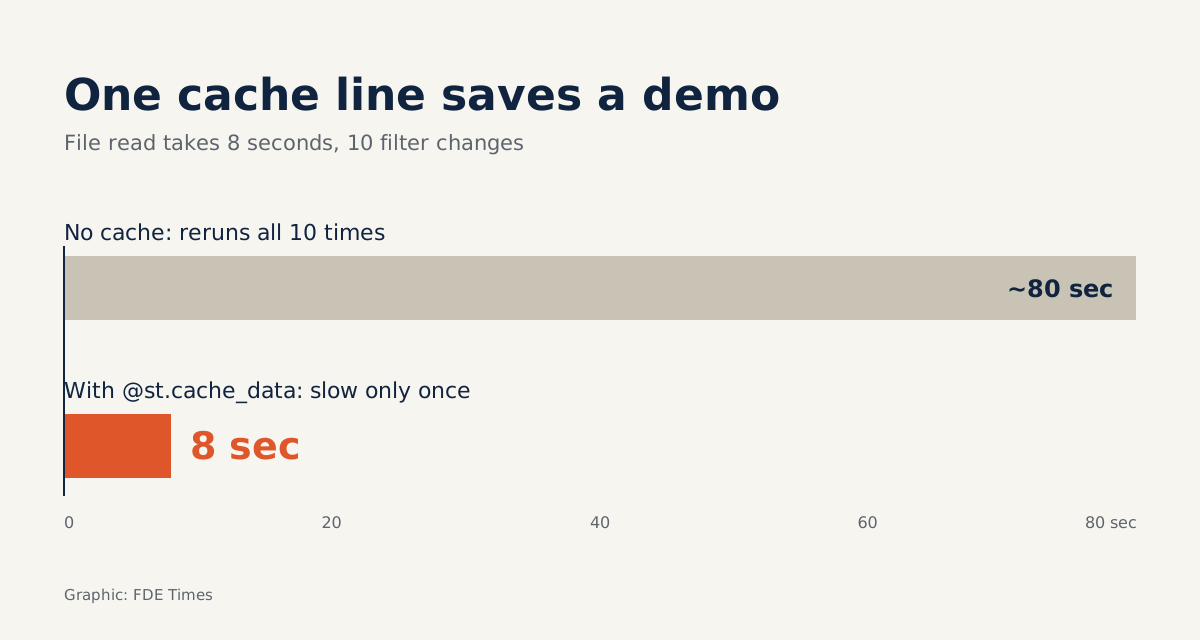
The cost lies in slow functions. Imagine a demo for a logistics company in which the function that reads the orders file takes about eight seconds. If the client changes a filter ten times during the meeting, that is ten reruns, roughly eighty seconds of watching a spinner, which is enough to make the demo lose its rhythm.
Streamlit has a caching mechanism for exactly this problem. The documentation notes that without caching, long-running functions run again and again and slow the app down. For functions that return data, the recommended default is st.cache_data:
import streamlit as st
import pandas as pd

@st.cache_data
def load_orders(path):
    return pd.read_csv(path)  # slow, but only really runs the first time

orders = load_orders("orders_sample.csv")

if "notes" not in st.session_state:
    st.session_state["notes"] = []  # the user's notes for this session
In the logistics example, the eight seconds are now spent only the first time; the nine filter changes that follow pull the data from the cache. One more point: according to the documentation, st.cache_data creates a fresh copy of the data on every function call.
That means modifying the DataFrame in your script will not corrupt the cache, but with very large tables the copying also costs resources.
The first thing to do when you open your laptop at the client’s office: wrap every data-loading function in @st.cache_data before writing a single widget.
Three signals that it is time to move on
The first signal is state. Session State, where you keep data across reruns, is tied to each user session and is not shared between users. The documentation is also blunt: close or reload the tab and everything in Session State disappears.
For a demo, that is acceptable. But if the client starts asking for a multi-step workflow, say an analyst approves a request in step one and a team lead approves it in step two, a single press of F5 can wipe out the work. At that point you need durable storage and an architecture that genuinely manages state.
The second signal is access. Streamlit has built-in authentication through st.login, using OIDC, but the documentation states clearly that OIDC supports authentication, not authorisation. Knowing who a user is differs from knowing what they are allowed to see, and an enterprise client that needs role-based access will ask you precisely the second question.
The third signal comes from the rerun model itself. Return to the logistics example: suppose the client wants to select an order in a table, open a form to edit the delivery address, then return to the table with the filters still in place.
Because every click reruns the whole script, you have to stash the selected order, the filters and the half-finished form contents in Session State yourself, then read them back at the start of every run.
Each new sub-screen brings a few more Session State keys that must stay consistent with one another, and a single mismatched key is enough for the table to show the wrong order. When most of your time goes into keeping interface state together rather than building the features the client needs, Streamlit is no longer the right choice.
Quick to share, but careful with client data
Streamlit Community Cloud lets you create, deploy and manage apps for free from a GitHub repository. For internal demos or a portfolio it is very convenient: push the code and you have a link to send to others.
With client data, treat this as a question to ask them first, not a default. Build public demos on fake data with the same structure, and run on real data only in an environment the client has approved.
What to learn first, and how to show it when job hunting
Learn in this order: the rerun model, then st.cache_data, then Session State, and finally st.login and its limits. With those four in hand, you understand enough both to build a demo and to explain to a client why a demo is not yet a product.
On a CV, do not just write “knows Streamlit”. Write something like: built a prototype on the client’s sample data in one day, agreed with the client on the conditions for changing architecture, then moved to a system with persistent state and authorisation. The goal is for the reader to see that you can do both: ship a demo fast, and recognise when to stop.
A one-hour exercise: find the breaking points before the client does
Take a fake CSV file of orders, build a table with filters, then time each filter change before and after wrapping the file-reading function in @st.cache_data. Next, add the ability to select an order and a form for editing its address, holding both in Session State. Finally, press F5 and note down what disappears.
The exercise helps you avoid three mistakes common in first demos. The first is forgetting to cache, leaving the client waiting after every click. The second is putting the client’s real data on a public app just because deployment is so easy. The third is seeing st.login and promptly promising role-based access control.
An afternoon with Streamlit can win a client’s trust. Keeping that trust depends on telling them up front, on the day of the demo, when it will be replaced with something else.
Was this article useful?
Thanks for the feedback!
7 sources
- Streamlit
- Snowflake Announces Intent to Acquire Streamlit to Empower Developers and Data Scientists to Mobilize the World's Data · 2022-03-02
- Basic concepts of Streamlit - Streamlit Docs
- Caching overview - Streamlit Docs
- Session State - Streamlit Docs
- Streamlit Community Cloud - Streamlit Docs
- User authentication and information - Streamlit Docs