One YAML file answers the two questions every LLM client asks
Promptfoo runs evals and red teaming locally, turning three prompts, two models and 20 test questions into one 120-result table with no third-party service in between.
In brief
- Promptfoo lets you declare evals in YAML without writing code, and runs every prompt × model × test case combination.
- Its red team mode splits LLM failures into adversarial plugins, generates a few hundred attack inputs and returns a report.
- Promptfoo runs locally under the MIT licence; according to an announcement on 9 March 2026, the company is joining OpenAI but has committed to staying open source.
Three prompts, two models, twenty sample questions. With Promptfoo, a single command runs all 120 combinations and puts the results side by side in one table.
So when a client asks whether the new prompt beats the old one, a forward deployed engineer can answer with a concrete count rather than an impression formed from a few manual tries during a demo.
The official documentation describes Promptfoo as an open-source CLI and library for evaluating and red teaming LLM applications. Almost every real LLM deployment needs both. The client wants to know how often the system gets answers right, and their security team wants to know how easily it can be broken.
Promptfoo handles both from one configuration file. That means one tool to learn for two questions the client is almost certain to ask.
Why should an FDE choose declarative evals?
Promptfoo stresses that you declare evals instead of writing code or working in heavy notebooks. For an FDE, the benefit is in who can read the file. The YAML is short enough for the client’s product owner to follow, and clear enough for their engineers to maintain after you leave the project.
Promptfoo also runs entirely on your local machine and calls the LLM directly. When the test set is made of the client’s real support tickets or contracts, you do not have to explain why their data passes through yet another third-party service.
The GitHub repository describes the tool as simple declarative configuration with CLI and CI/CD integration, able to compare multiple model providers side by side.
What does a minimal YAML file look like?
The promptfoo init command opens an interactive CLI that generates a starting configuration file, usually named promptfooconfig.yaml.
The file has three main sections: prompts (the prompt versions to compare), providers (the models) and tests (the test cases). assert is optional, but it lets you fail bad output automatically, for example output that is not valid JSON.
The skeleton below shows all four parts. The prompt, in Vietnamese, asks the model to extract the order number and complaint reason from an email and return JSON. The sample email reads: “Order 4821 arrived two boxes short, I want a refund.” You only need to replace the two placeholder provider lines with real models:
prompts:
  - "Extract the order ID and complaint reason from the following email, return JSON: {{email}}"
providers:
  - <client-current-model>
  - <candidate-model>
tests:
  - vars:
      email: "Order 4821 was delivered 2 boxes short, I want a refund."
    assert:
      - type: is-json
(The placeholders stand for the client’s current model and the candidate model.)
promptfoo eval then runs every prompt against every model on every test case. As the test set grows, the tests property can take a list of paths to files or directories. Clients can then add their own test cases to a shared folder rather than cramming everything into one file.
From vague “quality” to four failed emails
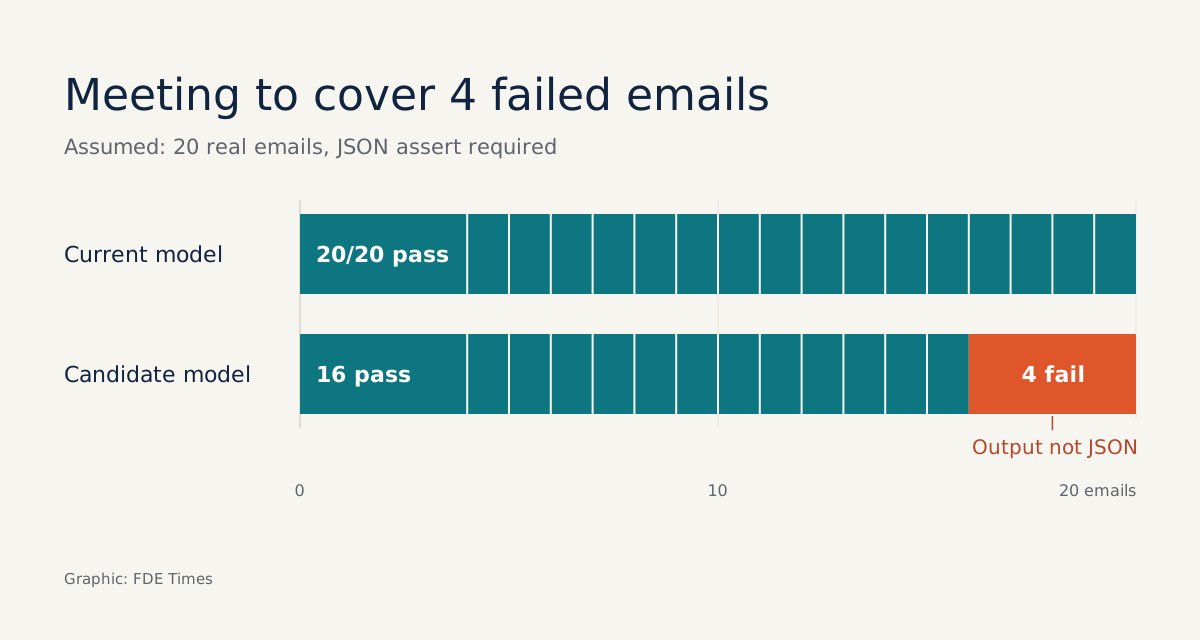
Imagine a logistics company that wants to move to a cheaper model for classifying complaint emails. You take 20 real emails, keep the assert that requires JSON output and run both models. The table below shows hypothetical results, purely to illustrate how to read them:
| Test case | Current model | Candidate model |
|---|---|---|
| Email 1: short delivery | Pass | Pass |
| Email 7: long email, several orders | Pass | Fail, output not JSON |
| Email 12: customer mixes in English | Pass | Fail, output not JSON |
| Total, 20 emails | 20/20 pass | 16/20 pass |
With this table, the next meeting is about four failed emails instead of a vague debate about “quality”. The client might accept the switch and add a processing step for long emails. Or they might keep the old model. Either way, the decision now rests on specific rows.
Red teaming: find the holes before the client does
The second half of Promptfoo is red teaming. The documentation describes it as a way to find vulnerabilities in AI systems before deployment and to get a quantitative measure of risk. Promptfoo groups LLM failure types into “plugins”, each one a set of adversarial tests.
The red team configuration also lives in promptfooconfig.yaml. The skeleton below only shows the structure. Pick the actual plugin names from the list in the red team documentation, matching the failure types the client worries about most:
providers:
  - <client-chatbot>
redteam:
  plugins:
    - <plugin-for-failure-type-1>
    - <plugin-for-failure-type-2>
(The placeholders stand for the client’s chatbot and a plugin for each failure type.)
The process has three steps. Save the configuration. Run promptfoo redteam run, which generates a few hundred adversarial inputs into redteam.yaml and fires them at the system. Then open promptfoo redteam report to see the results. If you would rather not use the web interface for setup, use the init command instead.
For an FDE, the value is that risk becomes a number rather than a feeling. A practical tip: when presenting to the client’s security team, bring both the redteam.yaml file and the report. They can rerun it and check the risk measure themselves rather than relying on your account of what you tested.
When should evals rerun in CI/CD?
Because Promptfoo integrates with the CLI and CI/CD, the real question is not whether to put it in the pipeline but which changes should trigger it. There are three moments when rerunning promptfoo eval should be mandatory.
The first is any prompt edit, even a single instruction that looks harmless. The second is a model change, or a new candidate model added to providers, as in the logistics scenario above. The third is when the client connects a new data source. Take a few real samples from it, drop them into the tests folder and only then let it go to production.
For red teaming, rerunning before each major release makes more sense than on every commit, since each pass generates a few hundred adversarial inputs. This is an operational suggestion; agree the frequency with the client’s security team.
The numbers are only as good as the test set
Promptfoo’s results mean something only when the test set reflects the client’s real data. If you invent the 20 sample questions yourself instead of taking them from real logs, the results table will look good and tell you nothing. The hardest part of evaluation is still customer discovery: sitting with users to learn what a correct answer looks like.
Ownership also matters. On 9 March 2026, co-founders Ian Webster and Michael D’Angelo announced that Promptfoo had agreed to be acquired by OpenAI, with a commitment that the project would remain open source and continue to serve its users.
The MIT licence offers some protection. Even so, if the client uses another provider’s models, raise this point yourself during the tool review rather than letting them discover it.
What to learn first, and how to put it on a CV
Learn evals first and red teaming second. Get comfortable with the prompts, providers, tests and assert structure. Practise writing test cases from real data. Then move on to adversarial plugins, and finally wire both into CI/CD.
When reading job descriptions for FDE or AI engineer roles, look for phrases such as “LLM evaluation”, “red teaming” and “guardrails”. On a CV, a line like “built a 200-test-case eval suite in Promptfoo, run in CI, catching format errors before a model switch” carries far more weight than “experienced in prompt engineering”.
FDE hiring managers want to see that you can turn a client’s vague question into a number anyone can check.
Was this article useful?
Thanks for the feedback!
7 sources
- Intro | Promptfoo
- Promptfoo: LLM evals & red teaming (GitHub promptfoo/promptfoo)
- Getting started | Promptfoo
- Configuration Overview - Getting Started with Promptfoo | Promptfoo
- LLM red teaming guide (open source) | Promptfoo
- Getting started | Promptfoo (red team quickstart)
- Promptfoo is joining OpenAI · 2026-03-09