Break S3, SQS and Lambda on your laptop, not in the client's AWS
LocalStack lets you make mistakes on your own machine instead of a client's account, but it now needs an auth token and its free tier is non-commercial.
In brief
- LocalStack emulates AWS services such as S3, SQS and Lambda in a container running on a laptop or in CI.
- Since March 2026 the container needs an auth token to start, and the free tier is for non-commercial use only.
- Treat it as a fast feedback loop; the final check still has to happen on the client's real account.
Since March 2026, LocalStack for AWS has shipped as a single unified distribution, and its container will not start without an auth token. Anyone using it to run AWS on a laptop should review how they install and launch it.
For FDEs this matters more than a routine update. The first weeks at a client are when integrations have to be built fastest, and when access to the client’s AWS account is usually most restricted.
An emulated environment on a laptop lets you get things wrong freely and at no cost. But you need to know how far the emulation goes and under what terms you are allowed to use it.
A miniature AWS in one container
The official documentation describes LocalStack as a cloud service emulator that runs in a container, on a local machine or in a CI environment. The project’s GitHub repo calls it a framework for developing and testing AWS applications on your own machine.
Testcontainers, an independent project, also describes LocalStack as a local cloud emulator for testing AWS and serverless applications, and ships a module for it. For an FDE, that means the same tool works both for hands-on experiments on a laptop and for integration tests running in CI.
An S3 → SQS → Lambda flow, built on the laptop first
Take an example: the client wants every document uploaded to S3 to produce a message in SQS, which a Lambda then reads and processes.
Build that directly in the client’s account and every failed attempt leaves stray buckets, queues and functions behind, and every fix means waiting for a deploy. On LocalStack all of those resources live on your laptop, so anything created wrongly can be deleted and rebuilt without leaving a trace in the client’s account.
The first step is running the container. LocalStack’s Lambda documentation requires the Docker socket to be mounted into the container for functions to run, because Lambda needs to start additional containers. A minimal Compose file looks like this:
services:
  localstack:
    image: localstack/localstack
    ports:
      - "4566:4566"
    environment:
      # Read the token from an environment variable, never write it into the file
      - LOCALSTACK_AUTH_TOKEN=${LOCALSTACK_AUTH_TOKEN}
    volumes:
      # Without this line S3 and SQS still work, but Lambda does not
      - "/var/run/docker.sock:/var/run/docker.sock"
If S3 and SQS are working but Lambda stays silent, that last volume line is the first place to check.
The whole trick is the endpoint
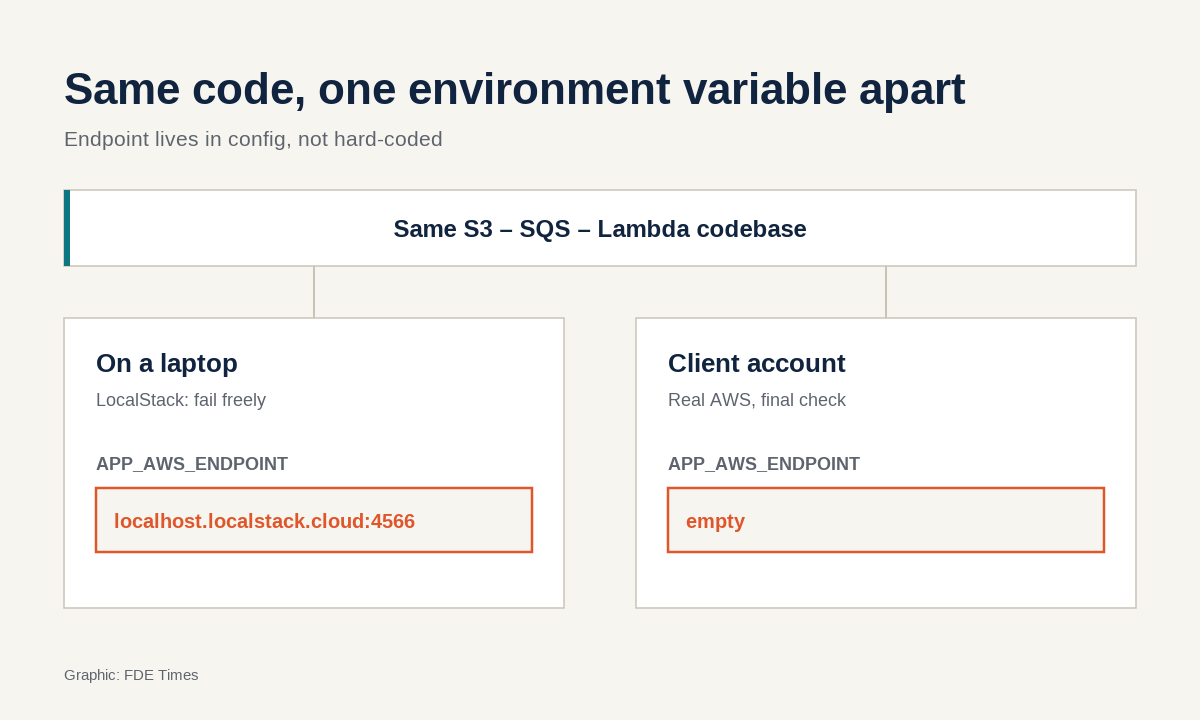
The AWS SDK connects to LocalStack by overriding the endpoint URL to http://localhost.localstack.cloud:4566, through code, a profile or an environment variable. The most expensive mistake is hard-coding that value: when the time comes to move to the client’s account, missing a single instance means the application calls an endpoint that does not exist. Keep it in configuration:
import os
import boto3

# On the laptop: APP_AWS_ENDPOINT=http://localhost.localstack.cloud:4566
# On the client's account: leave it empty and the SDK uses the real AWS endpoint
endpoint = os.environ.get("APP_AWS_ENDPOINT") or None

s3 = boto3.client("s3", endpoint_url=endpoint)
sqs = boto3.client("sqs", endpoint_url=endpoint)
With the standard AWS CLI, add the --endpoint-url flag:
aws --endpoint-url=http://localhost.localstack.cloud:4566 s3 mb s3://documents-test
aws --endpoint-url=http://localhost.localstack.cloud:4566 sqs create-queue --queue-name new-documents
The old awslocal wrapper has been deprecated and replaced by lstk. If the team’s runbooks still use awslocal, fix them now. In tests, the Testcontainers LocalStack module hands you the endpoint, credentials and region through calls such as .endpointOverride(localstack.getEndpoint()), so test code does not need to hard-code anything either.
A green test on the laptop does not mean it works on AWS
LocalStack is an emulation, not AWS. A test that passes on a laptop proves your integration logic is correct against the emulator; it does not yet prove it is correct against the real service.
So split the work into two tiers. LocalStack handles the integration logic: the right bucket names, the right message format, the right error handling. The client’s real account is where the final check happens, especially for the features your flow depends on most. Write that list down in advance to avoid surprises on go-live day.
Settle tokens and licensing in week one
LocalStack’s December 2025 announcement, followed by a guide in March 2026, said the unified AWS distribution requires authentication with an auth token. The official documentation calls the token a required credential for starting the container. A free tier still exists, but only for non-commercial use.
A client engagement is almost certainly commercial work. Before bringing LocalStack into a client’s repo, ask whether your company already holds a suitable license.
CI pipelines need a CI Auth Token rather than a developer’s personal token. The documentation also warns against committing tokens, and any token that leaks must be rotated immediately. Put it in the CI secret store, read from an environment variable as in the Compose file above.
Turn the exercise into evidence for your CV
To get something for your CV, turn the S3 → SQS → Lambda flow above into a sample repo with integration tests running in CI on a CI token. When you describe it, talk about the outcome, for example “the same codebase runs on the emulated environment and on the client’s account, differing only in configuration.”
That repo is also a concrete answer when an interviewer asks how you work in a client’s environment without breaking anything.
A laptop is the cheapest place to make AWS mistakes, and the client’s account is the most expensive. The more errors you hit and fix on the laptop, the less risk there is the first time you touch the real account.
Was this article useful?
Thanks for the feedback!
11 sources
- Overview | Docs (LocalStack)
- localstack/localstack (GitHub)
- Lambda (LocalStack docs)
- Installation (LocalStack docs)
- Overview (AWS SDKs) | LocalStack Docs
- AWS CLI | LocalStack Docs
- The Road Ahead for LocalStack: Upcoming Changes to the Delivery of Our AWS Cloud Emulators · 2025-12-18
- LocalStack for AWS Is Moving to a Single Image. Here are Your Next Steps · 2026-03-05
- Auth Token (LocalStack docs)
- Testing AWS service integrations using LocalStack
- LocalStack Module - Testcontainers for Java