Free DBeaver can't open the client's Parquet files. DuckDB can
Parquet support sits behind DBeaver's paid editions, but a DuckDB driver lets the Community edition read client data in an FDE's first week on site.
In brief
- DBeaver connects to most databases through JDBC/ODBC and ships with more than 350 drivers by default.
- Opening a Parquet file directly as a database is a feature of the paid editions; Community does not have it.
- On Community, go through DuckDB's JDBC driver, which reads any file DuckDB can read.
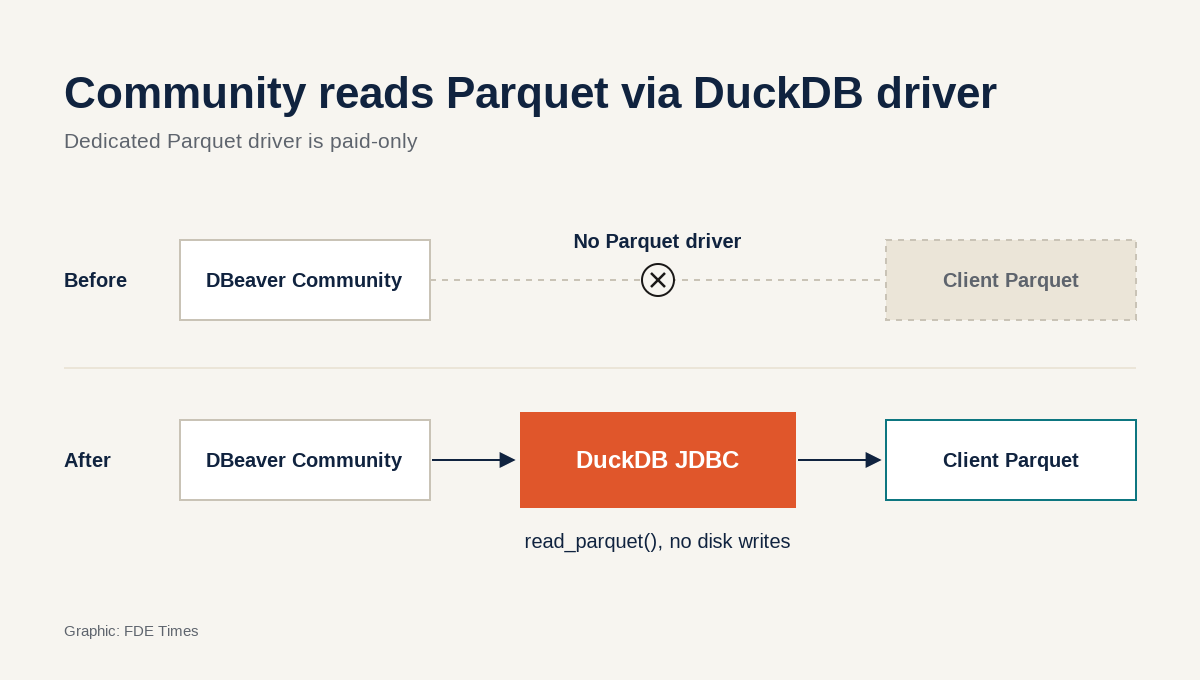
DBeaver’s README lists “Files as databases: CSV, DDL, JSON, Parquet, XLSX, and XML”. The line sits in the list of PRO features. DBeaver’s Parquet documentation confirms that the driver is available only in the Lite, Enterprise, Ultimate and Team editions. Install the free Community edition, receive a folder of Parquet files from a client, and there is no button to open it.
It is a small detail, but it lands squarely in an FDE’s first week on site. There is no pipeline yet and few permissions. There are a handful of connection strings and some export files, and the first job is to read the data before promising anything.
One tool for almost every database
The project’s GitHub page describes DBeaver as a free, cross-platform database tool for developers, SQL programmers, database administrators and analysts. The source code is licensed under Apache-2.0. The repository says it supports any database with a JDBC or ODBC driver, which by its own account covers almost every database in existence.
That is why an FDE should install it before the kickoff meeting. One client runs PostgreSQL, the next runs MySQL, and another department keeps a SQLite file. According to the official site, the Community edition manages SQL databases like these, while NoSQL and cloud databases are what the commercial PRO editions add.
The README lists more than 350 bundled drivers, along with a SQL editor, a data editor, export, import and migration, and ER diagrams. For a newcomer the ER diagram is the most valuable: it shows which tables join to which before you ask the client an awkward question.
DBeaver is not a new project. TechCrunch reports that Serge Rider began writing it in 2013, while the company’s own site gives 2010. It took off after it moved to GitHub in 2016 and now has more than 8 million users.
Where does the free edition stop?
CSV still has a route in Community: DBeaver’s import documentation describes a wizard that loads data from CSV and other formats into a table, with separate settings for each format. The catch is that this needs an existing database to hold the table. The data is being imported, not read in place.
Parquet is harder. Even with a paid license, the Parquet driver has two documented limits. Every connected Parquet file is read-only, which means you cannot accidentally modify the client’s source files. And when you connect a whole folder, DBeaver scans at most two levels deep.
The second limit is easy to misread. Say the client exports order data in the form orders/2025/03/14/part-0.parquet. The file sits at the third level, so it will not appear, and you could wrongly conclude there is no data for that month.
So before declaring data missing, count the files with an operating-system command and compare the result with what DBeaver lists.
The workaround through DuckDB
DuckDB’s official guide calls DBeaver a powerful and popular desktop SQL editor and IDE. According to the guide, DuckDB’s JDBC connector for DBeaver can query DuckDB files and, more broadly, any file DuckDB can read, with Parquet given as the example.
The steps are short. Create a new connection, choose DuckDB, enter the path to a database file or type :memory: if you only want to read files, then let DBeaver download the JDBC driver. Open a SQL editor on that connection and write the first query:
-- Count rows and check for empty columns across the whole order export
SELECT count(*) AS row_count,
       count(*) - count(customer_id) AS missing_customer_id
FROM read_parquet('/data/orders/**/*.parquet');
The advantage of :memory: is that nothing is written to the client’s disk and the source files stay intact. The two numbers from this query are what to bring to the second meeting. The total row count shows whether the export is complete; the number of empty customer_id values shows whether joins can be trusted.
What to learn first
Learn the SQL editor and the ER diagram first, because those are the two things you use from day one. Then practice setting up a DuckDB connection until you can do it in under five minutes. Leave the import and export wizards for last, for when you need to move sample data into your own environment.
On the career side, if an FDE job posting mentions working with client data, be ready to write SQL live in the interview. On a CV, do not just write “DBeaver”. Write which sources you profiled data from, what errors you found, and how quickly you found them.
The tool only gets the file open. The FDE skill lies in the question you put to the client when the numbers on screen do not match what they told you.
Was this article useful?
Thanks for the feedback!