One line of k6 can stop a slow build reaching production
A failed p95 threshold makes k6 exit non-zero, a signal every CI system understands, so slowdowns surface in the pipeline rather than in a client's complaint.
In brief
- A k6 threshold is a pass/fail criterion: when it is breached, k6 exits with a non-zero code and CI fails the build
- p(95)<200 means 95% of requests must finish in under 200 ms, a much stricter test than looking at the average
- Grafana advises against running large tests in an automated deployment pipeline; CI tests should be small
A single line, http_req_duration: ['p(95)<200'], can decide whether a deploy goes to production or gets sent back. That is how k6, Grafana’s load testing tool, turns the promise that “the system must be fast” into a condition a machine can check.
For FDEs this is a practical matter. You stitch together a pipeline, add a step that calls an LLM, change how data is queried, and the customer notices only one thing: the screen got slower. Without an automated threshold, you find out from a complaint email, not from CI.
What k6 does, and why it suits work on customer sites
k6 is written in Go, but test scripts are written in JavaScript; the source lives at github.com/grafana/k6. That means there is no special DSL to learn. Anyone who can read JavaScript can read the test, including the customer’s engineers who take over after you leave.
The central concept is the threshold. The k6 documentation defines thresholds as the pass/fail criteria you set for your test metrics. When a threshold fails, k6 exits with a non-zero code. Every CI system understands exit codes, so this is the hook that lets one test step turn the whole build red.
A minimal script, end to end
The k6 new command creates a script.js file in the current directory. Edit it into something like this, pointing the URL at the endpoint you worry about most:
import http from 'k6/http';
import { sleep } from 'k6';

export const options = {
  vus: 10,
  duration: '30s',
  thresholds: {
    // 95% of requests must finish in under 200 ms
    http_req_duration: ['p(95)<200'],
  },
};

export default function () {
  http.get('https://staging.example.com/api/search');
  sleep(1);
}
Run k6 run script.js with no flags and k6 uses exactly the options declared in the script. This is the valuable part: load, duration and threshold live in one file, reviewed and versioned alongside the code. For a quick experiment you can still override the number of VUs and the duration with flags, for example k6 run --vus 20 --duration 1m script.js.
If you want the test to stop as soon as a threshold is breached rather than waiting out the full 30 seconds, k6 has an abortOnFail property: set it to true for that threshold and the test stops the moment the threshold is crossed.
Check the exact declaration syntax on the Thresholds page of the k6 documentation before putting it into a pipeline. For a CI test, stopping early means fewer minutes billed and a faster signal.
Why p95 rather than the average?
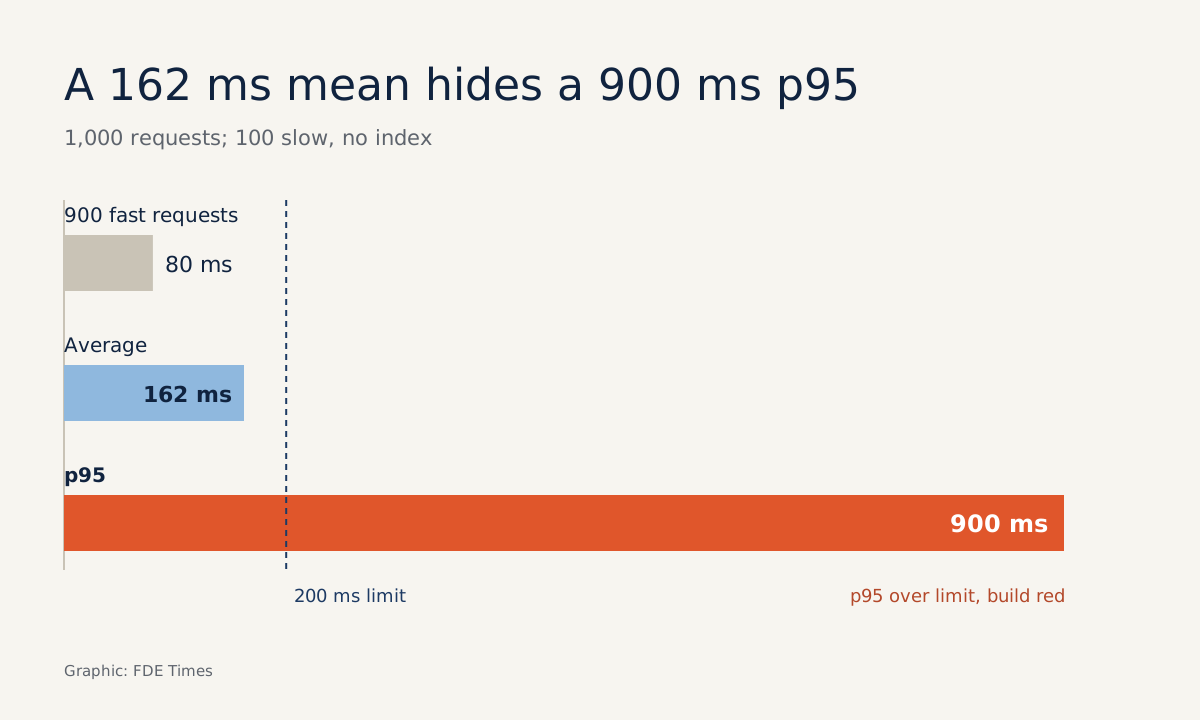
Picture 1,000 requests: 900 finish in 80 ms, and 100 take 900 ms because of a query that lacks an index. The average is (900 × 80 + 100 × 900) / 1,000 = 162 ms, which looks fine against a 200 ms target. But p95 falls in the slow group, at 900 ms, and the p(95)<200 threshold fails the build.
One user in ten waits nearly a second. The average hides them; p95 does not. The sample in the k6 documentation also sets its threshold on the p95 of http_req_duration, which makes it a natural starting point for your first test.
How to wire it into CI
The official documentation lists integrations with GitHub Actions, GitLab and Jenkins, with the aim of catching performance regressions caused by code changes. On GitHub, Grafana maintains two official actions: setup-k6-action installs k6 in the workflow, and run-k6-action runs the tests.
The sensible arrangement on a customer site is to put the test after the deploy to staging and before the push to production. The sketch below assumes you already have two deploy scripts; the part to watch is the needs chain. Check the action input names and version numbers against each action’s current README:
name: deploy
on:
  push:
    branches: [main]

jobs:
  deploy-staging:
    runs-on: ubuntu-latest
    steps:
      - uses: actions/checkout@v4
      - run: ./scripts/deploy.sh staging

  load-test:
    needs: deploy-staging
    runs-on: ubuntu-latest
    steps:
      - uses: actions/checkout@v4
      - uses: grafana/setup-k6-action@v1
      - uses: grafana/run-k6-action@v1
        with:
          # check the input name in the run-k6-action README
          path: script.js

  deploy-production:
    # only runs when load-test is green
    needs: load-test
    runs-on: ubuntu-latest
    steps:
      - uses: actions/checkout@v4
      - run: ./scripts/deploy.sh production
The mechanism underneath is still just the exit code: the threshold fails, k6 returns non-zero, the load-test job fails, and deploy-production never runs.
Mistakes that turn the gate into decoration
The most common mistake is a gate that has never closed. You add a threshold, the build goes green and everyone relaxes, but nobody knows whether the pipeline actually stops when the threshold is breached. On the first run, deliberately lower the threshold to a level that is certain to fail, so you see deploy-production skipped with your own eyes.
The second mistake is cramming a large test into CI. Grafana recommends using pass/fail criteria for large tests too, but advises against running large tests in an automated deployment pipeline.
A CI test should be small: it is an alarm bell for regressions, not a load test of the whole system. Real stress tests should run separately, on a schedule, with someone watching.
The third mistake is copying the 200 ms figure as is. It is only an example from the documentation; the right threshold has to come from the customer: what they promise their users, and which endpoints sit on the critical path. The first job on a customer site is to ask that question, and only then write the threshold line.
Mind the licence as well: k6 is released under AGPL-3.0. At enterprise customers with strict legal departments, ask about their open-source licence policy first, rather than installing it in the pipeline and being questioned afterwards.
How to put this skill on a CV
“Knows load testing” is a flat line. “Set a p95 threshold for the search API and wired it into CI, blocking a deploy that would have doubled p95” tells a story, and it is also a good answer when an interviewer asks how you have protected production quality.
To practise, take a personal project, write a k6 script, deliberately add a slow query and let GitHub Actions catch it. A red build with a clear reason is more convincing evidence than any skills summary.
Was this article useful?
Thanks for the feedback!
6 sources
- GitHub - grafana/k6: A modern load testing tool, using Go and JavaScript
- Thresholds | Grafana k6 documentation
- Running k6 | Grafana k6 documentation
- Integrations & Tools | Grafana k6 documentation
- GitHub - grafana/setup-k6-action: GitHub Action for installing Grafana k6
- Automated performance testing | Grafana k6 documentation