A repo that is clean at HEAD can still leak keys from its Git history
Gitleaks finds the leaked key, but before you rewrite any history, revoke the key.
In brief
- Gitleaks uses git log -p, so it can read keys that were deleted from a file but still sit in old commits.
- When you find a leaked key, the first step is to revoke or rotate it; rewriting history cannot be undone.
- Gitleaks is now feature complete and only receives security fixes; Betterleaks is a replacement that accepts the old flags and config.
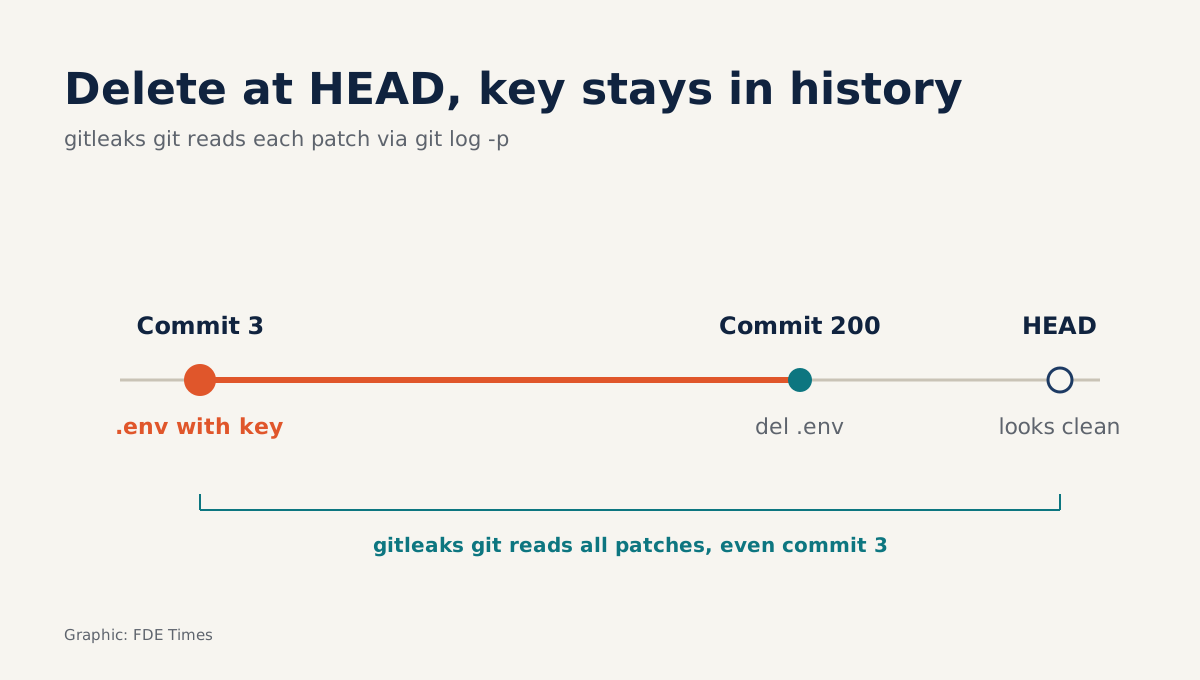
A .env file deleted in commit 200 is still there, intact, in commit 3. That is why a repo that looks clean when you open it can still hold a staging API key, a token for a third-party service, or a database password someone pasted in a hurry.
For a Forward Deployed Engineer, handover is when this matters most. You spend weeks working in a client’s repo or your own, then give the entire history to their engineering team. Anyone who clones it can read every patch that ever existed.
Gitleaks was built for exactly this. It is an open-source, MIT-licensed tool that finds passwords, API keys and tokens in Git repositories, files and directories. It was created by Zach Rice, who also maintains it.
Why scan the history, not just the files?
What matters is how Gitleaks reads a repo. Its git command scans a local repository by running git log -p underneath, which means it walks through every patch in the history. A key that has been removed from a file but survives in an old diff will be caught.
If you only need to scan a directory that is not a Git repo, such as a source export a client sends as an archive, use the dir command. These two commands replace detect and protect, which were deprecated in v8.19.0. If an older guide still uses detect, that syntax is out of date.
Picture a handover
Suppose you have just finished three months of systems integration for a logistics client. In the first week, to get a demo out quickly, you hardcoded the staging environment’s API key into a config file. Two days later you moved it into an environment variable and deleted the line. At HEAD, the repo is spotless.
Before pushing the repo to the client’s GitHub organisation, you open a terminal in the repo directory and run a scan in verbose mode to see the detail of each finding:
gitleaks git -vThe output points to the exact commit from week one, the exact config file and the exact key string. An ordinary code review would almost certainly miss this, because nobody rereads diffs from three months ago.
The natural reflex is to go and delete that commit. Do not make that your first move.
You have found a key. What comes first?
GitHub’s documentation on removing sensitive data is clear: the first step is to revoke the secret, or replace it with a new one. The reasoning is simple. Once a key has been in the history, you have to assume it has been copied, and only disabling it actually removes the risk.
Only after the old key is dead does the question of rewriting history with git-filter-repo arise. GitHub warns that once you proceed past that point the rewrite becomes irreversible, and that it must be coordinated with everyone collaborating on the repo.
At a client site, that coordination means telling their team first, because every existing clone will diverge from the new history.
In the example above, the sensible course is to rotate the staging key, note in the handover documents that an old commit contains a key that has been disabled, and then decide with the client whether the history needs cleaning. That decision is theirs, not yours alone.
Three common mistakes before a handover
Most incidents come not from missing tools but from doing things in the wrong order. The table below collects mistakes that follow directly from how Gitleaks and GitHub’s guidance work.
| Mistake | Why it is dangerous | What to do instead |
|---|---|---|
| Scanning only the files at HEAD | Deleted keys remain in old patches, readable by anyone who clones | Run gitleaks git to walk the full history |
| Deleting the commit before revoking the key | The key may already have been copied; deleting the commit does not disable it | Revoke or rotate the key first |
| Rewriting history without telling the client’s team | The rewrite cannot be undone, and existing clones will diverge | Agree with the client’s team before running git-filter-repo |
Keeping the repo clean after the clean-up
Once the old findings have been dealt with, you do not want them reappearing on every scan. A baseline solves this: Gitleaks ignores old findings already recorded in the baseline, so later scans report only new leaks.
It takes two steps. The first scan writes its results to a report file, which becomes the baseline. On later runs you point Gitleaks at that baseline and write new findings to a separate file:
# First run: save all existing findings as the baseline
gitleaks git --report-path gitleaks-report.json

# Later runs: ignore known findings, record only new leaks
gitleaks git --baseline-path gitleaks-report.json --report-path findings.json
Gitleaks’s greatest strength, according to Zach Rice himself, is its configuration system, which lets you write your own rules. For an FDE this pays off when a client has an internal token format the default rules do not recognise.
Suppose the client uses tokens made of acme_ followed by 32 characters. A minimal .gitleaks.toml keeps the default rule set and adds just one rule:
[extend]
useDefault = true

[[rules]]
id = "acme-internal-token"
description = "Client internal token"
regex = '''acme_[a-z0-9]{32}'''
keywords = ["acme_"]
Then run gitleaks git -v --config .gitleaks.toml. Test the rule on a scratch repo seeded with a fake token before using it for real, to make sure the regex catches what you intend.
To stop leaks at the source, Gitleaks can run as a pre-commit hook: copy the sample pre-commit.py script into the .git/hooks/ directory. At team level, the project offers a GitHub Action that scans pull requests and commits. The pre-commit hook protects your machine; the Action protects everyone else working in the repo.
This trio is also worth putting on a CV. A line such as “set up pre-commit and CI secret scanning, with a custom rule for internal tokens, before handing the repo to the client” shows a hiring manager that you treat a handed-over repo as an asset carrying risk, not just a pile of code.
Limits to know before choosing a tool
The project’s current README declares Gitleaks feature complete: no new features will be accepted, and future releases will be security fixes only. In March 2026 Rice launched Betterleaks, a drop-in replacement, meaning existing CLI flags and configuration files work without changes.
So the effort you put in today is not wasted. The scan commands, baseline and rule file above all carry straight over to Betterleaks. If a client is starting from scratch, it is worth asking which tool they want to standardise on.
Handing over a repo means handing over its past, and one run of gitleaks git -v before the handover is far cheaper than a call from the client’s security team afterwards.
Was this article useful?
Thanks for the feedback!