Ansible: configure a client's whole on-prem fleet without SSHing into each machine
One inventory line instead of twenty lines of hostnames, and a playbook that produces the same result however many times it runs: when an FDE has to touch a client's servers, those are the two things that matter.

In brief
- Ansible needs no agent: it is installed only on a control node, and managed machines just need an SSH account that reaches a POSIX shell.
- An inventory groups machines and host ranges. A YAML playbook runs the same tasks on every machine that matches a pattern, and running it again gives the same result.
- The control node does not run natively on Windows and needs WSL. If the network blocks inbound connections, use ansible-pull.
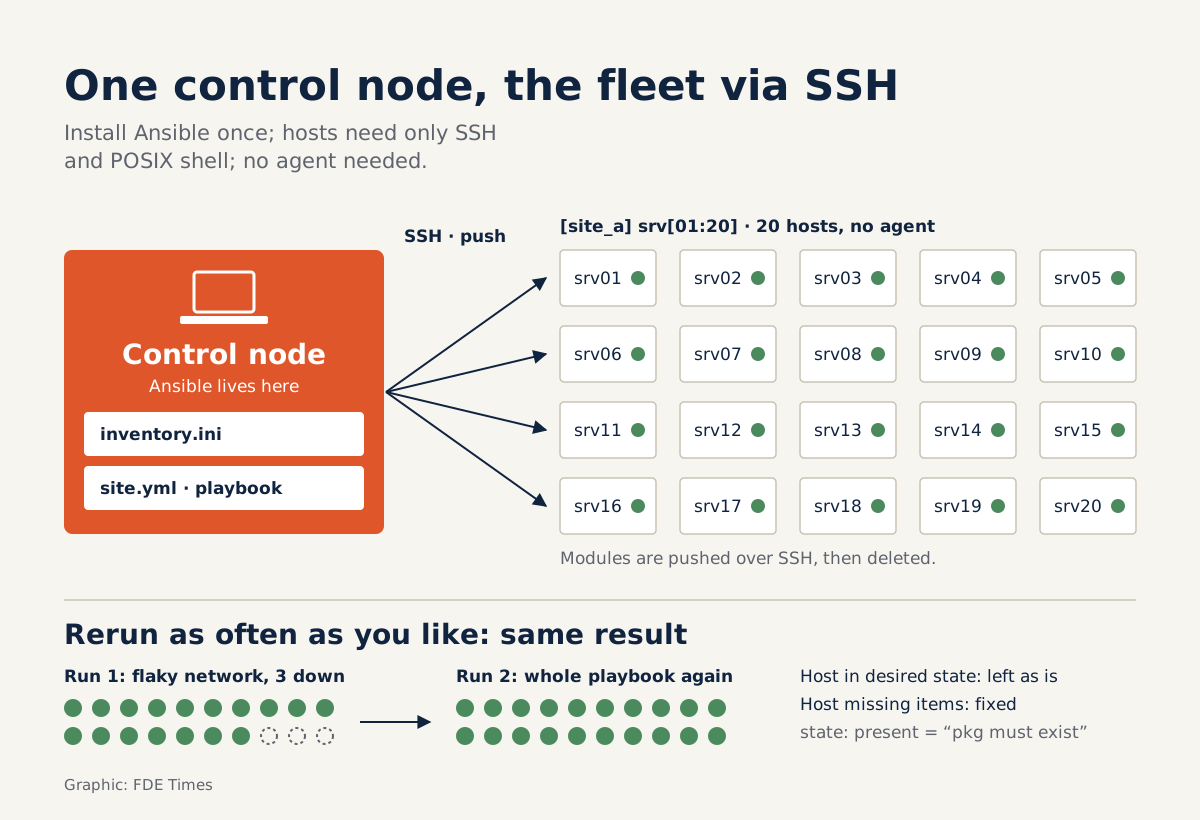
Picture your first week at a client’s factory. The server room holds twenty Linux servers, and you need the same runtime, the same configuration file and the same service on all of them. Open twenty SSH windows and it is easy to misconfigure one machine without anyone noticing.
Ansible was built for exactly this kind of job. Red Hat describes it as an open-source IT automation engine that handles both provisioning and configuration management. For an FDE doing on-prem deployment, its value is that you describe the desired state once and apply it across the whole fleet.
Why does “agentless” matter so much at a client site?
The official documentation calls Ansible agentless: it is installed on a single machine, called the control node. A managed machine needs only an SSH account that can reach an interactive POSIX shell. You do not have to install any Ansible software on the client’s servers.
In enterprise environments this is a real advantage: every extra piece of software on a client’s server is one more thing to explain and get approved. Writing on freeCodeCamp, Idris Olubisi explains that Ansible pushes modules over SSH and removes them as soon as they finish, so no agent or separate security infrastructure is needed.
So the first question for the client’s IT team is a very concrete one: will you be given an SSH account on these machines? If your playbook needs administrator rights, as in the example below (the become: true line), ask at the same time whether that account can escalate privileges.
A minimal example: inventory and playbook
Everything starts with the inventory, the list of managed machines you create on the control node. Host groups let you target many machines at once or set variables for a whole batch, so grouping by client site is the natural choice. The INI and YAML plugins also support host ranges, so you do not have to list identical machines one by one.
[site_a]
srv[01:20].site-a.local
That single line replaces twenty. Next comes the playbook, written in YAML, which describes the state you want the machines to reach. The snippet below is an illustration that installs a package across the whole site_a group:
- hosts: site_a
  become: true
  tasks:
    - name: Install Python 3 on every machine at site A
      ansible.builtin.package:
        name: python3
        state: present
(The task name reads “Install Python 3 on every machine at site A”.)
The command is ansible-playbook -i inventory.ini site.yml. By default, Ansible runs tasks in order, one at a time, across every machine matching the host pattern. The first task finishes on all twenty machines before the next begins, so any machine that behaves differently from the rest stands out immediately.
Will running it again break the client’s machines?
When you are touching someone else’s production systems, this is the most practical worry. The Ansible documentation sets out the principle of idempotency: running a playbook once or many times should produce the same result. The state: present line above means “this package must be present”, not “install it one more time”.
So if a flaky network drops three machines halfway through, you simply re-run the whole playbook. Machines already in the right state are left alone; those still missing something are brought up to date. Handing over work this way is far easier than trying to remember which machines you SSHed into.
Red Hat classes this approach as Infrastructure as Code: the playbook describes the desired state of the system and is usually kept in source control. For an FDE, the playbook repo is the handover documentation. The client’s IT team can read it, review it and run it themselves after you leave the site.
What limits should you know before arriving on site?
The first limit sits on your own laptop: without WSL, Windows is not natively supported as a control node. If your company laptop runs Windows, set up WSL in advance rather than discovering this on your first day at the client.
The second limit comes from the network. The default model is push: the control node actively SSHes into each machine. When the on-prem network blocks inbound connections, ansible-pull turns the push architecture into pull, so the machines fetch their own configuration. The documentation goes further and describes this pull architecture as having near-limitless scalability.
The third limit is the minimum requirement on the managed side: an SSH account and a POSIX shell. Without either, no playbook will run however carefully it is written, so confirm both on the kickoff call.
What to learn first, and what to put on your CV
Learn in this order: inventory, then playbooks, then idempotency, and only then the more complex features. Three VMs on your own machine are enough to practise all three steps. Write a playbook, run it twice and check that the second run changes nothing: this small exercise shows you idempotency first-hand.
When reading an FDE job description, check it against your experience: if it mentions on-prem deployment or configuration management, Ansible experience belongs near the top. On your CV, do not just write “knows Ansible”.
Write it as an outcome, for example “wrote idempotent playbooks configuring N servers at once, stored in Git so the operations team could re-run them”, with N being your real number.
On a client site, the person who earns trust is rarely the one who types commands fastest, but the one who leaves behind a system others can run again. A playbook repo in Git that the client’s IT team can run on their own is exactly that kind of legacy.
Was this article useful?
Thanks for the feedback!
8 sources
- Ansible Collaborative (Red Hat; ansible.com chuyển hướng về đây)
- Installing Ansible (Ansible Documentation)
- What is Ansible? A Tool to Automate Parts of Your Job (Idris Olubisi) · 2021-10-29
- Getting started with Ansible (Ansible Documentation)
- How to build your inventory (Ansible Documentation)
- Ansible playbooks (Ansible Documentation)
- ansible-pull (Ansible Documentation)
- What is Infrastructure as Code (IaC)? · 2026-07-28